

Blender Bonsai hatch not showing or work

Hello everyone,
I've been struggling for several days to get hatches or solid fills to appear on my 2D plans using Bonsai (BlenderBIM) 0.8.4. I am working on a project in millimeters.
What I have done:
Created an IfcMaterial and assigned it to my walls.
In IFC Material Appearances, I added a Section Appearance.
I tried both Hatch (ANSI31) and Fill Area (Solid).
I've tried different scales (from 1 to 100) since I'm in mm.
I am using the BIM Documentation tab to "Create Drawing" and view the SVG.
The issue:
My walls remain white/empty in the generated SVG file. I suspect a "Context" issue or a scale problem that I can't figure out.
My setup:
Bonsai version: 0.8.4
Project units: Millimeters
OS: Windows
Does anyone have a checklist to verify why the IfcFillAreaStyle isn't being picked up during the SVG generation?
Thank you for your help!
Jey (from Guadeloupe)
Comments
You may consider sharing some files or screenshots for better clarity of the problem. Thank you.
the following videos from this tutorial series might help.
If not, yes a screencapture (or better, a video cast) of exactly what you're trying to do might help us understand better.
Thank you for your help. today i can setup this but with a little proble :
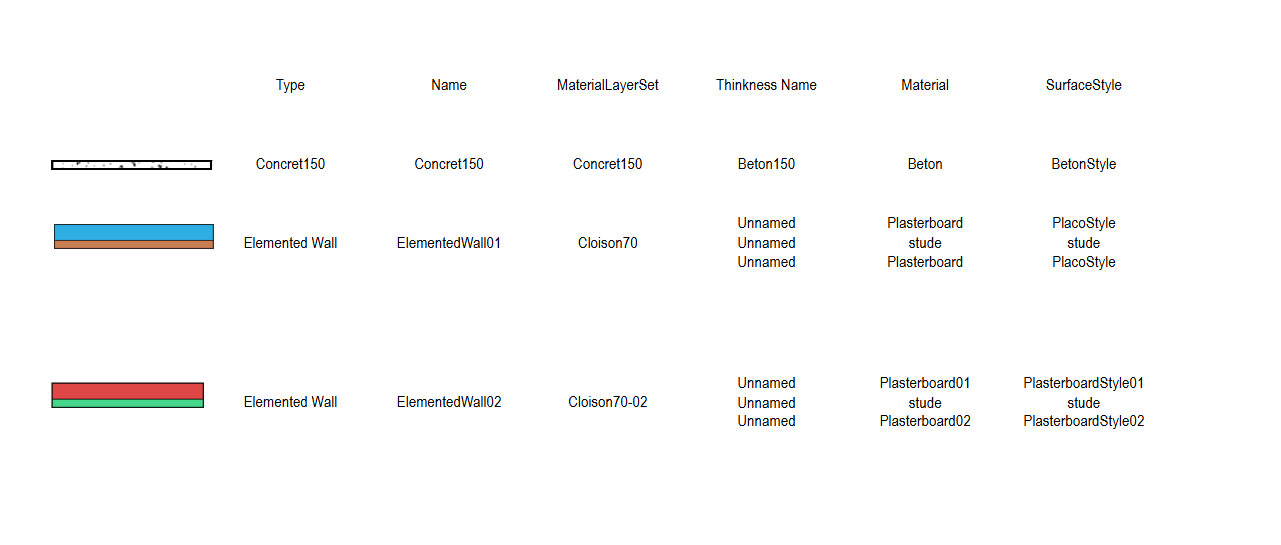
I setup a ElementalWall with 3 différents materials and the creation plan do not respect this :
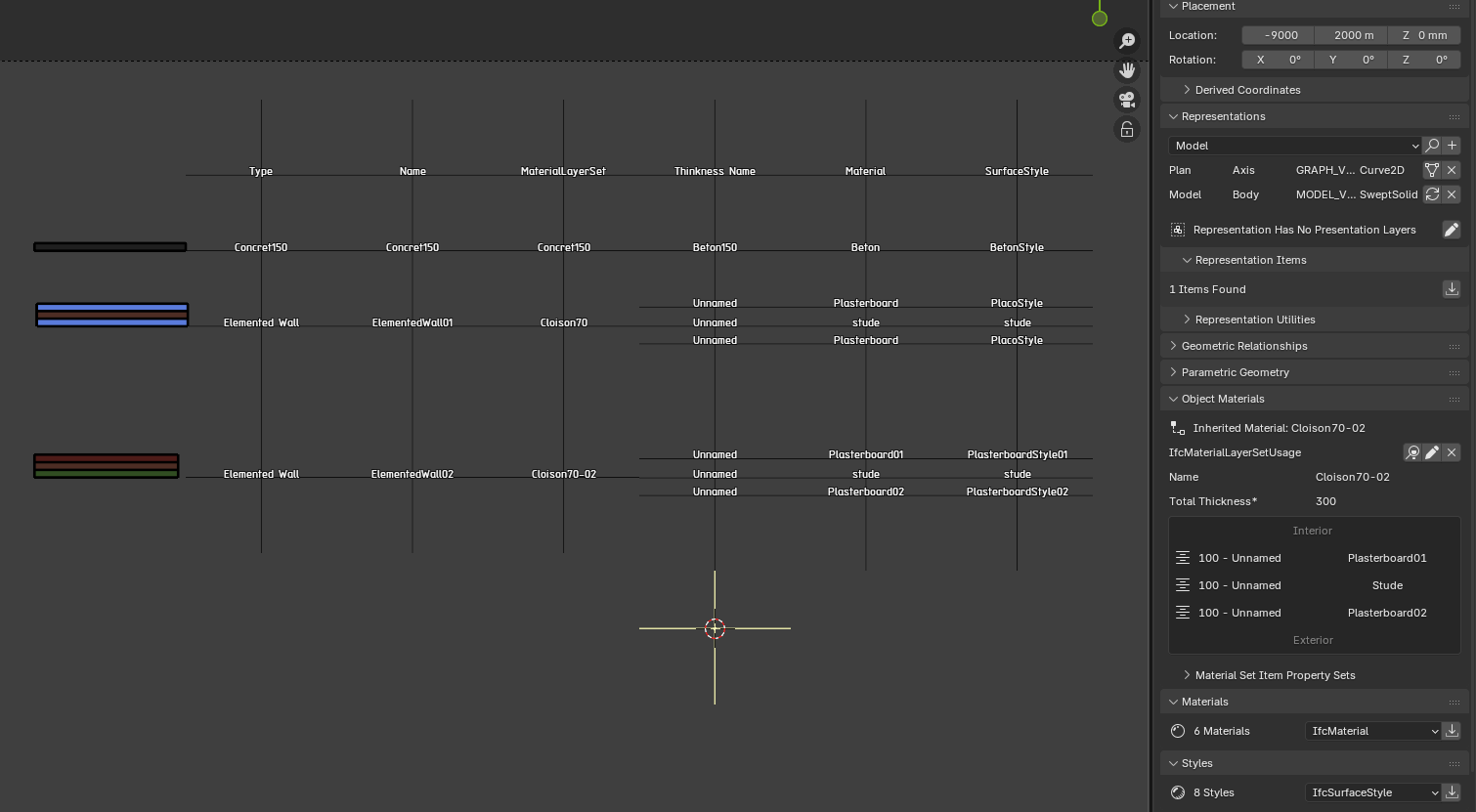
CSS :
.layer-material-Plasterboard01 { fill: rgb(223, 71, 71); stroke-width: 0.15; }
.layer-material-Plasterboard02 { fill: rgb(68, 215, 139); stroke-width: 0.15; }
The result is :
Can you help me
can you share the .ifc file and assets folder? I 'think' there might be a bug here, that i've run across before.
I joing the Ifc file but impossible to share the default.css
/*
* Bonsai - OpenBIM Blender Add-on
* Copyright (C) 2020, 2021 Dion Moult dion@thinkmoult.com
*
* This file is part of Bonsai.
*
* Bonsai is free software: you can redistribute it and/or modify
* it under the terms of the GNU General Public License as published by
* the Free Software Foundation, either version 3 of the License, or
* (at your option) any later version.
*
* Bonsai is distributed in the hope that it will be useful,
* but WITHOUT ANY WARRANTY, without even the implied warranty of
* MERCHANTABILITY or FITNESS FOR A PARTICULAR PURPOSE. See the
* GNU General Public License for more details.
*
* You should have received a copy of the GNU General Public License
* long with Bonsai. If not, see http://www.gnu.org/licenses/.
*/
text, tspan { /* 2.5mm / fill: black; stroke: none; font-family: 'OpenGost Type B TT', 'DejaVu Sans Condensed', 'Liberation Sans', 'Arial Narrow', 'Arial'; font-size: 4.13px; }
.cut { fill: black; stroke: black; stroke-linecap: 'round'; stroke-width: 0.35; fill-rule: evenodd; }
.projection { fill: white; stroke: black; stroke-linecap: 'round'; stroke-width: 0.25; }
.surface { stroke: none; fill: #fff; fill-rule: evenodd; }
.annotation { fill: none; stroke: black; stroke-linecap: 'round'; stroke-width: 0.25; }
.IfcAnnotation { fill: none; stroke: black; stroke-linecap: 'round'; stroke-width: 0.25; }
.IfcGeographicElement { fill: none; stroke: black; stroke-linecap: 'round'; stroke-width: 1; }
.PredefinedType-LINEWORK { stroke: black; stroke-width: 0.25; }
.PredefinedType-LINEWORK.dashed { stroke-dasharray: 3, 2; }
.PredefinedType-LINEWORK.fine { stroke-width: 0.18; stroke: #777777; }
.PredefinedType-LINEWORK.thin { stroke-width: 0.25; }
.PredefinedType-LINEWORK.medium { stroke-width: 0.35; }
.PredefinedType-LINEWORK.thick { stroke-width: 0.5; }
.PredefinedType-LINEWORK.strong { stroke-width: 1; }
.PredefinedType-BACKGROUND { stroke: black; stroke-width: 0.18; }
.PredefinedType-GRID { marker-start: url(#grid-marker); marker-end: url(#grid-marker); }
.PredefinedType-SECTION { stroke-dasharray: 12.5, 3, 3, 3; }
.PredefinedType-SECTIONLEVEL { marker-start: url(#section-level-marker); stroke-dasharray: 12.5, 3, 3, 3; }
.PredefinedType-PLANLEVEL { marker-end: url(#plan-level-marker); }
.PredefinedType-DIMENSION { marker-start: url(#dimension-marker-start); marker-end: url(#dimension-marker-end); }
.PredefinedType-ANGLE { marker-start: url(#angle-marker-start); marker-end: url(#angle-marker-end); }
.PredefinedType-RADIUS { marker-end: url(#fall-marker-end); }
.PredefinedType-FALL { marker-end: url(#radius-marker-end); }
.PredefinedType-SLOPEANGLE { marker-end: url(#radius-marker-end); }
.PredefinedType-SLOPEPERCENT { marker-end: url(#radius-marker-end); }
.PredefinedType-SLOPEFRACTION { marker-end: url(#radius-marker-end); }
.PredefinedType-DIAMETER { marker-start: url(#diameter-marker-start); marker-end: url(#diameter-marker-end); }
.PredefinedType-STAIRARROW { marker-start: url(#stair-marker-start); marker-end: url(#stair-marker-end); }
.PredefinedType-BOUNDARY { fill: none; stroke: red; stroke-width: 1; stroke-dasharray: 12, 4, 3, 4, 3, 4; }
.PredefinedType-SEALANT { fill: url(#crosshatch1); stroke-width: 0.25; }
.PredefinedType-FILLAREA { fill: white; stroke: black; }
.PredefinedType-BREAKLINE { fill: none; stroke: black; stroke-width: 0.25; marker-mid: url(#breakline-marker); }
.PredefinedType-TEXT { fill: black; stroke: none; }
path.PredefinedType-TEXTLEADER { marker-end: url(#leader-marker); }
text.PredefinedType-TEXTLEADER, tspan.PredefinedType-TEXTLEADER { fill: black; stroke: none; }
text.title, tspan.title { / 7mm / font-size: 11.55px; }
text.header, tspan.header { / 5mm / font-size: 8.25px; }
text.large, tspan.large { / 3.5mm / font-size: 5.78px; }
text.regular, tspan.regular { / 2.5mm / font-size: 4.13px; }
text.small, tspan.small { / 1.8mm / font-size: 2.97px; }
text.GRID, tspan.GRID { / 5mm */ font-size: 8.25px; }
.material-blank { fill: white; }
.material-diagonal1 { fill: url(#diagonal1); }
.material-diagonal2 { fill: url(#diagonal2); }
.material-diagonal3 { fill: url(#diagonal3); }
.material-crosshatch1 { fill: url(#crosshatch1); }
.material-crosshatch2 { fill: url(#crosshatch2); }
.material-crosshatch3 { fill: url(#crosshatch3); }
.material-brick { fill: url(#brick); }
.material-earth { fill: url(#earth); }
.material-glass { fill: url(#glass); }
.material-liquid { fill: url(#liquid); }
.material-grass { fill: url(#grass); }
.material-honeycomb { fill: url(#honeycomb); }
.material-sand { fill: url(#sand); }
.material-concrete { fill: url(#concrete); stroke-width: 0.5; }
.IfcSpace { fill: none; stroke: none; }
.PredefinedType-STUD { stroke: black; stroke-width: 1; }
.PredefinedType-WOOD { fill: url(#wood); stroke: rgb(201, 125, 82); stroke-width: 0.5; }
.PredefinedType-STEEL { fill: url(#steel); stroke: black; stroke-width: 0.5; }
.PredefinedType-CONCRETE { fill: url(#concrete); stroke: black; stroke-width: 0.5; }
.PredefinedType-PLASTERBOARD { fill: url(#sand); stroke: black; stroke-width: 0.25; }
.material-Concret150 { fill: url(#concrete); stroke-width: 0.5; }
.material-Cloison { fill: url(#wood); stroke-width: 0.5; }
.material-Plasterboard { fill: rgb(128, 255, 0); stroke-width: 0.15; }
.layer-material-Stude { fill: url(#wood); stroke-width: 0.15; }
.layer-material-Plasterboard01 { fill: rgb(223, 71, 71); stroke-width: 0.15; }
.layer-material-Plasterboard02 { fill: rgb(68, 215, 139); stroke-width: 0.15; }
It seems to work on my side.
Are you syncing both the .blend and .ifc together? If so, i've seen errors around this. https://github.com/IfcOpenShell/IfcOpenShell/issues/7098
You can try the bleeding edge build to test, if you'd like: https://docs-unstable.bonsaibim.org/guides/development/installation.html#bonsaipr-bleeding-edge-installation
...
Regardless, if you open just the .ifc file, do you get the same errors?
I just open the Ifc file !
At normal time, i work with Blender 4.5 and i have bug.
I open the same file Ifc into Blender 5.1 and Bonsai 0.8.5-alpha260329 and it work very well