

Trivial cheat script to activate Auto Smooth Shading for rendering rounded objects

I don't think Ifc natively supports a smoothing setting for objects. If you have rounded objects, the flat shading in renders can look a bit coarse. So here's a trick. Add a custom Pset to objects you want auto smooth on:
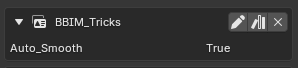
These will then save to the ifc file.
Then just run this script fragment in the Script tab, and their Auto Smooth will be set appropriately, and any renders will look a little more polished.
import bpy
import ifcopenshell
import bonsai.tool as tool

ifc_file = tool.Ifc.get()

for obj in bpy.data.objects:
    ifc_element = tool.Ifc.get_entity(obj)

    if ifc_element:
        sets = ifcopenshell.util.element.get_psets(ifc_element)

        if "BBIM_Tricks" in sets:
            tricks = sets["BBIM_Tricks"]

            if "Auto_Smooth" in tricks:
                auto_smooth = bool(tricks["Auto_Smooth"])
                obj.select_set(True)
                if auto_smooth:
                    bpy.ops.object.shade_auto_smooth()
                else:
                    bpy.ops.object.shade_flat()
The script will need to be run each session or reload of the ifc, but if you have lots of rounded shapes this will save you time. It could be turned into a plugin like here. It's pretty obvious how to extend it to do other tricks.



