

"Blocks" and "Instances" translated to Blender, Bonsai and IFC

Does IFC know/have real Instance Copies, when copying IFC Type Objects ?
Am I on the save side when my other Apps Blocks IFC Exports show up as IFC Types, in Bonsais Outliner ?
Are Blenders Linked Copies of Objects real Instances or just react to changes of their parent. Or does it need to copy "Collections" or such things ?
I mean "Instances" in a CAD sense.
An Autocad "Block" (Cell in Microstation, Symbol in Vectorworks, ....) Definition is saved only one time in the File. If you insert it in your drawing you will have one or multiple "Instances", which are exactly same as the Block source. Each Instance copy will only be saved by its Location, Rotation and Scale. Therefore, opposed to real copies, lots of Instance copies will not add much in file size and resources.
Comments
@zoomer This is one of the beauties of open file formats. You can take a look and see :).
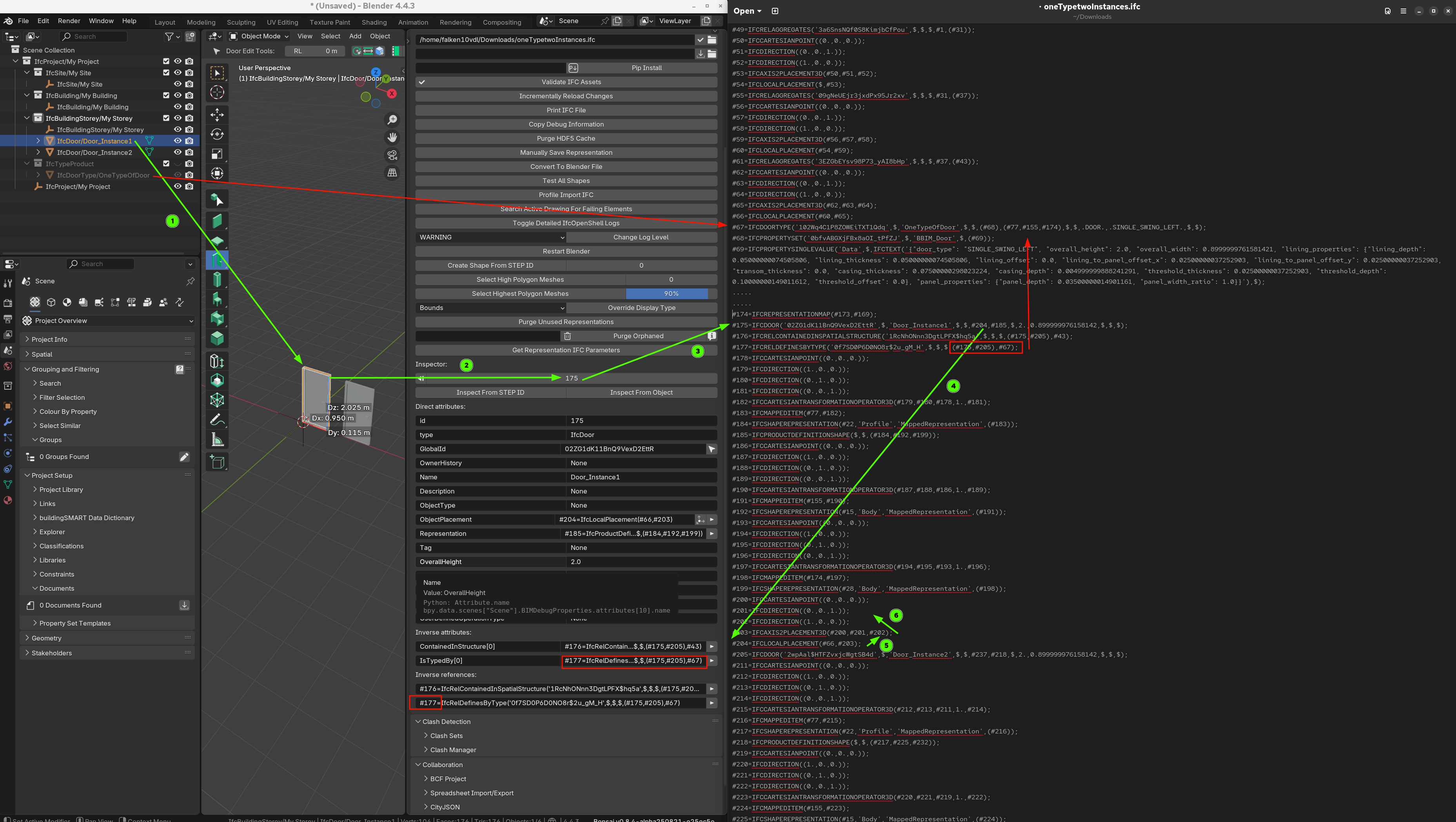
For example if I create a couple of doors Door_Instance1 and Door_Instance2. Both from the type OneTypeOfDoor and take a look to the generated file we see:
As you can see there is a number of relationships but clearly the instances "inherit" from the parent type so type information is not copied but just relationsips are established.
by the way the "Debug" section "Quality and Coordination" panel is a very usefull tool to traverse the IFC.
Cheers!
@zoomer
if I understand your post properly, add an IfcWindowType and one instance from it, then add one more and you see that the number of vertices does not change, in fact when you select the second instance it shows 0 vertices
There is also an option to create "linked aggregates" which duplicates copies of the original , if later edited the same is updated in its copies as well
the Debug panel is my favorite too, I learned a lot from it
Linked aggregates, however, act like types--in that, you can change one and they all change--but each instance is codified in the file. That is, there's no mapping or inheritance like @falken10vdl mentions for types.
That is, although handy, it doesn't make for a compact, efficient file as every instance is repeated in the file.
This topic is brought up a lot. https://github.com/buildingSMART/NextGen-IFC/issues/61
Thanks,
I wasn't familiar with your Bonsai Panel in your screenshot, so I looked for and was confused that your main Bonsai Panel has "Project Overview" active, not Q and C. I would not have found that Instance evidence in the IFC Text. Honestly I am still doing hard when I see the screenshot in front of me :))
But I think I get it now, we have proper Instances in IFC and Bonsai.
And when I create things that will be used more than one time in my File, I will create an IFC Type.
Thanks as well.
I think I should watch this part of @theoryshaw BIM Tutorial videos more concentrated.
But so far I did not really get it for plain Blender ....
I think I got the IFC Instancing - from my beloved ideal simple stupid beautiful CAD Block Instancing.
And that's ok as it is about geometry, mostly the largest parts of objects.
From this article from the neighbored Thread, and its 100 Chairs example, I think in IFC it can get much more cluttered, complex and abstract.
As with ACAD Blocks where you can assign its children to use "Attributes by Block". So the Block Instances are no more the exact siblings of the Block as you can overwrite each Instance.
Have to get used to that too.
Reminds me a lot about USD File Format.