

Continuous Integration in IFC Git repositories using IDS and validation

This was mentioned deep in this thread, but I think it deserves its own post.
If you are using the Git version control feature in Bonsai, and push your work to a remote repository such as github or forgejo, you can now configure Continuous Integration - ie. automatically check your IFC for validation errors and use ifctester to run any number of IDS rules every time you push to the repository.
To configure validation with ifcopenshell.validator, create a .github/workflows/ifc-lint.yml file with this content and add it to your repo:
Show ifc-lint.yml
name: IFC Validation

on:
  push:
  pull_request:

jobs:
  lint-ifc:
    runs-on: ubuntu-latest

    steps:
      - name: Checkout repository
        uses: actions/checkout@v3

      - name: Set up Python
        uses: actions/setup-python@v4
        with:
          python-version: '3.x'

      - name: Install ifcopenshell
        run: |
          pip install pytest
          pip install ifcopenshell

      - name: Run IFC lint checks
        run: |
          set -e
          shopt -s globstar nullglob
          for file in **/*.ifc; do
            echo "Validating $file..."
            python3 -m ifcopenshell.validate --rules "$file"
          done
To configure IDS testing, create a .github/workflows/ids-lint.yml file with this content and add it to your repo:
Show ids-lint.yml
name: IDS Compliance Check

on:
  push:
  pull_request:
  workflow_dispatch:

jobs:
  ids-lint:
    runs-on: ubuntu-latest

    steps:
      - name: Checkout repository
        uses: actions/checkout@v3

      - name: Set up Python
        uses: actions/setup-python@v4
        with:
          python-version: '3.10'

      - name: Install ifctester and idssplit
        run: |
          pip install ifctester
          pip install --no-deps https://github.com/brunopostle/idssplit/releases/download/0.1.0/idssplit-0.1.0-py3-none-any.whl

      - name: Run IDS validations
        run: |
          set -e
          shopt -s globstar nullglob

          if [ ! -d IDS ]; then
            echo "No IDS/ folder found"
            exit 0
          fi

          ids_sources=(IDS/**/*.ids)

          if [ ${#ids_sources[@]} -eq 0 ]; then
            echo "No IDS files found in IDS/ folder"
            exit 0
          fi

          ifc_files=(**/*.ifc)

          if [ ${#ifc_files[@]} -eq 0 ]; then
            echo "No IFC files found"
            exit 0
          fi

          mkdir -p split_ids

          echo "Splitting IDS files..."
          for ids in "${ids_sources[@]}"; do
            idssplit "$ids" split_ids/
          done

          split_ids_files=(split_ids/*.ids)
          if [ ${#split_ids_files[@]} -eq 0 ]; then
            echo "No rules found after splitting IDS files"
            exit 1
          fi

          echo "Running ifctester validations..."
          failed=0

          for rule_ids in "${split_ids_files[@]}"; do
            for ifc in "${ifc_files[@]}"; do
              echo "::group::Test: $rule_ids with $ifc"
              echo "Testing: $rule_ids with $ifc"
              output=$(python3 -m ifctester --no-color "$rule_ids" "$ifc" || true)
              echo "$output"
              echo "::endgroup::"

              if echo "$output" | grep -q '\[FAIL\]'; then
                echo "FAIL: $rule_ids with $ifc"
                failed=1
              else
                echo "PASS: $rule_ids with $ifc"
              fi
            done
          done

          if [ "$failed" -ne 0 ]; then
            echo "One or more validations failed"
            exit 1
          else
            echo "All validations passed"
          fi
You also need to create an IDS/ folder in your repository for any .ids files you want to use, these will be picked-up automatically.
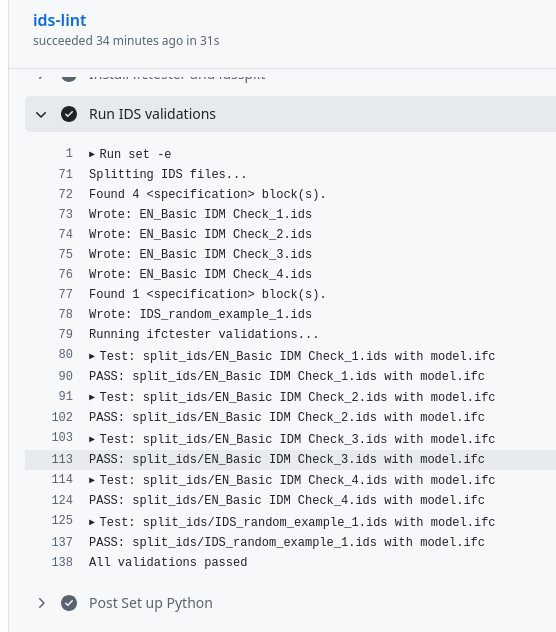
By default Github will mail the committer if there are any failures, pass/fail will then be shown next to each commit, and you can browse the full list of tests in the Actions menu:










 and 2 others.
Comments
For forgejo, I believe that you can just create a
.forgejo/workflows/folder and the same scripts should work - as long as the server is configured to run virtual machines for actions.Here's another git forge workflow: automatic generation of Gantt charts for any IFC Schedules in the repo and putting them online (on githib pages for example).
For each commit and tag in the default branch an entry is added to an index page at /ifc4d/ on the site:
..then a page is generated for the commit/tag showing the available IFC files in the project:
..where each Schedule is shown as a Gantt chart:
Code is here, basically this is the Bonsai Gantt functionality extracted as a standalone tool: https://github.com/brunopostle/ifc4d-gantt Instructions for setting up the workflow are in the GITHUB_ACTION_USAGE.md file.