@steverugi totally agree!
I was pointing to this since a lot of work done in blender with the help of modifiers or GN could be leveraged for the benefit of bonsaiBIM.
For example in MEP above, there are already quite nice pipe addons (for example https://amanbairwal.gumroad.com/l/GeoPipes ) that maybe can be used in a workflow in which that paramétric capability can then be used to create IFC constructs.
Just my two cents!
I've been tinkering with using GN's for pipework. I've found that if the GN modifier has more than one CSV linked into it then it is unreliable. I'm hoping that Blender 5.1 will have Lists that will remove the need to reference pipework dims outside of the Graph. GN's also struggle with using Strings as Attributes, meaning that work arounds using integer IDs that reference data tables elsewhere need to be used :(
My opinion is that GNs is essential for MEP work. I will eventually need to export my model to an IFC format for sharing with other companies - does anyone else use a 'Model in vanilla Blender then export to IFC' workflow?
@Bedson Wow! That is really nice work. Is this something you would be glad to share? Maybe we can take this as an example to try to combine GN stored in biend metafata file as engine to then create IFC MEP elements that get shared in IFC.
Thanks!
@falken10vdl@Bedson
I do modeling for simple MEP systems, for quantity purposes (I'm a QS, not MEP eng.)
with current UI I can easily run segments, the problem is that fittings need to come from some bespoke library to be used for electrical conduits (20,25,32mm..) and water pipes, since the available bend does not provide the right curvature/geometry, as far as I know Tee and Wye are not available options too.
I don't think there is need of a parametric swept solid for plumbing or electrical fittings, a library of solid mesh (maybe simplified one) elements is just fine as type to be instantiated where needed.
But routing requires a workable interface where segments and fittings can be arranged semi-automatically, along with port/flow settings, and that's where I can see needed improvement.
What do you think?
Cheers
My opinion is that GNs is essential for MEP work. I will eventually need to export my model to an IFC format for sharing with other companies - does anyone else use a 'Model in vanilla Blender then export to IFC' workflow?
I do, I model my own fittings using circle+spin and some extrusion, the are OK since I don't need extreme details, they are more placeholders with distribution ports assigned. Tee and Wye are relatively easy to model with booleans.
For complex assemblies I use Custom Extruded Solids, very poweful.
For something like a cable or flexible pipe I use a Blender curve with the bevel tool to convert it to a non-linear geometry.
Makes sense?
PS I never 'export', just convert solids to IFC element types
Cheers
I agree with @steverugi when he says that there are still many things to be done in BB before "parametric modeling" becomes a priority, but the discussion is good and I have some opinions:
IFCSvershock
Very good for automating the creation of some IFC elements, but unfortunately there are few.
When I tested it (a long time ago) I noticed that saving the file was only done through the Sverchock panel and objects created outside the node network were not saved. This may have already been changed, but I can't install it today to test.
Too much pain to install and development was not continued.
Sverchock
I haven't worked with Sverchock for some time (I was traumatized after a SV version upgrade bugged the script nodes I created and made them disappear after months of work), but it's a great tool for creating/modifying geometry.
I tested it today (with blend metadata) and what I noticed is that the "node group" remained in the blend file but was not updated for the object in the BB interface, and the geometry was not applied to the ifc object.
GN
If the "group node" is marked as "fake user" it is preserved in the blend metadata.
There's really a lack of a way to preserve a link between the ifc object and the node group, and a way to reapply it without becoming recursive. @falken10vdl I didn't quite understand the TAG proposal.
MEP
I think using GN for electrical and hydraulic networks is "using a cannon to kill a fly".
It might be an alternative for those who really need to make constant changes to projects, but that doesn't usually happen.
For pipes and fittings, they are usually found on the market in standardized sizes and gauges, that is, as steverugi said, a good type library is enough and parametric modeling becomes unnecessary.
BB already provides a good way to create these networks.
Some things are missing such as:
extending a pipe to a fitting
importing the ports along with the element from the library
an interface with fewer clicks to change the flow of the ports
@walpa. My idea is to use the attribute TAG in the ifc element to convey some information that can be programatically used to reaply GN constructs to IFC elements. Does it make sense?
Cheers!
The GN is a work in progress and needs a lot of work to finish it before I can post it here. I am stuck using Revit and only experiment with Blender during my free time. I have dreams of using Blender for my drawings and models one day. @steverugi@walpa I used to model the pipe fittings individually when I used AutoCAD (3D Dynamic Blocks allowing different sizes to be selected) but I have found that Revit's way of creating the pipe runs as 'lines' is much faster and easier. I am attempting to replicate Revit's way of working with GNs (Revit's pipework isn't perfect. A lot of it is hardcoded and can't be improved whereas with GNs in Blender there is almost no limit to what can be achieved). A future consideration is that if you need to size the pipe lines then they need to be joined - not separate fittings.
I think we're straying from the main topic of this thread. :)
Can we open another one to discuss this?
Suggested title: "Parametric Design in BonsaiBim - current status"
What do you think?
A bit late to the party, but fantastic work on saving Blender session state independent from IFC. This is sorely needed. I'm curious to know how people are using the UI customisation.
I have a couple of suggestions:
Where possible, minimise add-on preferences (one that comes to mind is the metadata file suffix. I would prefer us locking into an agreed suffix, I'd also remove the bool User UI Customisation - I can't think of any other software which has a similar checkbox)
It is a good idea to keep parametric object generation as a separate discussion. This may especially change once work is done on shape builder nodes.
My feedack:
I also think it would be best to have a fixed suffix so it is clear afterwards what that file is supoosed to contain.
.bonsai ?
I had set the bool UI Customization since it was a proposal for people to try under extras but kept disabled by default so it was not bothering those happy with a nonn customizable UI (you get those little gear buttons) but I agree that should not be there in the long run.
Maybe both the UI and the metadata features could move out of extras.
Cheers!
@falken10vdl said:
My feedack:
I also think it would be best to have a fixed suffix so it is clear afterwards what that file is supoosed to contain. .bonsai ?
I really liked the full meta suffix options, but I understand ....
(I had a problem with initial FileName.ifc.blend)
Dot Bonsai would be ok for me.
It "shows" what it is (special file for Bonsai) and you can't open it by double clicking accidentally.
(I may not resist to set Finder's "always open with .... *.App" though)
@Moult With the new refactoring of this feature, Tab visibility is moved to the addon settings area.
And we have two toggles:
1. Main switch to enable/disable the functionality
2. Switch to enable/disable the functionality for the current ifc file (tracked with a doc information element)
This meas that the information appearing in the addon settings (Tab visibility) is not bonsai wide but rather customized to the current loaded ifc+metadata file.
Is this an issue? I am asking because I do not know if addon settings are meant to be stored independently of the ifc/metadata.
@falken10vdl said: @zoomer The PR is merged. It can be enabled at user discretion under Extras:
saving to .metadata.blend
Cheers!
Somehow that does no more work for me (on Mac ?) since quite some time - existing Metadata files will not be updated and it will not create new Metadata files if not yet existing. Maybe since some weeks or maybe short after it went from PR to daily builds (?)
In the past, after CTRL saving the IFC, I got "Metadata saved" message in status bar. Now I only get "IFC file saved".
I checked my settings and tried with Blender 5.0 - 5.2 or file extension back to default ".ifc.metadata.blend".
Have not checked on Windows/Linux so far .....


Comments
@steverugi totally agree!
I was pointing to this since a lot of work done in blender with the help of modifiers or GN could be leveraged for the benefit of bonsaiBIM.
For example in MEP above, there are already quite nice pipe addons (for example https://amanbairwal.gumroad.com/l/GeoPipes ) that maybe can be used in a workflow in which that paramétric capability can then be used to create IFC constructs.
Just my two cents!
I've been tinkering with using GN's for pipework. I've found that if the GN modifier has more than one CSV linked into it then it is unreliable. I'm hoping that Blender 5.1 will have Lists that will remove the need to reference pipework dims outside of the Graph. GN's also struggle with using Strings as Attributes, meaning that work arounds using integer IDs that reference data tables elsewhere need to be used :(
My opinion is that GNs is essential for MEP work. I will eventually need to export my model to an IFC format for sharing with other companies - does anyone else use a 'Model in vanilla Blender then export to IFC' workflow?
@Bedson Wow! That is really nice work. Is this something you would be glad to share? Maybe we can take this as an example to try to combine GN stored in biend metafata file as engine to then create IFC MEP elements that get shared in IFC.
Thanks!
@falken10vdl @Bedson
I do modeling for simple MEP systems, for quantity purposes (I'm a QS, not MEP eng.)
with current UI I can easily run segments, the problem is that fittings need to come from some bespoke library to be used for electrical conduits (20,25,32mm..) and water pipes, since the available bend does not provide the right curvature/geometry, as far as I know Tee and Wye are not available options too.
I don't think there is need of a parametric swept solid for plumbing or electrical fittings, a library of solid mesh (maybe simplified one) elements is just fine as type to be instantiated where needed.
But routing requires a workable interface where segments and fittings can be arranged semi-automatically, along with port/flow settings, and that's where I can see needed improvement.
What do you think?
Cheers
@Bedson
I do, I model my own fittings using circle+spin and some extrusion, the are OK since I don't need extreme details, they are more placeholders with distribution ports assigned. Tee and Wye are relatively easy to model with booleans.
For complex assemblies I use Custom Extruded Solids, very poweful.
For something like a cable or flexible pipe I use a Blender curve with the bevel tool to convert it to a non-linear geometry.
Makes sense?
PS I never 'export', just convert solids to IFC element types
Cheers
I agree with @steverugi when he says that there are still many things to be done in BB before "parametric modeling" becomes a priority, but the discussion is good and I have some opinions:
IFCSvershock
Very good for automating the creation of some IFC elements, but unfortunately there are few.
When I tested it (a long time ago) I noticed that saving the file was only done through the Sverchock panel and objects created outside the node network were not saved. This may have already been changed, but I can't install it today to test.
Too much pain to install and development was not continued.
Sverchock
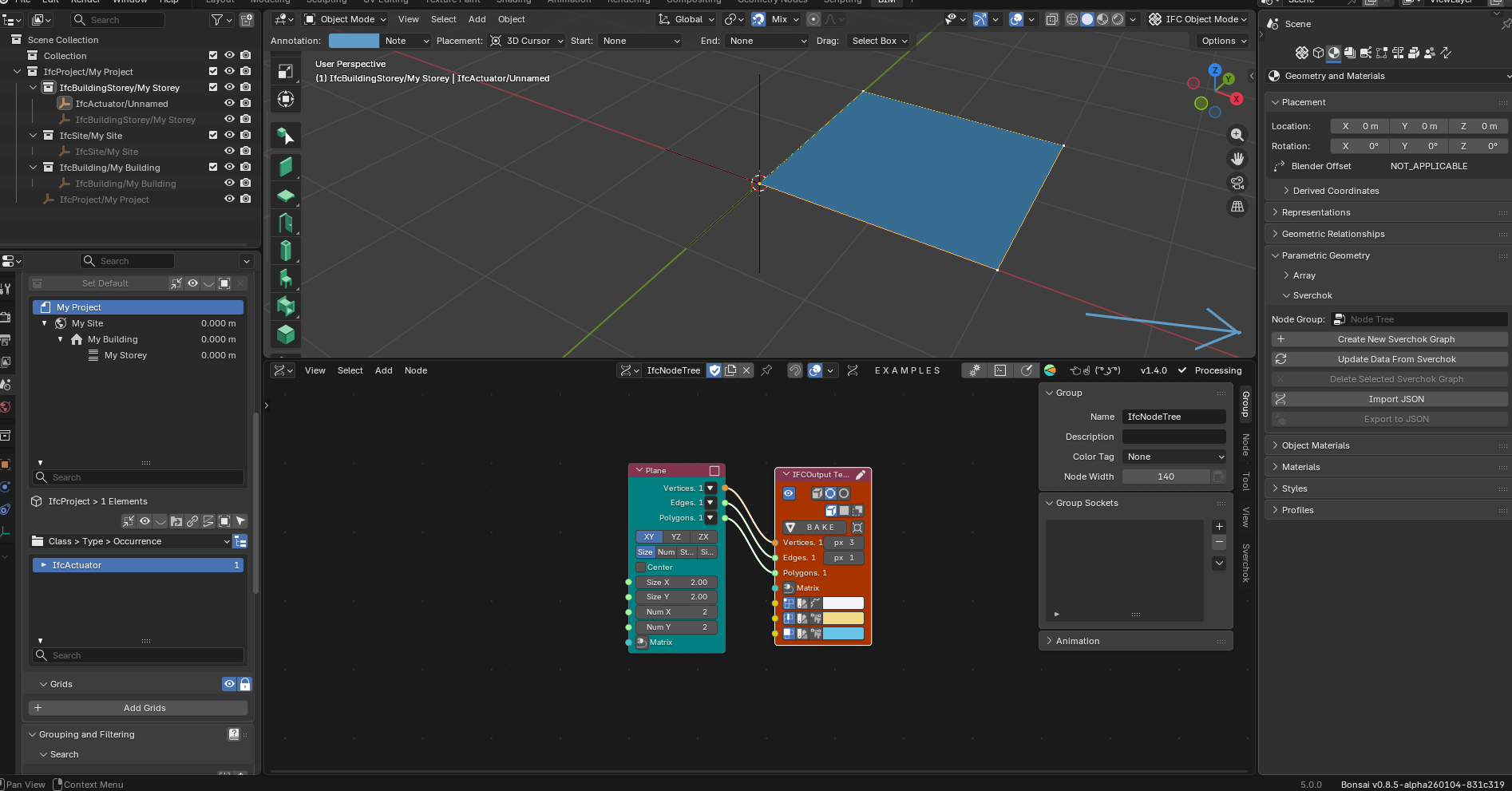
I haven't worked with Sverchock for some time (I was traumatized after a SV version upgrade bugged the script nodes I created and made them disappear after months of work), but it's a great tool for creating/modifying geometry.
I tested it today (with blend metadata) and what I noticed is that the "node group" remained in the blend file but was not updated for the object in the BB interface, and the geometry was not applied to the ifc object.
GN
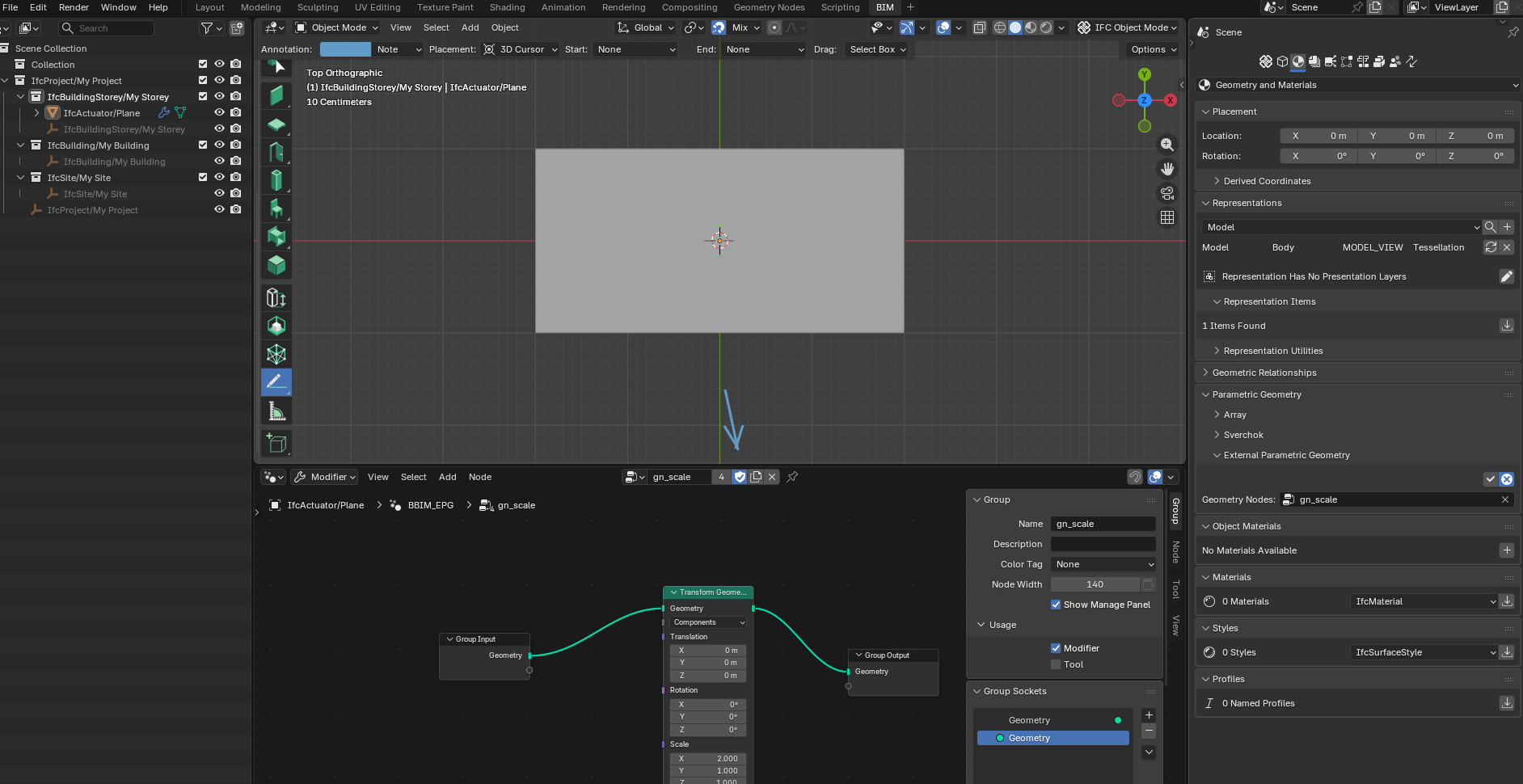
If the "group node" is marked as "fake user" it is preserved in the blend metadata.
There's really a lack of a way to preserve a link between the ifc object and the node group, and a way to reapply it without becoming recursive.
@falken10vdl I didn't quite understand the TAG proposal.
MEP
I think using GN for electrical and hydraulic networks is "using a cannon to kill a fly".
It might be an alternative for those who really need to make constant changes to projects, but that doesn't usually happen.
For pipes and fittings, they are usually found on the market in standardized sizes and gauges, that is, as steverugi said, a good type library is enough and parametric modeling becomes unnecessary.
BB already provides a good way to create these networks.
Some things are missing such as:
For HVAC I agree that GN can be a big step.
@walpa. My idea is to use the attribute TAG in the ifc element to convey some information that can be programatically used to reaply GN constructs to IFC elements. Does it make sense?
Cheers!
The TAG attribute might not be the right place for this; see here and here.
Maybe EPset?
Agree. TAG maybe is not the right item. EPSet seems more reasonable.
Thanks!
The GN is a work in progress and needs a lot of work to finish it before I can post it here. I am stuck using Revit and only experiment with Blender during my free time. I have dreams of using Blender for my drawings and models one day.
@steverugi @walpa I used to model the pipe fittings individually when I used AutoCAD (3D Dynamic Blocks allowing different sizes to be selected) but I have found that Revit's way of creating the pipe runs as 'lines' is much faster and easier. I am attempting to replicate Revit's way of working with GNs (Revit's pipework isn't perfect. A lot of it is hardcoded and can't be improved whereas with GNs in Blender there is almost no limit to what can be achieved). A future consideration is that if you need to size the pipe lines then they need to be joined - not separate fittings.
I think we're straying from the main topic of this thread. :)
Can we open another one to discuss this?
Suggested title: "Parametric Design in BonsaiBim - current status"
What do you think?
A bit late to the party, but fantastic work on saving Blender session state independent from IFC. This is sorely needed. I'm curious to know how people are using the UI customisation.
I have a couple of suggestions:
My feedack:
I also think it would be best to have a fixed suffix so it is clear afterwards what that file is supoosed to contain.
.bonsai ?
I had set the bool UI Customization since it was a proposal for people to try under extras but kept disabled by default so it was not bothering those happy with a nonn customizable UI (you get those little gear buttons) but I agree that should not be there in the long run.
Maybe both the UI and the metadata features could move out of extras.
Cheers!
I really liked the full meta suffix options, but I understand ....
(I had a problem with initial FileName.ifc.blend)
Dot Bonsai would be ok for me.
It "shows" what it is (special file for Bonsai) and you can't open it by double clicking accidentally.
(I may not resist to set Finder's "always open with .... *.App" though)
@Moult With the new refactoring of this feature, Tab visibility is moved to the addon settings area.
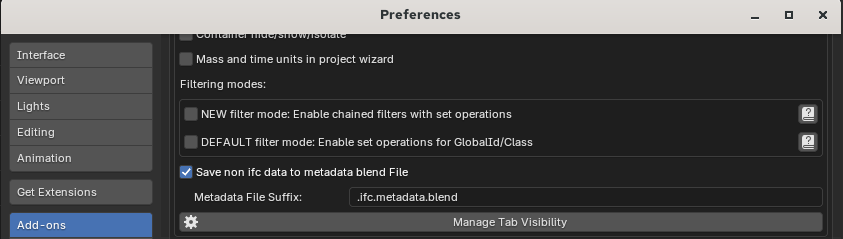
And we have two toggles:
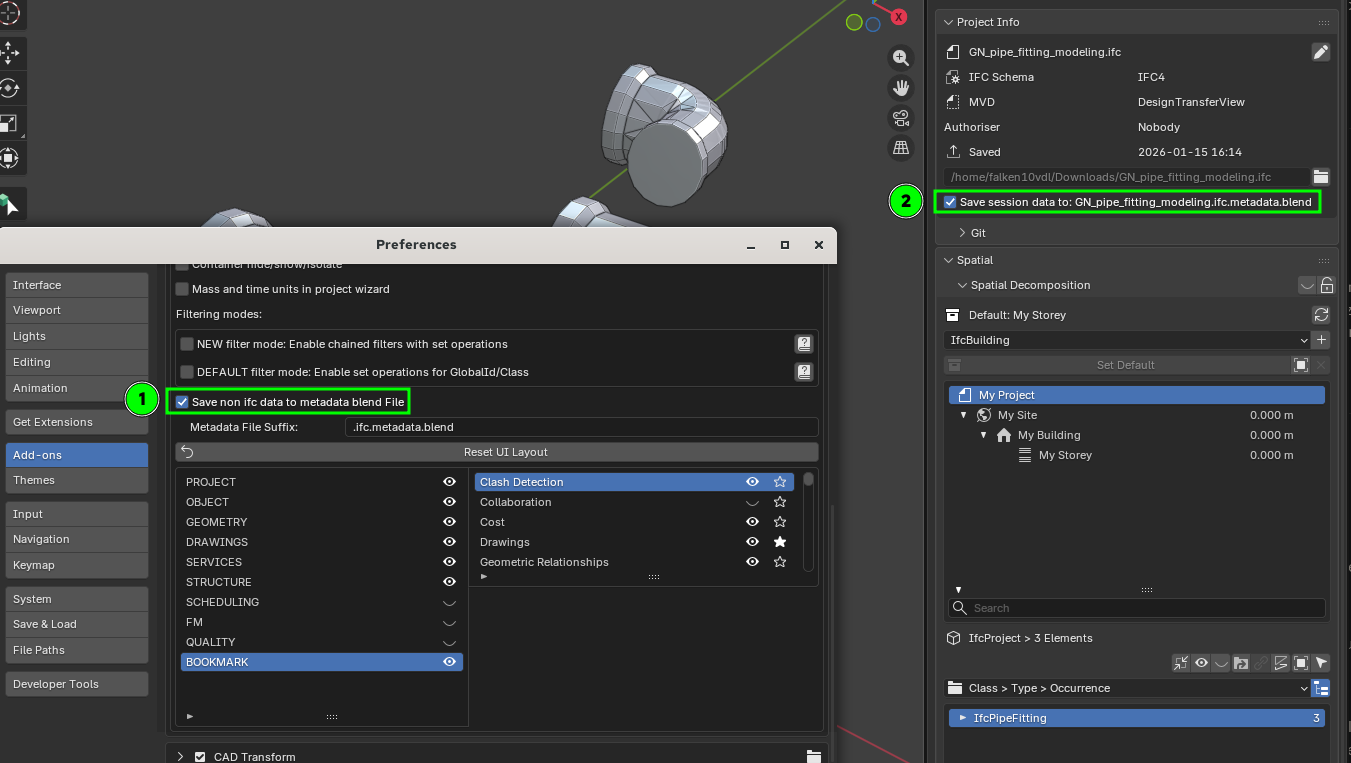
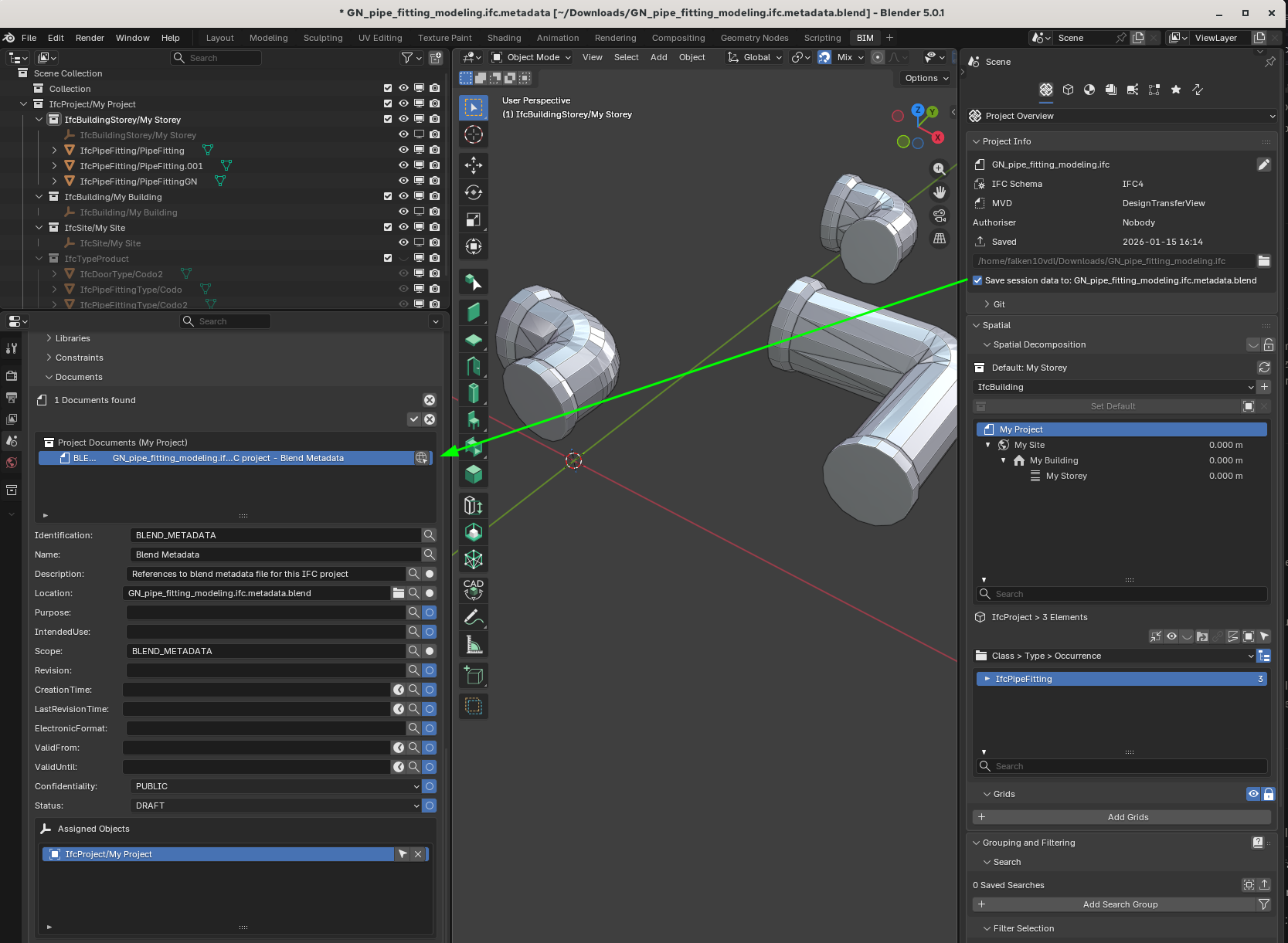
1. Main switch to enable/disable the functionality
2. Switch to enable/disable the functionality for the current ifc file (tracked with a doc information element)
This meas that the information appearing in the addon settings (Tab visibility) is not bonsai wide but rather customized to the current loaded ifc+metadata file.
Is this an issue? I am asking because I do not know if addon settings are meant to be stored independently of the ifc/metadata.
Cheers!
I think this is great. (To selectively deactivate MetaBlend)
If the switch is an issue, having switch 2 .... I could also live without the global enabler switch 1 ....
Could be switch 2 also be the option to choose a file ending for MetaBlend ?
Somehow that does no more work for me (on Mac ?) since quite some time - existing Metadata files will not be updated and it will not create new Metadata files if not yet existing. Maybe since some weeks or maybe short after it went from PR to daily builds (?)
In the past, after CTRL saving the IFC, I got "Metadata saved" message in status bar. Now I only get "IFC file saved".
I checked my settings and tried with Blender 5.0 - 5.2 or file extension back to default ".ifc.metadata.blend".
Have not checked on Windows/Linux so far .....
Am I doing something wrong ?
Wow, took me 3 days to find ... but that was an easy one .....
This new Setting ..... :
was OFF by default in all my Files ....
Glad I did not file a bug request ;)