

Whats the best way to model options, for example two different kitchen layouts?

Hi all,
A short story:
I tried asking copilot what class or classes to use to handle options. It told me that IfcScenario was introduced in v4.3.0 to handle exactly this kind of thing so off I went to BuildingSmart to read up on it. And found nothing. So I asked copilot to give me a link to the page about IfcScenario, instead it gave me a link to the top of the 4.3.0 schema and told me to search there. Which returned nothing. So I tried traditional searches, and got nothing. Could it be pending in the v5 spec? Nothing there either.
So I told copilot I'd followed it's instructions and not found anything and it said words to the effect 'oh you're right, it looks like I completely made that up, try this instead...'.
FFS! It's one thing when an AI misunderstands something but to totally invent something that exists nowhere on the web (so far as I've found) is scary, dumb people dumbly believe these things! But then, as the old saying goes 'garbage in, garbage out' and AI is trained on the greatest pile of garbage mankind has ever produced - the internet.
Anyway, story time over.
Copilots second suggestion was IfcGroup and IfcRelAssignsToGroup which do at least exist and the synopsis seems promising for the purpose. Are these the right classes to start reading up on? I'm looking for something that I can filter in different drawings and also filter on screen like you can with Pset_*Common Statuses, should I research custom Psets? Something else entirely?
Thanks
Julian


Comments
If you explore this template with the following drawings, and see how the 'exclude' filters are setup, you can get a sense of how i've done options in the past.
OPTION 1 - FLOOR PLANOPTION 2 - FLOOR PLANOPTION 3 - FLOOR PLANOPTION 4 - FLOOR PLANFor example:
IfcObject, "OD_Options"."OD_Option_1" = "N" + IfcObject, "OD_Options"."OD_Option_1" = "D"I use
"D"sometimes, if my options have different demo phases in them, that way i can use css to render them as red dashed lines, for example.Doing options completely inside a single IFC as described by @theoryshaw is definitely an option.
You can also do this with git branches. eg. have a main branch that is an existing building, and branches for each option. I have a project where the survey was a quick run around, which was used to work out some options, but the survey was later refined and the option branches were able to merge these changes.
Only to complement what @theoryshaw and @brunopostle said, for simple changes like different layouts of furniture you can just define groups and then turn visibility for the group (and in drawing exclude the rest of the groups)
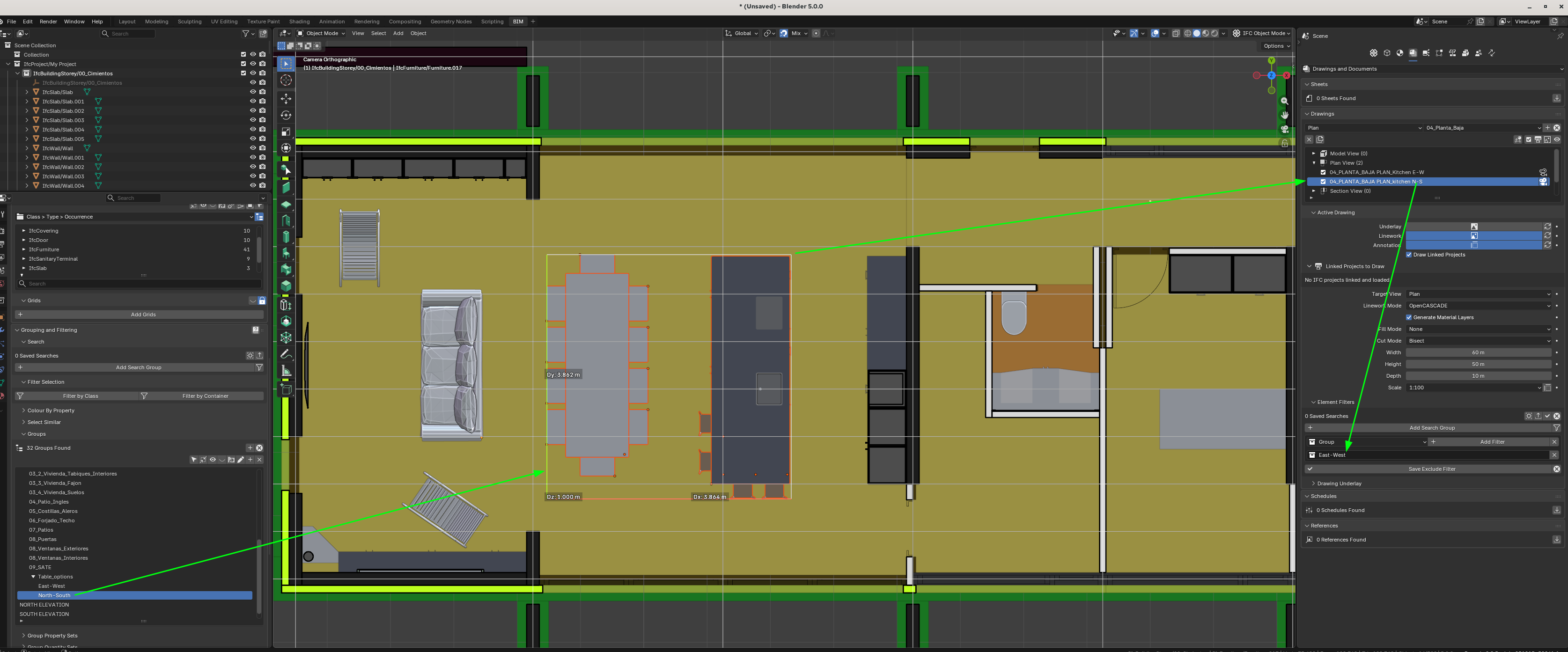
Here how to add two layouts with groups:
Cheers!
Just a thought.
For me that sounds like a better option (?)
I never understood IFC as the base of a BIM authoring or design platform. More as a medium to collaborate with (current) existing results. Or has IFC 5 tendencies do get so in the future (?)
I think IFC contains only a single current state, not multiple at a time by versions. So I would prefer to have the versioning capabilities for design needs inside Bonsai or Blender, or Git. While different design versions would mean saving/exporting different IFC Files (?)
Does that make sense ?
@brunopostle
With using git, let's say you create branch
option_Aand branchoption_B.And you're working along, pushing changes into both of those branches.
...and then you move a wall that's common to both, how do you push that change to both branches?
My two cents on handling options:
1. Very big differences (like option 1 in one location, option 2 in another location) -> different IFC files
2. Standard differences (like adding another floor or change the floorplan by adding another room) -> git branches in the file
3. Small differences (like moving around furniture, changing some non load bearing walls or the like) -> groups (or pset options like commented above). These should be limited otherwise you have to handle a lot of groups/options/filters
Cheers!
Thank you all, really useful. I shall research the various methods and try not to come back with too many dumb questions.
@Julian For me there are no dumb questions ;)
Small anecdote... I have recorded the video above to show for example two layouts of kitchen... in the example the initial one had mainly some north-south orientation so I just rotated and created the east-west... now that I have shared this with the top stakeholder of the project (my wife, this is for a house we are planning) it turns out it is something that has prompted very interesting debate.
So.. you see... thanks to your question I have now another option that turns out is quite good to consider.
Thanks!
Firstly, IFC (and Bonsai) has a whole ifc4d scheduling capability, so if you want to plan a project and play back the entire sequence from pre-construction to completion you can do this in Bonsai.
Secondly this idea of having a big BIM model with everything, and then exporting little IFC snapshots using MVDs is kind-of a hack to support a bare minimum of interoperability between proprietary platforms. Native IFC is much simpler, the IFC is the BIM model.
With IFC Git you can't cherry pick elements and move them between branches. I'm not saying it can't be done, but any implementation of this would be very fragile and would have many corner cases. The way that merging currently works is that if a merge between branches succeeds, the result is almost certainly a valid IFC file - but you have to merge whole branches.
If your modified wall is in the 'main' branch and you are happy for all 'main' changes to merge into the two option branches then this is easy, just merge from 'main'.
If your modified wall is in an 'option' branch and you want to move just this change into other branches, then currently you have to remake the change in your 'main' branch manually, maybe using some cooy-paste. You may also find that it is easier to duplicate the wall and delete the original - this way you can avoid all conflicts by just deleting the original wall in all branches.
@brunopostle
Sorry, I think run into my language barrier ....
I stumbled over "Versions" in IFC.
As for me, from my BIM modeling, Design Versions means possibly producing redundant geometry/data duplicates, which are obsolete once the Design Decision was made, which I don't think should be part of an IFC file (I may be wrong here ?)
Of course working with Design Versions should be part of Bonsai, as it is a BIM authoring Software. But not necessarily polluting the IFC file by saving it there ?
Or did you mean by your hint of ifc4d scheduling capability,
that there don't need to be redundant data/geometry, because you use ifc4d to just bring the existing geometry parts into different version states, similar to Animation in Blender. Like just changing parts position, data and appearance over time frame ?
Just like for my ArchViz needs where I need to save Cameras, Lights, Plants and stuff, which mostly can't and I think should not be saved inside and IFC ?
(On the other hand i see that @theoryshaw goes another way by integrating entourage like plants or cars into the IFC. Which is of course handy for generating Plans .....)
Obviously my non-IFC stuff fits well and belongs into Blender, but there was no reliable sync between the IFC and a Blend file, which is mandatory. Something which @falken10vdl ingeniously solved by his concept of the Metadata.blend, to sync the Viz parts separated in Blender - with the Bonsai IFC.
Which may also have a potential for future features in Bonsai, which could not be saved directly in the IFC .
But maybe that Versions example I stumbled over was a very bad example and no problem for IFC in general .....
@zoomer I was just pointing out that exporting multiple IFC files showing different stages or versions of a building is not how Bonsai works, Native IFC is a different way of doing things. There are also various methods for representing different building configurations in a single IFC without using git branches.
What's wrong with this exclude filter syntax in a drawing?
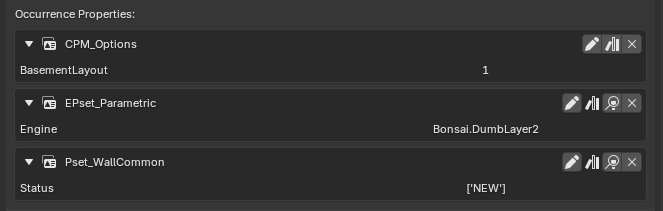
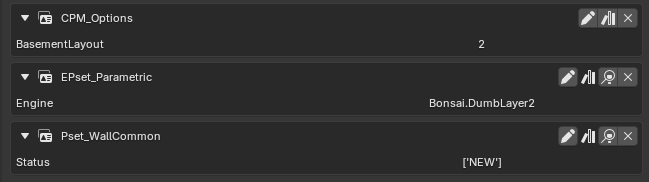
IfcObject, /Pset_.*Common/."Status"="DEMOLISH", "CPM_Options"."BasementLayout" != 1
and
I'm still seeing both walls. I tried !="1" in case the property is a string rather than a numeric but that doesn't work either.
try..
IfcObject, /Pset_.*Common/."Status"="DEMOLISH" + IfcObject, "CPM_Options"."BasementLayout" != 1Closer and proves the syntax I need for my custom Pset but it leaves only walls tagged CPM_Options.BasementLayout= 1. All walls with no CPM_Options are matched and therefore excluded.
This does exactly the same:
"CPM_Options"."BasementLayout" != 1This gives me what I want:
/Pset_.*Common/."Status"="DEMOLISH" + "CPM_Options"."BasementLayout"=2But would be a pain because I'd have to revisit it and add ...=3 & ...=4 as more options are added. Reversing the test to:
/Pset_.*Common/."Status"="DEMOLISH" + "CPM_Options"."BasementLayout"!=1Is back to excluding everything that does not have a CPM_Options tag. But there is a way to have my cake and eat it:
/Pset_.*Common/."Status"="DEMOLISH" + "CPM_Options"."BasementLayout"!=NULL, "CPM_Options"."BasementLayout"!=1Exclude if Status =Demolish OR (object has a CPM_Options.BasementLayout tag AND BasementLayout !=1)
Thank you @theoryshaw for getting me to the point it was just about getting the logic right, that I can do. When I was fighting syntax and logic it was harder to progress.
Would be nice if you could assign at type to
IfcAnnotation, ObjectType = "DRAWING", and then assign the EPset_Drawing pset to the type. That way you could have 'view template' so to speak. Like templates for floor plans, details, options, etc. Would avoid having to input the same stuff over and over again to the drawing instance.You could still use the option of having the instance's EPset_Drawing pset override the type's EPset_Drawing pset--on
Scalefor example.