Excellent as always thank you @theoryshaw.
I suspect that the intention is for all types to be simple to create in the roof tool but so far the only type that is fully implemented in parametric form is hipped. Hipped can be changed to gable as in your video but I think the intent is to get to the point where you can just change type from the parametric droplist. I think the tooltip should be changed to list only the type(s) that are functionally complete.
Stairs are the same, the tooltip lists all the types in IFC not what is implemented in Bonsai.
Julian, it is easiest to think of it this way. The type of roof in the roof elements "Predefined Type" is purelyinformational - the "I" in BIM. It doesn't actually dictate the representation (i.e. the 3D shape you see on screen). The representation can be shaped like a fish for all the software cares, and you can make the representation anything you can create with standard Blender tools and a bit of work.
Then there's the Parametric Geometry tools. These are effectively just helper functions that can quickly generate a representation, and as you no doubt realise the "Roof Type" is limited to Hipped/Gable and this is not connected to the elements predefined type. This is only what the parametric tool uses to create an initial representation for you. In theory the tool could be expanded to increase the number of types it can create, but that is a chunk of work no one has picked up (although Dion mentioned that it needed an overhaul, I don't think he has had time to do anything).
In conclusion, it is not appropriate to remove the other Predefined Types which are part of the IFC standard just because a Bonsai-specific helper function is limited in scope. (Oh and this applies to any other parametrically generated elements too... stairs, doors, windows, etc).
Yeah, I get it. I'm not suggesting there's anything missing or wrong in the underlying handling or completeness of ifc. I think the intention is for the Bonsai UI to protect the user from needing to know about how ifc is structured. For those that do understand the Add IFC Object route is always there. It's just the Bonsai UI (the combination of the BBIM_stair pset and the Bonsai Roof Tool in Blender) that isn't complete to what is intended yet.
This is why I raised it here rather than straight in a github feature request, to get different opinions :-)
Perhaps change the tooltip to something along the lines of:
Create any IFC style of roof nativly: FLAT, SHED, GABLE, HIP, HIPPED_GABLE, GAMBREL, MANSARD, BARREL, RAINBOW, BUTTERFLY, PAVILION, DOME, FREEFORM or
Parametrically create: HIPPED
Hipped gable is probably the most common type (in the uk anyway), they 'only' need to add checkboxes to flip each endpoint between hip & gable for that style to be complete. Mind, that's probably horribly complicated as there are a variable numbers of hips/gables
I think the tooltip should be changed to list only the type(s) that are functionally complete.
I misunderstood. I thought you meant to remove the Predefined Types from the element attributes. My bad.
Thing is, while the "Quick Create IFCRoofType" does default to a parametric roof, you can also create any other predefined type with custom geometry with the Roof Tool waffle button Type Manager, then "Create New IFCRoofType". So the tooltip is actually accurate.
Hipped gable is probably the most common type (in the uk anyway), they 'only' need to add checkboxes to flip each endpoint between hip & gable for that style to be complete. Mind, that's probably horribly complicated as there are a variable numbers of hips/gables
Did you know you can select any edge in the parametric hip/gable, and set it to be a gable edge?
I didn't until I watched the video embedded in the link @theoryshaw posted. I had subdivided an edge and tried manually moving it up but it gets reset. I didn't have that toolbar open at the time though there's no certainty I'd have spotted that button even if I had!
Could someone please create a gable roof (gable both ends) and then try resizing it? If I make the ridgeline longer all is good but if I move the mouse to shorten it the roof reverts to hipped.
Looking for confirmation before submitting bug report.
The roof generating code is based on an algorithm that tries to create a roof out of an outline. All the ridges are generated from the algo, and it is prone to odd results because the algo is not perfect. When you resize the algo is dynamically attempting to create a roof based on the new shape, and it will not always look how you expect.
If you want to look at the base algo it can be found here: https://github.com/prochitecture/bpypolyskel (it is itself based on https://github.com/Botffy/polyskel )
From some of the Bonsai code comments I think this is a bit of a black magic box. One comment refers to needing a PhD to understand it!
Hmmm. Stumbled onto this http://wscg.zcu.cz/wscg2003/Papers_2003/G67.pdf
Section 7 is interesting, as the roof looks a bit more realistic. For the life of me though, I can't work out how they get those set differences in Step 4. Is Red not supposed to contain 3?!? If so, how does it decide which AAR takes priority? Size?
Maybe a silly question, but... Couldn't be simpler if any "face" of the roof would be considered as a SHED? I mean, in that way, perhaps they could be considered as independent roofs that intersect between them (in the same way walls do ib between them, joinning, extending and so on...).



Comments
https://github.com/IfcOpenShell/IfcOpenShell/discussions/7002#discussioncomment-14024574
Excellent as always thank you @theoryshaw.
I suspect that the intention is for all types to be simple to create in the roof tool but so far the only type that is fully implemented in parametric form is hipped. Hipped can be changed to gable as in your video but I think the intent is to get to the point where you can just change type from the parametric droplist. I think the tooltip should be changed to list only the type(s) that are functionally complete.
Stairs are the same, the tooltip lists all the types in IFC not what is implemented in Bonsai.
Julian, it is easiest to think of it this way. The type of roof in the roof elements "Predefined Type" is purely informational - the "I" in BIM. It doesn't actually dictate the representation (i.e. the 3D shape you see on screen). The representation can be shaped like a fish for all the software cares, and you can make the representation anything you can create with standard Blender tools and a bit of work.
Then there's the Parametric Geometry tools. These are effectively just helper functions that can quickly generate a representation, and as you no doubt realise the "Roof Type" is limited to Hipped/Gable and this is not connected to the elements predefined type. This is only what the parametric tool uses to create an initial representation for you. In theory the tool could be expanded to increase the number of types it can create, but that is a chunk of work no one has picked up (although Dion mentioned that it needed an overhaul, I don't think he has had time to do anything).
In conclusion, it is not appropriate to remove the other Predefined Types which are part of the IFC standard just because a Bonsai-specific helper function is limited in scope. (Oh and this applies to any other parametrically generated elements too... stairs, doors, windows, etc).
Yeah, I get it. I'm not suggesting there's anything missing or wrong in the underlying handling or completeness of ifc. I think the intention is for the Bonsai UI to protect the user from needing to know about how ifc is structured. For those that do understand the Add IFC Object route is always there. It's just the Bonsai UI (the combination of the BBIM_stair pset and the Bonsai Roof Tool in Blender) that isn't complete to what is intended yet.
This is why I raised it here rather than straight in a github feature request, to get different opinions :-)
Perhaps change the tooltip to something along the lines of:
Hipped gable is probably the most common type (in the uk anyway), they 'only' need to add checkboxes to flip each endpoint between hip & gable for that style to be complete. Mind, that's probably horribly complicated as there are a variable numbers of hips/gables
Ahhh...
I misunderstood. I thought you meant to remove the Predefined Types from the element attributes. My bad.
Thing is, while the "Quick Create IFCRoofType" does default to a parametric roof, you can also create any other predefined type with custom geometry with the Roof Tool waffle button Type Manager, then "Create New IFCRoofType". So the tooltip is actually accurate.
Did you know you can select any edge in the parametric hip/gable, and set it to be a gable edge?
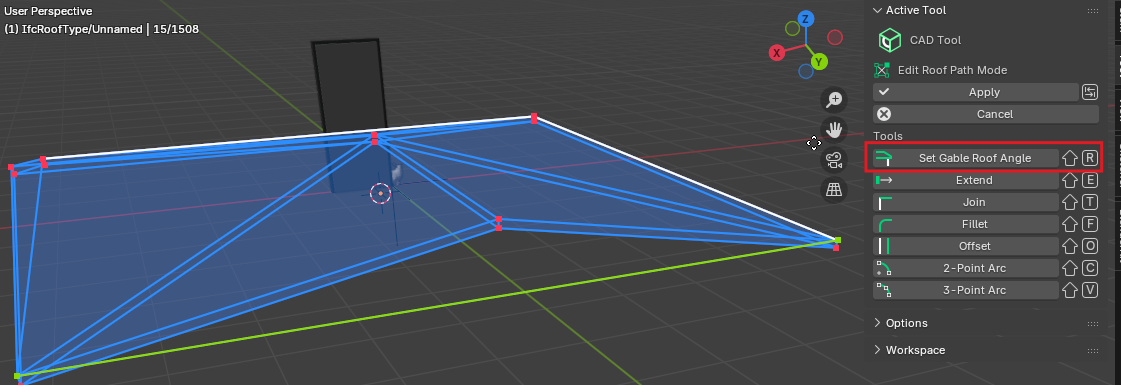
I didn't until I watched the video embedded in the link @theoryshaw posted. I had subdivided an edge and tried manually moving it up but it gets reset. I didn't have that toolbar open at the time though there's no certainty I'd have spotted that button even if I had!
Could someone please create a gable roof (gable both ends) and then try resizing it? If I make the ridgeline longer all is good but if I move the mouse to shorten it the roof reverts to hipped.
Looking for confirmation before submitting bug report.
Thanks
Julian
The roof generating code is based on an algorithm that tries to create a roof out of an outline. All the ridges are generated from the algo, and it is prone to odd results because the algo is not perfect. When you resize the algo is dynamically attempting to create a roof based on the new shape, and it will not always look how you expect.
If you want to look at the base algo it can be found here: https://github.com/prochitecture/bpypolyskel (it is itself based on https://github.com/Botffy/polyskel )
From some of the Bonsai code comments I think this is a bit of a black magic box. One comment refers to needing a PhD to understand it!
Addendum: This page has some cools diagrams, animations and discussion of the method: https://www.tylermw.com/posts/rayverse/raybevel-introduction.html
Hmmm. Stumbled onto this http://wscg.zcu.cz/wscg2003/Papers_2003/G67.pdf
Section 7 is interesting, as the roof looks a bit more realistic. For the life of me though, I can't work out how they get those set differences in Step 4. Is Red not supposed to contain 3?!? If so, how does it decide which AAR takes priority? Size?
Maybe a silly question, but... Couldn't be simpler if any "face" of the roof would be considered as a SHED? I mean, in that way, perhaps they could be considered as independent roofs that intersect between them (in the same way walls do ib between them, joinning, extending and so on...).