

Validation errors

I've just dropped my model into the BuildingSmart validator for the first time in a while and I've got a bunch of these errors:
Id Entity Severity Message
#2861 IfcShapeRepresentation Error Violated by:
((0 == 1 ^ 0 == 1) ^ 0 == 1)
+ where 0 = sizeof(())
+ where () = #2861=IfcShapeRepresentation(#2862,'Annotation','GeometricSet',
(#2863)).OfProductRepresentation
+ and 0 = sizeof(())
+ where () = #2861=IfcShapeRepresentation(#2862,'Annotation','GeometricSet',
(#2863)).RepresentationMap
+ and 0 = sizeof(())
On instance:
#2861=IfcShapeRepresentation(#2862,'Annotation','GeometricSet',(#2863))`
Running backups through the validator I think the change that introduced the error was adding options and drawings filtered to show the options.
Any hints on what I might have done wrong? In human language please! I know what ((0 == 1 ^ 0 == 1) ^ 0 == 1) etc means.
Could it be that #2861 isn't referenced in my .ifc? That tag only appears once on the line shown, it's not used as a parameter anywhere in the file. If so, how might I have achieved that SNAFU?
Comments
Rather than using the site you can use the Validator built in to Bonsai. It gives somewhat clearer information... i.e.
(You will need to run Blender/Bonsai from a console or open the console if available on your OS)
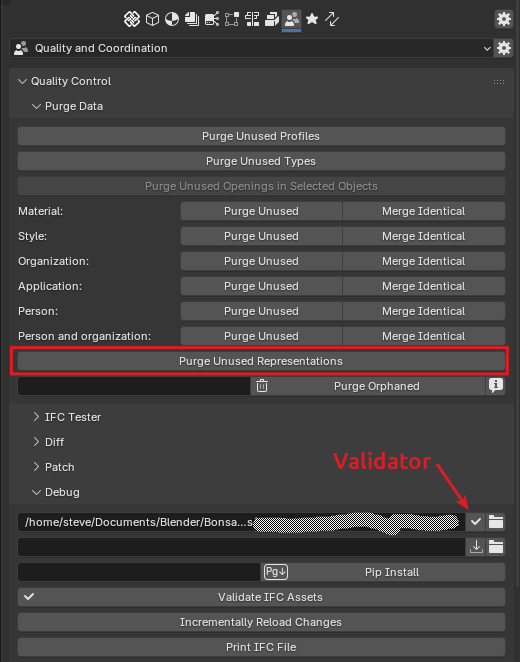
This is a bit easier to understand what it was trying to assert. Unfortunately you often need to really know IFC file structure to understand what it means, and especially how to fix it.
The best I've understood this is that a representation was orphaned and not properly cleaned up for whatever reason while editing elements or their types. It doesn't actually cause any problems as such. If you look in the debug pane you can try out purging unused parts of your file, but be careful. Take backups (or git commit) before doing this, and check the resulting file is still correct. I tried "Purge Unused Representations, and it removed my #114474.
I don't know if there is some handbook somewhere explaining all these rules and how to fix problem files, but it would be useful!
Thank you @sjb007.
I am somewhat heartened that I had correctly guessed what the error really meant even if I hadn't a clue how to fix it!