After using 'Colour by Property' I want to return to my original colouring settings but 'Reset Colour' makes all grey-ish.
Reloading the model does the job but maybe there is a better method..
Any help? thanks in advance
Hmmhh, it seems to also influence Blender Meshes - outside of the IFC Collection !
I had given an orange (viewport display) color to a Sphere and switched to "Solid" viewport shading.
After using "Color by Property" and again reverting - the Sphere also lost their (viewport display) color which switched back to default white !?
I think there currently are a lot of issues with IFC and Blender Viewports. At least in latest builds and Blender 5.
I also can't safe any SurfaceStyle Settings, like for Render or Shade, nor any External Textures. At least on Mac.



Comments
I think Petru had a video about this.
Thanks but it's not saying much to restore colors after reset, unless I missed it?
I thought maybe this was mentioned. Guess not. Petru is around here :)
Wish you all the best for 2026!
@magicalcloud_75
the question posted on BIMvoice Academy got an answer by Petru:

So I guess we stick to
File>Open Recent IFC Projectfor the time being :)For future development I think the button
Reset Coloursshould return colors back to the original settings?Thanks and Happy 2026
Hmmhh, it seems to also influence Blender Meshes - outside of the IFC Collection !
I had given an orange (viewport display) color to a Sphere and switched to "Solid" viewport shading.
After using "Color by Property" and again reverting - the Sphere also lost their (viewport display) color which switched back to default white !?
I think there currently are a lot of issues with IFC and Blender Viewports. At least in latest builds and Blender 5.
I also can't safe any SurfaceStyle Settings, like for Render or Shade, nor any External Textures. At least on Mac.
@zoomer , @magicalcloud_75
I posted a Feature Request /7526
thanks @Moult for coming to the rescue
to restore original coloring, go to Viewport Shading and switch Object Color back to "Material", that's it
After
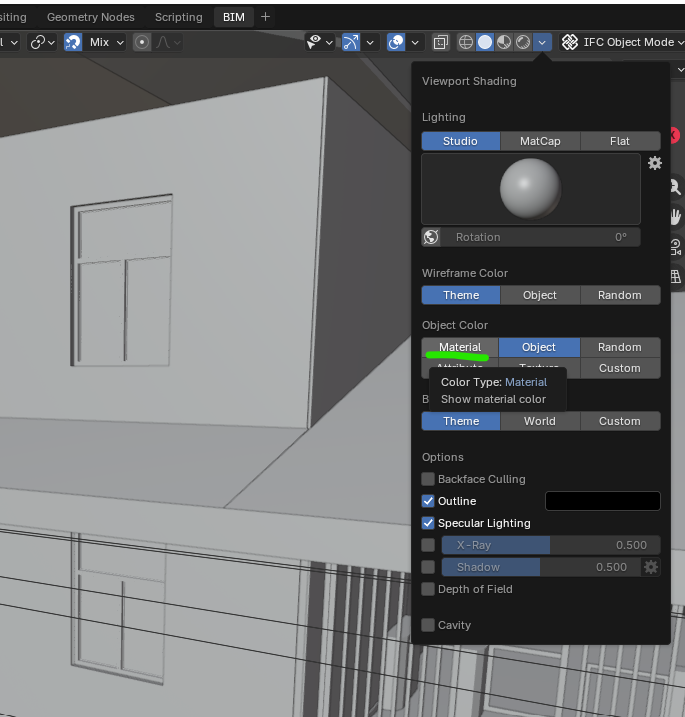
Reset ColorursAfter clicking on
Object Color>Material