

Drawing documentation - small fixes necessary! Then ready to use for my office

Hi everyone,
I’ve been putting Blender Bonsai 0.84 and 0.85 through its paces and I’m incredibly close to making it the primary BIM solution for my office. The progress is impressive, but I’ve hit a few technical friction points. If these can be ironed out, I’ll be able to drop my other BIM subscriptions and transition to a monthly contribution to the project.
I wanted to share a few bugs I've encountered and some workflow suggestions that would significantly improve professional documentation output.
Current Bugs in v0.84 and/or v0.85
The following issues are currently preventing a stable documentation workflow:
Material Layer Rendering: Material layers are not consistently drawn in generated views. I often have to fall back to the "Layer Name" representation, which is insufficient for professional-grade multilayer wall and slab details.
Section Level Persistence: Section levels are being deleted whenever a drawing is reloaded.
Dimension Stability: Dimensions tend to flip orientation randomly during edits, and there is currently no toggle or button to manually switch/lock the orientation.
Space Positioning: IFC Spaces are randomly resetting their coordinates to [0, 0, 0], losing their relationship to the spatial container.
Proposed Workflow Improvements
Beyond the bugs, these changes would streamline the "production" side of my office work:
Decouple Annotation Text: Currently, levels (RL) and stair arrows (UP) are hardcoded. I propose making these editable text fields by default. Ideally, these would function like other text annotation objects that can be dynamically linked to object properties.
CSS Consistency for Annotations: It would be much more intuitive if all Annotation objects shared a unified CSS logic. For example, being able to assign fill areas and linework to the same classes without needing to rename some of them differently for each object type.
Batch Editing for ifcIndexedPoly: Editing linework or dimensions one by one is a significant bottleneck. Is there a roadmap (or a hidden method) to edit multiple ifcIndexedPoly objects (like linework) simultaneously without entering each one individually?
I’m curious if others are experiencing these specific bugs—particularly the material layer rendering—or if there are known workarounds I’ve missed. I’m eager to get these resolved so I can fully commit to the ecosystem.
Thanks to the developers for the incredible work so far!








Comments
Thanks for sharing. You might know this already, but there's a few existing bug reports that align with your experience.
yes, some current bugs: https://github.com/IfcOpenShell/IfcOpenShell/issues/7252
yes, current bug: https://github.com/IfcOpenShell/IfcOpenShell/issues/7450
I feel like this one is fixed, but perhaps not.
https://community.osarch.org/discussion/comment/27329/#Comment_27329
https://github.com/IfcOpenShell/IfcOpenShell/issues/6956
Create a feature request? https://github.com/IfcOpenShell/IfcOpenShell/issues/new
I don't quite follow you here, mind elaborating on this concept?
https://github.com/IfcOpenShell/IfcOpenShell/issues/6286
Thanks @theoryshaw for the fast reply, you seem to be one of the only ones around really interested in the documentation part. Thanks for your groundwork to make this possible to begin with.
Well, sucks to know, that some of them are not really usable natively right now. I actually went into the source code of the plugin and gpt helped me to at least fix the problem where the section_level objects are reset every time. But it'd be nice to make these objects more userfriendly altogether.
What i meant with the css logic - right now im using the stylesheet like this:
.w005 { stroke-width: 0.05; }
.w010 { stroke-width: 0.10; }
.w013 { stroke-width: 0.13; }
.w018 { stroke-width: 0.18; }
...
.stroke-black { stroke: black; }
.stroke-grey { stroke: #c1c1c1; }
.stroke-lightgrey { stroke: #bbbbbb; }
...
.solid { stroke-dasharray: none; }
.dashed1 { stroke-dasharray: 0.75, 0.5; stroke-linecap: square; }
.dashed2 { stroke-dasharray: 1.5, 1; stroke-linecap: square; }
etc...
And in my classes field under the EPset_Annotation i just pick individually what is necessary right now like this:
w018 dotted stroke-lightgrey
this way i have full control inside blender to get the results i need. :)
Now the problem...
This logic fails me for fill-areas though, here i still need to use single predefined classes and "name" the object type, for example:
.PredefinedType-BLACK{ stroke: none; fill: black; }
This is tedious and unnecessarily bloats the css script which in turn slows down Inkscape for me. I wish i could just use the same method as for the linework for all annotation objects.
(I dont have GIT and hope to get around it for now - can someone please add a request, that it'd be nice to change the "EPSet_Annotation.classes" field in blender externally (like they scan the .css file and give you a drop-down. Or even better: color pickers that give you custom rgb values if you need exceptions like other CAD software. Should be as simple as write the object directly and keep the css stylesheet to overwrite it with "important!". Just an idea)
Dumb question, why can't you do this?
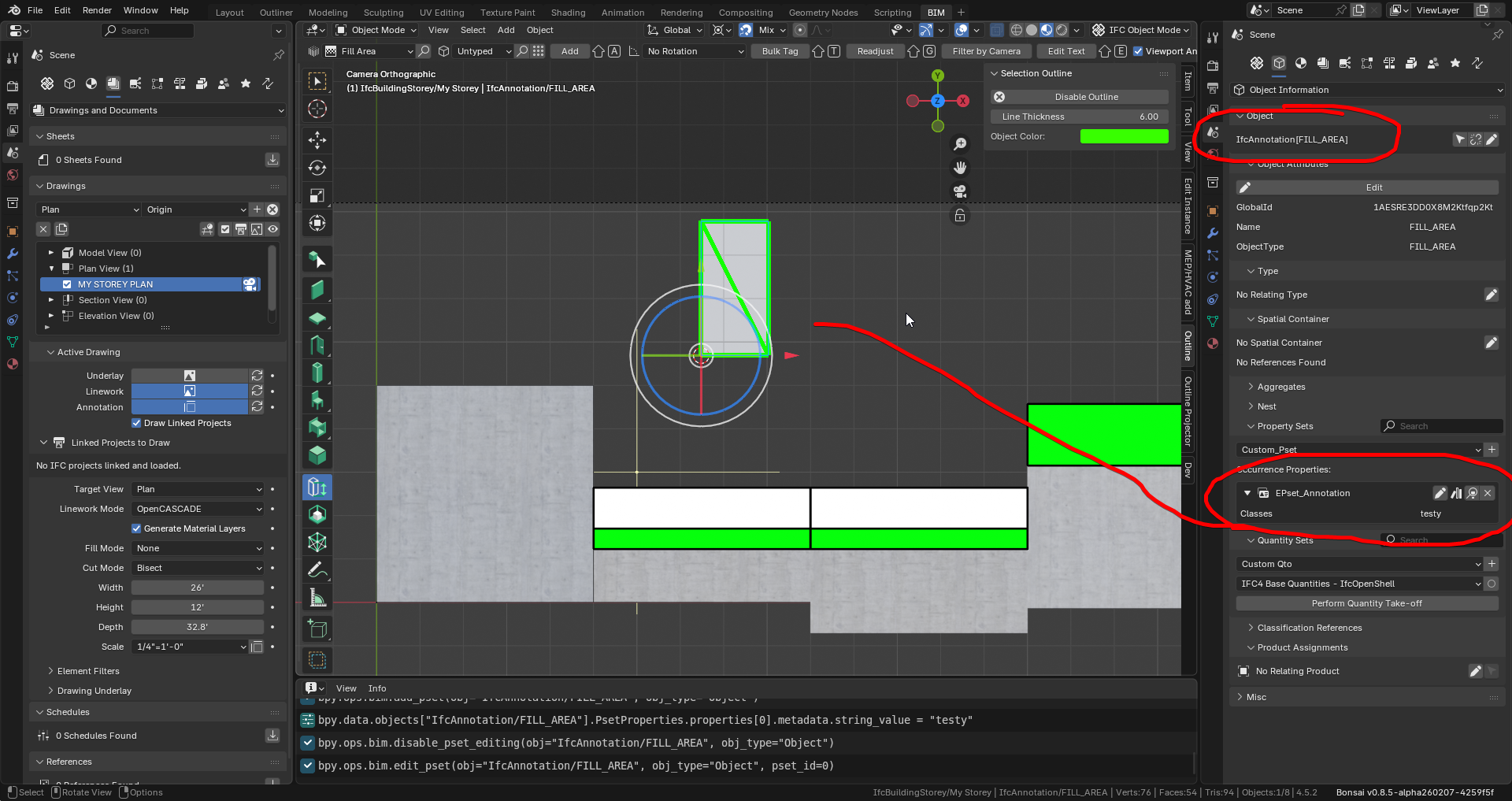
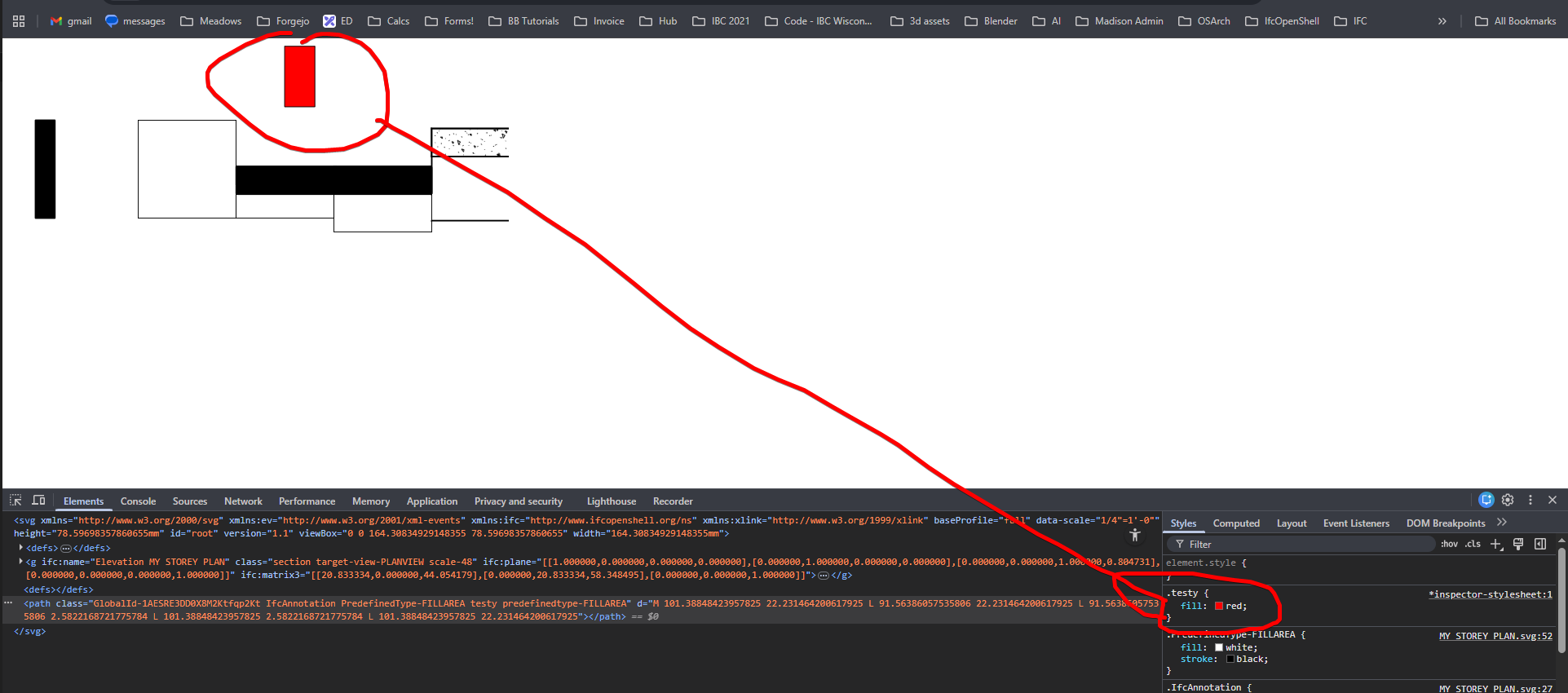
Doesn't this align with the
classes field under the EPset_Annotationapproach?Hmm, it somehow didnt work in my case. Are you using 0.8.5? i went back to 0.8.4 because the documentation was unstable on linux Blender 5.0. It might just be a bug in my case. :(
It might be. I encourage bug reports early and often. :)