

FreeCAD 1.1 has been released

FreeCAD 1.1 has been released!
The new release comes almost one and a half years after the previous release with lots of new improvements. As the previous release came with a lot of groundbreaking changes, the development team concentrated on quality and fixing of issues in this release. Even though this was the priority, the new release still comes with many new features.
Some highlights of the new release include:
✅ New core datum tools
✅ Much improved transform tool
✅ Clarify Selection for easier selection of objects in crowded areas
✅ Many sketcher improvements
✅ Interactive controls for many Part Design tools
✅ Animations for FEM results
✅ New three point lighting system
✅ Search in the preferences
✅ Lot of UI improvements all around the software
These are some of the new features specifically in the BIM Workbench:
✅ New Drawing View tool for streamlined creation of views
✅ BIM Views panel for better overview of spatial structure and sheets of the project
✅ New interactive sun position for the Site object
✅ Support for B-splines for structures
✅ Offset enabled during Wall creation
✅ Better support for continuous dimension creation
✅ Fine-tuning of Space creation from other objects
✅ Native IFC support for 2D objects (linework, text, dimensions)
See the full release notes here: https://wiki.freecad.org/Release_notes_1.1
Download the new release: https://www.freecad.org/downloads
You can check out the promotional release video here, but note that all of the highlights in the video are MCAD related:










 and 5 others.
Comments
Looks great.
while drawing walls:
They removed the "Continue" option. (edit* I could see they jus moved it)
what about this Offset? it does nothing :/
Hmm, looks like a bug. It should offset the whole wall from the base object. You can set it up after the wall is created by adjusting the Offset parameter of the wall.
I reported the issue to FreeCAD GitHub.
Yes, this option was moved for the position to be consistent with other BIM and Draft tools.
This video covers new features of the BIM Workbench in FreeCAD 1.1 release.
This video covers new feature of native IFC functionality in the new FreeCAD 1.1 release. The development of native IFC has slowed down a bit in this release and concentrated on bugfixes.
Some of the new features are:
✅ Basic support for IfcType. The functionality is very limited so not practical at this stage.
✅ Support for 2D objects - Linework, Text and Dimensions. The implementation comes with some bugs, it is a work in progress.
✅ New element icons in the projects tree for better overview of the project.
✅ Upgrade to IfcOpenShell 0.8.4 by default.
Note that the native IFC modeling in FreeCAD is still work in progress and not production ready. To get production ready IFC files from FreeCAD, it is recommended to use native FreeCAD modeling techniques and than use the export to IFC tool.
It looks like Freecad 1.1.0 or 1.1.1 installed with flatpack comes without IfcOpenShell. That was working in 1.0 :'(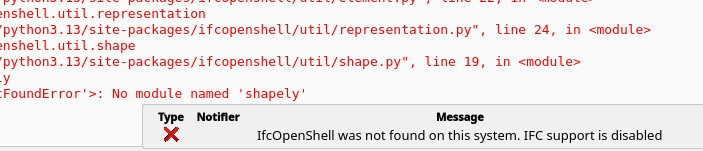
@alfredoangeles this is a known issue, which unfortunately has not been solved with FC 1.1.1 release.
You might try this fix, but it did not work for me: https://github.com/FreeCAD/FreeCAD/issues/28769#issuecomment-4199936637
Other option is to use AppImage from the FreeCAD download page: https://www.freecad.org/downloads.php
Note that the wall offset issue that you reported has been fixed.