

Trying to make elements in an IFC System non visible

I am trying to use the IfcOpenShell's methods 'api.root.remove_product()' and 'utils.system.get_system_elements()' to remove from the file elements that are part of an undesired system.
Is there another method that will mark an element as "non -loadable" or "geometry-less" that is quicker than 'remove_product()'?
My goal is to visualise the content of the IFC file by trade. For the new Ventilation IFC, for example, I will hide elements in all the other systems.
I am dealing with a very large IFC file (ca. 1,8 GB) containing lots of elements, as is the whole MEP network of a commercial building. As it was provided by the owner during the tendering process, I cannot ask the issuer to separate it by trades.
Below is a reduced version of the code that I am currently using.
import sys
import ifcopenshell
from ifcopenshell.api import root
from ifcopenshell.util import system as system_util

def remove_elements_from_systems(input_file: str, output_file: str = None) -> bool:
    """
    Remove elements from systems starting with 'H RL 6' or 'H VL 6' in an IFC file.

    Args:
        input_file: Path to the input IFC file
        output_file: Optional path to save the modified IFC file.
                   If not provided, will append '_modified' to the input filename.

    Returns:
        bool: True if successful, False otherwise
    """
    try:
        # Open the IFC file
        ifc_file = ifcopenshell.open(input_file)

        # Find target systems
        target_systems = [
            system for system in ifc_file.by_type("IfcSystem")
            if system.Name and (system.Name.startswith(("H RL 6", "H VL 6")))
        ]

        if not target_systems:
            print("No systems found starting with 'H RL 6' or 'H VL 6'")
            return False

        # Process each target system
        for system in target_systems:
            print(f"Processing system: '{system.Name}'")
            elements = system_util.get_system_elements(system)

            if not elements:
                print(f"  No elements found in system '{system.Name}'")
                continue

            # Remove elements from system
            for element in elements:
                try:
                    root.remove_product(ifc_file, product=element)
                except Exception as e:
                    print(f"  Error removing element {element.id()}: {str(e)}")

        # Save the modified IFC file
        if not output_file:
            import os
            base, ext = os.path.splitext(input_file)
            output_file = f"{base}_modified{ext}"

        ifc_file.write(output_file)
        print(f"Modified IFC file saved to: {output_file}")
        return True

    except Exception as e:
        print(f"Error processing IFC file: {str(e)}")
        return False

if __name__ == "__main__":
    if len(sys.argv) < 2:
        print("Usage: python IFCElementsInSystemRemove_Minimal.py <input_ifc_file> [output_ifc_file]")
        sys.exit(1)

    input_file = sys.argv[1]
    output_file = sys.argv[2] if len(sys.argv) > 2 else None

    if not remove_elements_from_systems(input_file, output_file):
        sys.exit(1)
Comments
The screenshot shows the result of the script processing, which is why I am looking for an alternative.
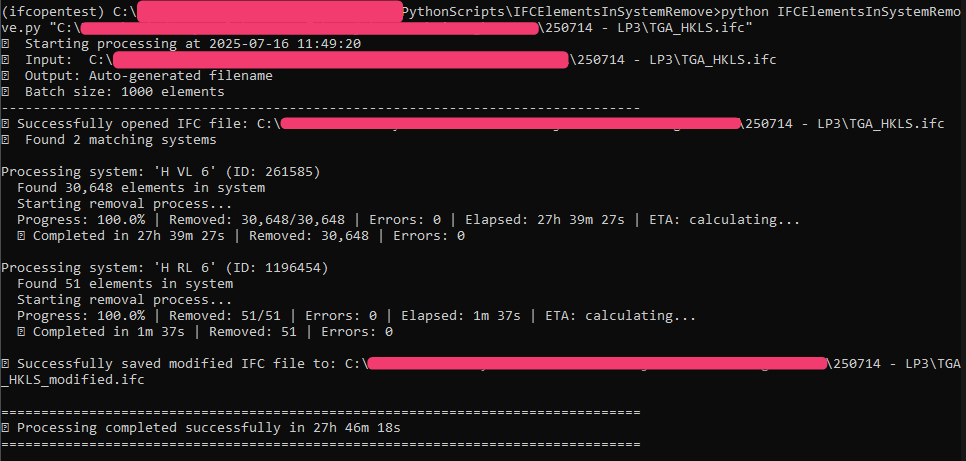
It takes a day to remove one system containing more parts. I have about a dozen of these in the model.
This is why I would like to know if it is possible to reduce the delivery time to less than a couple of weeks.
PS: Edited as when pasting the message it got automatically translated.
Have you looked at https://github.com/IfcOpenShell/IfcOpenShell/blob/v0.8.0/src/ifcpatch/ifcpatch/recipes/ExtractElements.py
This seems to be doing what you want to do (split elements off into another file) based on a filter query, using IfcPatch. The query would be using https://docs.ifcopenshell.org/ifcopenshell-python/selector_syntax.html
Using the c++ filtering is probably going to be significantly faster than stepping through all items and removing them in Python.
Of course the wrinkle is figuring out the magical query syntax. At a rough guess (totally untested) something like:
system.Name !*= /^H [RV]L 6/Which says something along the lines of
All elements that do not belong to systems starting with "H RL 6" or "H VL 6"I know it is wrong, I just haven't figured out what that query should really look like.
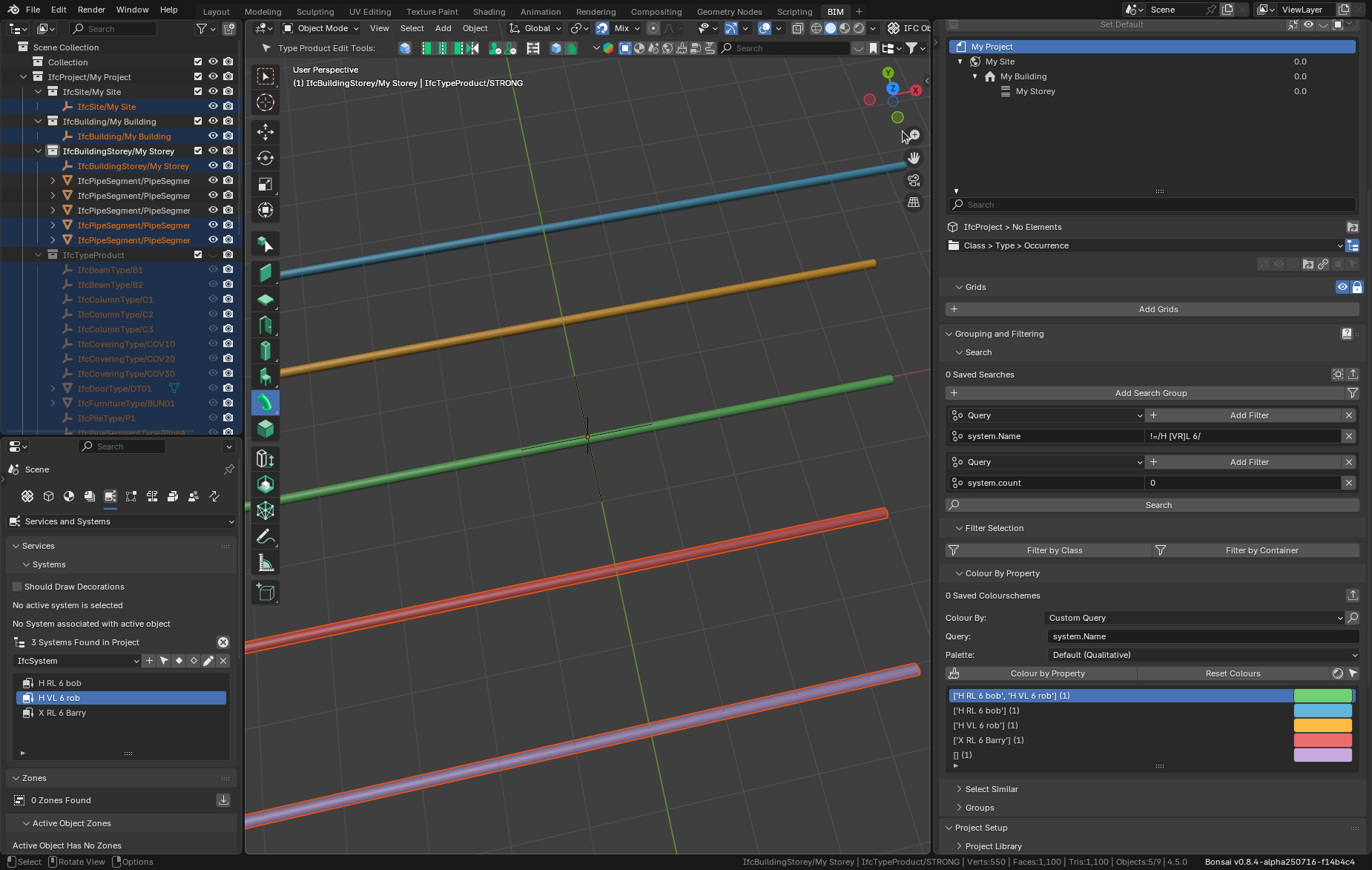
Here's a query that excludes elements with defined system names, and includes all others, plus any elements without any system (wasn't sure which way you wanted that.)
query:"system.Name"!=/H [VR]L 6/ + query:"system.count"="0"I figured this out using Bonsai and some pipe segments added to the appropriately named systems.
A picture is worth a thousand words and all that:
Two caveats with using the filter:
1. I'm not sure if you will lose some other required information in the produced files.
2. There is no guarantee that this is faster than your current method.
It is likely that an additional api call like
root.remove_multiple_products(ifc_file, products=elements)that stays in C++ code and deletes all the elements at once is going to be more performant than switching back and forth between python and C++ constantly. 28 hours is crazy.Dang! https://github.com/IfcOpenShell/IfcOpenShell/blob/v0.8.0/src/ifcopenshell-python/ifcopenshell/api/root/remove_product.py
The remove_product API call is python, and it is doing lots of reverse id searches, which then need to be removed, which then cause more searches and so on. That is probably why your script takes 28 hours. I doubt a remove_multiple_products api call would be any faster, because it would still be making many calls in Python, doing all these same searches.
Just browsing the code, and I see that remove_product calls get_inverse (and even some of those results call remove_product, so a bit of recursion, and lots of calls in general. The doc string of get_inverse warns that this is a slow function.
This is deleting all the connected data in the ifc file. Is this strictly necessary for your use case? Have you tried changing:
to
Eventually remove_product calls this ifc_file.remove after doing all the get inverse stuff. If this is OK, it might be a lot faster, although it might leave your per trade files a bit polluted.
And if that is not enough, you could look into this which is talking about batch deletions from the ifc_file. The docs are a bit sparse so you might have to dig around in the source to figure out how to use it, but here's a handy description, and here's an example of batch mode being used. Looks pretty simple.
Hi sjb007
Thank you for taking a look at my problem.
I will test the IfcPatch for extracting elements today to see if it is quicker than the remove_product(element) approach.
If not, I will test your first recommendation to use ifc_file.remove(element). I have also found this method, util.element.batch_remove_deep2(), in the documentation.
Do you know what the warning about it not working on elements with inverses means in the context of an MEP model?
The truth is Eloy, I'm figuring this stuff out as I go - no actual practical experience with it - so take everything I'm saying with the proverbial grain of salt.
I don't know definitively what the inverse comment means with respect to MEP. What I can say is that the IFC format is highly interconnected, with many references between things. In the code these are requested for an element with the get_inverse call. So my reading is that if the element still has any of these relationships, you will not be able to delete it using this function. Just looking at what the remove_product call looks for and removes, I see a bunch of IfcRel* that looks to directly relate to MEP, i.e. IfcRelServicesBuildings, IfcDistributionPort, IfcRelConnectsPortToElement, IfcRelConnectsPorts, IfcRelFlowControlElements are the obvious ones. I suspect batch_remove_deep2 is going to skip most of the elements of a MEP system.
So the basic remove on it's own with MEP is probably going to leave a lot of dangling IfcRel which, according to code comments, will set the deleted items reference set to null. This is definitely in C++ though (I've looked at the code first before saying it this time) and even though it is getting all these same inverses to set them to null, it should be one or two orders of magnitude quicker.
I worked on it over the weekend. Though the IfcPatch didn't work, using 'ifc_file.remove(element)' achieved the desired result in just 9 hours.
I used another script to clean out systems with no elements, and now I have IFC files that only show what I want in BIMCollab and Solibri. Their weight in GB is almost the same, though.
It's just as you warned. There are lots of orphaned geometry definitions, but that's OK for my use case.
Once again, thank you for the suggestions.
Dumb question, could you create a dummy story and put all this geometry in that story and then have the viewer just turn it off? I would think this would be faster.