

Working version of elaborate numbering tool for Bonsai

Over the last two weeks, I have worked at engineering firm 3BM to create a numbering tool in Bonsai. The image below shows the UI.
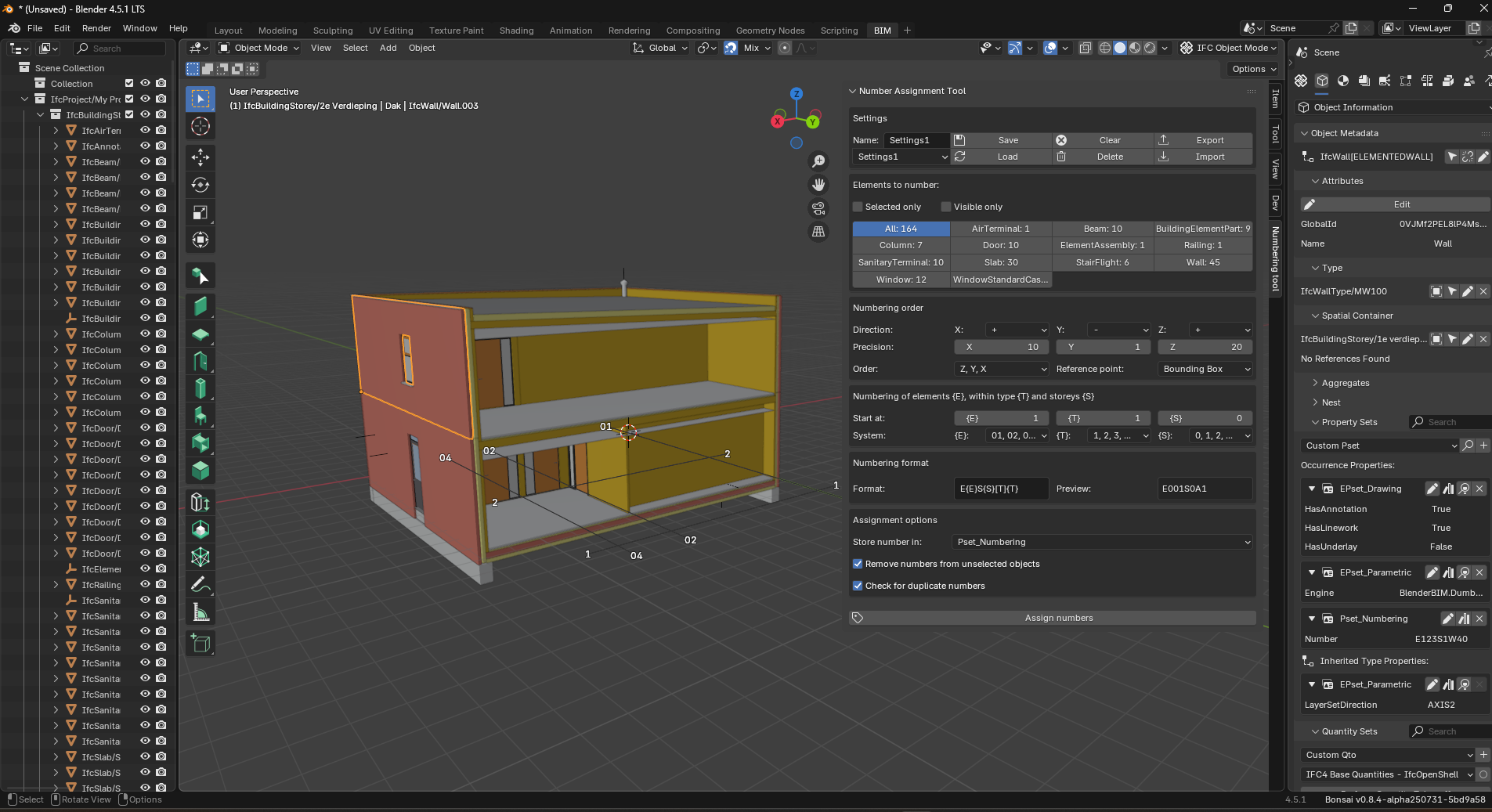
The user can select which elements to number, in which order, with which format and where to store the number. Settings for a numbering can be saved in the project or exported.
The code is available in this repository, which also contains a short demo video:
https://github.com/BjornFidder/BonsaiNumbering
The only feature not working yet is to allow for storage of the number inside a Type-Common Pset (e.g. Pset_WallCommon).
Would this tool be suitable to include into native Bonsai? I'd love to hear your feedback. Any tips for better structuring the code or where the tool could be placed in the UI are welcome.
Tagged:









 and 4 others.
Comments
Great. This is a very useful tool.
BTW, I asked myself why this numbering cannot be stored (at all or alternatively) in the entity Tag attribute. If I understand the specification correctly, this attribute was created precisely for this purpose. https://standards.buildingsmart.org/IFC/RELEASE/IFC4/ADD2_TC1/HTML/link/ifcelement.htm
tags I think are also used to store softwarespecific ID's. I used the Name to count, in kombination with csv-tool. But almost my parts are instances of a type.
If other software is abusing that field, that is not a valid reason for you to not use it correctly, otherwise you become part of the problem. You are instead inventing a whole new custom Pset that nobody else uses. In effect you punish those other applications that do adhere to the standard.
Better to do the right thing now, and raise a bug with applications that are not doing the right thing.
In the current version, the user can select whether the number should be stored in the Tag property, or in a custom Pset (Pset_Numbering). It seems indeed that Tag is the most suitable place to store the number (and this is the default), but I guess it is fine to allow for storage in a new custom Pset if users wish to do so?
Would recommend allowing a user to push the value to any designated attribute or property.
@BjornFidder Oh, OK. I got the impression originally that you were actively avoiding using the Tag. Good to know it is user selectable. Unless there's a real good reason not to, I'd suggest you default to using the Tag.
Would be nice! I will see whether this is feasible. If multiple types are selected, I would have to see if I can check which atttibutes and properties are shared among the whole selection.
😳 Errr... was it too difficult to understand? Sorry. I sometimes forget that English is a second language for others. It's easy to get carried away with it.
Short translation of my original post: Follow the standard, and do the right thing. The world will be a better place.
Ok
I got the following error, perhaps not using it correctly...
video: https://community.osarch.org/uploads/editor/il/sly2k2n00f5p.mp4
Thanks for testing.
I can not reproduce the error myself, but I added a simple check for None-types that might solve the problem. Can you try with the new version in the repo?
(Presumably it was trying to read numbers from the Sun element)
Tried with the latest, got the same error...
video: https://community.osarch.org/uploads/editor/r9/ghzzxao4wave.mp4
Fixed.
I was able to reproduce your error with the Sun object enabled in Blender. I missed one handling of such objects in my previous fix, sorry.
I have confirmed that the current version works also with the Sun (or any other non-IFC object) in view.
@BjornFidder I just tested it in linux and it works beautifully :)
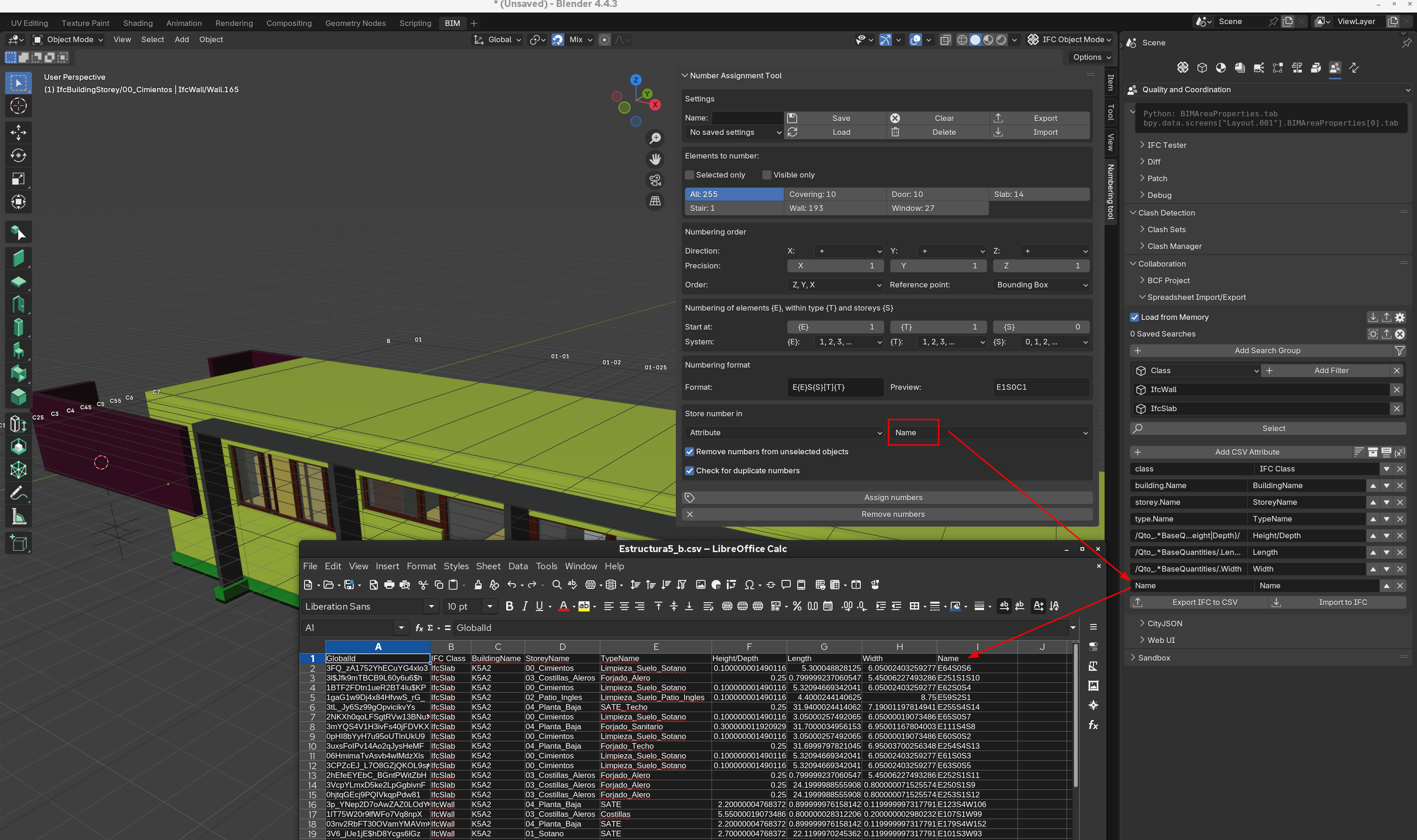
Thanks!
This is supported in the new version! User can assign number to attribute (tag, name or description) or to a pset (shared among selected types, or custom pset)
Got it working!
Curious, could this evolve into a bulk namer? That is be able to both number and name?
Could you do something like this, i wonder?
And play off the syntax here:https://docs.ifcopenshell.org/ifcopenshell-python/selector_syntax.html
Just thinking outloud...
Another nice feature, would be to have an option to base 'numbering order' on the order objects where selected in the scene--since numbering, might not relative to X,Y,Z sometimes.
Seems like a lot of that Format/Prefix/Suffix can just be defined using Pythons format mini language: i.e.
giving:
where C would be the class name.
@theoryshaw Glad you got it working, and thanks for the ideas. In the current version of the tool, numbering+name is already somewhat supported, e.g.
[T] is the first letter of the type (IfcDoor-> D) and [TF] the full name (so Door). The syntax is shown in the tooltip of the Format textbox.
However, supporting regex and additional syntaxes might be nice! I will look into the ifcopenshell syntax.
Numbering order based on order of selection is a nice feature, will look into that.
I am wondering: should I try to get this tool into a pull request so that it can be incorporated into native Bonsai? Or would it be better suited as a standalone tool?
I was also thinking to split up the tool such that it can be easily used in code, separate from the Blender UI. Then, you could for example also select elements using the ifcopenshell selector syntax.
Maybe then, this part of the tool could be added to native ifcopenshell?
Yes, i think that would be a nice addition.
Yes, another nice addition.
I have created a pull request, see PR #7064.
I have not fully separated a tool into native ifcopenshell, however, the tool can be used as a script, separate from the UI, as such:
The settings are given as a dictionary. You can get a default set of settings and customize the dictionary values as desired, or you can use a json file that you exported from the UI as such:
Very cool. I would like to defer to the core developers on the review and ultimate pull.
Thinking it might take awhile, as there's a few backlogged PR's out there, it seems.
This is now implemented in the current version. The user can select any of the attributes Tag, Name or Description, or select one of the available Psets that is shared among the selected types, including the Type-Common pset, and a Custom Pset.
Could you also test whether the tool does not lead to an error anymore in the current version?
This is now implemented in the current version. The user can select any of the attributes Tag, Name or Description, or select one of the available Psets that is shared among the selected types, including the Type-Common pset, and a Custom Pset.
Could you also test whether the tool does not lead to an error anymore in the current version?
This is now implemented in the current version. The user can select any of the attributes Tag, Name or Description, or select one of the available Psets that is shared among the selected types, including the Type-Common pset, and a Custom Pset.
Could you also test whether the tool does not lead to an error anymore in the current version?
@BjornFidder really cool! Thx (I´m not a console user, so I run it as explaned and it worked well)
Info for users: One way to run/open a pythonscript in blender
1. Split the screen: Open the (Blender-) Texteditor
2. Drag and Drop the file into the texteditor
3. Press the "play" button
(For this script use the link above, press on the green "Code" button, "download ZIP", extract it, use the .py file as described in step 1-3)