

IfcTypeProduct Missing from Bonsai Install

Greetings! Im not to Bonsai and following the IFC Architect tutorials in Youtube.
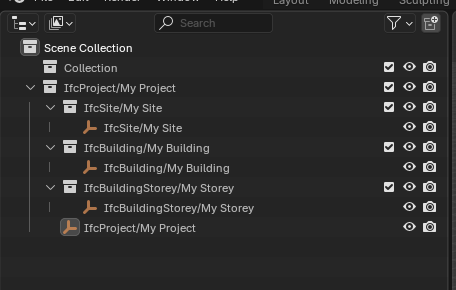
I hit an issue early on - my install does not seem to include any of the Ifc libraries within Bonsai. For example, in the IFC Architect video, his install has an IfcTypeProduct entry in the Scene Collection all the entries below. This is completely missing from my install, see screenshot.
FWIW Im in Bonsai 0.8.3-post1, and I've tried installing through the native preferences interface, as well as completely uninstalling and installing via the downloaded zip file. Both have the same outcome. If its helpful my Blender version is 4.5.2 2025-08-20.
Didnt see any reference to this in the existing discussions.
Any ideas?
Comments
Resolved this myself, but figured I'd keep the post incase anyone else runs into.
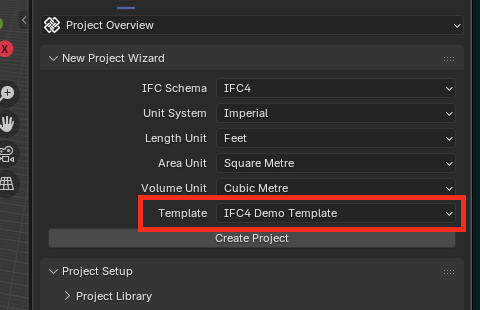
Rookie move, I had forgotte to select the proper template when creating the Bonsai Project.
If you open a new IFC in File / New IFC project,
besides the Units option on top, there is also New Demo Project option. This will offer a IfcTypes to start and try.
Or.
in a blank IFC File, if you just activate the Wall Tool (in top bar you see "no IfcWallTypes found") and as soon as you press the "quick create IfcWallType" button, it will create the IfcType Collection in Outliner for you.
@fenjohanson try using the demo template on creating a file a the bottom of the Wizard menu
hope it helps
Recently I already noticed that I do no more have the Wizard menu like you have :
Is it just because I use newer latest Bonsai builds - or did I screw up my Bonsai UI by my custom startup Blend File ?
BTW, File/New/Project Wizard doesn't do anything either.
@zoomer
looks like something went wrong with the installation ?
difficult to say from your image
after I create a Project I have the following
if already open you can go back to Wizard Menu with
Thank you both for the additional comments!
Zoomer, dont know about your last question!
OK, thanks, looks like I screwed something up.
What I see all the time is the dialog after you open an existing IFC File - with Advanced Option activated.
When I load a (Bonsai edits free) IFC File via Advanced on, Advanced Panel will disappear after loading and it looks like yours. But when I create a new IFC, I will always see the Advanced Options Panel only and have no Wizard access.
Have to investigate ....
@zoomer You tried to open a file and selected "Advanced Mode" in the file dialog window. These are the advanced options for modifying how the file is loaded.
Yes, usually I made use of Advanced Mode when I opened IFC files for the first time (clean meshes or merge materials). But now I don't get rid of these when I create new IFCs in Bonsai ....
Likely it has to do with that I recently had a new (empty) IFC created and later did some Blender related things and unfortunately updated my startup file, with unwanted IFC stuff in it. So I manually deleted the IFC Collections in Outliner and some Materials and re-saved my startup.blend again.
But am not sure, as happens in all my Blenders, which each have their own startup file.
Have to look at it tomorrow.
OK, it was unwontedly saved/corrupt in my Blender Startup Files.
Basically when Blender opens, something in the Startup File tells Bonsai that it has to load in a certain IFC File by using the "Advanced" Panel. What would help would be to press the load button - then it will load that IFC in and I get the regular "Project Info" Panel back ....
That did not work initially as I have overwritten that Bonsai expecting IFC already in the past (I added a.BAK). But that does not help as I do not need that special IFC loaded, nor can I get rid of any IFC File loaded so that I could resave/overwrite my broken Startup File that way.
Deleting the BIM Tab, uninstalling Bonsai, restarting, installing official 0.8.3 in between, ..... all did not help in any way. Also tried to delete all of these 8 "Data" (blocks ?) that contained the name of that IFC from my Startup.blend in Text Editor, but that only lead to Blender ignoring that edited Startup.blend completely.
I tried to recover a few older Versions of my Startup Files with Apple's Time Machine. I realized they all had the same problem and had to go back way further, even older than when I had the thread with my first huge Bonsai problems. So I had to go back to January!? where I found Startups that had no Bonsai problem but at least already hold about 90% of my Startup File's content.
So I vote for a way/option to clean all Bonsai stuff out of a Blend File or to somehow separate the Settings of Bonsai from Blender.
(That path and file history stuff and such things)