

Error Create drawing from elevation view

I downloaded a SketchUp file and then imported it into Blender. After that, all the models were converted into IfcWall. When I clicked Create Drawing Section View, it worked, but when I tried Elevation View, it didn’t work.I downloaded a SketchUp file and then imported it into Blender. After that, all the models were converted into IfcWall. When I clicked Create Drawing Section View, it worked, but when I tried Elevation View, it didn’t work.

Python: Traceback (most recent call last):
File "C:\Users\Sahru\AppData\Roaming\Blender Foundation\Blender\4.5\extensions.local\lib\python3.11\site-packages\bonsai\bim\module\drawing\operator.py", line 350, in execute
linework_svg = self.generate_linework(context)
^^^^^^^^^^^^^^^^^^^^^^^^^^^^^^^
File "C:\Users\Sahru\AppData\Roaming\Blender Foundation\Blender\4.5\extensions.local\lib\python3.11\site-packages\bonsai\bim\module\drawing\operator.py", line 925, in generate_linework
self.serialiser.finalize()
File "C:\Users\Sahru\AppData\Roaming\Blender Foundation\Blender\4.5\extensions.local\lib\python3.11\site-packages\ifcopenshell\ifcopenshell_wrapper.py", line 3421, in finalize
return _ifcopenshell_wrapper.SvgSerializer_finalize(self)
^^^^^^^^^^^^^^^^^^^^^^^^^^^^^^^^^^^^^^^^^^^^^^^^^^
RuntimeError: An unknown error occurred
Comments
But strangely, the section view was able to create a drawing and export to DXF successfully.
If you open the console (windows, or on Linux run blender from a console) and activate more debug information:
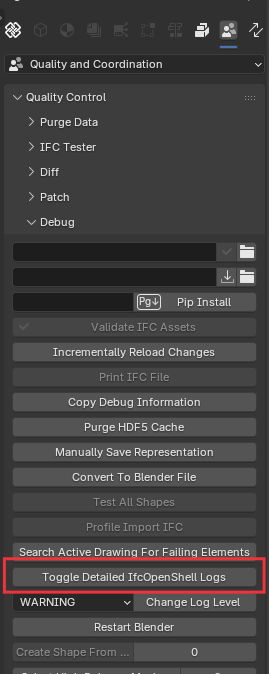
Does this give you any more insight as to exactly what it is failing on?
yes
Here's a way too, to find the offending object(s) that prevent printing:
After I deleted that object, I was able to create the drawing. If I don't want to delete that object, how can I fix it?
Try.. Mesh --> Clean Up --> Limited Dissolve.