

Cannot get the animation to run from the active camera

Was wondering if anyone can help me troubleshoot this problem.
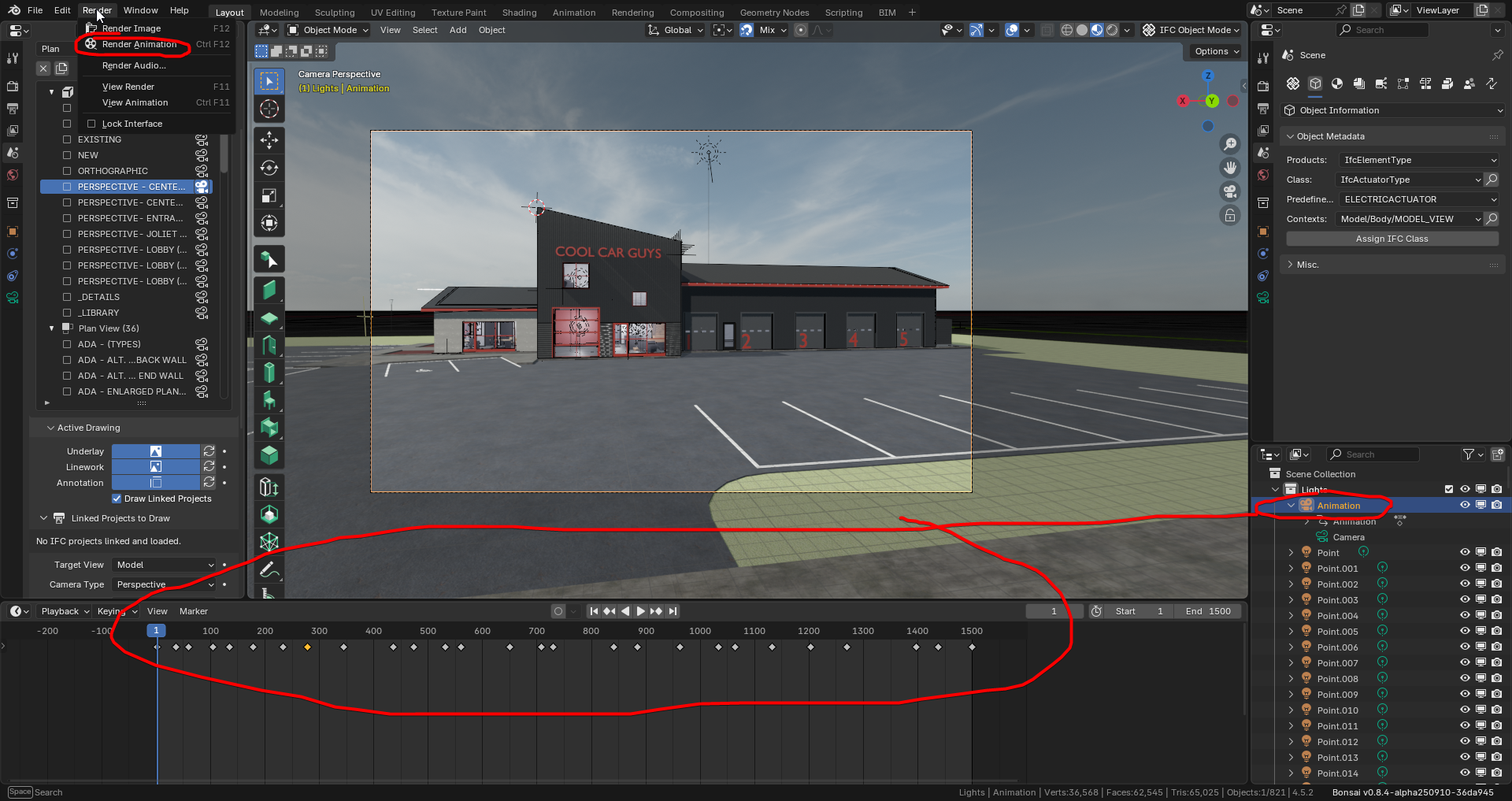
I cannot get the 'Animation' camera to run the animation. The animation always starts on the PERSPECTIVE - CENTER AVE. camera, even though that one is not active.
That is I Cntl+0'ed the 'Animation' camera, so that one is active, but still doesn't change anything when the animation is run.
Open the OD_Cool_Car_Guys.blend file first.
You can use the following script to do a shallow and sparse download/clone of all the
dependent files, including textures, drawing assets, etc.
Just copy and paste the entire script into Git Bash. Will take a couple minutes to download.
#!/bin/bash
set -e


URL="https://hub.openingdesign.com/OpeningDesign/Cool_Car_Guys.git"
SPARSE_PATH="Open/Models/Bonsai"
COMMIT="54c67c53962affc3a0cc6a47c65855914803ad1e"

# Extract repo name from URL
REPO_NAME=$(basename -s .git "$URL")

echo "Cloning into folder: $REPO_NAME"

# Shallow clone with no checkout, filtering blobs
git clone --depth=1 --filter=blob:none --no-checkout "$URL" "$REPO_NAME"
cd "$REPO_NAME"

git sparse-checkout init --cone
git sparse-checkout set "$SPARSE_PATH"

if [ -n "$COMMIT" ]; then
    git checkout "$COMMIT"
fi

# Shallow submodules too
git submodule update --init --recursive --depth=1 --progress

read -p "Press Enter to close..."
Comments
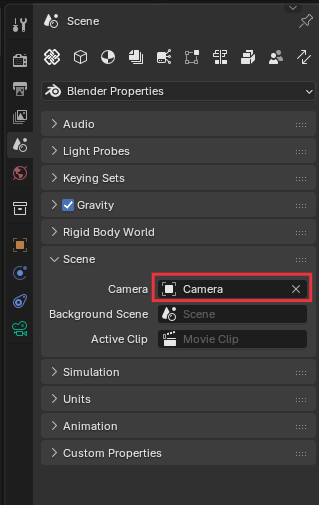
Option 1: If you want to change the camera for the whole scene, go into the regular Blender options tab, and set the scene camera:
Option 2: Select your camera, and select your frame, and use Ctrl-B over the timeline to bind the camera. All frames after will use that camera. This allows you to switch between cameras at will in an animation:
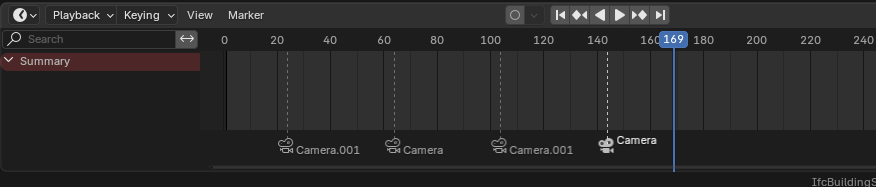
annotation to sjb007, you can find "Bind Camera to Markers" also at "Marker" at timeline... well explained!
Bingo that was it!
Thanks so much.
This rabbit hole looks beautiful from down here. ;)
If you are doing more animation and rendering with a change to cycles take a look into systenconfig of blender, if you didn't have done it already. (To use Gpu and processor render, maybe it will also speedup the viewport in some cases)
One hiccup, however, is when i bind the camera to the marker, it breaks the 'bim drawings' then.
Warning: Untested musings follow...
1) Bind the camera to frame 2, and treat frame 1 as junk to be discarded. Do the bim drawings work OK then? (Assuming you have frame 1 selected for the drawings.)
2) Create a new Scene, and put your animations in there, and keep your bim drawings activities in the original scene. I'm really am not sure if this is workable. I've never tested multiple Scenes with Bonsai.
Hmmm. I just tried a second scene using a "Linked Copy" of the main Scene. It seems to work. The bound camera in the second scene is not present in the first, and the drawings work as normal in the first scene.
@theoryshaw
First, realy realy cool to combine all that stuff! "Have to shock you to stop the hiccups" ;-)
If I do some Visuals and Co, i complete split it from the BIM-stuff. (convert to Blend) So I prevent "cross errors" and if I have some issues, its easier to fix it or search for a solution. (e.g.: to get outlines for AI render, I have to change to "pencil-mode" and I didn´t tried it with an ifc-file"). I´m too lazy to backup files all times, so it´s easier for me to avoid unwanted .ifc-issues. I also can change the renderengine, play around with lights, use HDRI´s, use predifined texturs, UV-mapping, cams, colorgrading, grapheditor, compositing, export as,... all the "standard" workflows as blenderuser.
Greetings
just another little info for XR, visuals... with "datasmith" its possible to import an .ifc in UE (UnrealEngine). Realtimerendering in Nvidia Omniverse is also nice. (but the possibility to use the data needs -against to the beginning- some programming knowledge). Hope all the interoperability/ exchange and new features (realtimesensordata, steering, smartThings,...) will get a final boost with ifc5.