

CostSchedule .csv import | Description column NOW AVAILABLE

Kudos to super @Massimo again for adding the column "Description" to the import .csv
which means the same field of a cost item can be now conveniently edited in a .csv table, like in the schedule or rates here:
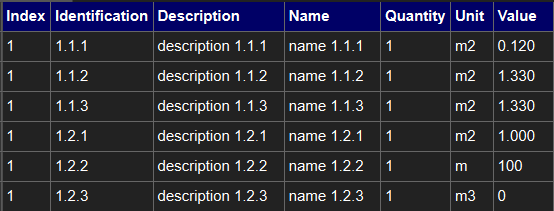
result:
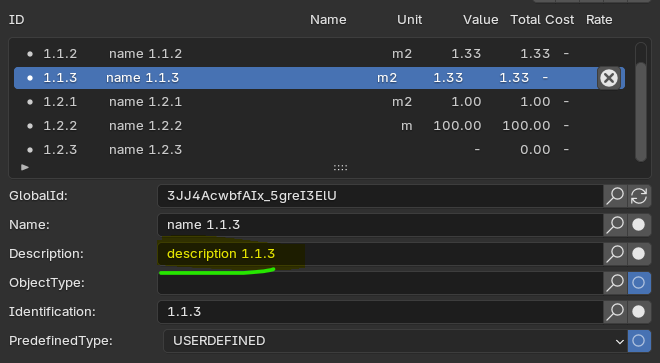
happy modeling (and quantity/costing)
Tagged:









Comments
another new feature
I almost forgot to mention that @Massimo also implemented the reference to a schedule of rates.
Now it's possible to refer to a cost schedule (SoR in this example) and import a .csv table with dynamic link to cost rates
BEFORE
this is how it was before, as a .csv table:
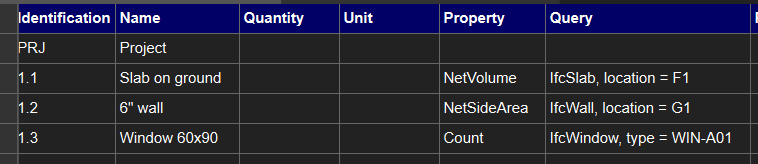
to have the following Cost Schedule:
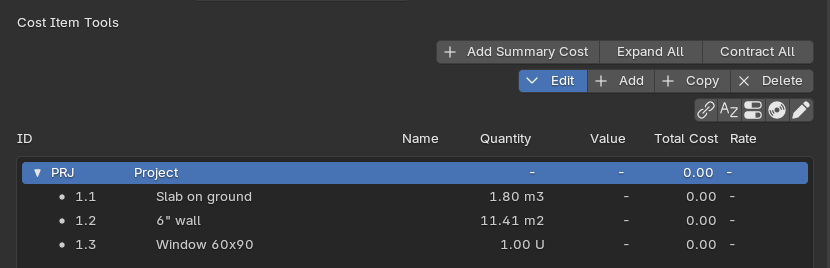
NOW
now with the updated format we have two additional columns 'RateSchedule' and 'RateID', like this:
that conveniently create this:
based on a loaded schedule of rates:
this is a game-changer since before rates assigned to a cost items had to be inserted manually, so thanks again Bonsai dev team to make users' life easier ;)