

FlangeGenerator Geonodes

Flange Geonodes
It can be used by loading the blendfile, or copy and paste the object (or used in the assetbrowser)
After that, the object can be deleted. Just add a SingleVert (note: if a singleVert is added Editmode is activated) assign the Class/Type, switch to the material tab "external parametric Geometry" "+" select the FlangeGenerator and config the part. (Or Edit the geonode... whatever :-) )
It's a simple one without sealsocket, bevels, welding cuts.... but it can be modified also the node...
Happy modeling!
Tagged:




Comments
That's really good, thank you for sharing. I like the simple way that you created an Array. Have you (or @walpa or anyone else) created any Geo Node valves? Do you drive the sizes using Python (Blender Side Panel), so that you can add Custom Parameters (I'm pretty sure that Geo Nodes can't add custom parameters ATM).
Hi @Bedson thx. I didn´t created valves with geonodes, but I think it should be possible, but not as easy as simplified flanges.
(Don´t know if i cought you right, I didn´t use python)
Python can be used to send dimensions and metadata like Descriptions etc to the Geo Nodes. The dims could be dictionaries in the script or external files (like JSON etc).
😎 didn't know that.
Here is a small code snippet to create a GN and update the parameters using python:
Would it be for a collection of valve assets?
I haven't tried modeling valves yet, but it would be an interesting exercise. We'd need catalogs.
I didn't quite understand, would it be creating a new parameter in the GN group using a script?
I will try and play around with this addon (https://extensions.blender.org/add-ons/spreadsheet-import/)
@walpa very cool (this fruits are little too high for me at the moment - 7th dwarf from the left 😉 )
Thanks for sharing the Script, it's very helpful. The Parameters I mentioned are Custom ones (such as Description, Model, Supplier etc). These can be part of the Script. I believe that Geo Nodes can't add Custom Parameters. The valves can be part of a Collection (or individual Meshes), perhaps with their visibility linked to the pipe's DN. It would be excellent to have the valves parented to a Point in a Curve (with the pipe defined by a Geo Node Curve modifier). The Geo Node would read an Attribute on the Point that stipulated that a valve (or a Fitting etc) of a certain type should be added. Johnny Matthews has done two very good pipe tutorials showing how elbows and tees can be added to Curves/Mesh lines.
Very cool, good luck!
Just remember that each GN generates a single mesh, so if you use a datasheet with several valves of different sizes, this may generate all the valves in a single mesh, and it can be difficult to separate them later.
I think it might be easier to create these parameters in the IFC class assignment (that's what I'm doing with script)
Individual meshes, for sure, to be able to create a library that users can import each element individually (IMO)
It would be wonderful, but Bonsai doesn't work with Blender's modifiers yet.
Thx @walpa maybe (just in my mind) its possible to create it in a way, where the user can choose the index (sheet-row with all distances and dimensions) and out of this, the object (valve, pump, whatever) will be generated in GN.
Hmm, interesting approach!
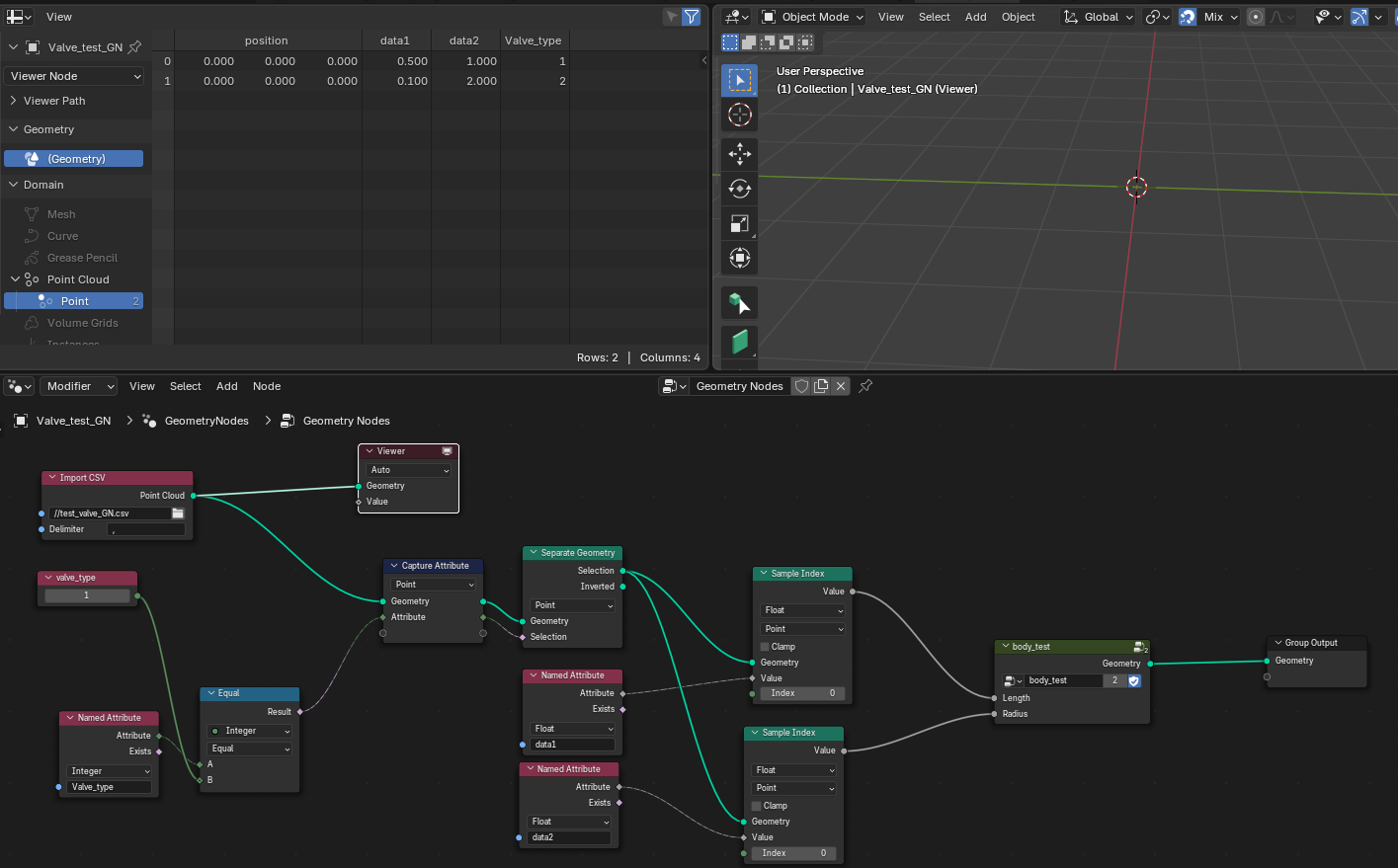
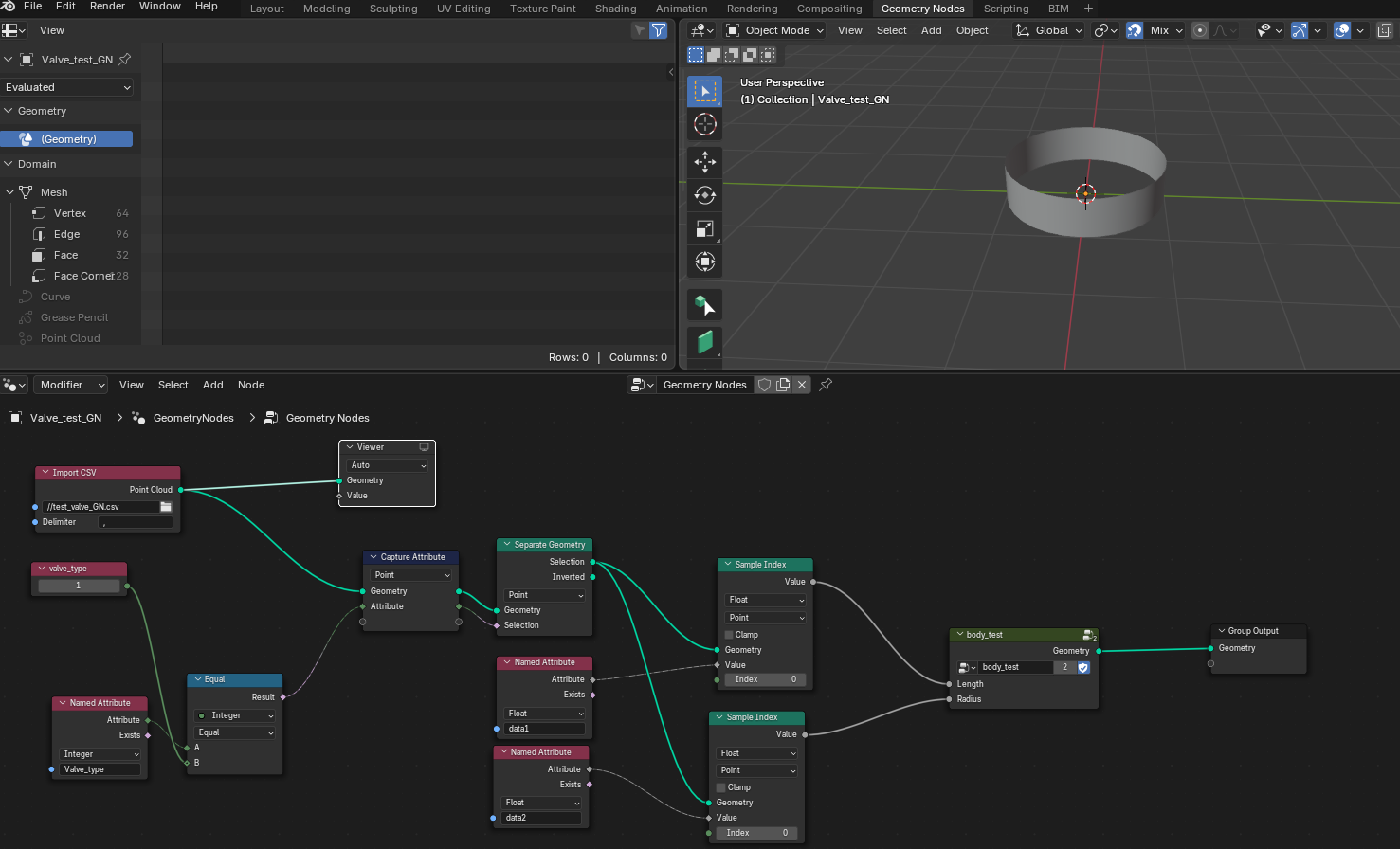
Import CSV Node might also work. Here's a cool video with an example of how to use it.
How about:
More than one way to skin a cat! I am using a panel to select a 'Pipe Type' first, then the DNs in the 2nd pulldown will be only the ones available for that Pipe Type.
I like your CSV import method.
I'm just doing the panel now for Elbows...
Very cool! Have to model and think about it, maybe I get the idea I want to have. Pls keep sharing!
"Off topic"
Do you know how GN behaves in the USD?
https://docs.omniverse.nvidia.com/connect/latest/blender.html
https://docs.omniverse.nvidia.com/connect/latest/blender/manual.html
The connector is deprecated and as I know GN is not supported - the results (applied GN as modifier) should. I just exported and imported .usd classic. (Had to do some scaling, it worked and its some time ago. GPU was always on limit, so I didn't used omniverse and .usd often)
Thanks @Mas. I asked this question because of the use of USD in IFC5. My hope is that the GN "non-destructive method" will one day be supported, but that's a topic for the future.
Cheers
Sry at all the first Flangegenerator doesnt work for IFC the mesh is not manifold (bad topology) so I dont recommend using it.
:-(
Tried also another way in geonodes, here it is.
1. Add a single Vert, if GN is loaded by append. (Note you are in Editmode) --> press "Tabulator"
2. Add the modifier -GN-FlangeGenerator- to the Point.
(If you drag and drop or copy and paste the object from the blend file, step 1and2 are not needed)
3. Config the flange. Apply modifier.
4. Modify it, (select Rings "Alt-Select"--> add Bevels "Ctrl+B")...
5. Classify it as IFC-entity.
It should be manifold and it should work, the topology is not perfect (but ok), maybe some of the coredeveloper of bonsai, can say if its good enough or if there should be more improvements on topology.
It's fun to speculate. Blender seems to be getting NVidia's DLSS. But imagine if it gets Nvidia's Mega Geometry one day. In theory you'd be able to work on an entire hospital model without lag.
I´m hoping for ifc5 and sometimes I want to know how the materials (pbr) will be working, (textures, uv) if .usd is supported fully, we can use all the modeling technics gameengines, technologies for Picturegeneration/ Worldgeneration/ XR... easier. (LOD, openworld,... UnrealEngine, Omniverse,...)
I use the Triangulate node before outputting the geometry (configuration depends on choosing the best result).
It tends not to cause bugs when converting to IFC.
@walpa good to hear, in my thoughts decimate n-gons and "cleaner" geometry is always the optimum or an improvement... (I'm even not 100% happy with the result 😀, till it's without any "issues" for 3d-print, fully useable for clean uv-mapping and clean workflows for modification (loopcuts, clear edgeloop-selection,...). I'm nearly there, but not completely. 🖖