

Does Blender/Bonsai support IfcIndexedTriangleTextureMap?

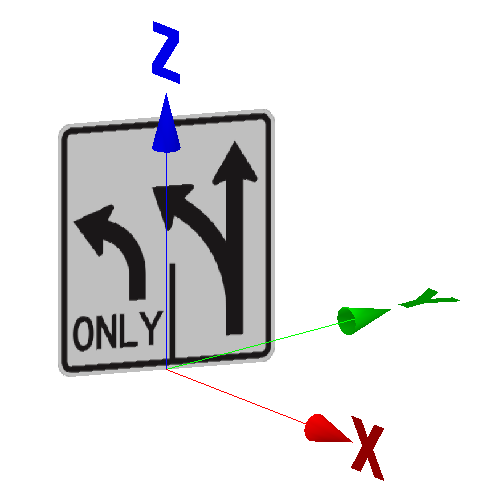
I've been reading about and experimenting with modeling highway signs using IfcIndexedTriangleTextureMap. I created a sample model that works in KITModelViewer (V7.4) but I needed to turn on a texture display setting.
In Blender/Bonsai I just see a black square
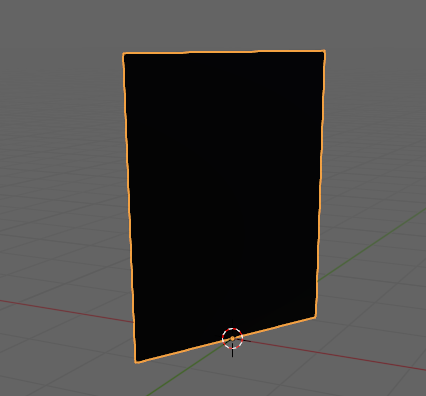
Is there a setting that I need to enable?
Here is my IFC file and graphic


Comments
You also have to turn textured or rendered viewportmode on. I remodel it and place it infront and join it with the original geometry.... as you can see it in this post https://community.osarch.org/discussion/3156/3d-ifc-symbols#latest
In your file u have to apply (IfcSurfaceStyles) a renderstyle and in the texturemenue u have to choose generated instead of UV... and change the viewportdisplay to textured or rendered....
Dont know if this is matching the IfcSchema. (I dont get UV-mapping done complete in bonsai). Maybe someone can tell more about it.
Attatched remodeled .ifc
one way...
Sorry, that was a way to apply the texture.
But yes, i don't know how to render out IfcIndexedTriangleTextureMap.
Curious if the way i showed above, works in KITModelViewer?
Found:
https://github.com/IfcOpenShell/IfcOpenShell/issues/2021?utm_source=chatgpt.com
@Mas Thank you - the single sign turns out very nice.
How did you so quickly create the polygons?
If I was modeling a highway corridor with many signs, would this technique lead to a very large file?
@theoryshaw Thank you
I followed your video but did not get the same result. I'll keep trying.
@Rick_Brice
I modeled it with your pic as backround, added a point, extruded it and aligned it over and over with the pic, added a Plane and used the knifeproject function, splitted the parts extureded them, joined it together and did the bonsaistuff. (But I´m thinking about doing this stuff out of .svg files and .dxf). (Maybe I´m creating libraries for Signs in all sizes and for each ifcSchema -first for austria- and try to sell it.)
Filesize is about 100KB bigger per sign (no texture needed), if the structure with types and instances is nice, I think that should not be a problem. (Thinking also about to combine it with a aluminiumplate and in the front -joined- thin the Sign)
Hi @Rick_Brice
creating instances from a type doesn't increase more space than the original object I think (I tried with @Mas' file and it doesn't)
Cheers
I tried with Inkscape and it neatly traced the screenshot from @Rick_Brice's above in no time, and saved it as .svg
yes but only for each unique sign making an IfcSignType right?
Cheers
@steverugi svg works great, but to reduce the points i would do a cleanup using "limited dissolve".
Yes by signtype.
greetings
@steverugi I followed the steps outlined in the video example precisely, but could not get the sign texture image to display. When you save the rendering style, you sign changes from black to white, mine does not.
Is there a setting somewhere in Blender that I need to adjust? If you could provide screenshots of the important settings, that would be great. I'm still very much a novice with Blender.
Thank you
@Rick_Brice
the video above is from @theoryshaw, not for me ;)
I can try to record a clip with the steps soon, unless @Mas has something already to show
cheers
PS I don't use texture, only style per selected extruded solids, it's easier than it sounds
@steverugi at the moment only the first austrian Sign. I can do some screeners (btw a vid about) creating symbols/sings out of .svg. (with some hints if the curves are filled, pointreduction,...)
dumb question, did you turn on 1 of these 2 modes?
@theoryshaw Brilliant question - no I did not have either of those modes enabled. Once I did, the sign image appeared.
Thank you
FWIW - I've heard from others that textures are generally not well-supported across a wide variety of tools. It might be interesting to contrast interoperability and file size of extruded SVG paths (IfcArbitraryProfileDef) versus image textures. Generally speaking, SVGs are much lighter than rasterized images and have the benefit of not getting pixelated at larger scales.