

Unlocking Rotating and Scaling elements

Using Blender 4.5.3 and Bosai 0.83. I received an IFC file with many elements. When I select everything and then rotate the model on the x-axis, not all elements rotate accordingly. When I select one of these elements, I see that under the Item tab, rotate, the lock for the x-axis is closed. Is it possible to perform a search for all elements which locks are closed, and then unlock them?
Comments
Try unlocking these, and then rotating everything.
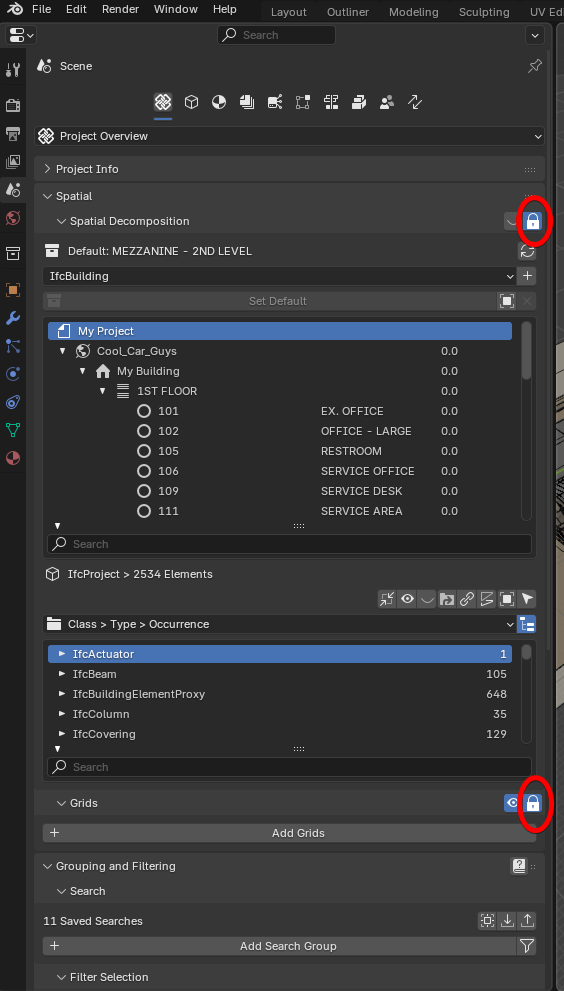
If that doesn't work, run this script. It selects everything that is locked in rotation/location.
Scaling is a whole other animal. It can be done, but there's a lot of subtleties involved.
Namely, turning everything to a tessellation, and then scaling, and then manually saving the representation. There's many pitfalls, if doing this en masse.
Hi theoryshaw,
Thank you for your response and providing the script.
**Method 1: **
Unlocking Spatial Decomposition and Grids had no effect on the locked rotation.
**Method 2: **
I selected the entire model in Object mode, then opened the Scripting tab and executed the provided code. When I opened the Modeling tab,
all the x, y, and z-axes of the Location, Rotation, and Scale were locked. I unlocked all of these manually. but when I selected different parts of the model the x-axis Rotation was still locked. Am I doing something wrong?
When you manually unlock them in bulk, hold the 'alt' key down when you do so.
It's a weird Blender UI pattern, I've never understood.
So true.
And even pressing ALT doesn't work anywhere, or there are places where it works without ALT. And 25% of your ALT attempts will fail because you had the wrong timing or forgot it for the next operation and there is no feedback, ....
Hi theoryshaw,
Yes, unlocking the bulk and pressing ALT did the trick. Thank you very much theroyshaw this saved me a lot of time!
gotta start somewhere: https://blender.community/c/rightclickselect/o7OA/
I was also feeling the need to open a few threads on RightClickSelect lately. Thanks for this and inital Thread. I liked all where possible ....