

View (and hide) elements of a linked IFC File in Bonsai

Hello everyone,
I have a question about the functionality of the "Link IFC" function in Bonsai. I know that its a read only mode, but according to the documentation and multiple youtube videos I found (e.g. this one) I assumed that its possible to select and hide separate elements of the linked IFC and not only the whole project. However, when I link an IFC, only the entire project is displayed in my scene collection, and I can only select and hide the entire project, but I cannot expand the project and view the various elements (see screenshot below).
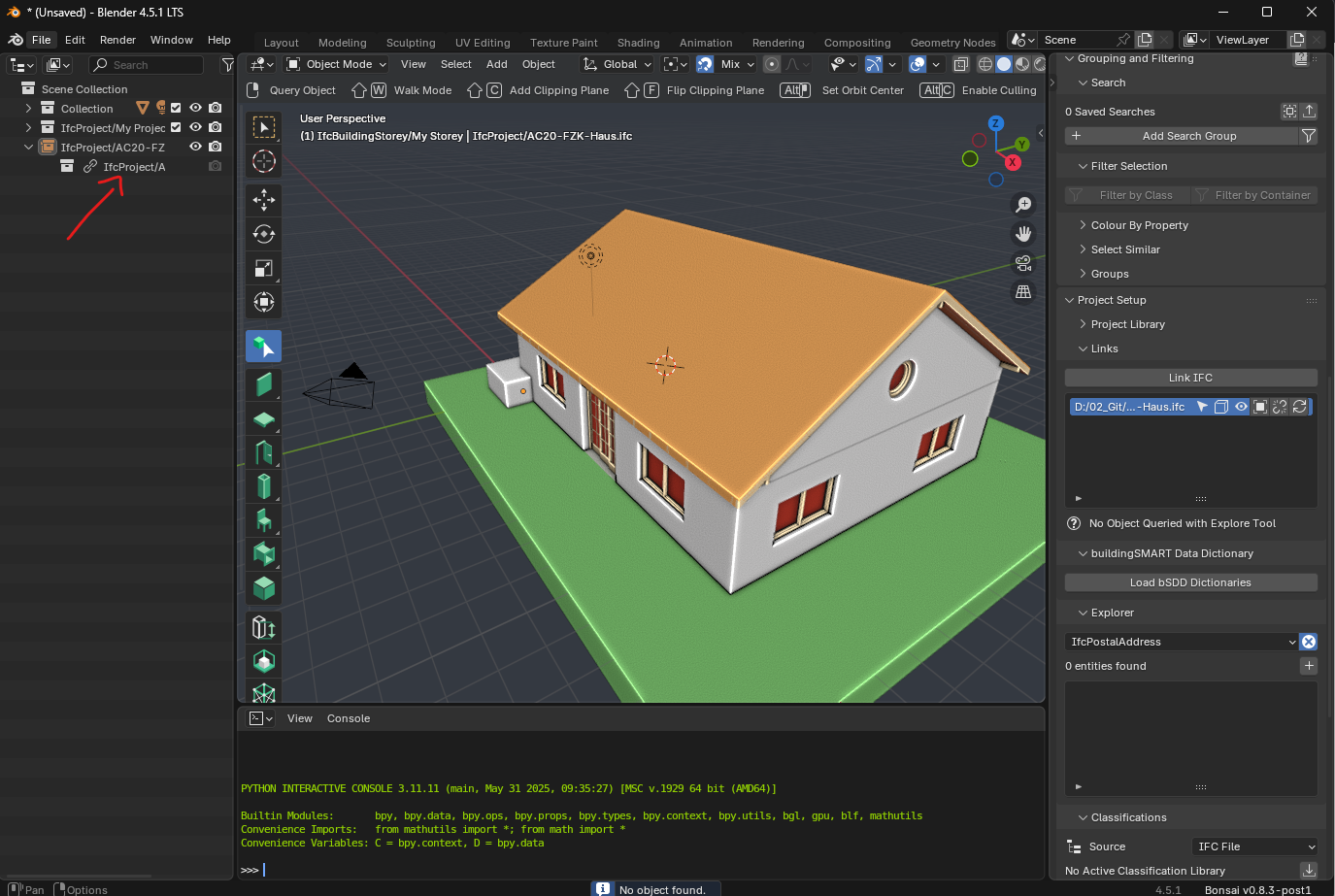
What I discovered is when using the BIM explore tool I can right-click an element and see the attributes and properties of the obect in the "Explore Tool" under the "LINK IFC". But this still not allows me to hide seperate elements of the linked IFC. Am I missing something here or has the functionality changed in the newer Bonsai versions? The video I linked is ~ 1 year old.
Thanks in advance!!
David
Comments
Hey,
it used to be like this, one asks, some answer.. but the threads are growing too fast, there is no time to answer all anymore.. i believe you have to fill in some bug/wishes in github or the ifcopenshell project..
good luck..
I think something like the following feature request is along those lines...
https://github.com/IfcOpenShell/IfcOpenShell/issues/6939