

BIM reality - what to do if engineers don't use IFC Types and send you 400-500 MB IFCs ?

E.g. here a Sprinkler Setup for a larger building.
Looks like it was exported from a vertical App on top of Microstation. Bonsai takes a bit of time but loads and displays it without any issues. (Blender uses 20+ GB of memory)
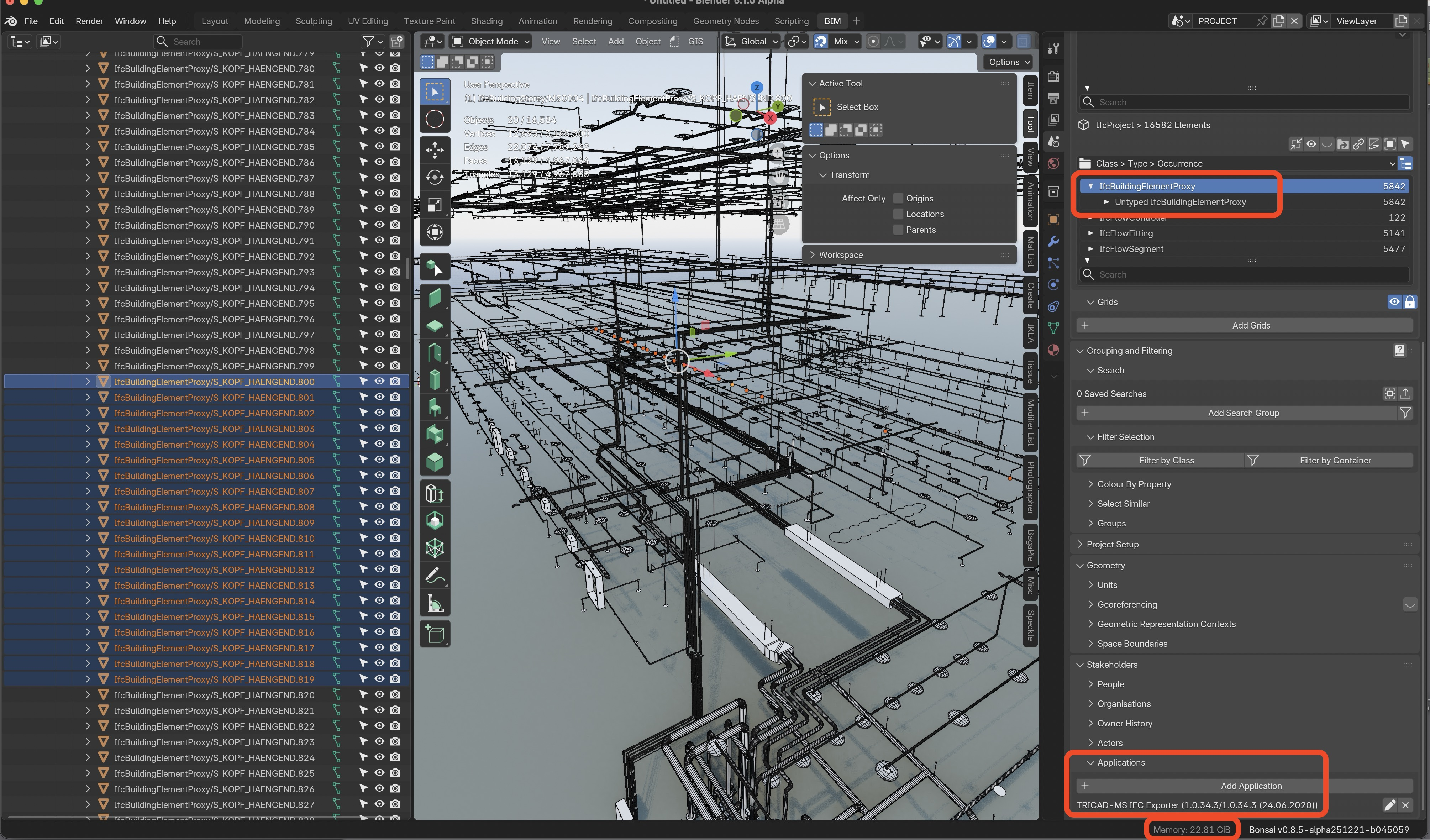
Geometry is also a bit crappy ....
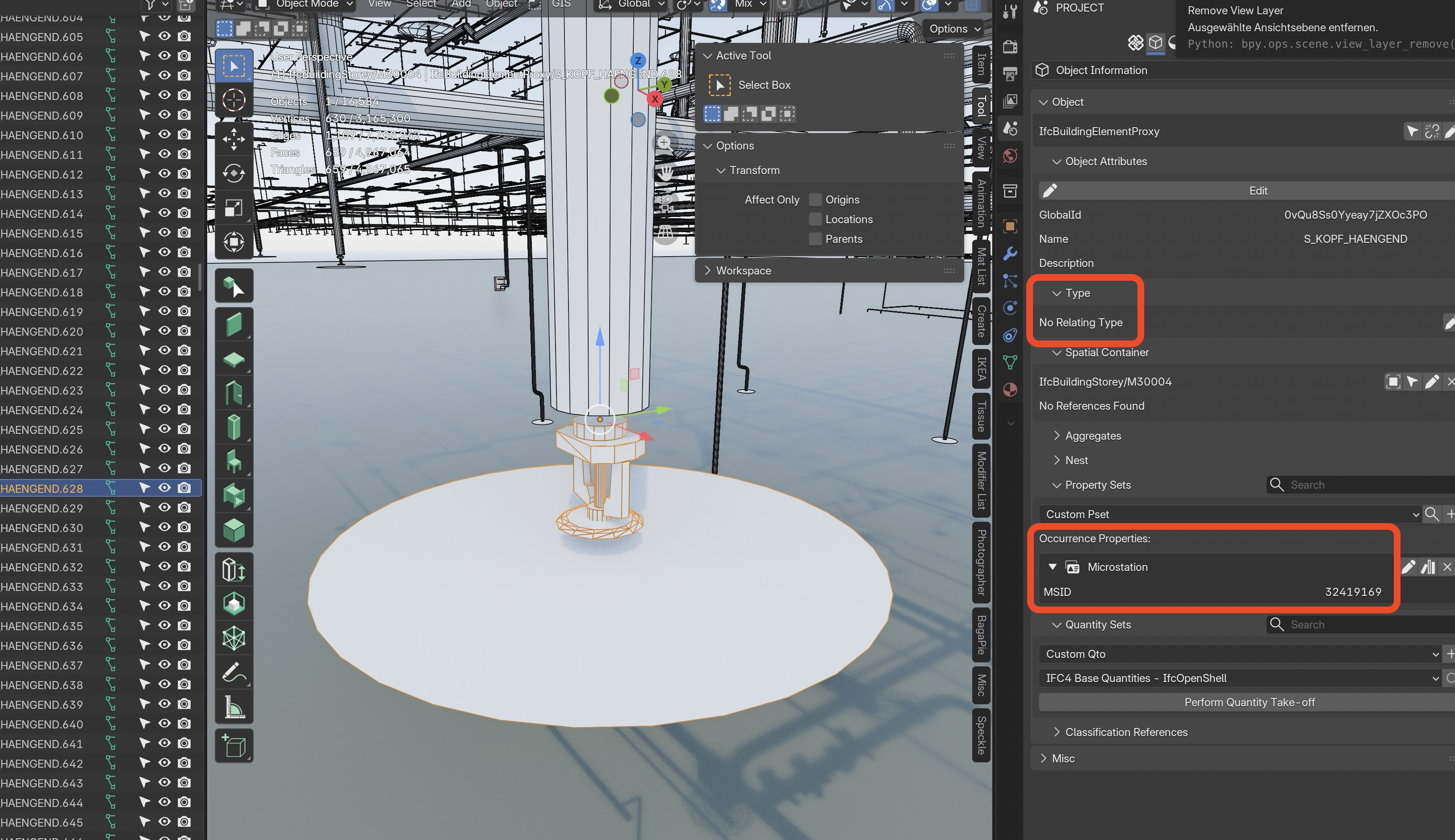
Would it be possible to create a Type from one of the sprinklers, select all instances and assign that Type ?
Comments
That should work. I did a trivial test and looked at the results. Changing to using a type will save a chunk in terms of filesize, so the file loading might be quicker. The runtime performance and memory usage should be improved as it looks like the instances are using the same mesh geometry in the outliner, i.e. in Blender speak they are like "Linked Duplicates".
In your IFC file the representations/shapes are shared. The complexity of this geometry will dictate how much this reduces the filesize over individualised meshes. Also, it is easier to improve a single types geometry than to fix many individual instances.
One note, when you convert your source instance to a type, it will be hidden by default. You might instead want to copy an instance, and make that the type.
Thank you very much.
Yes, I also thought of that.
And if I got that right, it is needed to create the Type with the geometry aligned to File Origin - to keep the Instances in Place after assigning the Type (?)
I wasn't sure if you can just apply a Type to an IFC Object already containing geometry. If I get that right the whole old geometry and data just gets dissolved.
I will play with that.
I get more and more impressed by Bonsai over time.
Searching and Selection (by name here) is much more capable than what I am used from my other BIMs.
Bricscad uses machine learning to automate several things. Like applying BIM tags to standard Solid geometry. Or for to find same 2D/3D Objects/Collections and create a Block from it and convert them to Instances.
But what is not implemented is to run through the Block Library and recognize and purge "copies" of the same Block. So you have to explode the related copies in file first. But unfortunately Bricscad is already stressed by that file size as it is with the Block copies. And running "BLOCKIFY" would block it for hours.
Seems like such jobs can work much more streamlined in Bonsai.
Well, so far it seems to work.
I did SHIFT+D duplicated 3 of these Element Types, sent them to origin, gave them a more suitable IFC Class and switched them to IfcElementType. That worked great. I was also able to Select all related "Instances" by Name.
Then it took a while ..... until I finally got that I have to switch my Selection to have the same IFC Class as the Type, before being able to see, select and attach the desired Type. Which I started.
Well, this Sprinkler type was used 1100+ times in the File .... and runs already since nearly 4 hours !
It looks like assigning an IFC Type to multiple existing Elements could work but for now I have no proof yet. Will let it run for a couple of more hours .....
Never have seen Blender using 84 GB memory and it runs 100% CPU which may be single-threaded but is distributed above all performance cores ....
BTW,
Merry Christmas to all ....
Have to share that it really worked after 4-5 hours !
1100 IFC Elements of "hanging" Sprinklers successfully converted to Type attached.
The IFC File size went down from 450MB to 300 MB.
(80+ GB memory demands stays)
So for fun I started Type attaching conversion of another 500+ of "standing" Sprinklers. Mayby I should create other Types too - to see what a reasonable IFC file size and editing performance could/should be .....
Maybe I should open a PR that someone rewrites Bonsai's "assign Type" in Assembler ;-)
Ok, back to Christmas .....
It's not entirely clear to me, but I wonder if Bonsai isn't doing a lot of Blender related stuff that is significantly slowing down the process.
It might be possible to create an IfcPatch style recipe that will assign types to elements based on a selector syntax query.
(Note that that code is not real. It is just the idea.)
There are some existing recipes included that deal with fixing or assigning types here:
https://docs.ifcopenshell.org/autoapi/ifcpatch/recipes/index.html
This might be quicker, and less hassle than starting up Blender and selecting and assigning in the UI.
This one in particular would be a good starting point.
https://github.com/IfcOpenShell/IfcOpenShell/blob/v0.8.0/src/ifcpatch/ifcpatch/recipes/MergeDuplicateTypes.py
You could either briefly open the file to create the derived types and saving it before running an IfcPatch script, or make another file with all your types in it, and merge them into your received files. There is a Merge patch recipe too, so you should be able to create a single script to merge and process your received file in one go. No need for you to babysit it.
Thanks @sjb007
These are interesting. Especially this one.
But more for Bricscad in this case, there it would be exactly what I need - but good to know, it might come in handy once that (likely) will happen for me in an IFC.
Initially I also thought it would be this problem.
But realized it is only a Bricscad problem, as the IFC author rather missed to make use of Types. There weren't any Types in it. And when importing into VW, that also does not create any Symbol/Block from a Type. Just Bricscad does create Blocks from these Elements, maybe because of in lack of DWG not really having other adequate alternatives like Groups. unfortunately Bricscad somehow creates a separate Block "Copy" for each Element.
But I think the Receipt for this would be pretty similar to the one you found.
Might be.
On the other hand I think a 480 MB IFC is a huge IFC. Bricscad is also struggling and lagging too. It created a 500+ MB DWG from it. (I was once told a 100 MB DWG would be a gigantonormous file)
I converted 2 Types of Sprinklers successfully and reduced IFC file size to half.
I did not go much further as many other things were all IfcBuildingProxy tagged + had no names and/or not copied that often to be worth.
But I ran into a problem when I did the same conversion for some Sprinkler Deflectors. Somehow, they ended in Nirwana, located some 100 km from origin.
I noticed that first when importing the IFC into Bricscad and having display issues and strong lags. Its 3D Viewport is on the weaker side anyway but when I imported into Vectorworks I found similar "too far away from origin" issues.
So I went into Bonsai did a "frame all" test which also lead to an empty viewport. It took a while to find these outliers by "select similar" as they had no proper names and somehow reverted to their original Building Proxy class. If finally found them by a Selection by Material and was able display one by one when I select only a single object. They looked quite distorted from rounding errors.
There was no possibility to bring them back to their intended location so I deleted the outliers, saved the IFC and re-imported it. Now the IFC is ok again for all Apps. Just a little bad feeling something could happen in a real project. (I think I read someone else here had also had problems with dislocating elements (?)
(It would take too long to try to reproduce here, to be worth a bug report)
I think speed & filesize was never the focus for BuildingSmart IFC development and validation. Which makes it the biggest hurdle and blind spot for the whole implementation of openbim if you ask me. 500MB is way too large.
@magicalcloud_75
It would be quite an interesting exercise to check that half a gig model: the number of vertices/polygons used for elements, per type, the number of types, the profile used, etc..
Just saying.. ;)
But in this case, the file is really crap, in many ways. No use of Types for Instance Copies, no proper Classification, bad geometry conversion, .... maybe they didn't even use "Cells" and Instancing in Microstation or it got lost when exporting. That Model could be a fraction of the file size.
But yes, a non human readable file format and structure likely could be much faster.
As i see my Vectorworks does also not make use of IFC Types for its "Symbols" and Instances when exporting ....
EDIT
I think it does - but AFAIK also creates a new Type Copy for each number of Instances ....
And VW does not create Symbols from IFC Types when importing. All Instances are imported as a separate (IFC) Objects.
At work I've written custom patches to overcome this issue. Can you please submit a bugreport along with a sample file so that we can try to implement a generic patch for this?
I am unfortunately again not sure which issue for a bugreport you exactly mean ....
The issue where types are simply not used. I suspect the zooming out issue is due to either a bug or simply a side effect of replacing types where placements are inconsistent relative to the geometry (i.e. not a bug, but not what users "intend" when replacing types).
Either we can write a patch which is more efficient than the Blender interface, and/or optimise the function in the Blender interface.
Ok, thanks !
So this is a feature request (?) There are really no types used or exported.
That worked well, all stayed at their position.
Assigning a Type to about 2500+ (?) Sprinklers took some time (few hours), which isn't that much slower than in my other Apps and I really liked Bonsai's logical and direct workflow here !
But if there is potential for speed improvements - very welcome of course.
Then I did the same for the "Sprinkler Deflector" which were added to the standing Sprinkler type. Its origin was slightly off, so not centered but just beside the geometry and decided to leave it as is - so that it will keep its position to the Sprinkler when I add its Type.
When I started assigning their Type and came back to Blender later, the Deflectors were not visible in the drawing but I did not care and thought about maybe broken geometry, I did not expect just dislocation. I closed and saved the IFC (+Metadata.blend) as I wanted to test importing the IFC into my other BIMs.
There I realized something does not work well in Bricscad with lagging and Fit View problems. Similar in Vectorworks but that allows me to find and Select these outliers and deleted them, then the File was ok and far better to handle than the original IFC import without Types and instances.
That is why I opened the IFC in Bonsai again (inside its Metadata.blend) to also search for the outliers, to move them back. But the "Frame all" failed and outliers were outside of what Blender Viewport can display so there was no possibility to select these by a marquee selection. But I was able to select these by their unique name in Outliner and just deleted them and re-saved the IFC.
So the IFC now also worked fine and lag-free in Bricscad. Inside the Block list there were now only 3 Blocks for the 3 Sprinkler versions, where each Sprinkler Block now had thousands of "Block References" (Instances) - instead of thousands of Block copies with only 1 Reference each, as it was by the original IFC.
But I doubt to be able to reproduce that dislocation of the Sprinkler Deflectors after applying their Style.
Besides the dislocation, all had the same offset, everything was ok. Their Type was totally ok and basically the Deflector Elements were OK too - just that they were a bit deformed because of exceeding floating point issues - as they were offset many Kilometers away, about 4-6 or more (?) extra digits.
I may try to reproduce.
Or look deeper into why the Metadata Blend keeps the "Frame View" issues in Blender - although the outliers are definitely no more existing in IFC and BlendFile. Maybe that should also happen in a plain Blender file - when you duplicate the Cube and move it far away by adding 6 or more digits to all XYZ locations - Frame all - delete the Cube again - Frame all ....
OK, I did some testing ....
I did the test in Blender,
And there is no problem in Blender ... once the outlier element is deleted Frame All works well again.
So I looked closer into my IFC - I deactivated my whole IFC Collection and tested "Frame All" but had negative result. When I activated some of my Blender Dummy Geometry for "Frame Selected" - but realized the IFC is still visible !?
SO when collapsing the hidden IFC Collection, I realized that there was a copy of my IFC Collection !
I do not know where it comes from ...
AFAIR early Metadata.blend options had such duplication problems but were solved ?
Nevertheless, as soon as I set one of both IFC Collections visible - Frame All fails. If both IFC Collections are invisible - Frame All works and fits the Blender objects.
Hmmh, too much parameters I can't exclude ...
(like issues when Mac went to sleep, possibly saved 5.1 files in 5.0, ....)
I opened the IFC without (hiding) Metadatablend, there was no duplicate IFC Collection.
Also the "Frame All" problem (rests of dislocated objects) must be in the IFC itself, as it happens also when loaded IFC in my startup.blend.
Can't replicate the dislocation issue.
Sorry, not helpful but it is what it is.
Will keep an eye on possible inconsistencies when using Metadata.blend option or dislocations.
If the underlying geometry is the same for instances but the placement is different you migth want to try to set origin to the geometry for all objects (might take a while), pray that the rotation didn't somehow get applied, and then do the batch type assignment.