

Creating BIM Model in 4 minutes

@GerardT asked me about the quickest way to generate a 3D Model from 2D plans, since I am experimenting with IfcSverchok.
Since the IfcSverchok development is unfortunately quite stuck, the only way I know of right now is using the Homemaker addon, so I've created a small script that converts shapes made from the parametric CADSketcher drawings and converts them to topology volumes, which can be directly used by Homemaker.
You can find the files here:
https://github.com/JanFilipec/Sverchok-Tutorials/tree/main/CADSketcher2Homemaker





Comments
And the video here:
@JanF, Thank you very much for taking the time and for the link to your script that converts CADSketcher drawings to topology volumes for use with the @brunopostle Homemaker addon.
I appreciate you looking into the quickest way to generate a 3D model from 2D plans, especially given the current state of IfcSverchok development.
I will certainly look at the files you have provided, conduct tests, and then provide my feedback.
Man I wish something like CADSketcher was integrated into Bonsai, at least for profile drawings. Element constraints would also be a welcome addition.
Please specify the exact, compatible versions and download links ** for the ** Sverchok and ifcSverchok add-ons used with Blender 4.3.2 and Bonsai v0.8.3-post1.
Please specify the exact, compatible versions and download links for the Sverchok and ifcSverchok add-ons used with Blender 4.3.2 - Bonsai v0.8.3-post1.
I was running:
Blender 4.3.2
Bonsai 0.8.3-post1
Homemaker-v0.20250220.0
Sverchok 1.2.0
CADSketcher 0.27.5
All from releases on their respective Github pages
I have frequently encountered the following error code while attempting to install Sverchok 1.2.0.
Install Sverchok 1.2.0. It doesn't work. Also, rename this folder to Sverchok.
[Blender Manager] Directory ensured at: C:\Users\gint.BlenderManager\mngaddon
[Blender Manager] No project open at start. Timer will start when a project is created or loaded.
[Blender Manager] on_load_post_handler registered.
[Blender Manager] Blender Manager Plugin registered.
[Blender Manager] Load event triggered.
[Blender Manager] No settings.json found.
addon_utils.disable: sverchok-1.2.0 not loaded
Traceback (most recent call last):
File "C:\Users\gint.BlenderManager\BlenderVersions\Blender 4.3.2\4.3\scripts\modules\addon_utils.py", line 428, in enable
mod = importlib.import_module(module_name)
^^^^^^^^^^^^^^^^^^^^^^^^^^^^^^^^^^^^
File "C:\Users\gint.BlenderManager\BlenderVersions\Blender 4.3.2\4.3\python\Lib\importlib__init__.py", line 126, in import_module
return _bootstrap._gcd_import(name[level:], package, level)
^^^^^^^^^^^^^^^^^^^^^^^^^^^^^^^^^^^^^^^^^^^^^^^^^^^^
File "", line 1204, in _gcd_import
File "", line 1176, in _find_and_load
File "", line 1126, in _find_and_load_unlocked
File "", line 241, in _call_with_frames_removed
File "", line 1204, in _gcd_import
File "", line 1176, in _find_and_load
File "", line 1126, in _find_and_load_unlocked
File "", line 241, in _call_with_frames_removed
File "", line 1204, in _gcd_import
File "", line 1176, in _find_and_load
File "", line 1140, in _find_and_load_unlocked
ModuleNotFoundError: No module named 'sverchok-1'
Error: No module named 'sverchok-1'
Traceback (most recent call last):
I think this is also described in the comments in GitHub, you need to unzip the file, rename the module and zip it again if I remember correctly. I think someone also posted the corrected version somewhere.
The installation of Sverchok-1.2.0 resulted in multiple errors. The troubleshooting steps attempted, which included unzipping, renaming the module, and re-zipping the file, did not resolve the issue.
The specific error encountered, which was troubleshot using Gemini, is:
RuntimeError: Error: 'module' object has no attribute 'NodeSocketInterface'This is a compatibility error caused by using an outdated version of the Sverchok addon with Blender 4.3.
The specific error AttributeError: 'module' object has no attribute 'NodeSocketInterface' happens because Blender 4.0+ significantly changed its Python API. The version of Sverchok you have installed is trying to use old code (NodeSocketInterface) that no longer exists in Blender 4.3.
Here is the step-by-step fix:
1. Uninstall the Broken Sverchok
You need to remove the current incompatible version to prevent conflicts.
Open Blender 4.3.
Go to Edit > Preferences > Add-ons.
Search for "Sverchok".
Expand the arrow and click Remove.
Note: If you cannot remove it from Blender because it crashes, delete the folder manually at:
C:\Users\gint\AppData\Roaming\Blender Foundation\Blender\4.3\scripts\addons\sverchok
2. Download the Correct Sverchok Version
For Blender 4.3, you typically need the latest Master branch version of Sverchok, not the stable release (which is often older).
Go to the Sverchok GitHub Repository - https://github.com/nortikin/sverchok
Click the green Code button.
Select Download ZIP.
Do not unzip this file.
3. Install the New Version
Back in Blender Preferences > Add-ons.
Click the Install... button at the top right.
Select the ZIP file you just downloaded.
Enable the addon by checking the box next to Node: Sverchok.
4. Retry Your Workflow
Once Sverchok is successfully enabled without errors:
Restart Blender completely.
Try to enable Ifc Sverchok (or whatever process triggered the error). Since IfcSverchok depends on Sverchok, fixing the parent addon should resolve the importlib errors you saw in the log.
Summary of the Log Errors
AttributeError: ... 'NodeSocketInterface': This was the "root cause." Your Sverchok version was written for Blender 3.x and crashed when it couldn't find this specific API command in Blender 4.3.
Addon Sverchok is not installed: This appeared because the crash happened during the loading phase, so Blender assumed the installation failed effectively.
importlib Tracebacks: These were just side effects of Python failing to find the broken Sverchok modules.
I downloaded and installed sverchok-master.zip, and it works.
I was executing:
Blender 4.3.2
Bonsai 0.8.3-post1
Homemaker-v0.20250220.0
Sverchok 1.4.0
Ifcsverchok-0.8.2
CADSketcher 0.27.5
Test
@JanF
EDIT
Approach 01: Constraint-Based Pipeline with CADSketcher
- Direct, one-click conversion of a standard Blender Mesh (e.g., from a CAD import) into a fully constrained, parametric CADSketcher sketch is not currently possible.
Designs must be recreated parametrically. This involves manually drawing CADSketcher entities - Reverse engineering workflow (Lines, Arcs, Circles) by tracing or snapping them to the vertices of the original background mesh.
A feature to convert the mesh layout directly to Sketcher format would be highly beneficial, enabling an editable, fully non-destructive workflow.
Approach 02: Algorithmic Pipeline (Bypassing CADSketcher)
Can a script be utilized to use 2D inputs, such as designated wall axes within CAD-imported floor-plan outlines or room-area definitions, without relying on the CADSketcher tool?
IfcSverchok Development Status
Given the current state of IfcSverchok development:
@GerardT, for whatever reason your comments were being snagged by the spam filter. Not sure why.
I unspammed them.
I deleted all duplicate comments to keep the thread readable.
It is possible, we only use mesh edges anyway. The reason I choose to use cadsketcher is that in my experience 100% of cad plans are a mess and need redrawing and for designing cad skecher is perfect for parametric non destructive drawings.
Yes. Room areas are actually a good idea, that should be definitely doable. Do you have an example drawing?
Yes. You can generate any shape as a mesh and classify it as any element found in the ifc schema.
Yes.
The problem is not the size of the model, the main wall I hit is that ifcsverchok only uses meshes, which means the resulting model can not be natively edited with Bonsai.
To demonstrate the process of generating a Building Information Model (BIM) from existing 2D plans, I sourced architectural CAD Drawings from https://www.freecadfiles.com/ for an educational example.
The site provides** free DWG files for various building types**. The two projects chosen are:
1- Single-Family House Project: https://www.freecadfiles.com/2020/05/Single-Family-House-Project.html
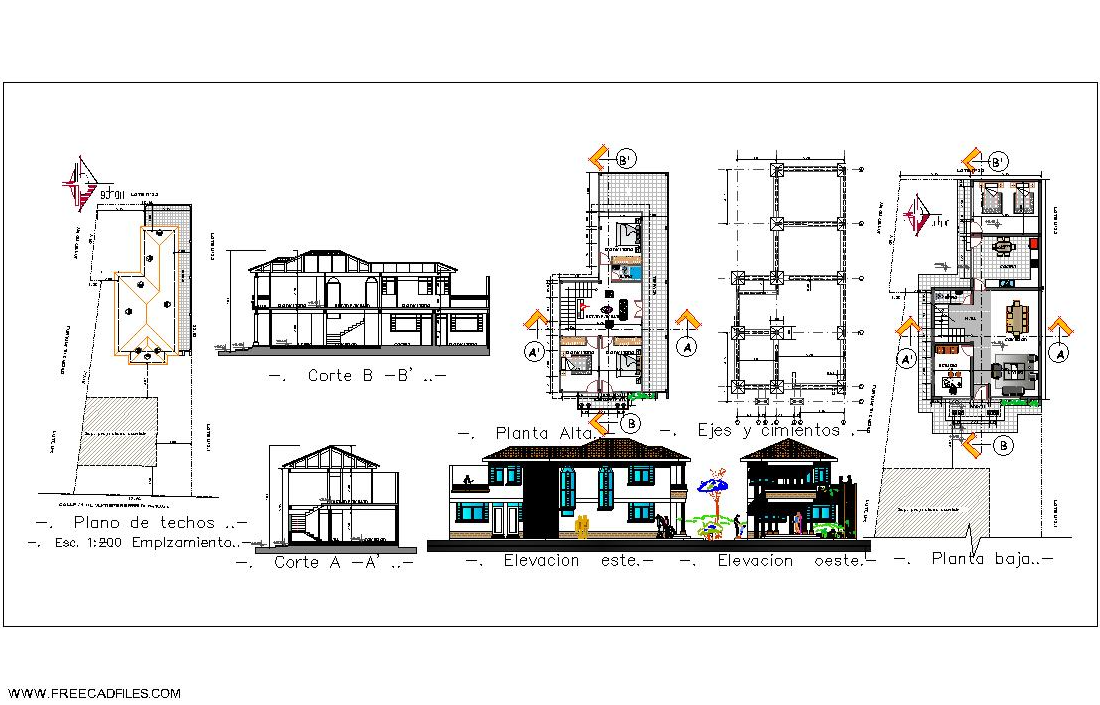
2- Apartments Building: https://www.freecadfiles.com/2020/08/apartments-building-dwg.html
Finally, Sverchok has DXF nodes.
with ifc and sverchok personally me find out that way
The cycle of working with Cricket and Bonsai.
If you're an architect like me, you can try BIM in a blender, it's Bonsai, it has the ability to create any elements using geometry from a Cricket. Moreover, it uses Viewer Draw, that is, an OpenGL representation of geometry, you will be able to display only edges in a Cricket, and Bonsai already takes geometry completely, polygons. In addition, this geometry will work in the case of, for example, a wall, like a regular wall, accepting door and window openings.
in a circle, then only variables and update
This workflow creates parametric mesh geometry for a single element, I don't need that. I'm trying to create walls with layers or beams with profile extrusions. (Using ifcprofiledef)
@JanF
For follow-up. Last month, I received clarification on the FreeCADFiles Terms of Use & Conditions (reproduction, duplication, copying, etc.) via their WhatsApp account. This was after sending an email at the end of November 2025, for which I received no response.
Do you have a Script (bypassing CADSketcher) with all primary structural components for a complete building, including foundations, walls, windows, doors, columns, roofs, and other essential elements?
@GerardT the short answer is no. I don't have a script to convert 2D drawings to a bim model with one click.
I also don't know any tool capable of this and I think there are good reasons why tools like that don't exist yet - it's extremely complex. To be honest it's also not something I am very interested in, my goal is rapid building design prototyping based on simple sketches. This also allows to create 3D models based on 2D plans very quickly, but not automatically. However as I mentioned in a couple of threads, I am currently stuck, because of some serious limitations of ifcsverchok.
@JanF , @GerardT
if you don't mind me writing it:
I'm not particularly skilled at 3D modeling, yet I find that converting DWG/DXF files to IFC (structural or general architectural) takes very little time—and I personally find the process quite enjoyable.
While it requires some initial training, if you are familiar with any CAD software, you should be up and running within a few days. Reaching full proficiency—including managing attributes, properties, materials, and profiles—might take a month or two.
If that is your goal, once you gain some practice, you can even start sketching directly in IFC; there’s no need to draw lines first and convert them to solids later.
I also believe the modeling process provides a privileged insight into the project, allowing for a deep understanding of its intricacies. Delegating that to an automated process (or worse, AI) takes away the 'feeling' of the work; you are no longer in the driver’s seat.
cheers and happy (humanly) modeling
I'd like to clarify a few points so that there is no misunderstanding following my last question.
The script I requested was not intended to convert 2D drawings into a BIM model with a single click.
Instead, I was inquiring about a script that converts the shapes you created into topological volumes, similar to what you shared in your first post back in November 2025.
Although there are some limitations with ifcsverchok, I would like to know whether or not it was possible to create topological volumes via a script from the shapes and/or room areas of the two selected projects that I shared links/pictures in December 2025.
P.S.: I am not familiar with ifcsverchok.
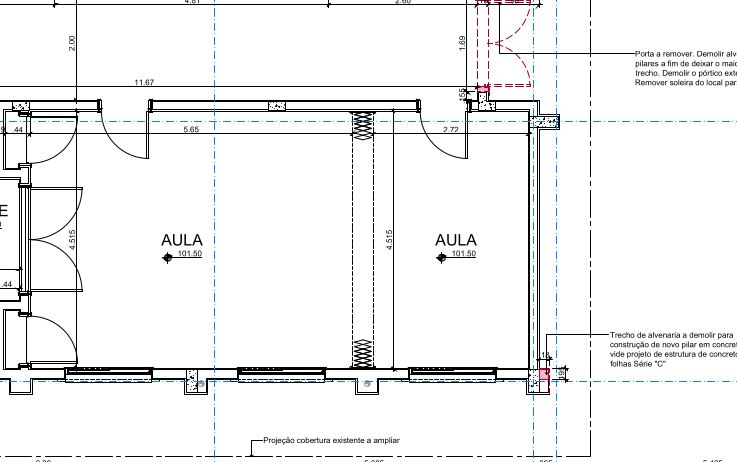
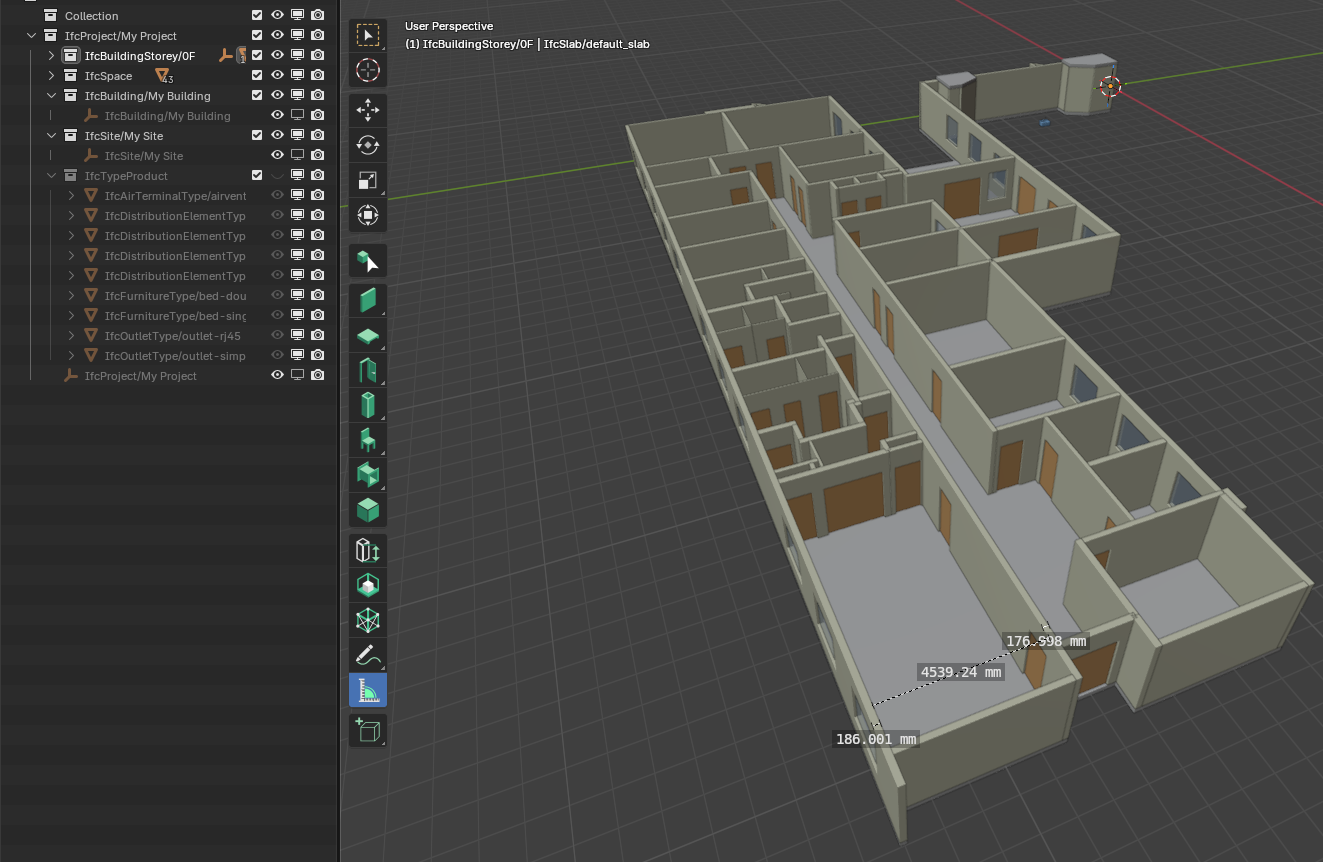
A BIM model from PDF in seconds?
I haven't personally tried and don't know how much it would cost (it seems to be free..) but from the video it looks handy: link to amplify
PS I still prefer my artisanal approach :D
Thanks @steverugi
It may not be a definitive solution, but it can be very helpful in some cases.
In my test:
Cons:
Pros:
See the images below:
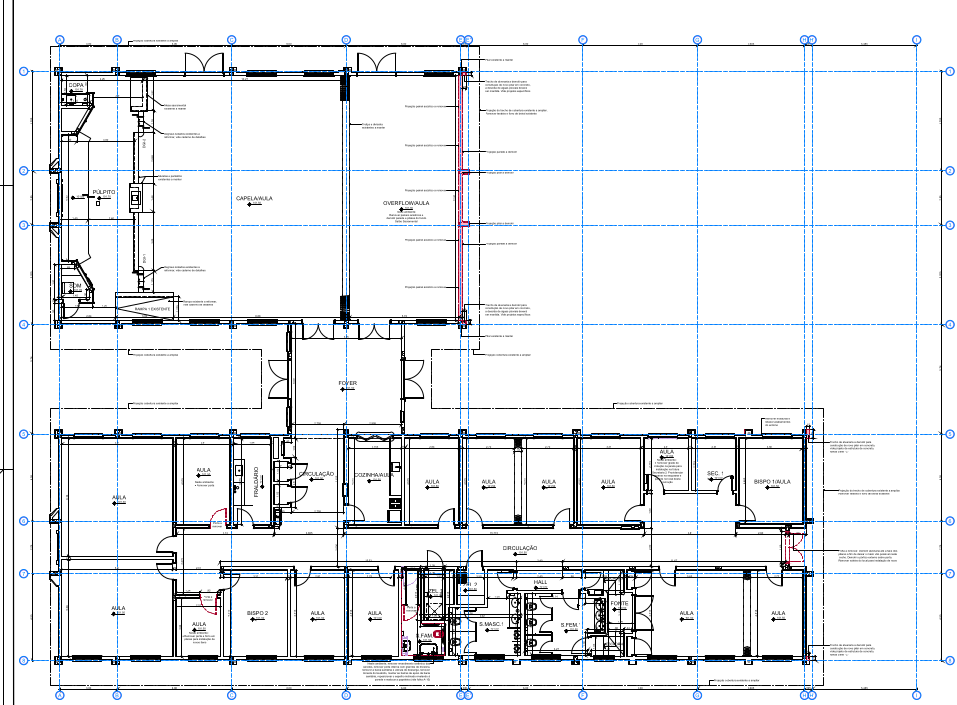
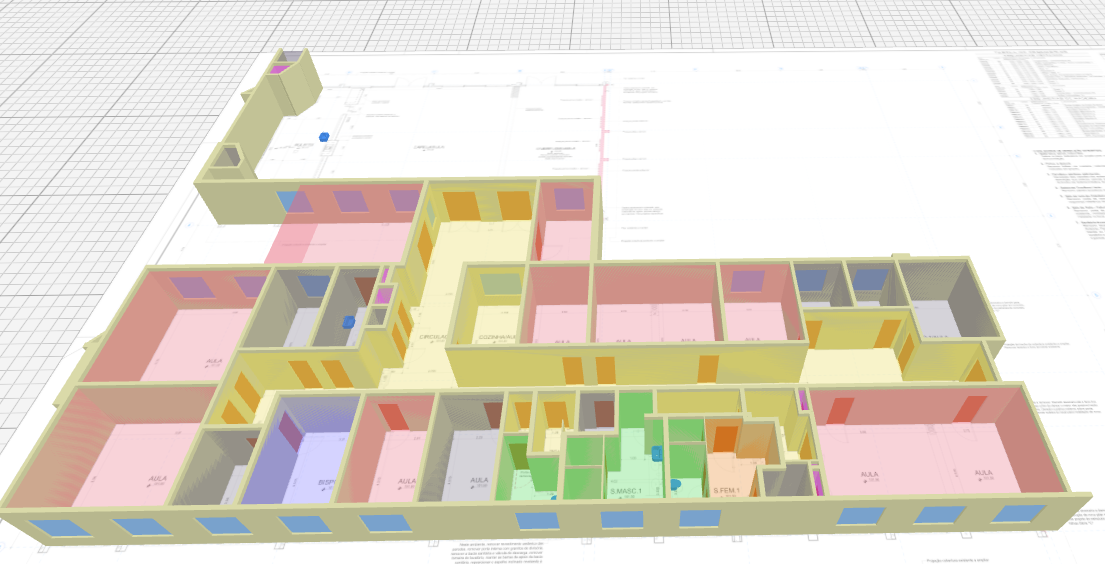
@steverugi while I understand your point and I too find modelling quite relaxing, I'm surprised you don't see any value in a tool like this. I see following use cases:
1. quick design iterations - the main reason I work on this. In my experience designing with pen and paper is irreplaceable with digital tools, because the brain works differently when sketching by hand. However I often also need precise room areas as a feedback, which is why I work on this and experiment with these workflows (https://community.osarch.org/discussion/283/bim-modeling-using-greasepencil#Comment_3248)
2. quantity take offs
3. digitalisation of assets
Yes, modelling is fun, but since everyone is trying to automate it, you will have to as well, if you want to keep up with the competition. Also, one more benefit I see is the inherent standardisation and reliability of the algorithm.
@JanF
I am all for hand made stuff, especially writing and sketching, it's natural and helps me a lot during a learning process. I too need to jot down my thoughts and ideas on paper before using the keyboard/mouse. Maybe because I am a late boomer? :)
I am not sure I can follow your points about measurements and digitization.
Not really, automation is fascinating, but apart from becoming a tad intrusive lately, there are some tasks where it excels, others where it's just pointless or outright a colossal waste of resources.
But I am biased, since I tend to stay at a safe distance from group-thinking and behaving, I only keep an eye on it from time to time in case something interesting comes out..
Thanks for the interesting exchange
Cheers and happy modeling
@steverugi
Since 2024, I have been familiar with and utilized BIMify, which was later rebranded to Amplify.
My use case is a workflow approach without AI/ML.
Amplify (formerly BIMify) is not 100% open-source; it is only partially open-source. Its Machine Learning models and geometry-correction algorithms are proprietary; the portion of its codebase that uses the IfcOpenshell library for IFC file generation is publicly available at https://github.com/BETXeni93/IFC-Suite/tree/main/bimify
I wanted to try something with those files, but the first one I couldn't even open and the second one doesn't have any room polygons