

Sketch/Prototype of a lightweight (H/Bestands-)BIM software in Blender

Hello OS Arch community!
During the past term of my architecture studies at RWTH Aachen, I started working on a prototype BIM extension for Blender (working title: "Goliath"*). The motivation and idea behind this came from my background working in a small low-tech architecture firm and, to be honest, from my frustration with using a very complex Bonsai to model two HBIMs in the previous term, which I felt was not suited for the kinds of buildings I needed to make models of.
I'm not proposing to replace Bonsai or anything ridiculous like that, I deeply appreciate the Bonsai project. I just wanted to try my own take and collect/work on some ideas, which, who knows, might be helpful or interesting to others, which is the main reason for why I'm making this post.
Here's a video introduction:
I'm also attaching the report with some (technical) documentation below.
For the future, I will porbably fix some of the many, many functionality issues pretty soon and I will probably keep working on the project and use it as a tool during the next term in my master's thesis. Everything after that, time will tell. Thank you for reading!







Comments
Report document:
Very cool project. So is it somehow the idea that you model like in blender and do right-click and create types of your objects that then become IFC elements / types ? It feels like the guys at Qonic ( if you know, they are from Belgium and do something that is a bit of a Sketch-Up for BIM ) are doing something similar ? Thats not OS though, which is a bit of a problem considering why we are all here.
Can you integrate Goliath to Bonsai later or would that be a goal ? Or is Goliath "just" ment to be for existing building ?
I really like that lightweight approach.
And I thought it reminds me of the early (BIM ?) stages of Bricscad. Direct Modeling with Solids, applying BIM Classes later. No wonder, Qonic's Erik de Keyser employs still parts of the Bricscad team.
Interesting background information, thanks. Their product looks quite promising, as well with the approach to work in the cloud, so that your hardware doesn t have to handle large data. I ended up trying to learn Bonsai though, to never be locked in again.
Thank you! Well to be honest, since the focus was first on workflow/user experience, I haven't yet thought about interoperability and how all of this works in the IFC context as much as I need to. But yes one central idea was to use Blender's existing geometric modeling capabilities.
And one of the first questions when this started was: When we have an old building that consists of lots of individual parts (i.e. when many of the elements present are their own type), what roles should types play? For example, we worked on a house once where we put four different "types" of exterior walls on one storey, with a maximum of three instances of any type (whether we really had to do this is debatable). In my opinion, this question also applies to the benefit of parametric modeling.
And about Bonsai, I'm not yet sure how this project relates to it. Maybe it's a collection of suggestions to implement into Bonsai at some point, maybe it will become an extension for an extension, maybe it will remain a completely isolated prototype.
I think something like this is really necessary, a lightweight "BIM" AddOn on Blender. Which is not necessarily "IFC". Just Modeling and Project Organization from an architectural point of view.
I think I need both. While Blender overall is absolutely great, Architectural Modeling in Blender is possible - but not comfortable and for me many workflows (still) feels not comfortable or even wrong for that purpose (?)
Would be great if there will be a bit of overlapping between Bonsai and Goliath, were both maybe can learn from each other or share resources and "technologies". (compatibility, Modeling UX, ... ?)
From the video and the PDF ....
What I never like is an Object Origin at the center of an Object. I even hate when a e.g. Cube appears with its centered Center at File Origin. Especially the uselessness in Z direction. The first thing I do in Blender when importing or creating Geometry in Blender is to re-order the Object Origins to a useful location. I prefer it on a vertex or maybe from the start of the building Grid, better at a Vertex, front bottom left or so.
But I think it was not meant that way by Goliath (?), more like centering origins back to object center in C4D - where all imported CAD geometry had all (!) objects origins at file origin, which really makes no sense and disturbs view navigation - of course from a CAD perspective I also do not want objects origins that reside anywhere outside of an object's volume .....
And I think the Section Gizmo is a bit irritating and should be off by default, controlled mainly by an interface element not by Object or in Outliner ?
Everything else makes me pretty excited.
Stories (intelligent management for changes and linking dependencies possible ? Like move all Stories above)
Element Types Tags, simple for sorting and legibility (Wall, Slab, Beam, Column, Window, ....
Machine learning to auto-assign based on geometry proportions welcome .... ("BIMIFY")
Face Editing, auto-Edit Mode. Like a PushPull tool along face normal, .... Or just an "apply Scale" after any operation :)
@straaatooos There are very cool features in your project! One that could be ported to Bonsai is construction lines :) It would be great if you issue a PR to provide such functionality ;)
Is it possible for you to share your code?
Thanks!
@zoomer Thanks a lot for sharing your ideas :)
I get that having the object origin at center can also be irritating. The main goal here was to avoid having origins at locations that have nothing to do with the object's geometry whatsoever (like at project origin). And the Section Plane/Gizmo - I completely agree. Doing this with an object was my way of making a "pretend UI element". The section plane is one of the things I didn't want to spend too much time on, because it is in principle a duplicate of something that is already implemented in Bonsai (Temporary Section Cutaways). Which brings us to
Yes I agree! This overlap (like in the case of the Section Plane) is definitely one of the things I want to think about when I really have time to continue working on this project. Maybe this will even result in a PR like @falken10vdl suggested (though I really can't promise anything useful beyond the prototype stage with regard to my coding abilities)
I also forgot to put the github link in the post for some reason... The good the bad and the ugly: https://github.com/straaatooos/goliath
I think it is great that it has a Gizmo to move, rotate or switch orientation. Just that it irritates when it is on by default. Maybe there is a way to switch it cutting display on/off.
(Temporary Section Cutaways)
Oh, I either already forgot or have overseen .... have to look at it in Bonsai.
My other BIM has its BIM Sections as objects, with some UI elements to flip direction or change width/depth and such things. AFAIR a double click activates display cutting in viewport. So you have as many of those Sections as you want. Horizontal Plan Sections, vertical Sections. And an Option to isolate single Stories with one click. My other (other) BIM has a simple Clip Box.
I think there are endless solutions but something to visually cut the Model is really welcome in a BIM.
Thanks for the Github Link, I will try to install ......
I was able to install your AddOn.
I wonder if it somehow interferes with Bonsai or my Startup.blend file.
I it contains my daylight System, Cameras, a bit of Dummy Geometry and my Viewport Settings. So Goliath duplicated my Dummy Geometry for the Wireframe Models (which irritated me again :) at first).
I tried in Blender versions from 5.2 Alpha down to 4.5 LTS
But I miss the "SectionPlane" and "PointCloud" Object in Outliner as seen in your Video :
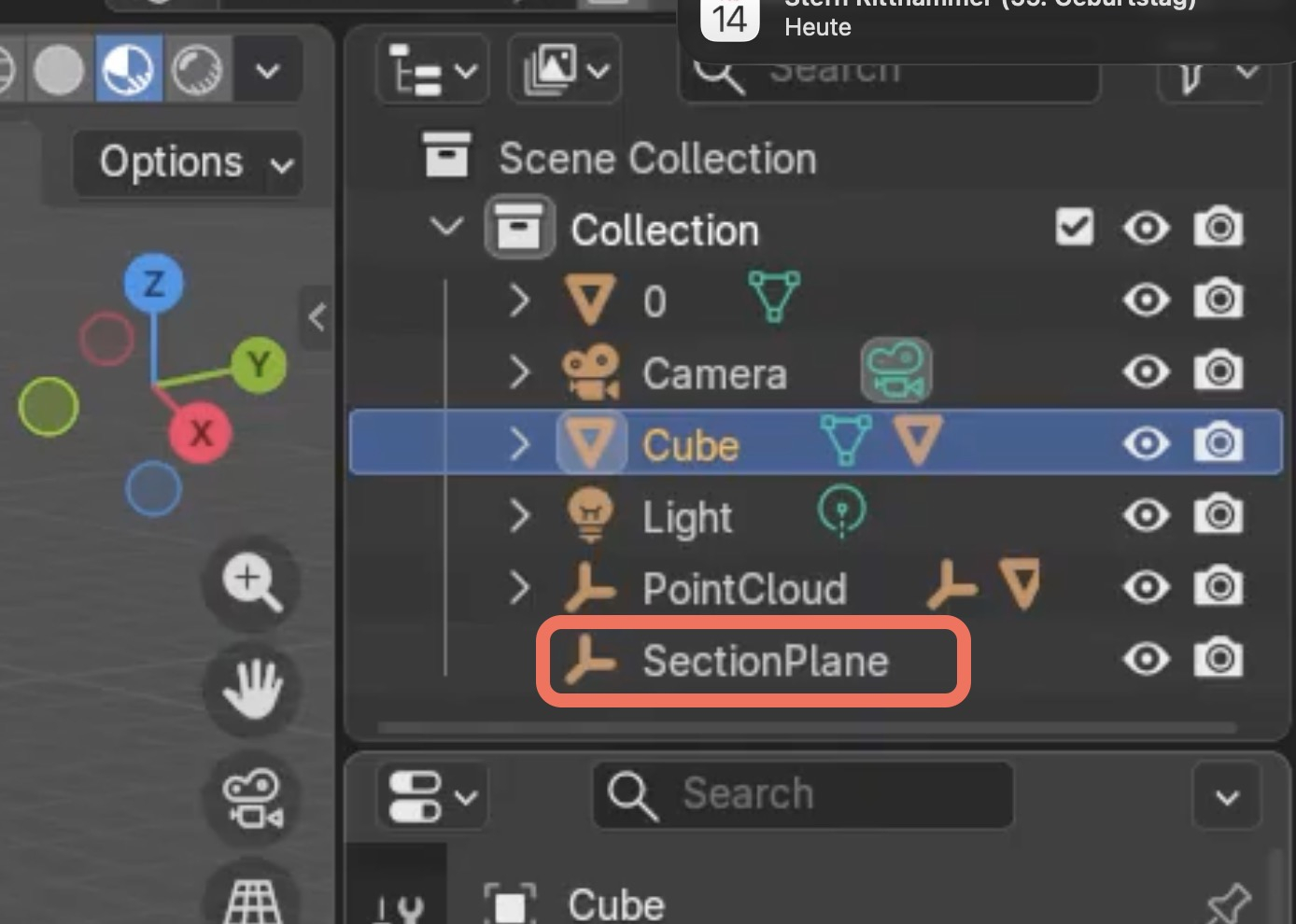
For me it looks like this :
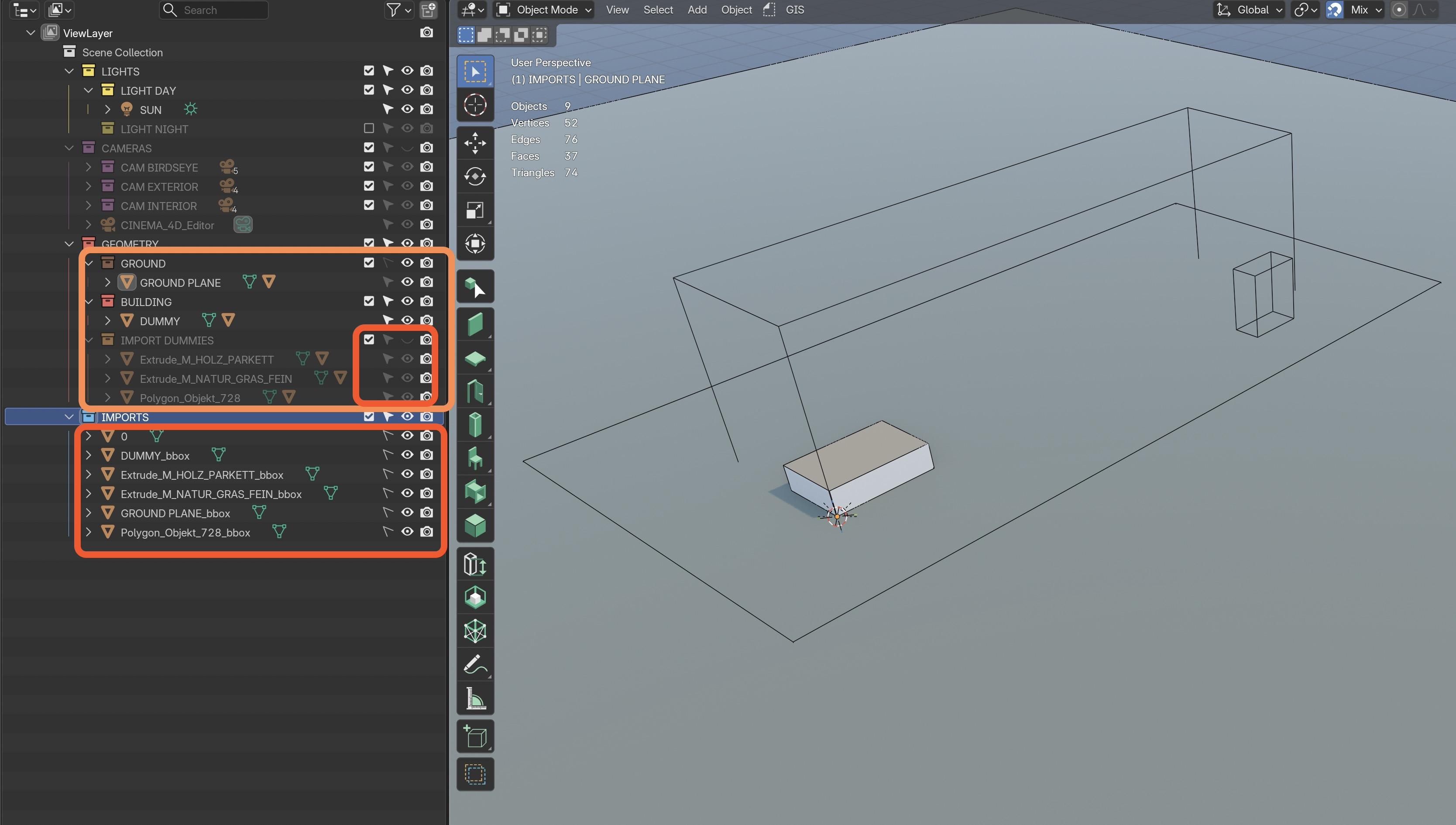
Or am I just using it wrong ?
The PDF and Video are really great, aesthetically pleasing and make you to want that :)
Hmm I'm thrilled that you decided to try to use it but I have to admit it is much too early for me to offer or suggest doing this. The reason I used "prototype"/"demonstrator"/"sketch" everywhere is that it is not really usable outside of the conditions it was developed in yet. I apologize for making it look otheriwse, I should have stated this more clearly.
A couple of things:
In all honesty, I didn't expect this to generate (any) traction or interest in this way and I definitely didn't expect anyone to want to try it. It's very exciting, because it shows me (and hopefully Prof. Beetz) that my hypothesis that this is something that is wanted in the (open source) architecture space is not completely off and I really want to thank all of you for showing interest. But right now it really is - as intended - just a demonstration of a collection of ideas. I don't know when, if ever, I will get to make this an actually complete and usable product. Probably during the next term, but I don't want to make any promises and generate expectations.
I didn't want to push any pressure. In generell and on any OSS forum in special. Of course is totally ok if this was it now and it stops here or for the foreseeable future. But if that changes any time, please post it here :)
I think the idea is quite good and well executed. I don't think it is completely off at all. I would want it :)
Hen and Egg problem, I think if more things like Goliath, Bonsai and Freecad were available and known, more Architects would be into OSS. But with recent global changes, I think the chances are better than ever.
Aha !
Maybe I should read the manuals - I just tried to get the AddOn Zip ASAP :)
No problem. I will try to look at your startup.blend.
(BTW I think I need a startup.blend-Switcher. Maybe that could work like/with Blenders File Templates ? But these may reside in the App Folder and be overwritten with each update)
Now I do no more think it really interferes with Bonsai but I will keep an eye on it.
No, they came in that way.
That was what irritated me :) I thought Goliath would not work with Blender 5.1 upwards and thought it went crazy and duplicated my (even invisible/deactivated) Geometry. I did expect to find what I have seen in the video.
Now I know you use these for your Section/Cut Views. Was not sure from your Video if they would belong into the "0" Object. They went into my "IMPORT" Collection as it is activated in my startup (?)
I think that is a good idea.
Initially I thought the HiddenLines in front of the Cut are just a graphical magical Blender OpenGL thing. Maybe that is what irritated me. I did't even realize that with my normal Sections/CutBoxes/.... I was used to never had anything visible in front of the Section. But with recent versions of my other BIMs, there do come options too, like semi transparent geometry options instead of hard cuts and such things ....
I just need to get used to it.