

Repair walls with openings exported to ifc from ArchiCAD

Hello everyone,
I need to fix an ifc originating in ArchiCAD, which I received from an architect. I used Bonsai to isolate the problem in a separate file that I am uploading with this post.
There are 3 walls in the file, the top two of them having several openings and I don't like the way these are defined. When I delete the openings in Bonsai, the corresponding ifc element is removed but the wall geometry stays untouched, i.e. the holes remain exactly as they were. Examined closely, each wall has an axis and body representation, body of the openingless wall is a SweptSolid (IfcExtrudedAreaSolid), whereas bodies of the perforated walls are Breps (IfcFacetedBrep).
It seems that ArchiCAD embedded the openings into the wall Breps (judging from the mesh, seen when examining Brep in edit mode), so the actual opening elements are redundant. Is there a way to fix that efficiently across 500 walls? Like regenerate the wall geometries as SweptSolids based on the wall's axis representation? The architect used a converter that is supposed to create parametric geometry. From my experience, this is the best I can get from ArchiCAD, but if anyone knows better, I'd be grateful.
The whole point of the excercise is opening the ifc file in Revit and getting all the walls as system families with openings (editable geometry). I know for a fact, that Revit's ifc importer is capable of doing that. I verified this by reopening an ifc exported from Revit and also opening an ifc created in Bonsai. In these cases the wall bodies were always SweptSolids and openings were removable via Bonsai.
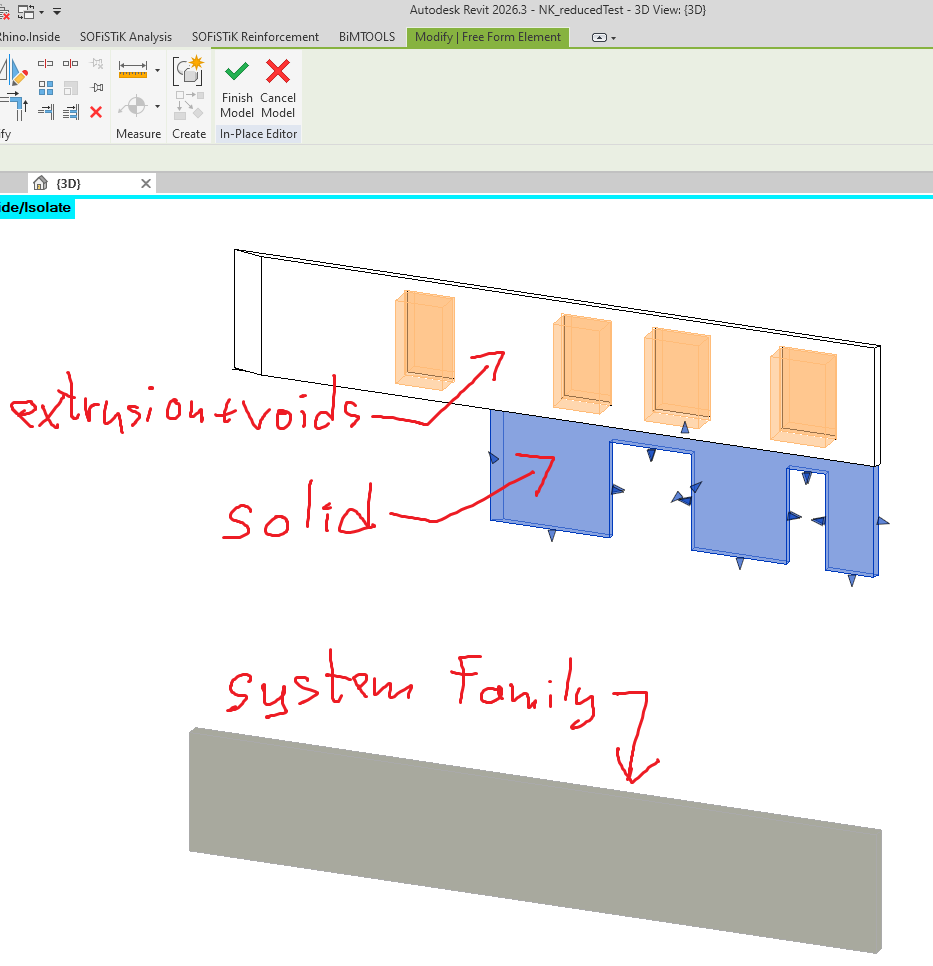
Opening my test file in Revit shows one further detail that I did not notice in Bonsai, as the two walls with openings are interpreted differently. The topmost wall is an inplace family with a solid body defined as footprint extrusion + openings as voids (theoretically editable but not usable at scale). The other wall is a solid without voids, editable only via grips. I couldn't identify a difference in the definition of these two walls in Bonsai.
I can kinda work with what I've got, but it is not ideal. I'd have to recreate each wall via a script based on the line representation + bounding box and then insert doors and windows based on the ifcOpenings (which I'd first have to extract from the original ifc file as solids, because I cannot reach the voids inside inplace family via API). Done this before, but wtf. Obviously I'd like to be extra certain this is the only way, before I start. I hope there is a more reasonable solution.
Graphisoft has a Revit plugin for improved ifc import, which does not help. ArchiCAD can also create a .rvt file, but that just creates uneditable directshapes. Fwiw, the original ifc comes from ArchiCAD 28.3.0. I am using Bonsai in Blender 5.0 (installed yesterday) and Revit 2026.3.0.37 with ifc addin v26.4.1.0.
Comments
I'm not an archicad user, but...
here's a possible AI answer, for your architect collaborator to try
Why the walls are Brep right now
The Graphisoft documentation states this explicitly and unambiguously:
That one unchecked box is the root cause. When it's off, ArchiCAD computes the boolean result of wall minus all its openings and hands you the pre-cut mesh as a Brep. The
IfcOpeningElemententities become decorative — they describe voids that are already baked into the geometry. When it's on, the wall is exported as its full uncut gross solid, and each door/window void is expressed as a properIfcOpeningElementwithIfcRelVoidsElementlinking back to the wall. That's exactly the structure Revit's IFC importer knows how to consume as a system family with editable hosted openings.The full translator recipe
Tell the architect to open File → Interoperability → IFC → IFC Translators, duplicate their current translator to a new one (don't mangle the original), and set the following under Geometry Conversion:
1. Export all model elements' geometry as:
Parametric (Extruded/revolved)Or useParametric with exceptionsif they want junctions on plain walls to be correct:Extruded/revolvedExtruded/revolved without junctions(already their current setting — this is fine for Revit)2. ✅ Check "Export gross geometry of elements (Export holes separately)" This is the critical fix. It enables the wall to be a SweptSolid and moves the voids into the
IfcOpeningElementhierarchy where they belong.3. Material preservation mode (IFC2x3 schema):
Never explode elementsDo NOT use "Explode all elements into parts" for the Revit workflow. That mode turns theIfcWallinto a geometry-less container and puts each composite skin into its ownIfcBuildingElementPart. Revit will not interpret that as a system family wall. You want a singleIfcWallwith the layer set attached to it.4. Partial Structure Display — this is a view/export option, not strictly translator-side, but critical: the file you received has the header flag
Option [Partial Structure Display: Core of Load-Bearing Elements Only]. That's why your Brep walls are 200mm Y-extent whileBaseQuantities.Widthsays 410mm — you're only getting the structural core. The architect should export with Entire Structure so the composite build-up is represented in the geometry, not just in the quantities.For IfcMaterialLayerSet
Switch these on under Data Conversion in the translator:
IfcMaterialLayerSet/IfcMaterialLayerSetUsageattached viaIfcRelAssociatesMaterialto each wall. Without it, material data simply isn't written.With "Never explode" + Building Material Properties on + gross geometry checked, ArchiCAD will produce walls structured like this in the IFC:
Revit's IFC importer maps
IfcMaterialLayerSetUsageto a compound wall type, matches each layer's material name to Revit materials, and creates a proper hosted door or window family from theIfcDoor/IfcWindowin the filling element. That's the best achievable result from the ArchiCAD → IFC → Revit path.What to realistically expect
Even with perfect settings, two limitations remain:
Extruded/revolved without junctions: walls will be simple rectangular extrusions that overlap at corners rather than being properly mitered. This is fine for Revit system families, which redo the junctions on import using its own wall cleanup rules. It actually works better for Revit this way.https://help.graphisoft.com/AC/25/INT/_AC25_Help/121_IFC/121_IFC-37.htm
"That one unchecked box is the root cause." is typical chatbotspeak. Just checking the box leads to a slightly different body representation (CSG), but still not what I need (SweptSolid). Thanks anyway, it did bring some useful stuff to my attention.
It turns there's a lot of settings for ifc export from ArchiCAD and optimizing it via calls and emails with the architect was a little difficult. However, we did find a good solution for our particular case in the end. He used the default export settings from ArchiCAD version 25, which he transfered to his current version 28 (based on an older dataset we found that had the desired properties, so we tried to recreate the conditions). The resulting export had walls as SweptSolids and Revit reconstructed them nicely as system families and opening families. For some reason, ArchiCAD 28's default export settings lacked the correct classification rules and exported everything as BuildingElementProxy. I fail to see why Graphisoft would change this, so I think there may be something off about the architect's local installation. Can't say for sure, though, because I don't have the software and I don't want to pester the architect with further investigation after getting what I needed.
Most importantly, I can confirm that it's possible to go from ArchiCAD to Revit via ifc and retain walls with openings as editable system families. And shoutout to Bonsai for being a tool that allowed me to understand exactly how the geometry needs to be defined.