Hello,
Sorry, I created a topic but should have searched first. I found about Linked Aggregate, but Ctrl+Shift+D doens't work in my case (IFC attached in previous post), saying "No Linked Aggregate selected"
Any recommendation?
Thanks!
@RaphaëlVouilloz
try select the IfcElementAssembly of your aggregate, open Linked Aggregates (like shown in your image) move the 3D cursor where you want it and and click on the 2-page icon on its right to duplicate it
Thanks @steverugi
It still doesn't work and display the message: "No Linked Aggregate selected", here attached is a video
I've tried with both official and unstable version on Windows, Blender 5.0.1



Comments
Edit (see below)
Hello,
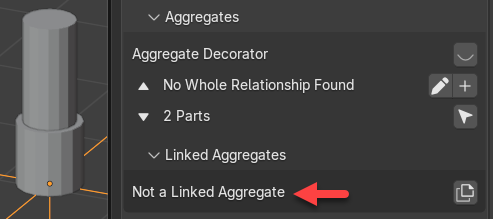
Sorry, I created a topic but should have searched first. I found about Linked Aggregate, but Ctrl+Shift+D doens't work in my case (IFC attached in previous post), saying "No Linked Aggregate selected"
Any recommendation?
Thanks!
@RaphaëlVouilloz
try select the IfcElementAssembly of your aggregate, open Linked Aggregates (like shown in your image) move the 3D cursor where you want it and and click on the 2-page icon on its right to duplicate it
Thanks @steverugi
It still doesn't work and display the message: "No Linked Aggregate selected", here attached is a video
I've tried with both official and unstable version on Windows, Blender 5.0.1
Try selecting 'just' the part (not the empty), before clicking on the duplicate button.
The UI, here, could probably be improved. :)
The following tutorial video from this series, might help....
@theoryshaw , @RaphaëlVouilloz
For some reason I can do it by selecting the empty ..
on both windows 10 and Linux mint machines, "unstable" release
Or is it something else?
cheers
PS it also works by selecting an element part of the assembly as you indicated