

Blender Expression Engine with Bonsai Integration

Hi all,
I like a lot the expression engine that it is available in software like Freecad.
This is a first attempt to mimic that using python (so probably not scalable to hundred of thousands of expressions). I have created an addon https://github.com/falken10vdl/bexpeng based on asteval for safe expression evaluation and networkx to maintain the graph of relationships between parameters and expressions referring to the parameters.
Then I crafted a first PR to add integration to it Add BExpEng: Blender Expression Engine integration#7850
Here you can see it in action using some numeric values:
Note that this could also be interesting for strings as asteval supports python f-string so you can create quite elaborate descriptions for example based on a combination of strings and numbers:
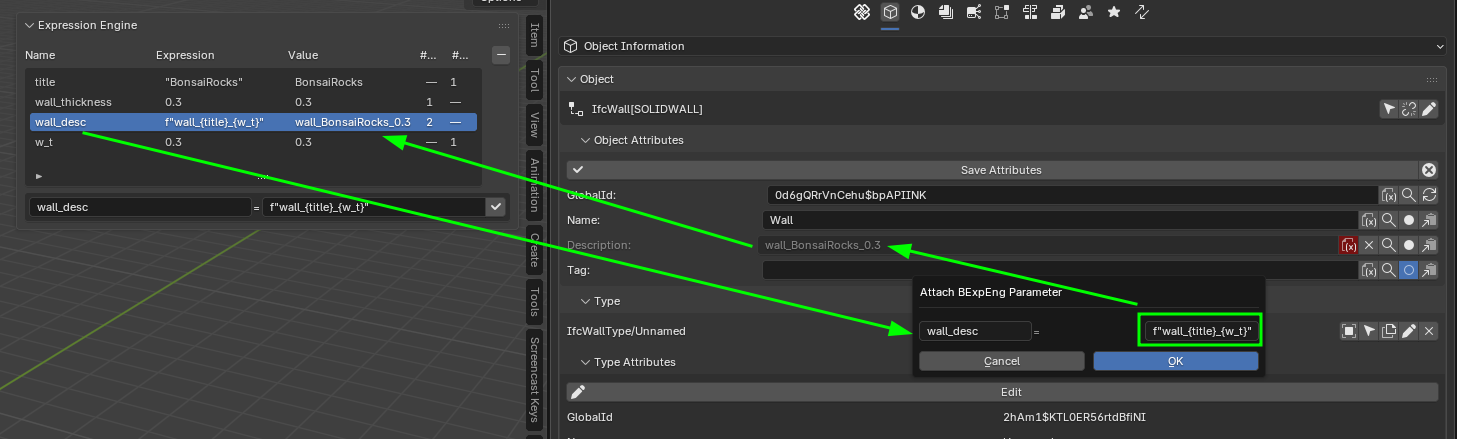
As you can see this relies in storing the information in the .ifc.metadata.blend file but I guess that if the community wants to have it stored in ifc, that could be done in a similar way as array or other parametric info is stored by Bonsai.
Your feedback is very much appreciated.
Thanks!







Comments
Wow, parameterization...
Are these new parameters global or assigned to specific objects?
@walpa The Bexpeng is a quite simple addon it is just a shared store that holds the source of truth for a "shared parameters". A shared parameter is just a unique name and an expresion (the expresion can refernece other shared parameters and use functions for numerals or strings).
Other addons like Bonsai can integrate with it by consuming parameters. So in Bonsai we attach an input field in the UI to a parameter and whenever the parameter is changed you receive a callback to update whatever depends on it (in Bonsai that is the corresponding blender property, ifc representation and 3dview representation).
You can attach the same parameter to whatever field you like (I have tried to add to many fields but probably some are still missing) just by clicking the little button next to it. When youdo that the icon gets red and the field is greyed out to signal it is now controlled by a parameter.
Does it make sense?
Cheers!
Looks cool, although overkill for my pedestrian uses.
One small request... When you do a demo video can you either reduce the window size and only capture the smaller window, or increase the scale in the preferences. On my monitor (alas still just 1920x1200) the text is almost impossible to read making it very hard to understand what you are doing.
Yes, that makes sense. Looking forward to testing it.
@sjb007 Sorry for the low resolution. I think I messed up the resolution change.
After playing a little bit I have changed the workflow. The idea is that the Bexpeng panel is used to create the parameters and there you can also update the expressions, or remove them. To remove, the count of #Sub (ie fields subscribed) and #Dep (ie other parameters that depend on this one) must be 0. To attach attach/detach to a relevant input filed you use the popup that appears when you click in the icon (sheet with (x)) next to the relevant input field. I have also added a bulk operator to attach or detach (with ALT) for the selected objects.
See it here in action:
Cheers!