

Surface Styles Revisited

This is a proposal (blender 5.1) Styles revisited#7938 for a simple toggle to get either pretty styles based on external files (texture or .blend, UV, shaders.) or fast rendering based on Ifc simpler approach (Flat Material).
When loading the file the mode is in "Fast".
FAST (Precedence chain: Render+Texture → Render → Shade)
- Solid: Flat colour (color_type=MATERIAL)
- Material Preview/Rendered: IFC node graph (Rendering ± Textures, or Shading colour)
PRETTY (Precedence chain: External → Render+Texture → Render → Shade):
- Solid: UV texture (color_type=TEXTURE, UVs on demand)
- Material Preview/Rendered: External .blend → IFC node graph fallback
See it in action:
Cheers!







Comments
cool!
This project doesn't seem to work correctly--see video.
...also the following video shows that the 'toggle' takes quite a bit of time -- 2mins.
video: https://community.osarch.org/uploads/editor/db/sns93k4e7lkw.mp4
@theoryshaw Ok, lets default to "pretty" if metadata file is loaded It will remmber.
One question about wish list. The goal is the following use case? If one defines an external style, then bonsai should be able to generate a simplified render or shade style if the user has not provided one?
Cheers!
I only made it for blender 5.1 yet. Did you try in 5.1?
yes, basically 'abstracting' the color of the material definition, as the shade color, if that makes sense. Might not even be possible in blender yet.
...
No i haven't tried 5.1 yet.. kinda stuck behind this
Update: i just tried the same thing on 5.1, and still got the same results.
Let me try to reproduce the error and see. Thanks!
Cool, if you want to download the textures from: https://hub.openingdesign.com/OpeningDesign/OD_Submodules
...save them in the following relation to the
Barn_2_0project. That way, the relative links still work.@theoryshaw I was able to test your file. To me it looks t is working properly :) I agree it is quite slow when "pretty" is enabled (I need to look to that one).
What I see is that you have many External styles defined without defining any "Shade" or "Render". For that case it is clear that the fast will not be able to generate other one. However if I define the shade and render I see that in solid mode the shade is taken and in material preview the render is taken (for "fast") or the external for "pretty"
See for example below I define for the style GS_Flooring_Wood51 the style "Shade" in red and then the style "Render" in green. In the Materila preview mode and "fast" if only "Shade" is defined, then that one is shown (that happens at the begining) If Render is defined then that one is shown (the one in green). If pretty is toggled then the External is shown
Do you agree or is there any issue I am not seeing?
Thanks!
I have added a new operator that allows you to average the texture of the "External" style and generate a simplification average of color for "Shade" style. I do not touch the "Render" Style so since Render is based on "Shade" you can use that one to modify or customize the propose "Shade" color.
I have added progress indicators in the mouse pointer (move around to see it change) for the Alt-Click of the suggested Shade colors and fort the "Pretty" operator.
I will now take a look to the performance of "Pretty" since it is rather slow.
Cheers!
One critique: Your button is showing the current setting, and you click on it to activate the mode that is not displayed. This (for me) is confusing UI design. When I click on a button I expect the software to do the thing on written on the button. You've flipped that so it will activate the unseen thing.
Two alternatives:
Two buttons, current mode highlighted:
A current status, and a "switch to" button:
("Switch to Pretty" could be a suitable icon.)
Indeed @sjb007 ! I thought it was my English understanding but I was also confused myself!
I think your sugestion clarifies it much more.
Thanks!
Very Cool!
@falken10vdl a PR on your PR. :)
https://github.com/falken10vdl/IfcOpenShell/pull/4
Thanks! merged. Nice addition. I was seeing also a bit pale the proposed colors :)
@theoryshaw I updated the PR to improve speed. I saw that switching shaders between external and principled bsdf was an overkill (also was doing this per material instead of per style) so I came up with the idea of generating directly "two branches" one for the external and another for the principle bsdf. This seems to add little overhead and we can switch between them very fast. For each material we have a BIM_Output_Flat (with just the principle bsdf) node and a BIM_Output_External node (with whatever was copied from the external blend file). The toggles just switches the active_output.
I also have set Flat as default for solid mode and Pretty for Material_preview/Rendered.
Cheers!
PS: Also changed naming from "fast" to "flat" since both are pretty fast ;)
i could be missing something, but i think this is missing.
Nope. I removed it :) Is it needed?
Cheers!
It tis. :)
I put it back. Still since now switching between external and shade/Render is quite fast using bpy.ops.bim.toggle_prefer_ifc_shading for all styles why would you want to just switch a number of them? bpy.ops.bim.update_current_style with Alt-click is already available using bpy.ops.bim.toggle_prefer_ifc_shading. Should not we just rationalize to a single place to switch styles? If we want to keep bpy.ops.bim.update_current_style I guess we should remove bpy.ops.bim.toggle_prefer_ifc_shading (but maybe the default action to do for all and the alt or shift action to do for selected objects?
Cheers!
Looking to this PR it looks to me that maybe I took a too radical approach :) It has allowed me to understand much better how Ifc styles are handled and the representation in Blender materials with textures/UV and shaders. However maybe instead of this PR I can issue a few which would be easier to digest and tackle different aspects independently:
New PR to establish a precedence of Blender representation based on what styles are available (this can be extracted from the current PR). Currently if you have a "Shade" style but no "Render" style, Blender will default to "white" if your Viewport Shading is set to Material_Preview or Rendered. The idea is that in this case it uses principled BSDF from "Shade" so in the end we have as proposed above but using the already used terminology in Bonsai:
"Shading (maybe this one could be renamed Shade/Render or Flat)" (Precedence chain: Render → Shade)
Solid: Flat colour (color_type=MATERIAL)
Material Preview/Rendered: IFC node graph (Render, or Shade colour)
"External (maybe this one could be renamed Texture/External or Pretty)" (Precedence chain: External → Render+Texture → Render → Shade):
Solid: UV texture (color_type=TEXTURE, UVs on demand)
Material Preview/Rendered: External .blend → IFC node graph fallback
The bpy.ops.bim.toggle_prefer_ifc_shading operator would be removed and we would use the existing bpy.ops.bim.update_current_style operator to switch between the Shade/Render (i.e. Flat) and the Texture/External (i.e. the Pretty)
New PR To generate Shade base color from external (this can be extracted from the current PR)
What do you guys think?
Cheers!
Seems good to me. :) The only way to know for sure, is to hack around on it. :)
...
I have noticed
bim.activate_drawingseems to take longer now, with BonsaiPR--not sure it's because of this work, or not.In general, it would be nice to improve the speed behind
bim.activate_drawingas even currently inv0.8.0, it's pretty slow still.I do not think that the PR would have a great impact since activate_drawing takes shading style to solid for line drawings but that is a fast branch. Maybe other PRs in bonsaiPR?
Something along the way doubled up the material definitions.
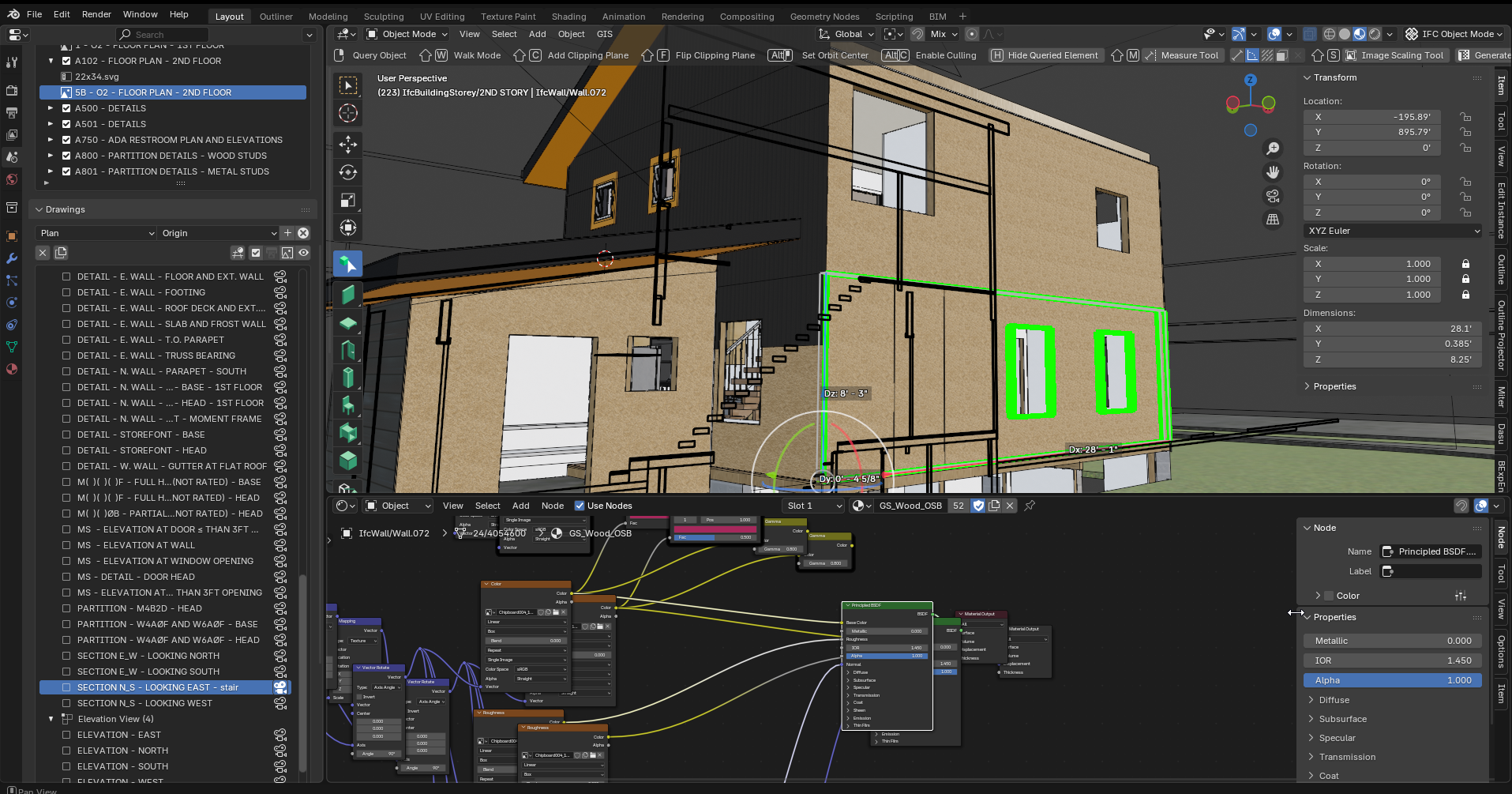
So that might be the cause of the
bim.activate_drawingdelay.will key an eye out if it happens again.
Thanks! Let me check. The copy might be done wrongly more than once
Somehow, for me, editing the Surface Styles does not reliably work (on Mac ?)
(Semi OT)
More a general Surface Style's saving behaviour - that has never ever worked for me.
While all the Material options promised in the GUI to be available, would be already be sufficient for me in 95% of Materials in a BIM context. I could mostly renounce of "referencing" any Surface Style by "External", to a Blender PBR Material in an external .Blend Library File.
I opened the IFC Demo Project, add a Wall and insert a Door and a Window.
I get 3 Surface Styles (Frame, Glass and Panel)
I edit the "Glass" by "Render" to have Transparency and save "Render" - it looks great in rendered Mode.
I save the IFC, I close the IFC. Once I open the IFC again, all "Render" transparency gone !?
I edit "Frame" in "Render" and apply a black color to "Surface Color" and to "Diffuse" - it looks great in rendered Mode.
I save the IFC, I close the IFC. Once I open the IFC again, all "Render" colors gone !?
But it seems to save the "Shade" settings fine !? It looks great in Shaded Display Mode.
(I also set colors and transparency by "Surface Color" and that seems to be all saved and kept after reopening the IFC (?))
I can't imagine that is really a Mac -only issue (?)
If somebody likes to try/replicate .....
Mac with blender 5.1?
Cheers!
Ahm, meanwhile in Blender 5.2 daily and latest daily build Bonsai.
(not your latest BonsaiPR - so no duplication of Material Nodes found here)
And when I tested Surface Style editing again yesterday, it looked so promising as my edits seemed to be saved for the first time. Until I reopened that file today again and all (Render) transparency and color was lost again ....
I just reset it today and it is kept for that session.
I just mentioned this here, together with @theoryshaw frightening screenshot (I think randomly duplicated data is nearly as bad as lost data) because so far I could never experience any trust in editing surface styles (on Mac only ?) and tend to think it is not unlikely that surface style editing saving itself my have some major issues (?)
(Maybe as a visualizer, I am a small minority with my interest and ambition in Surface Styles testing at all ?)
EDIT :
Looks like setting a Diffuse Color in Rendering is already lost when I "Save Rendering Style" and just reopen it ......
While "Transparency" seems to stay but "Reflectance Method" also gets lost (?)
@theoryshaw I am not able to reproduce this issue. Do you have a way to trigger the problem? Thanks!
I am not having any issue like you mention. Please see it below
What version of blender are you using? Note that save for render is not working in the mainstream bonsai version. You have to use bonsaiPR or apply yourself either PR:Fix IfcSurfaceStyleRendering colour reset on save#7882 or PR Styles revisited#7938.
Thanks!