

IFC Product Library addon for Blender Bonsai — seeking feedback

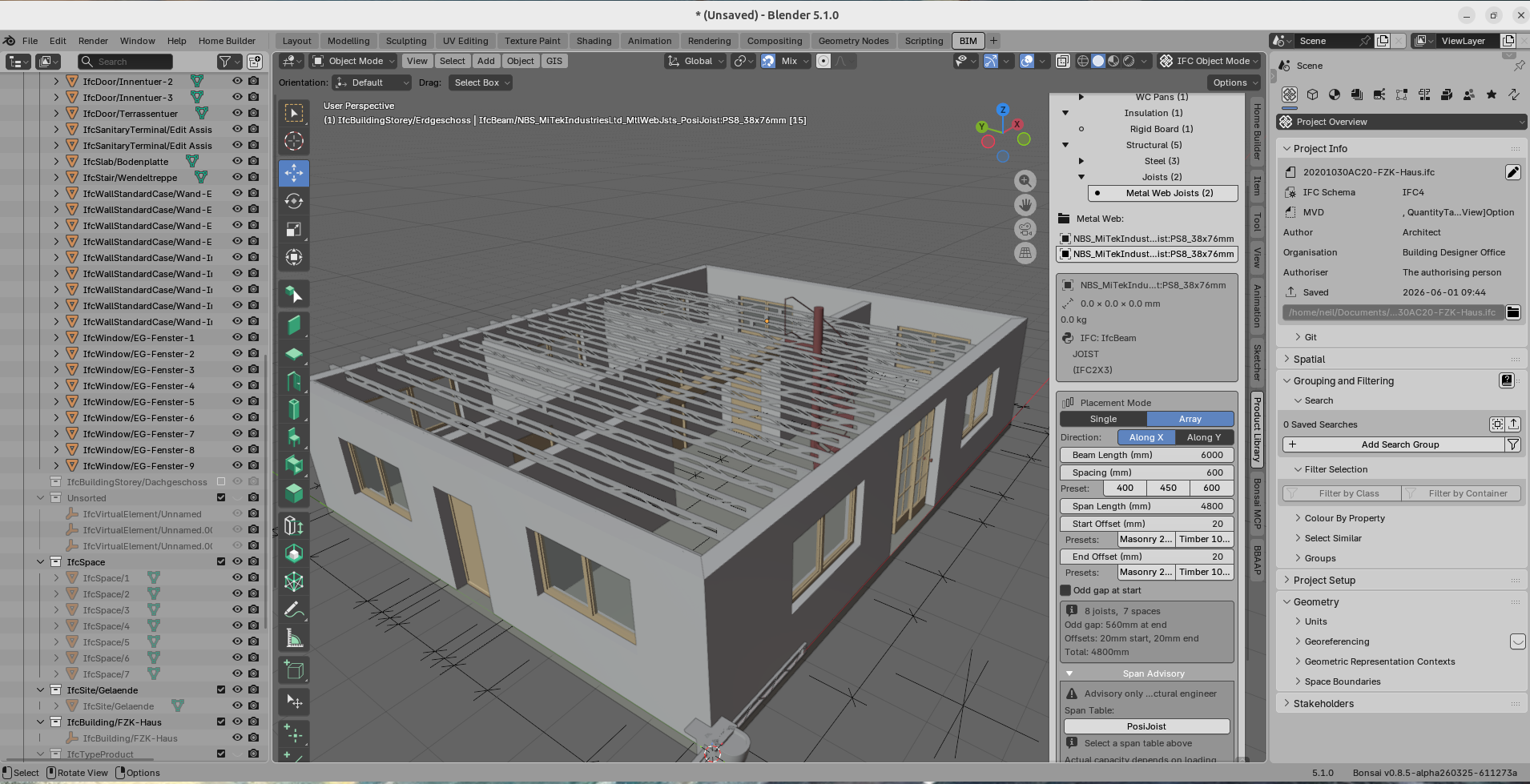
I've built an open-source product library addon for Bonsai that lets you browse, search, and insert manufacturer IFC products into your projects from a sidebar panel. It also includes an import wizard for converting OBJ/STL/glTF / etc. files into catalogued IFC library products. There's also a rudimentary array placement for structural beams and joists with span advisory tables.
Built it because I found Bonsai's learning curve steep and wanted a more intuitive workflow for placing real products and couldn't find anything to do what I needed. Works with manufacturer IFC downloads (Armitage Shanks, Hansgrohe, etc.) and geometry from GrabCAD and similar sources.
Looking for feedback on the workflow, the library structure, and particularly interested in how others would approach parametric geometry for products like metal web joists where simple scaling distorts the geometry.






Comments
@neil101
sounds great, any link to the add-on please?
My bad - here's the link: https://github.com/NeilC56/bonsai-ifc-product-library#
Product/assets Libraries are always welcome.
@theoryshaw has a proposal to make that via Git
Hi, There doesn't seem to be any releases as of yet to test it.
I think regular daily build releases are currently a bit limited/delayed as there are some larger core modernisations under the hood happening for a few weeks.
Apologies for the delay in publication - here it is at last: https://github.com/NeilC56/bonsai-ifc-product-library/releases/tag/v0.3-alpha
I have a library folder not found error.
Small issue.
Although when I look at the AddOn Settings and open the path, I see the folder ....
Took me some time to realize .... but it looks like the default path entry pointed to a .../ifc-product-library
while the existing folder on Mac was ..../ifc_product_library (underscores !)
Once I selected that existing folder it worked.
EDIT :
Sorry. Got it now.
I found the demo library in the Zip and added it to a custom Library Folder on a data drive, which I assigned in the AddOn.
I don't know about Macs at all - I used Windows for years at work, but now I only use Linux/ Open Source, sorry for the confusion.
I'm still working on the Product Library, particularly the PosiJoist insertion. I think the main functions (file conversion etc.) work OK but any feedback welcome. It's just one module of a larger project I'm working on at the moment.
Not for me here (in Blender 5.2 Beta on ARM Mac)
I do not really understand the structure. For me it looks like initially there are no IFCs, just JSON, Zips and other formats ...
and when I try to insert objects - more folders are appearing at library's top level (?)
If it works for you on Windows,
it could be that, because I have the Library on a shared drive on another Mac,
(IMHO Mac network got broken completely over the last few years, it's a PITA)
that I have sometimes some access problems, like e.g. no rights to extract Zips in this case (?)