

BIMobject IFC files in Project Library always show "No Geometry" — geometry is on instance, not on t

I'm using Bonsai BIM 0.8.4 and trying to add external IFC objects downloaded from BIMobject into my project using Project Library.
Problem:
Every BIMobject IFC file I test shows "No Geometry" in the Add Type Occurrence dialog.
After investigating, I found that the geometry in these files appears to be attached to the IfcElement instance, not the IfcElementType. Project Library detects the type correctly, but the type itself seems to have no shape representation, which may explain the "No Geometry" message.
I confirmed this by opening one file separately in Bonsai — the window (GEALAN S9000, IFC4) displays correctly with full geometry.
Questions:
Is there any way in Bonsai 0.8.4 to use the Window Tool with a window type whose geometry exists on the instance rather than on the type?
Is there a workflow to transfer/copy geometry from the instance to the type so Project Library can use it properly?
Is this a known limitation of Project Library with manufacturer-exported IFC files (BIMobject, etc.)?
What is the recommended workflow for bringing BIMobject IFC windows/doors into a project so they can be inserted into walls with automatic opening creation?
I also tested MergeProjects via IFCPatch. The instance appears in the project with geometry, but it cannot be used with the Window Tool for wall placement.
Any guidance would be greatly appreciated.
Comments
Did you try selecting the Window (IfcElement products) class and changing it to WindowType (IfcElementType products)?
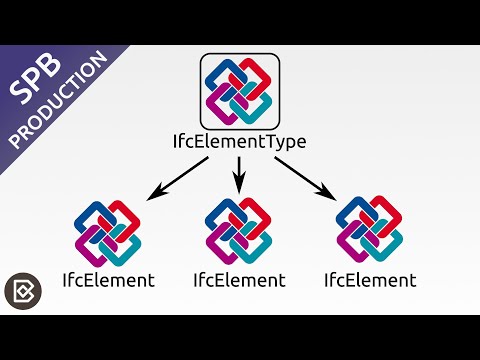
I described the element -> element type workflow here:
Thank you @semhustej ! I will watch your tutorial first and try it out in practice. I will come back with results.
Manual class reassignment:
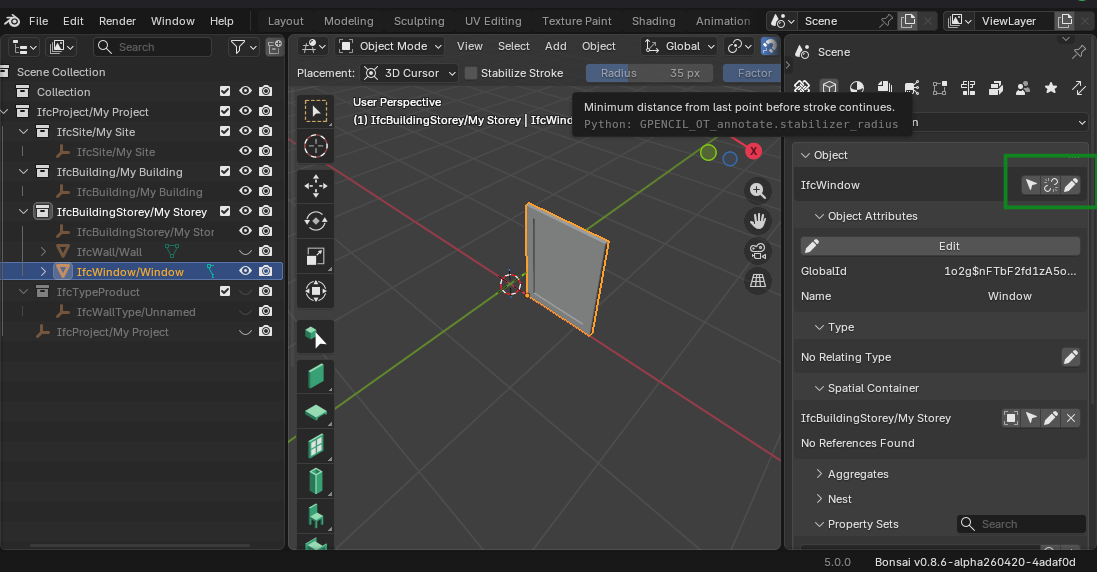
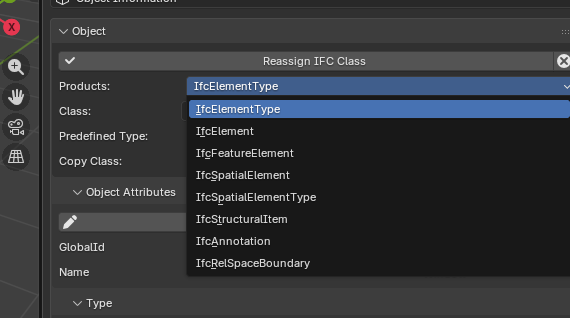
@walpa Thank you for the screenshots showing where to change the class.
I want to explain my situation a bit better because I'm still stuck. When I load the GEALAN S9000 Window IFC4 file from BIMobject in Project Library, I can see the IfcWindowType correctly in the list. But when I try to append it I always get "No Geometry".
I opened the same file separately in Bonsai and the window looks fine with full geometry. So the geometry is there, but somehow it doesn't work in Project Library.
I also tried to reclassify the IfcWindowType to IfcWindow but after doing that I got "IFC Element Not Found" and it stopped working completely. I'm not sure if that was even the right thing to do.
I'm not sure exactly why this is happening or how to fix it. Is there something wrong with this specific file? And is there a way to make it work?
I also tried IFCPatch MergeProjects but Blender crashes every time I run it.
Thank you for your patience, I'm still learning.
Update — Problem Solved
After a lot of testing I finally found the solution. The problem was not with Bonsai or with my workflow — it was with the specific IFC files from BIMobject.
The GEALAN files from BIMobject have the geometry attached to the IfcWindow instance, not to the IfcWindowType. That's why Project Library always showed "No Geometry" — it finds the type correctly but the type has no shape representation.
I tried downloading a window from bimandco.com instead, and it worked perfectly on the first try. Project Library loaded it with geometry without any problems. I found it in Multi Object Tools and was able to place it in walls correctly.
So if anyone has the same "No Geometry" problem in Project Library — try a different source. Not all BIM libraries export IFC files in the same way. bimandco.com works well with Bonsai.
Thank you everyone for your help and patience.
Thanks for the update. One has to be careful with models from BIMobject, as quite often the models are junk because of saving to non-native format.