

BIM Object Tools - the "Update Button"

I tend to always move parts of connected Objects around, (and sometimes am disappointed if there is no connection to e.g. Slabs), especially moving Walls.
Besides there is limited visual feedback, that usually means I have to press the Update Button to see the final result.
Would it be possible that Bonsai presses the corresponding Update Button for me instead, each time when I moved things ?
Comments
a good feature request, for sure.
Thanks.
Yes, but maybe a naive one ....
There may be reasons. I think there was another thing constantly updating which led to huge lags overall (?)
Yes perhaps, but my intuition feels there's a clever way to figure this out.
Hello, @zoomer would you mind adding a few screenshots or a video showing off the issue(s) or add a bit of detail. I'm pretty sure this may be resolved more gracefully. Cheers
Hi @Gorgious,
I myself had no lags ....
My feature wish was just for automatic Geometry/Viewport updating after moving a Wall, connected to other Walls.
When I move the Wall, visually the Wall stays in place, instead there appears and moves a kind of Wall center line.
Only after I hit the Geometry Refresh Button, the Wall appears at its new location and neighbored Walls adapted.
(So the moving connected Walls, in itself, works perfectly. It is just about the extra click and missing feedback while)
I just had some previous thread in the back of my mind, where it was about Blender lagging for another user, and someone who fixed it explained that some task did expensive (unneeded) refreshes causing that lag.
So I thought that maybe there is a legitimate reason why we have to manually refresh so far. That maybe my feature wish may be problematic.
For most entities regenerating geometry is extremely fast, but for entities that have more complex ways to generate their geometry it is computationally expensive, eg a wall with 1000 openings will take a very long time to regenerate, even if the actual holes in the mesh will apear at the exact same location.
I think, as you gathered, that this is mostly a hardware limitation, as in, we can't afford to both have responsive viewport AND up-to-date complex geometry. There is also a software part, as in, we need to find a smart way for the wall to know that it doesn't need to regenerate all the boolean operations if I just extend its axis by 2 m and no other opening has to be integrated.
But this is indeed a paper cut for end users and for simple geometry could be solved, I think, albeit I wouldn't wish for the geometry to regenerate as i drag and drop an object, but only after i have dropped it to its new position. I think a good compromise is to give user the agenda and knowing what moving X wall or Y window will entail for other, connected elements that depend on it by displaying on screen a ghost of how the other connected geometry will behave afterwards or something like that. Curious to see other's opnionn on subject, especially regarding how it's done in other software (what is "industry standard" ?).
That would be better than seeing no result and thinking it did not work :)
I would be already happy with auto regeneration after dragging, which is currently not the case.
I can live with the current center line moving as placeholder while dragging
Life Updating while dragging would be a great UX feature - but kind of a luxury.
If life updating would lead to start lagging in snaps and movement, it would not be beneficial and better without.
I have no clue if there are possibilities to offer it as long as it is easily real time only and otherwise to skip it or if there may be options to switch to a simplified graphic style and such. If there are options (and no other higher priorities) I would welcome.
seems a preference toggle, to turn on/off automatic regeneration, would address those times (which i feel might be rare) when automatic regeneration would be too laggy.
I think we can pretty much know in advance which kind of elements will take a lot of time to generate, usually it comes down to either very dense geometry of heavy calculations. For dense goemetries most of the parametric or axis based elements are pretty light in terms of raw geometry so this would almost never be a problem. TBF the only two problems for now that I can see is that modifying geometry sometimes also modifies the IFC state, so you don't want to do that 60 times per second anyways, but I believe there are ways to circumvent it. It does make the second to second "state" of the model a bit more brittle as for example a crash in the middle of dragging an element around may have unintended consequences if not done properly in backend. Second one is as I understand also one of the reasons why blender vanilla modifiers were abandoned a long time ago for calculating openings : They're just too slow to compute for real time. I think there is a way to know in advance which elements will take a long time to generate by just looking at their properties and their relationships with other elements. Time to investigate !
I am wondering when a user would not want connections to update live in the viewport when dragging a wall for example.
An automatic skip live regenerate would be great.
Now I have a different Wall movement and connections behaviour in latest Blender 5.2 but also in 5.1 !?
When I drag a (connected ?) Wall, e.g. 4 Walls forming a rectangle .... I do see the Wall moving live now, not just its center line - but now it looses connections and related Walls will not adjust their length !? I basically lost all Wall connecting.
And another thing I noticed is that I lost the beautiful Bonsai feature, that when drawing Walls near to Axes, Bonsai will snap to the related Axis and also it produces even numbers. It took me a while to realize that it is because of my Ground Plane of my Startup Blend file. Once I hide the ground it works again as expected. But AFAIR I never had a problem with my ground plane before. I also don't think I changed any Settings, like for Snaps.
I thought about today's 5.2 but it also happens in 5.1 from 1-2 weeks ago ...
Were there any changes of Wall or Snapping behaviours in Bonsai lately ?
Latest daily build is already from 20260515 or about 2 weeks old.
Or did I manage to screw something up ?
I think you want snap to increments ? Hold SHift while dragging to snap to 0.1 units.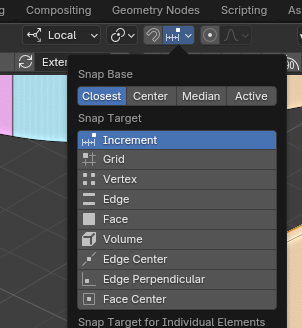
I did not understand the first paragraph, coudl you share screenshot of the setup ?
First draft :)
Beautiful!
Would this and fillet walls also work on any extruded profile type of objects, like say beams or other generic profile based geometries?
Sorry for the delay ....
I tried again today and it worked as expected !?
Still a problem.
Add a Blender Plane in at Z=0.00, expand it reasonably. Try to draw Bonsai Walls on it.
For me there is no more usual Axis soft Lock along X or Y and no more even number automation.
Once I hide the Blender Plane, both work fine again.
Thank you for the answer, gotta be honest I still don't fully understand the problem. I do think you might have changed the snapping settings ?
FWIW I'll take my time with this feature, it seems this adds a lot of potential for CTDs and data corruption so need to ironclad the test suite to ensure not breaking files and causing ifc / blend desyncs.
It might have to do with snapping settings.
Drawing over the ground plane (set to none selectable) does ignore increment and soft axis lock snaps.
I could deactivate all "Face" snaps, then it will work again - But then without I could no more insert Windows in Walls (?)
AFAIK, Bonsai by default is set to activate "Bonsai BIM Snaps" when you open a new IFC anyway (?)
So I should use the same Snap Settings as always. (On the same ground plane from my startup.blend)
Indeed, as soon as Bonsai Face Snap enabled,
same increment and axis lock loss, when I try to draw interior Walls on top of a Slab ....