

Object Transform Tools

Small plugin to move and rotate selected objects to match the active object.
This might be possible natively, but couldn't find it, if it exists.
https://hub.openingdesign.com/OpeningDesign/Utility_Apps/commit/7a65aee5dcef78329273f72510e17eebb9d1a1cb









Comments
Added a snap to surface tool...
Also renamed the plugin to
Object Transform Toolshttps://hub.openingdesign.com/OpeningDesign/Utility_Apps/commit/b907d848f1e9ab74c33126939266c1178168ca81
Nice ! As an alternative or for inspiration for °1 I suggest using the "Align Tools" extension, it adds a "Align Selected to Active" button in the Transform panel, but also a bunch of nice utilities in the Item panel.
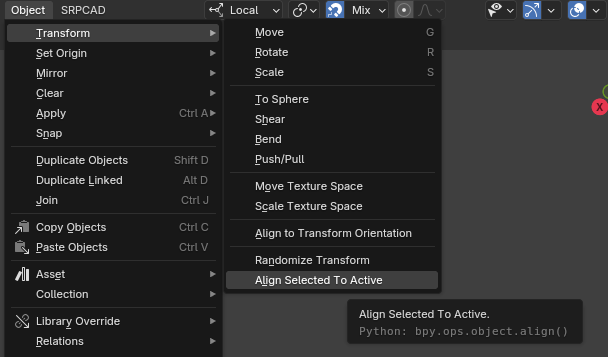
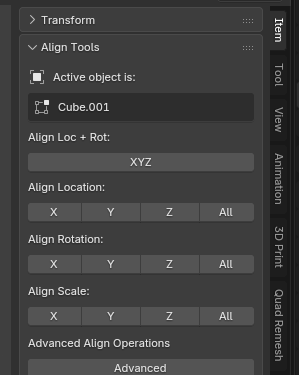
°2 is nice too, I don't know of a single button way to do it natively.
Cheers
added...
Add Distribute Between Bounds operator to Object Transform Tools
Evenly distributes 3+ selected objects between the two that are
furthest apart, keeping the outermost objects fixed.
Endpoint Line mode: snaps middle objects onto evenly spaced points
along the line connecting the two furthest pivots, so it works at
any orientation (diagonal/rotated arrangements)
Single Axis mode: equalizes spacing along one global or local
(active object) X/Y/Z axis
Pivot toggle: space by object origin or by geometric center computed
from evaluated mesh vertices in world space
Preview toggle: flip the movement on/off in the redo panel to
compare before/after
https://hub.openingdesign.com/OpeningDesign/Utility_Apps/commit/96aede743416cb2b0b1fb27630c05ee39601da77
Great !
align the object's origin to one of the object's faces...
https://hub.openingdesign.com/OpeningDesign/Utility_Apps/commit/56560098b45c8e72cab7ae71b3c9ed9db9e4f81e
only works on vanilla blender objects, for now... not Bonsai objects.
PR's welcome. :)