Of course I tried. You need to understand that a negative opinion is exactly the same, only better than enthusiastic appeals for donations. I have experience in cad developments, I know where to look and what to expect.
Forgive me, I am limited so I cannot understand how an empty negative comment, without actual example to explain what is that you think should be improved or corrected, is better than what I and others do every day on the Issues page since started using OCS.
I now use OCS in my personal experience at work (yes in an actual paid workflow) , but maybe one day I will understand, who knows.
And because of my limited knowledge I enthusiastically promote donations to support this project, the same enthusiasm I (naively of course) put in Bonsai.
The world is divided in doers and takers, I just like to be in the first team, but it might be due to my ignorance ;)
@steverugi said: @zamtmn Are you the author of ZCad? Looks like a pretty decent AutoCAD like application itself. Wasn't aware of it.
Maybe with your experience on the matter you can share some insight, or collaborate on your efforts.
Of course I tried. You need to understand that a negative opinion is exactly the same, only better than enthusiastic appeals for donations. I have experience in cad developments, I know where to look and what to expect.
Forgive me, I am limited so I cannot understand how an empty negative comment, without actual example to explain what is that you think should be improved or corrected, is better than what I and others do every day on the Issues page since started using OCS.
I now use OCS in my personal experience at work (yes in an actual paid workflow) , but maybe one day I will understand, who knows.
And because of my limited knowledge I enthusiastically promote donations to support this project, the same enthusiasm I (naively of course) put in Bonsai.
The world is divided in doers and takers, I just like to be in the first team, but it might be due to my ignorance ;)
Cheers
No apologies, everything is fine.
In my opinion, all the big words about:
Full 2D drafting... Native DWG & DXF... 3D modeling...
Should be attributed to the plans, not to the implemented usability functionality. That's all in the future... Yes, something can be drawn, but so far it looks more like a viewer, not an editor.
And the first point is to point out that it was created by AI, which is now the main factor in lowering expectations.
Full 2D drafting... Native DWG & DXF... 3D modeling...
4 weeks ago I also expected a full featured OCS App that has just to be tested for bugs.
(How else - if the release is expected at the end of the year)
It crashed when I tried to start it on Mac. Blocked by Apples Gatekeeper. Could not find 3D geometry in my files (was hidden behind ghost geometry) Did not find the Layer Manager and stuff (I'm no Autocad expert) CTRL instead of CMD on Mac.
Everything was usually fixed in ½ -2 days.
I am used to different standards in my proprietary world. For one of my main Apps I even gave up filing support requests as it seemed useless. From my 4 weeks of OCS testing experience, Hakan + AI already developed and fixed more for me than a proprietary year.
if we could wait for bonsai to get mature like now, why couldn't we wait for OCS to be -- at least can subtitute basic-but-essential of propertiary sofware capabilities ?
i will always root for hakanseven -- or anyone who contribute to opensource AEC things regardless their success or failure in filling the big hole between commercial and free-to-all software. in this economy, i believe we need opensource to have more alternative and to survive.
OpenCAD Studio may not have quite the same functionality as Octave’s BricsCAD BIM/Ultimate, but if it were to incorporate AutoCAD 2D features, it would certainly be a game-changer. I’m looking forward to it
WTH ....
CAD on Smart Phones ?
(Or better on a large iPad for my old eyes)
There are so many people that wished for not getting only CAD Viewers, measurement options and PDFs but for native basic file editing when on Site. Often preferring Touch Tablets vs full Mobile devices.
That's ok, there are Pens for more reliable input. But No clue about Android or mobile Linux (and pen input)
I assume there is no iOS/iPadOS version for reasons (?)
I prefer a desktop and large monitors anyway. But I think there is a real demand for CAD on Mobile.
are we able to set shortcut keys in oCADs yet or perhaps that hasn't yet been implemented?
I was never an autocad user so setting keyboard shortcuts for me is not necessarily complying with 'industry standard' but having the freedom to match my personal weirdness :)
@Nigel In Acad at least the shortcut idiom is not to rely too much on dedicated higher level shortcuts like we have in Blender (SHIFT D, G, SHIFT N) but you can access an interactive console at any time, eg you want to offset a line type "OFF" on your keyboard and a dropdown appears with valid command candidates, press SPACE or RETURN to select the first one in the list. It's a bit like if you had the "F3" search list on at all times in Blender. You do have shortcuts like CTRL A, CTRL C / CTRL V, CTRL SHIFT C, CTRL Z, etc. for industry standard operations. It also uses function keys a lot. Also the right click contextual menu is very useful albeit not very nice for the carpal tunnel syndrome. Cheers
@Gorgious thank you for the explanation. I do like short shortcuts and being able to map these is so cool... like single key stroke or a one-hand Alt +key or Shift + key and so on
Indeed, AutoCAD does have customizable keyboard shortcuts, albeit very limited. Mostly constrained to standard system level commands (clipboard operations, undo, saving, printing etc), opening dialogs, and toggles.
For customization purposes I'd look into editing the file acad.pgp, which allows defining custom aliases or shorter words for commands.
As far as I can see OCS doesn't yet support this though, there's no .pgp file to edit yet I think, but I'm looking forward to the day it does.
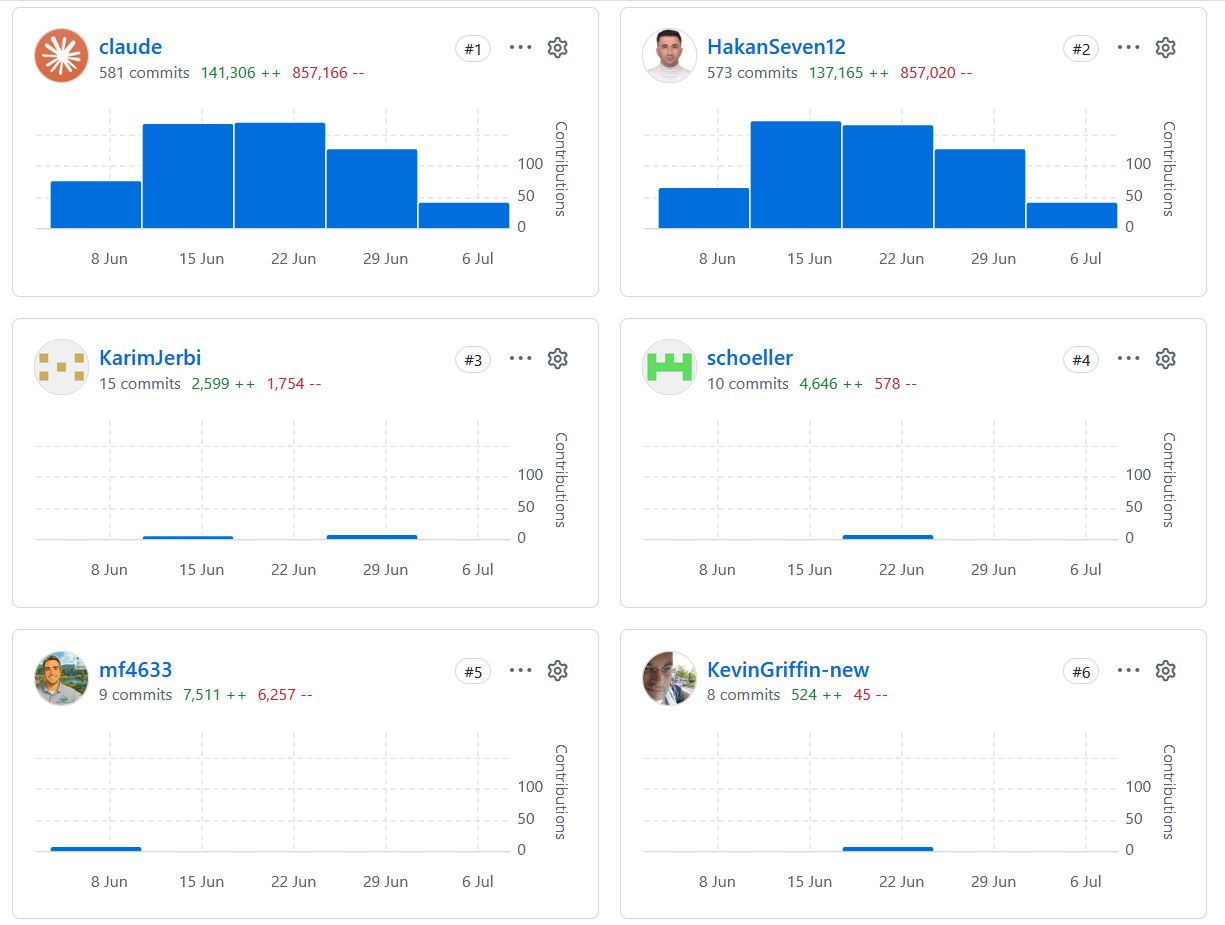
Fun fact: apart from Hakan, there were six other developers who contributed to the Open CAD Studio code in the last month. Of course the brunt of the work lays on Hakan's shoulders, but it is nice to see other developers chiming in. I am not a developer, but some of the contributions seem like a pretty good improvements to me.
Just chipping in to say thank you for your work on this! I recently used it to inspect a DWG on Linux and it worked well and seems much slicker than QCAD/LibreCAD.


Comments
@zamtmn
Forgive me, I am limited so I cannot understand how an empty negative comment, without actual example to explain what is that you think should be improved or corrected, is better than what I and others do every day on the
Issuespage since started using OCS.I now use OCS in my personal experience at work (yes in an actual paid workflow) , but maybe one day I will understand, who knows.
And because of my limited knowledge I enthusiastically promote donations to support this project, the same enthusiasm I (naively of course) put in Bonsai.
The world is divided in doers and takers, I just like to be in the first team, but it might be due to my ignorance ;)
Cheers
Yes, I'm same developer, similar app))
No apologies, everything is fine.
In my opinion, all the big words about:
Full 2D drafting... Native DWG & DXF... 3D modeling...
Should be attributed to the plans, not to the implemented usability functionality. That's all in the future... Yes, something can be drawn, but so far it looks more like a viewer, not an editor.
And the first point is to point out that it was created by AI, which is now the main factor in lowering expectations.
4 weeks ago I also expected a full featured OCS App that has just to be tested for bugs.
(How else - if the release is expected at the end of the year)
It crashed when I tried to start it on Mac. Blocked by Apples Gatekeeper. Could not find 3D geometry in my files (was hidden behind ghost geometry) Did not find the Layer Manager and stuff (I'm no Autocad expert) CTRL instead of CMD on Mac.
Everything was usually fixed in ½ -2 days.
I am used to different standards in my proprietary world. For one of my main Apps I even gave up filing support requests as it seemed useless. From my 4 weeks of OCS testing experience, Hakan + AI already developed and fixed more for me than a proprietary year.
BTW,
same with Bonsai. Great times in AEC.
if we could wait for bonsai to get mature like now, why couldn't we wait for OCS to be -- at least can subtitute basic-but-essential of propertiary sofware capabilities ?
i will always root for hakanseven -- or anyone who contribute to opensource AEC things regardless their success or failure in filling the big hole between commercial and free-to-all software. in this economy, i believe we need opensource to have more alternative and to survive.
OpenCAD Studio may not have quite the same functionality as Octave’s BricsCAD BIM/Ultimate, but if it were to incorporate AutoCAD 2D features, it would certainly be a game-changer. I’m looking forward to it
OCAD web was not usable on phones. So I made some improvement for phone screens
WTH ....
CAD on Smart Phones ?
(Or better on a large iPad for my old eyes)
There are so many people that wished for not getting only CAD Viewers, measurement options and PDFs but for native basic file editing when on Site. Often preferring Touch Tablets vs full Mobile devices.
There is no touch screen integration yet :) So touches are simulating mouse clicks. Also you can pan and zoom from view tab
That's ok, there are Pens for more reliable input. But No clue about Android or mobile Linux (and pen input)
I assume there is no iOS/iPadOS version for reasons (?)
I prefer a desktop and large monitors anyway. But I think there is a real demand for CAD on Mobile.
are we able to set shortcut keys in oCADs yet or perhaps that hasn't yet been implemented?
I was never an autocad user so setting keyboard shortcuts for me is not necessarily complying with 'industry standard' but having the freedom to match my personal weirdness :)
@Nigel In Acad at least the shortcut idiom is not to rely too much on dedicated higher level shortcuts like we have in Blender (SHIFT D, G, SHIFT N) but you can access an interactive console at any time, eg you want to offset a line type "OFF" on your keyboard and a dropdown appears with valid command candidates, press SPACE or RETURN to select the first one in the list. It's a bit like if you had the "F3" search list on at all times in Blender. You do have shortcuts like CTRL A, CTRL C / CTRL V, CTRL SHIFT C, CTRL Z, etc. for industry standard operations. It also uses function keys a lot. Also the right click contextual menu is very useful albeit not very nice for the carpal tunnel syndrome. Cheers
@Gorgious thank you for the explanation. I do like short shortcuts and being able to map these is so cool... like single key stroke or a one-hand Alt +key or Shift + key and so on
Indeed, AutoCAD does have customizable keyboard shortcuts, albeit very limited. Mostly constrained to standard system level commands (clipboard operations, undo, saving, printing etc), opening dialogs, and toggles.
For customization purposes I'd look into editing the file acad.pgp, which allows defining custom aliases or shorter words for commands.
As far as I can see OCS doesn't yet support this though, there's no .pgp file to edit yet I think, but I'm looking forward to the day it does.
Fun fact: apart from Hakan, there were six other developers who contributed to the Open CAD Studio code in the last month. Of course the brunt of the work lays on Hakan's shoulders, but it is nice to see other developers chiming in. I am not a developer, but some of the contributions seem like a pretty good improvements to me.
The OCAD web interface has been optimized for phone screens. I made as much space available as possible for the 3D view.
OCAD web: https://hakanseven12.github.io/OpenCADStudio/
"Your scientists were so preoccupied with whether they could, they didn’t stop to think if they should" -- Dr. Ian Malcolm
Just chipping in to say thank you for your work on this! I recently used it to inspect a DWG on Linux and it worked well and seems much slicker than QCAD/LibreCAD.
I'm really glad to hear it worked well for you 🙂 feedback like this is motivating