

[BlenderBIM] Door tag for both a 'Type Mark' and 'Instance Mark'?

Does anyone have a workflow to create a door tag for both a 'Type Mark' and an 'Instance Mark'?
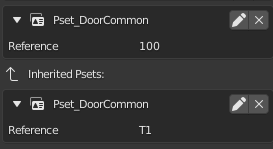
The example below, the door instance has 100 as the Pset_DoorCommon.Reference parameter, and the door type has T1 as the Pset_DoorCommon.Reference parameter.
Using {{Pset_DoorCommon.Reference}} in the IFC smart tag, only shows the instance value 100. How would you create a tag to show T1?
Tagged:

Comments
I haven't been able to get a 'door tag' to show as a tag, but I imagine you can set the type mark as an attribute like 'tag'?
Like:
new {{Pset_DoorCommon.Reference}} \n {{Tag}} ?
In his demo file @Moult uses:
{{Name}}\n{{type.Name}}
Would that be useful?
Here's the demo file for comparison
Use
typeto reference the type, sotype.Pset_DoorCommon.Referenceshould work.However,
{{Name}}\n{{type.Name}}is the correct location to put this. The "type mark" should be stored in thetype.Nameand "instance mark" should be stored in theNameitself. TheReferenceproperty was a legacy thing from IFC2X3 for vendors who didn't support types, and finally got removed in IFC4.3.