

installing blenderbim problem

Hello.
I have installed blender 3.6.4.
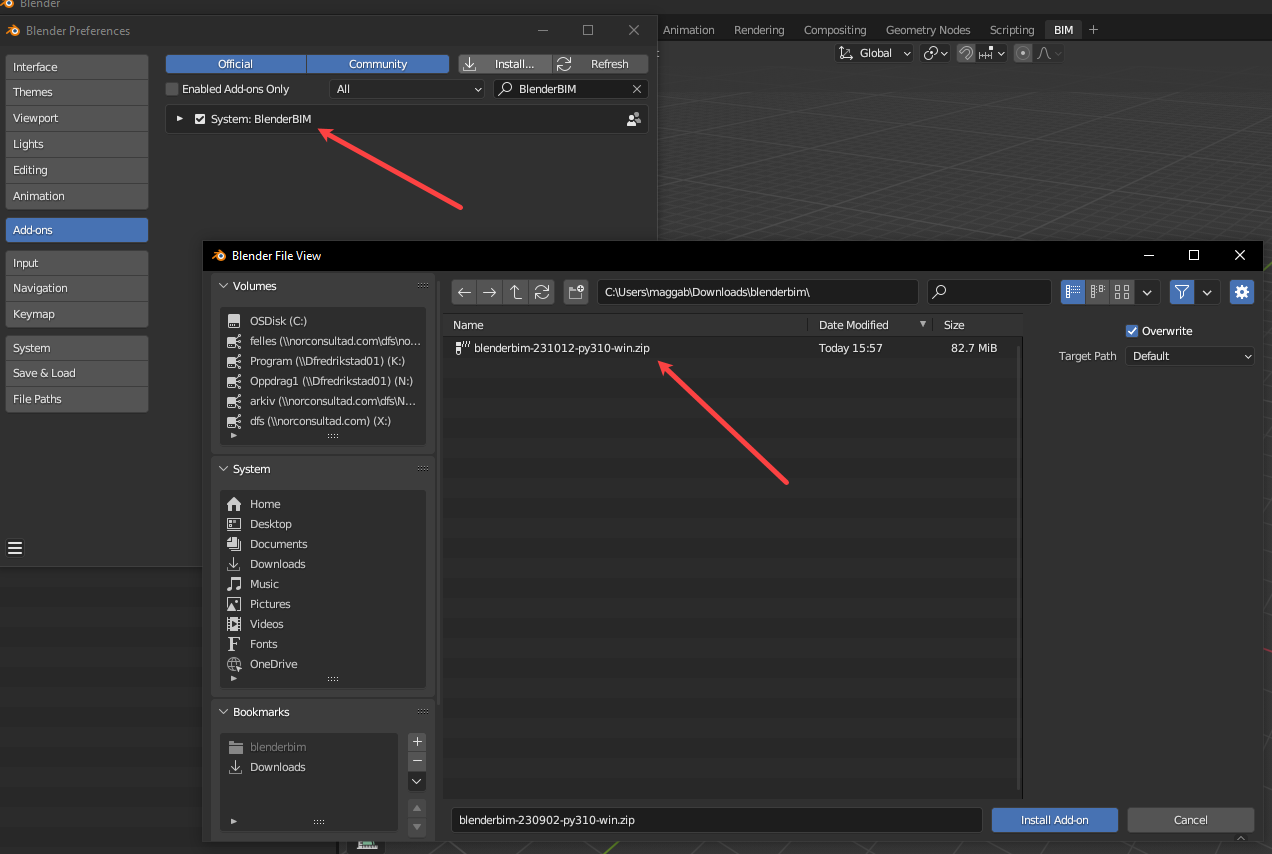
Then i want to install the blenderbim add on. Im currently trying to install blenderbim 231012.
When i try to install it, im not getting the import-export blenderbim. I only get system:blenderbim.
Have anyone got the same issue?
Tagged:
Comments
I think this is indented, and has been changed awhile ago.
With #NativeIFC, it's no longer a import/export process--as BB is writing/reading directly to the IFC file.
Thus, BB now opens and saves to an IFC file...
video: https://www.dropbox.com/scl/fi/bjs7ju9elxhz8w7tg25ao/2023-10-12_12-11-03_Blender_blender.mp4?rlkey=0gz69m3wtoo73tex0i3sg8qxh&dl=0
I dont have to import IFC file like you show in the video either
Dumb question, did you enable the plugin?

...
Or if you still don't see
Open IFC Project, download the latest BB here: https://blenderbim.org/download.htmlnevermind. I see you have a later version..

should still work, though.
weird. I dont understand why it dont work
Seeing "System: BlenderBIM" is normal. It was changed in the last release. It is also normal not to see anything in your import/export settings. You can just open / save IFCs:
You're probably looking at pictures / video tutorials that are outdated (and yes, our official documentation tutorial is outdated and we need to update it!)
I only get this.
It looks like your add-on is not enabled. Can you check that it is enabled in the preferences > add-ons tab?
I got the same as you now. i forgot the enable it this time after removing it xxx times.
Thank you.