

IFC standard for Project Management and beyond

I'm gonna leave this picture here and ask you how beautiful it is....
Not for the beauty of the colors or design or the visual it self, but instead of the beauty of the standard it self, the tools that allow you to work with it and explore the untapped potentials.
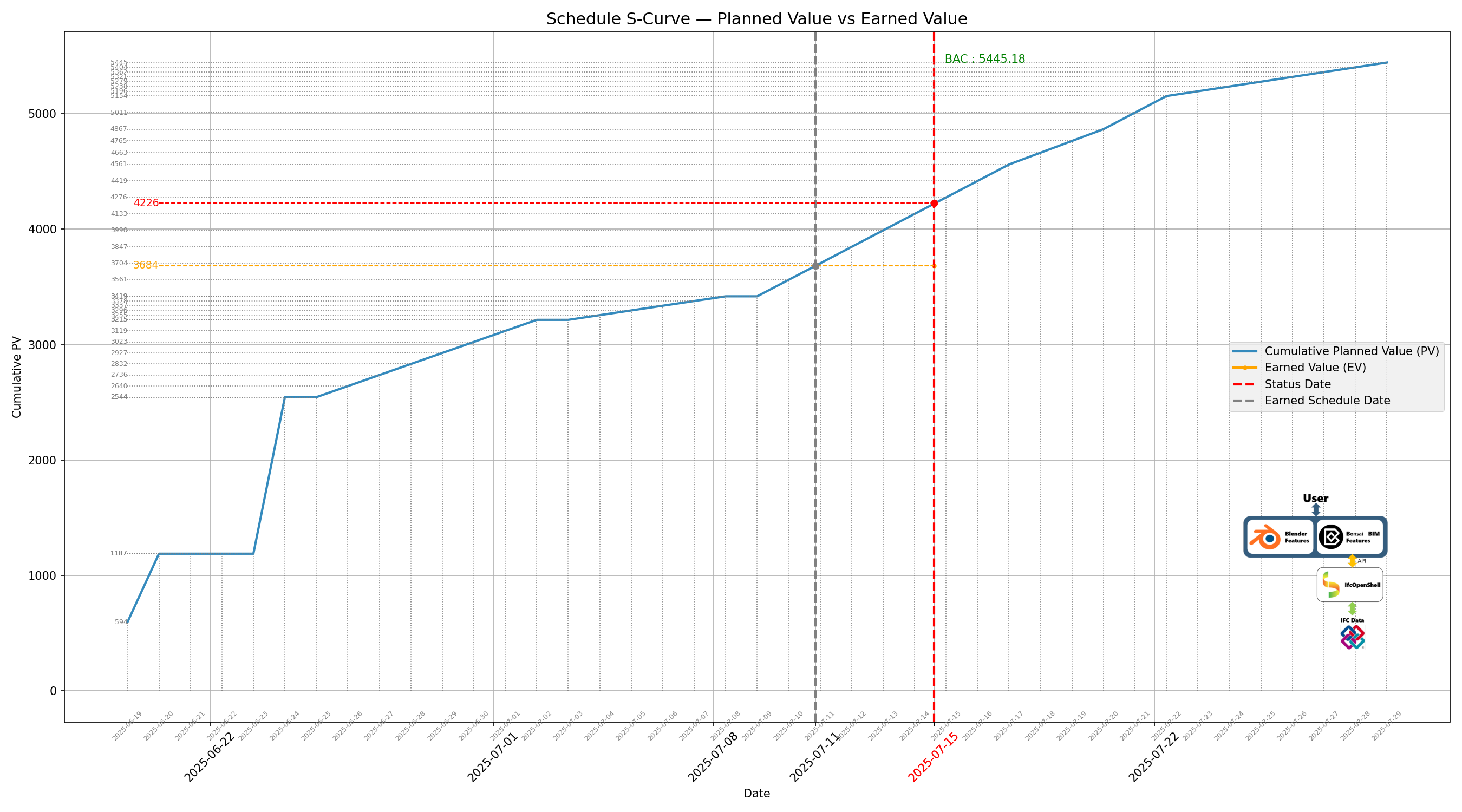
How many of you have considered using the standard for :
- Construction Work Situations
- Project Controls
- Resource Quantity take off
- Earned Value Analysis
- Getting the site personnel involved in BIM for their specific use case
- Time Series analysis
All of these generated and processed natively in IFC





Comments
@Dimitris
amazing stuff! this is gold in project management (and it's IFC compliant..)
it would be nice if you could share the workflow to produce such a beautiful S-curve chart
or at least the basics
thanks a lot
@steverugi
Thank you, yes I intend to provide the workflow as soon as I finish the use case
Keep you posted
i wish i knew what i was looking at. ha.
looks cool though. :)
Still working on the POC and I would like to share with you the following resources.
I am using IDS for schedule and task data validation and I would like to get your opinions on other type of properties that in your opinion would be good to be included in the data validation test.
please find bellow the IDS file as well as a printout from the test in a small example.
One thing that I could observe is that the entityTaskTime doesnt include a GUID so when having a report from IDS you cannot quite identify for which task is the entity TaskTime refering to. To get around this I have populated the TaskTime name with the task GUID it is refering to so the IDS report and in extension the BCF report have identifiable task entities where the issues rely.
Really looking forward into your thoughts.
Thank you
@Dimitris
did you try with
model.get_inverse(task_time)? it returns all entities with inverse relationshipsince there is only one IfcTaskTime assigned to an IfcTask in the returned list, you can match it with the following (tested) script:
then you can test it with:
as reported in the function explanation it could be a slow process but maybe practical in this case?
PS credit to ChatGPT5 for the pythonic simplification of the function
I'm not sure you can use
allow_duplicate=Falseto return a set, to avoid theis_a("IfcTask")but might be worth a try?Hi @steverugi thank you for your input,
With IfcOpenShell you can achieve this, however I was referring to IDS as means of validation.
Unfortunately from what I understand IDS at the moment (maybe in versions to come?) doesn't support inverse relations to be defined in the applicability facet.
As mentioned above,
The workflow has been presented at the buildingSMART Romanian Chapter where I had the opportunity to showcase this among others to @SigmaDimensions
Bonsai Scheduling and Costing Workflow from resource built ups
Hi everyone,
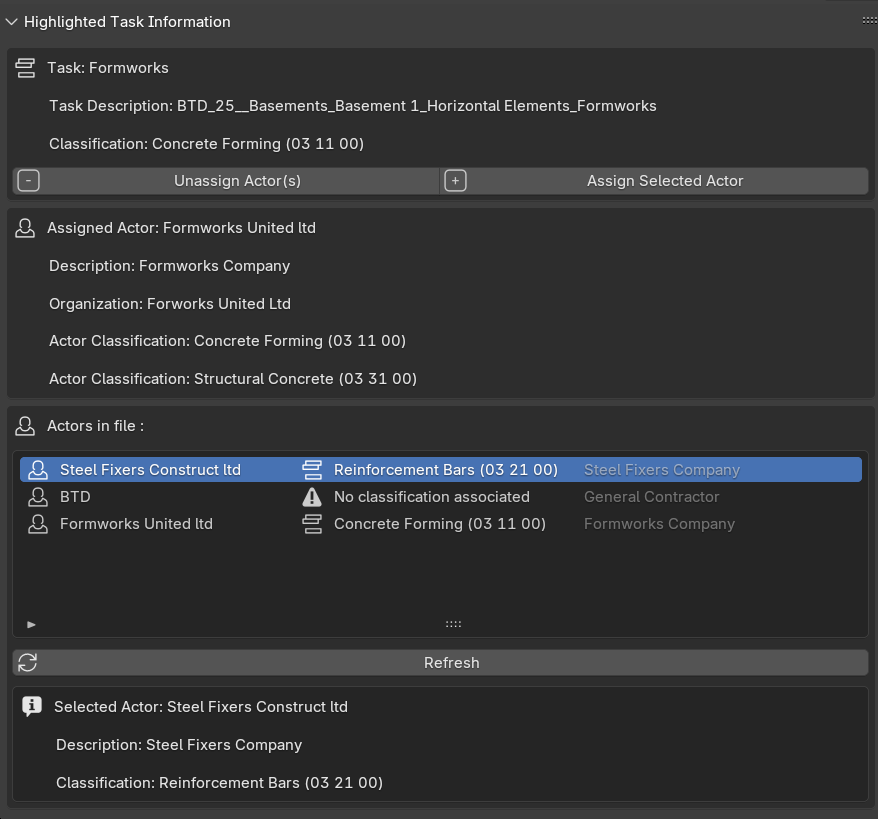
I have crafted a panel for Bonsai on the 3D view to help with the Task information Classification and assigned Actors
you can grab the script for the repo for testing
https://github.com/DimitriosThe/Bonsai-Bim/blob/main/README.md
If you want to upvote the feature
https://github.com/IfcOpenShell/IfcOpenShell/issues/7427
What you can do with the Panel:
WIP Update
So as you will observe I've gone a lil bit further
Now you can see further more information about the task and the resource assigned to the task.
You can:
See cost per U.M. of the assigned resource of the task
Assign Resource Actor (which will generate also a new Actor specific resource and replace the assigned resource of the task to reflect the actor)
Unassign Resource actor (WIP to get the resource back to the "Actor neutral State" and assign that to the task
Next step is for the panel to assign and unassign Actors on the resource level by selecting a resource and assigning the Actor
TBC
WIP Update
grab the version from : https://github.com/DimitriosThe/Bonsai-Bim/tree/main
Upvote (Thumbs up): https://github.com/IfcOpenShell/IfcOpenShell/issues/7427
BL_PNL_ACT_TASK_ACTOR_.py
####
Shows:
The previous panel might in its own way be somewhat confusing when someone considers that an Actor can be applied to a Task, a Resource, or even an Object
As such and to limit the confusion I've made a simplifying form in which the Actors are assigned at the Task level only.
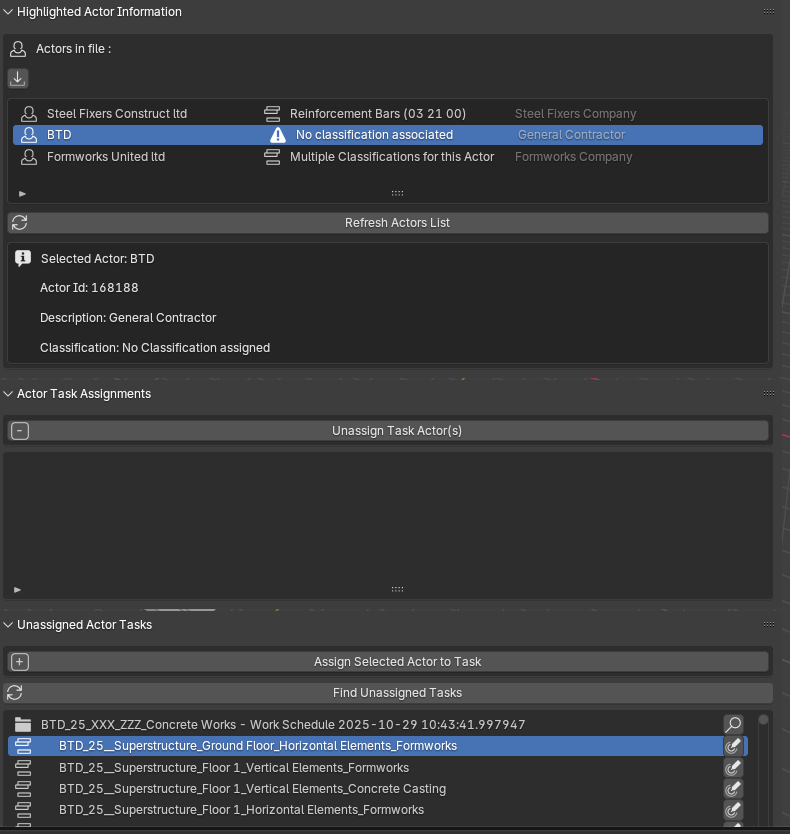
grab it at : https://github.com/DimitriosThe/Bonsai-Bim/tree/main/actors_tasks
And as so you now have the following features:
Select them from a list to show further information, such as :
By selecting the actor, the "Actor Task Assignments" panel is populated with the tasks the selected actor is assigned to
Further developing this panel could provide a nice use-case for Construction management of subcontractors where also references to Contract documents could be also populated for each subcontractor/ task from within the model
let me know what you think
Cheers,
I have been contemplating the idea of data drops with respect to Construction/ Project Management, and as such placed the following question:
What if you could exchange Costing and Scheduling Data without the Geometry using the IFC Standard?Quick answer : Yes , you can by tweaking
The
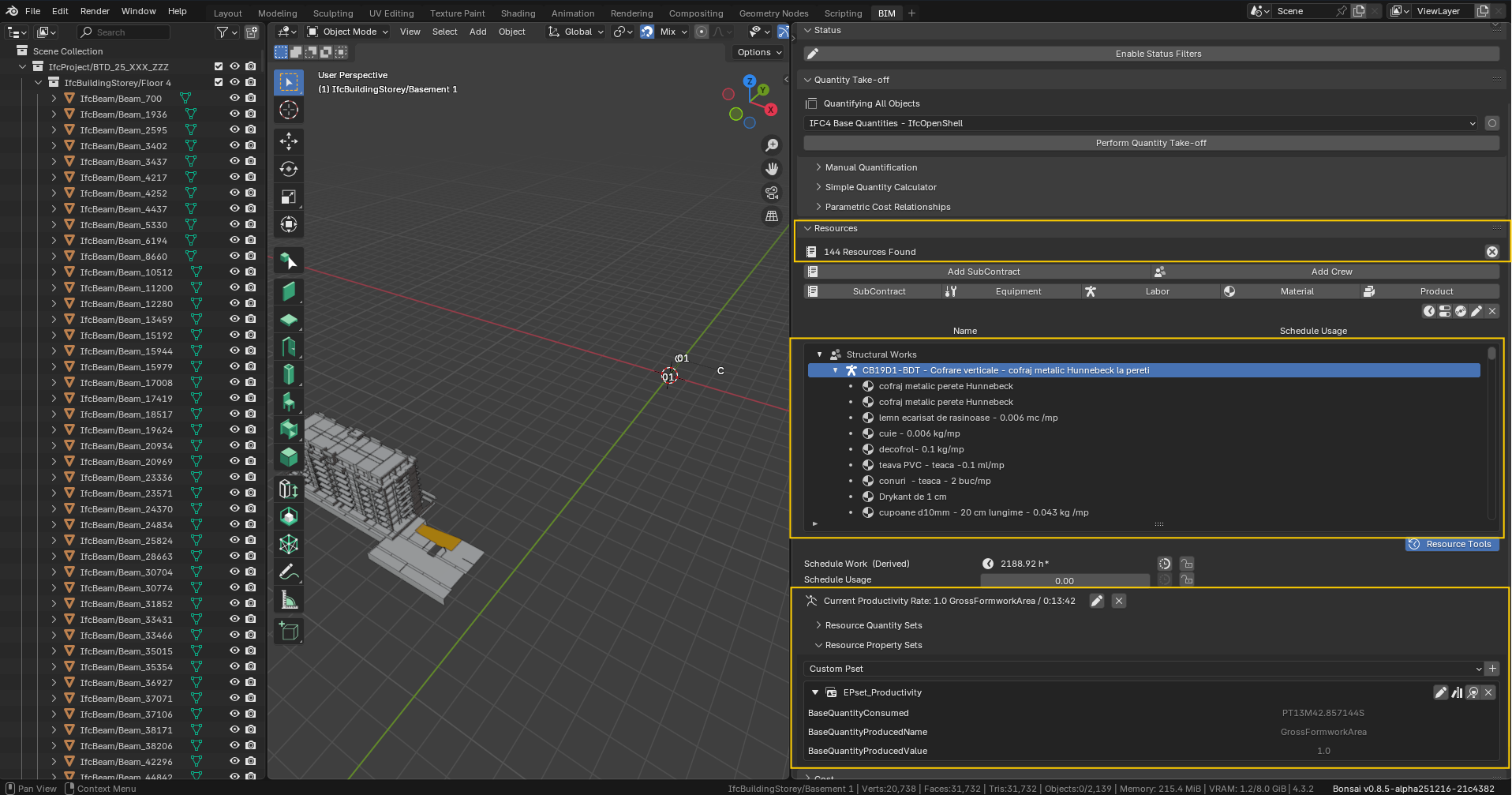
IfcPatchandExtract Elementsrecipe is the solution and as such I have tweaked it to serve this scope. See the example that follows:So here we have a project that includes resource buildups. The idea would be to be able to extract only these resources and share them as a
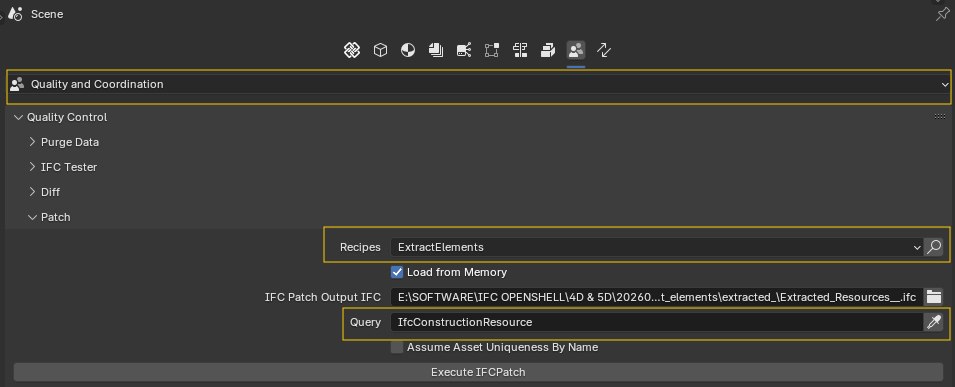
libraryfor resources to be used on other projectsAs such by applying the
IfcPatchExtract Elementsrecipe with the queryIfcConstructionResource(of course the query can be further optimised for specific resource buildups etc)we get the extracted elements file that:
Include only the resource builtups without any geometry, however with all the necessary properties and information (Classifications, Property Sets, Productivities etc). The generated file can then be used as a
Project Libraryto "transfer" these resource buildups to other projects to be used.And here is the result for the
Cost Schedule:Again the resulting file contains the
Cost Schedulewith all theResourcesandProductsand theirPropertiesassigned to theCost Items, however without anyGeometry. Where can this be useful? Well I can quickly think of the following uses:Project Librarywith respect to Cost BuildupsProject Costsbenchmarking filesAnd the following is the
WorkScheduleexample:In the
Workschedulefile you have theResources,Productsassigned,Calendars,Task Relations,Task Property SetsandElements Property SetsUses:
I would like to have your comments / ideas on the aforementioned and if you find them usefull as a feature in Bonsai.
Cheers
@Dimitris
yes, IFC as cost/plan schedule exchange format (beyond their underlying geometries) is something that deserves much more popularity or a simple app on its own
thanks
Thank you @steverugi ,
There is so much potential, and I would really like to see more people getting interested in implementing Costing, Scheduling and Resource management workflows within Bonsai, getting ideas and opinions pushing the envelope in an integrated lifecycle approach of using OpenBIM in AECOM industry.
FYI
For those who are interested in giving it a try on the mentioned above 'extract elements' recipe, you can do so by installing https://github.com/falken10vdl/bonsaiPR/tree/v0.8.5-alpha2603120735 from @falken10vdl bonsaiPR
Cheers,
Next up
Resource Requirement GraphHaving all these information imbedded within the file one can start utilizing them for representations of resource graphs either for 'Construction Phase' or even 'Operation Phase' of assets.
As such the resulting graphs can help actors realize the resource requirements at any given point in time throughout these phases any validate against real site/ operational conditions.
This of course is the precursor for
resource levelingandresource smoothingactivities as well as LOB graphs and Schedule tasks clashing rulesActor assignment, Construction Management and Scheduling
Below is a demo of a POC for information grabbing from Construction Management processes and importing information to the Work Schedule as well as populating Construction Processes Documentation through the Standard
https://canva.link/a77drpi1g8j4z51
Following recent days I have been thinking on a panel for Bonsai with regards to model validation for Costing (and in the near future Schedule) use case / workflows.
As such I have been working on such a panel that would be quite beneficial in my perspective for the said use case.
What is included?
I have uploaded a video showcasing these features.
Would appreciate the feedback