

Blender + Bonsai Start up Time

Not the highest priority ... but
Blender with all my AddOns and Extensions (feels like about 50 ?), on my M4 MBP starts in about a second, which nowadays feels like instant. Which is very impressing for a 30 year old Software.
But as soon as Bonsai is installed and activated, it is more like about 10 seconds.
(On my aging Windows PC with a Ryzen 3950X astonishingly not that much slower)
And by far not as bad as most of my other commercial CAD/BIM bloatware - which once also was about that fast before it got mature (more like 30-60 seconds).
So my questions is, until Bonsai hits a 1.0 version, are there any (low hanging fruit) options to accelerate the startup time in the future ?
I am aware that Bonsai is already a nearly complete (vertical) BIM App on top of Blender, but would like to know if there is a realistic potential or would be completely tedious or mean the need to rewrite it in C or Assembler or such unrealistic things ....


Comments
BTW,
why does Blender with Bonsai can start so much faster on Linux (ElementaryOS) than on macOS ?
(Blender without Bonsai installation starts instant on Mac. With Bonsai it feels like 30 s)
Bonsai needs just a hand full of extra seconds on Linux - on an outdated Ryzen 3950, with far lower single core speed and memory throughput than my M4 Max.
I must say I've noticed this too. There is a slowdown, but with Linux, the slowdown is minimal. On Windows, it's noticable.
Yes this is a thing, for sure.
Coz Linux is better! 😋
No argument. :)
I wonder... Has anyone found a way to easily profile Bonsai? Would be useful to be able to quickly zoom in on things that impact performance like that bim.activate_model issue.
Hmmm.... https://extensions.blender.org/add-ons/addonprofiler/
That looks useful. I might have a play with that.
Ooooo...
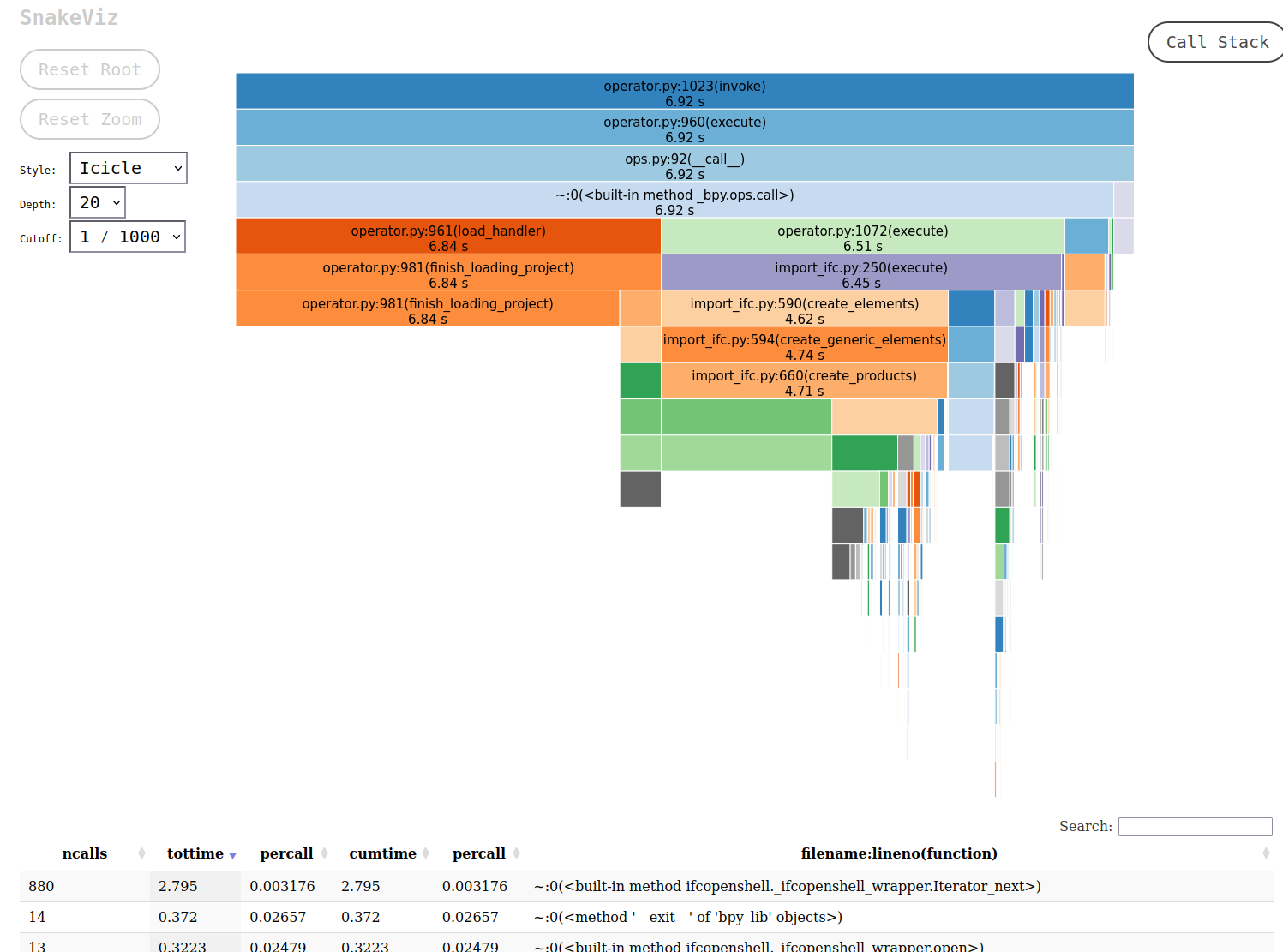
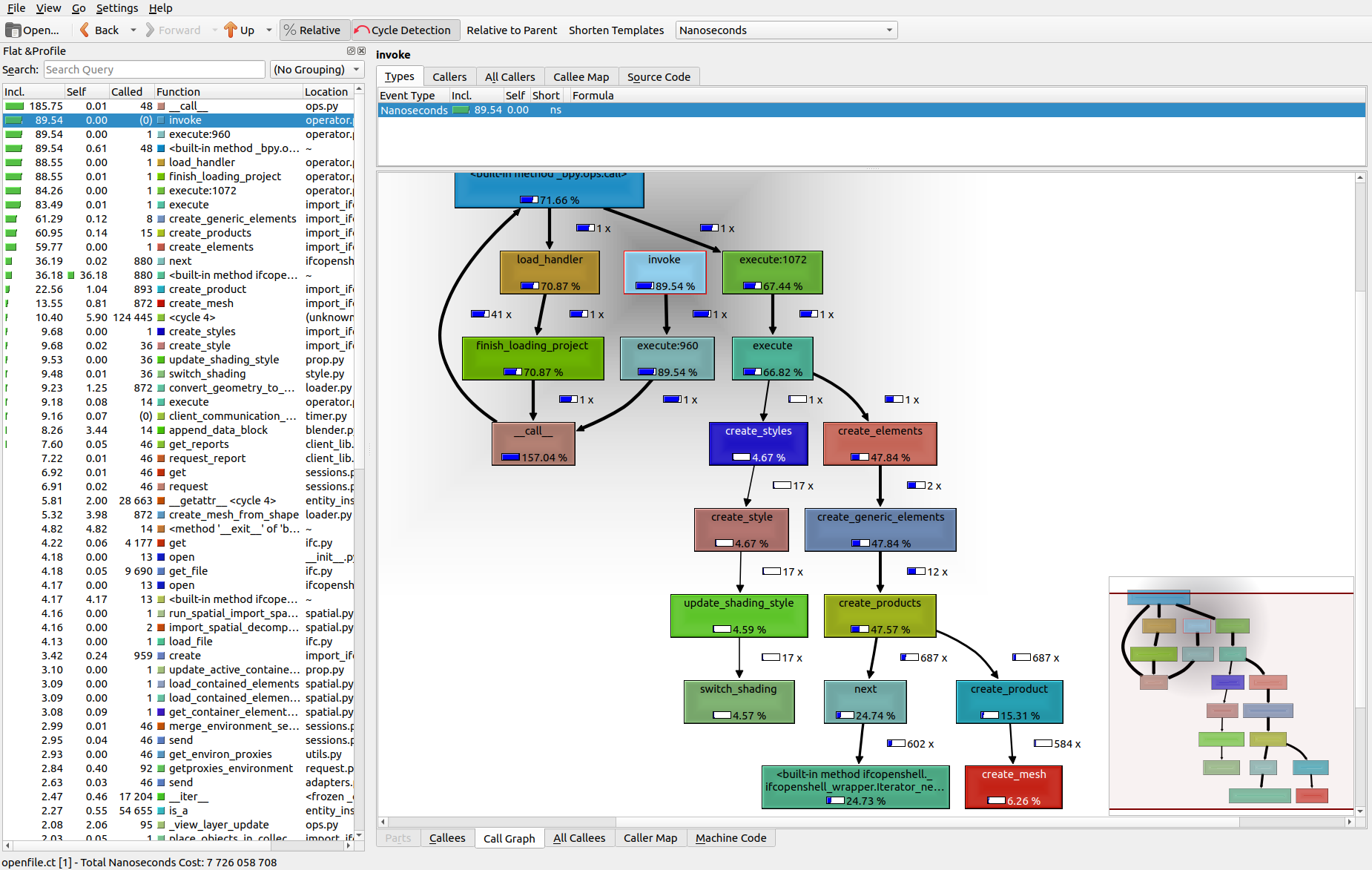
Very easy.
Install add on, quick capture as I open my project file. Save it, Then use snakeviz for a nice icicle graph (what? did flame graph get trademarked or something?):
Or alternatively, use pyprof2calltree and open it in kcachegrind which is pretty hardcore:
I started with "Bonsai" since it came as an IFC importer only.
For a few years I was always used that Blender needs nearly as long to start as my VW. It took some time until I tested and realized that it is only as long as BlenderBIM/Bonsai was installed. Well, I thought it is because Bonsai is a huge Plugin or vertical App.
On my Windows PC Bonsai started faster - as long as I was on my M1 Mini. I assumed that Apple does still some security checks each time when starting "Apps from the internet". If you start a new App the first time (or an update, or after an OS update) it will take really long time for security testing.
Now, to start Blender with Bonsai it needs :
PC 3950X 20s
M4 Max 16s
and
Linux 3950X 5s
Well, I really like the graph and the color choice of the addonprofiler :)
I can see that Bonsai would start much faster - if we could get rid of all these +.py parts of Bonsai ;)
But what does it tell to a developer, can you see already something wrong ?
BTW,
realized I can not activate Bonsai in my Manjaro Linux - as they install Blender 4.5.1 already in a Python 3.13 version !
2.13?!?!? Yikes. Why not just d/l Blender direct from the Blender site? Comes with it's own Python 3.something included.
While the graphs/profiles are useful, I'm not sure if there's a way to profile startup. Also, I don't use Windows, so that would be for someone else to investigate.
Yes, I didn't expect 2.13 EDIT : Sorry, I meant 3.13 of course .....
I don't use Manjaro, just for testing Linux since years. I already lost my Tumbleweed years ago while an ElementsOS update installation. That ElementsOS 7.1 is already broken and unable to do updates - but that Manjaro still lives.
I don't use it for Software testing though, as it is so cumbersome to install external Software via Tarballs and Console.
No clue how/where Bonsai is done/compiled for Mac.
But once saw an Apple developer video about XCode and lost of nice graphical testing and optimization Tools.
(I think this is a newer similar video https://developer.apple.com/videos/play/wwdc2025/247/?time=1067)
Just leaving these for reference that I found in my searching:
Tuna - Claims SnakeViz gets things wrong.
VizTracer - Looks like you can replay the calls over time. Cool looking, but requires it's own tracer class.