

Simple customization of panel layout to clear/arrange space for different workflows

During triage I have read a number of issues very interesting with asks about some sort of panel layout customization.
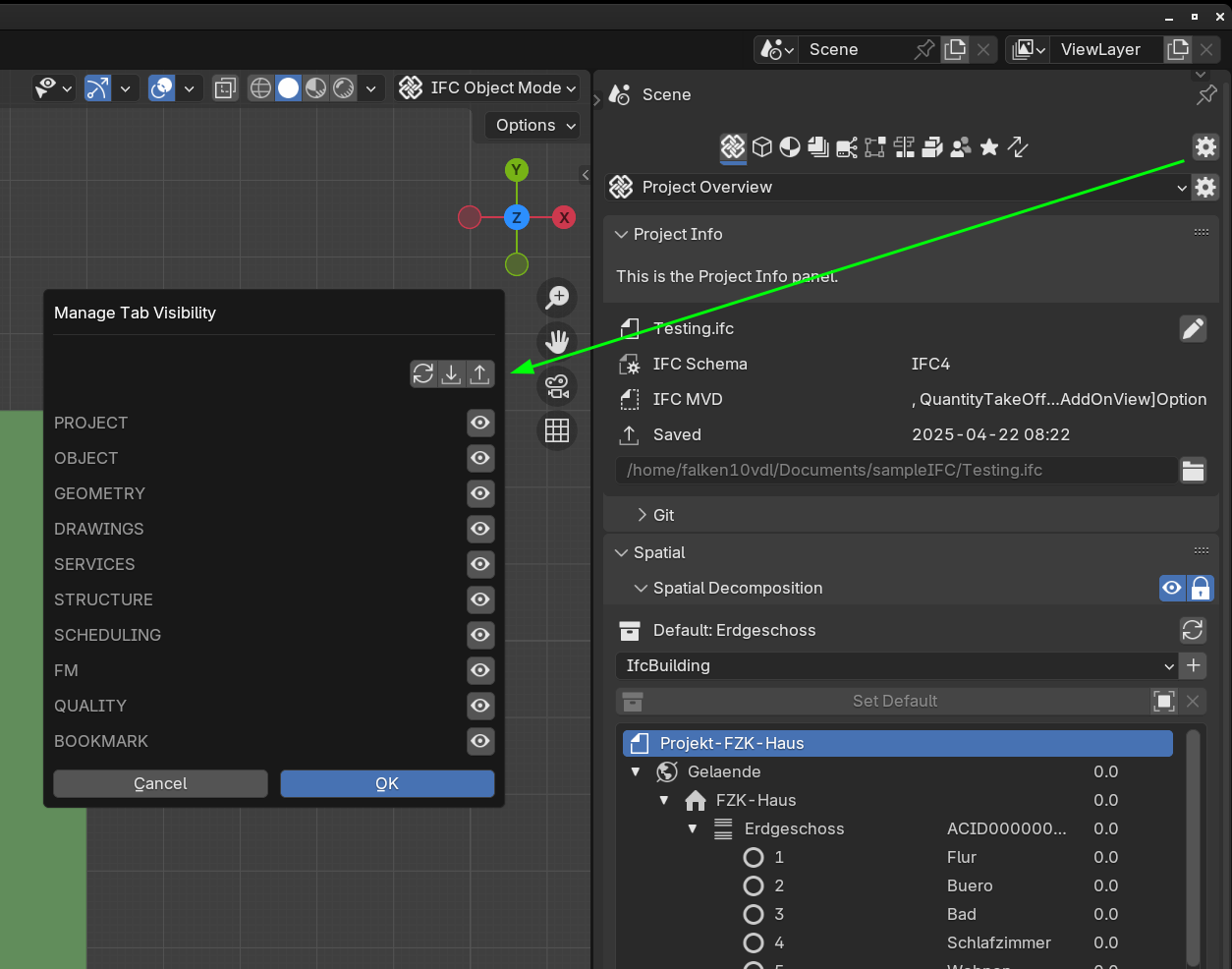
Here is a proposal for some simple customization of the visible panels in order to allow the user to have the best arrangement of panels based on the workflow to accomplish.
A gear icon is created in each tab. This opens a pop up where one can either click the "eye icon" to hide the panel or the "star icon" to move it to the "BOOKMARK" tab.
Please take a look:
"
Probably next step is to save this to some .json file so the settings can be kept after restart
Let me know what you think.
Thanks!







Comments
Very interesting! Like the ability to hide things, because there's a bunch of stuff I have no idea how/when I would use. Some further suggestions if you haven't already done or thought of them:
1. Hiding whole tabs (i.e. Services and Systems, Structural Analysis, Facility Management)
2. Saving the reordering the existing panels within a tab, or in your favorites tab.
3. A "Reset to default layout" option.
@falken10vdl very interesting!
I remember there was an option in the past where user can enable/unable different panels, but i think it isn't available anymore..
I like the bookmark panel idea, it could be very useful!
Etymology of wiki
Lol thought I was on ChatGPT
Here with the proposal from @sjb007

The import/export is still WIP.
Thanks!
Excellent! Small suggestions:
Something like this, right?
Allocated 90% of the width to the left column (centered)
Let me get the loading/saving logic in place and I will submit a PR for review.
Thanks!
Here the updated proposal.
I am very new to Bonsai & Blender :) and I am an amateur programmer in python (used to make patches in assembler for Telco Switches...) so I have used scene properties (I guess blender's way) for the booleans to control the panels visibility and if they are in the bookmarks tab and a simple python dictionary with booleans for the tabs visibility. Sincerely I do not know what is best, pros and cons of using either one and best practice. Maybe the core developers could give a hint or point to some discussion between storing in blender's properties vs python's standard or even IFC properties (I have seen that for example arrays are stored in the IFC by means of properties. I do not think that UI info is something probably to store in IFC but who knows ;) ).
Let me craft some documentation and I will submit a PR for review.
Thanks!
Here the PR User UI customization #6638 with the doc updating the interface part for your review.
I attach the updated doc.
Thanks!
Interesting. I like that it doesn't add too much clutter to the UI, looks streamlined. I think it's still reserved for power users or technical supervisors because newcomers won't know what they need or don't need before knowing what's in available in a panel. I think it makes sense having these properties stored in the Blend file rather than globally in the addon preferences, because different files may entail different workflows. However having a way to define presets or default values in the preferences would be a plus.
There was some time ago some parameters in the preferences that allowed to fine tune which panels were allowed, but it's been scraped when the whole UI was reworked to display most of the properties in the scene interface. There was some talks about enabling or disabling interface elements depending on the user workflow.
@Gorgious I completely agree. Probably, rather than a json file to store these settings a blenderfile (only storing the workspace data block?) could store this and the relative position of the panels within the TAB. When loading the IFC this could also load this UI info from that blend file if it actually exists (ex .bonsai_layout_blend).
Thanks!
@falken10vdl Great work! Thanks for sharing with the community.
How can I test this user UI customization?
@GerardT the PR is available to test. I will advice to setup a development environment that will allow you to fetch the PRs and test them.
Please take a look to https://docs.bonsaibim.org/quickstart/ide/windows_ide.html or https://docs.bonsaibim.org/quickstart/ide/linux_ide.html in chapter 15 (the last one :) ) you get to do that. It is a nice learning experience.
Anyhow this PR seems it is now fairly old. Let me rebase it to the current sw base.
Cheers!
The PR is rebased. Please take a look to teh pdf document aboce in the discussion for the documentation on how to use it
I appreciate for taking the time to rebase the PR to the current software base.
Amazing feature, great work @falken10vdl thank you very much for your contributions!