Script To Copy IFC PSet To A Blender Custom Parameter

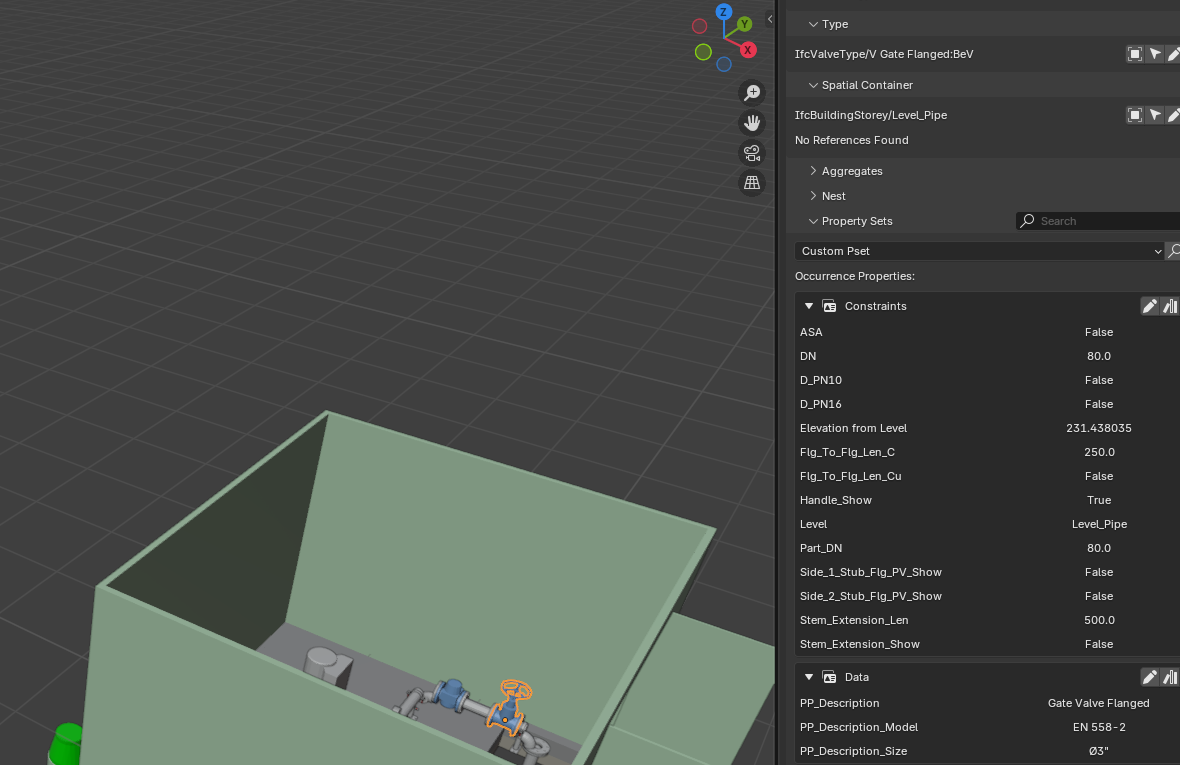
I have an IFC file with some IFC data. The PSet is called PP_Description. Is it possible to iterate through the IFC elements and when they have PP_Description present, create a Blender Custom Parameter with the same name (PP_Description) and the same value?
Comments

  • No reason why not. Ironically I created a PR that did the opposite of what you are asking for; Blender Custom Properties to Pset values. Maybe that will give you some clues...

    Bedson
  • Thanks for the link.
    I'm not a coder and I can't seem to get the correct imports for working with the IFC data....I'm trying to get an AI to help but it seems stuck on which imports to use too....
    `import bpy
    import ifcopenshell
    import ifcopenshell.api
    from ifcopenshell.util.pset import PsetQto

    Define the target PSet names

    TARGET_PSETS = {"PP_Description", "PP_Description_Model", "PP_Description_Size"}

    def add_custom_properties_from_psets():
    ifc_file = ifcopenshell.api.run("context.get_file", None)
    if not ifc_file:
    print("No IFC file found.")
    return

    # Iterate over all products in the IFC file
    for product in ifc_file.by_type("IfcProduct"):
        if not hasattr(product, "IsDefinedBy"):
            continue
    
        for rel in product.IsDefinedBy:
            if rel.is_a("IfcRelDefinesByProperties"):
                pset = rel.RelatingPropertyDefinition
                if pset.is_a("IfcPropertySet") and pset.Name in TARGET_PSETS:
                    blender_obj = ifcopenshell.api.run("blender.get_object", ifc_file, product=product)
                    if not blender_obj:
                        continue
    
                    for prop in pset.HasProperties:
                        if prop.is_a("IfcPropertySingleValue"):
                            prop_name = prop.Name
                            prop_value = str(prop.NominalValue.wrappedValue)
    
                            # Add custom property to Blender object
                            blender_obj[prop_name] = prop_value
                            # Optional: make it visible in UI
                            if "_RNA_UI" not in blender_obj:
                                blender_obj["_RNA_UI"] = {}
                            blender_obj["_RNA_UI"][prop_name] = {"description": f"Imported from {pset.Name}"}
    

    add_custom_properties_from_psets()`

  • When I run a simplified script to just report the value of one named PSet on one selected object, nothing is found depsite that Object having it's PSet name and value shown in Bonsai. Does Bonsai use different PSet Names under the hood (perhaps a prefix or suffix)?
    import bpy
    import bonsai.tool as tool
    import ifcopenshell.util.element

    class ReportPsetValue(bpy.types.Operator):
    """Report the value of PSet PP_Description for the selected object in the console"""
    bl_idname = "object.report_pset_value"
    bl_label = "Report PSet Value"
    bl_options = {"REGISTER", "UNDO"}

    def execute(self, context):
        obj = context.active_object
        if not obj:
            self.report({'WARNING'}, "No object selected")
            return {'CANCELLED'}
    
        element = tool.Ifc.get_entity(obj)
        if not element:
            self.report({'WARNING'}, "Selected object is not an IFC entity")
            return {'CANCELLED'}
    
        psets = ifcopenshell.util.element.get_psets(element, should_inherit=True)
        pp_description = psets.get("PP_Description", None)
    
        if pp_description:
            print(f"PSet PP_Description for '{obj.name}': {pp_description}")
            self.report({'INFO'}, "PSet value reported in console")
        else:
            print(f"No PSet 'PP_Description' found for '{obj.name}'")
            self.report({'WARNING'}, "No PSet 'PP_Description' found")
    
        return {'FINISHED'}
    

    Register the operator

    bpy.utils.register_class(ReportPsetValue)

    To use: Select an object, then run bpy.ops.object.report_pset_value() or search via F3

  • I've worked it out - the PSet is a collection. The Collection is like a dictionary of the Parameter Names and Values (Revit Project Parameters with their Values). All working now.

    sjb007theoryshaw
Sign In or Register to comment.