Is the interior cutout like a vertical column right the way through? Like a column or lift shaft for example? If yes, and you use an extruded profile to define your space, then you can simply add a contained outline in the profile and a hole will be made.
If you want to be a bit more complex, you can go into "Ifc Item Mode" (1) and in the toolbar you can "Add Item" (2). Once you have multiple items, select two items (4), go to the Boolean section (3), and add (5) a difference, intersection or union. Note you won't see the effect until you escape back to Ifc Object Mode.
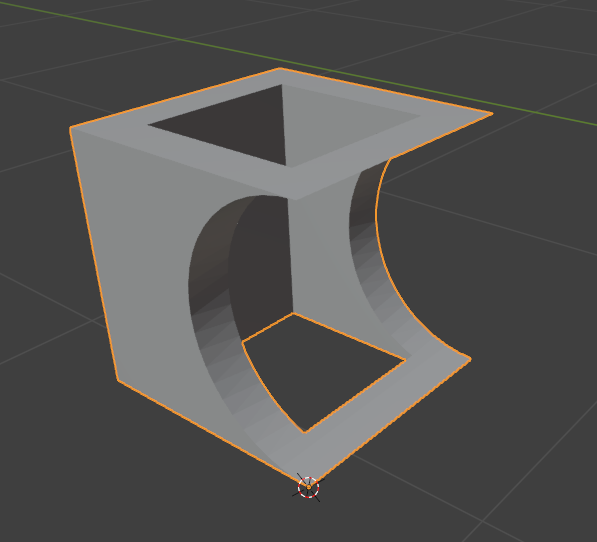
The square object uses the first single profile with a hole method, and then the second method to cut out a horizontal cylinder section, giving:
None of this is specific to IfcSpaces, although in this case I did create them as IfcSpaces.
@sjb007
Thank you for your response.
Yes, I want to create a duct inside the space.
I tried the method you mentioned, but when I create a Mesh Cube in Item Mode, it is not possible to change its dimensions to match the hole I want to create.
@Erfan_Hoss said: @sjb007
Thank you for your response.
Yes, I want to create a duct inside the space.
I tried the method you mentioned, but when I create a Mesh Cube in Item Mode, it is not possible to change its dimensions to match the hole I want to create.
@steverugi
I have an apartment space. I want to place a duct inside this space. In the end, I want to subtract the volume of this duct from the total volume of the space.
Therefore, it is necessary to have two spaces inside each other: one is the entire space, and the other is the duct space, which is inside the larger space and creates a hole in it to reduce its volume.
EDIT
forgot to mention that if you need an IfcSpace identifying the cavity of the shaft you can select its walls to get it, as shown in the video with the other walls
EDIT
forgot to mention that if you need an IfcSpace identifying the cavity of the shaft you can select its walls to get it, as shown in the video with the other walls
Yes, thank you.
However, this method becomes very time-consuming and difficult when the walls of the larger space have many breaks and are complex—especially if this operation needs to be repeated multiple times.
The method I explained in the video below is the same second approach that @sjb007 described.
If I proceed with this process, will it cause any issues or is it correct to do so?
both methods are valid
method 1: create a space with the T-tool using surrounding walls and subtract the volume of another solid using boolean
method 2: create a space using an extruded area solid, use internal polygon to define the cavity
using boolean in method 1 allows editing of the subtracting solid
using method 2 is useful if you just need to cut out a passing through element from a simple extruded volume representing the original IfcSpace
it's up to your preference to decide which does the best job for you I guess, maybe more experienced modelers will step in soon
PS the sound of your video is too low I didn't fully grasp what you said, sorry
both methods are valid
method 1: create a space with the T-tool using surrounding walls and subtract the volume of another solid using boolean
method 2: create a space using an extruded area solid, use internal polygon to define the cavity
using boolean in method 1 allows editing of the subtracting solid
using method 2 is useful if you just need to cut out a passing through element from a simple extruded volume representing the original IfcSpace
it's up to your preference to decide which does the best job for you I guess, maybe more experienced modelers will step in soon
PS the sound of your video is too low I didn't fully grasp what you said, sorry
Your explanation was very helpful and it really helped me.
I'm very thankful to you


Comments
Is the interior cutout like a vertical column right the way through? Like a column or lift shaft for example? If yes, and you use an extruded profile to define your space, then you can simply add a contained outline in the profile and a hole will be made.
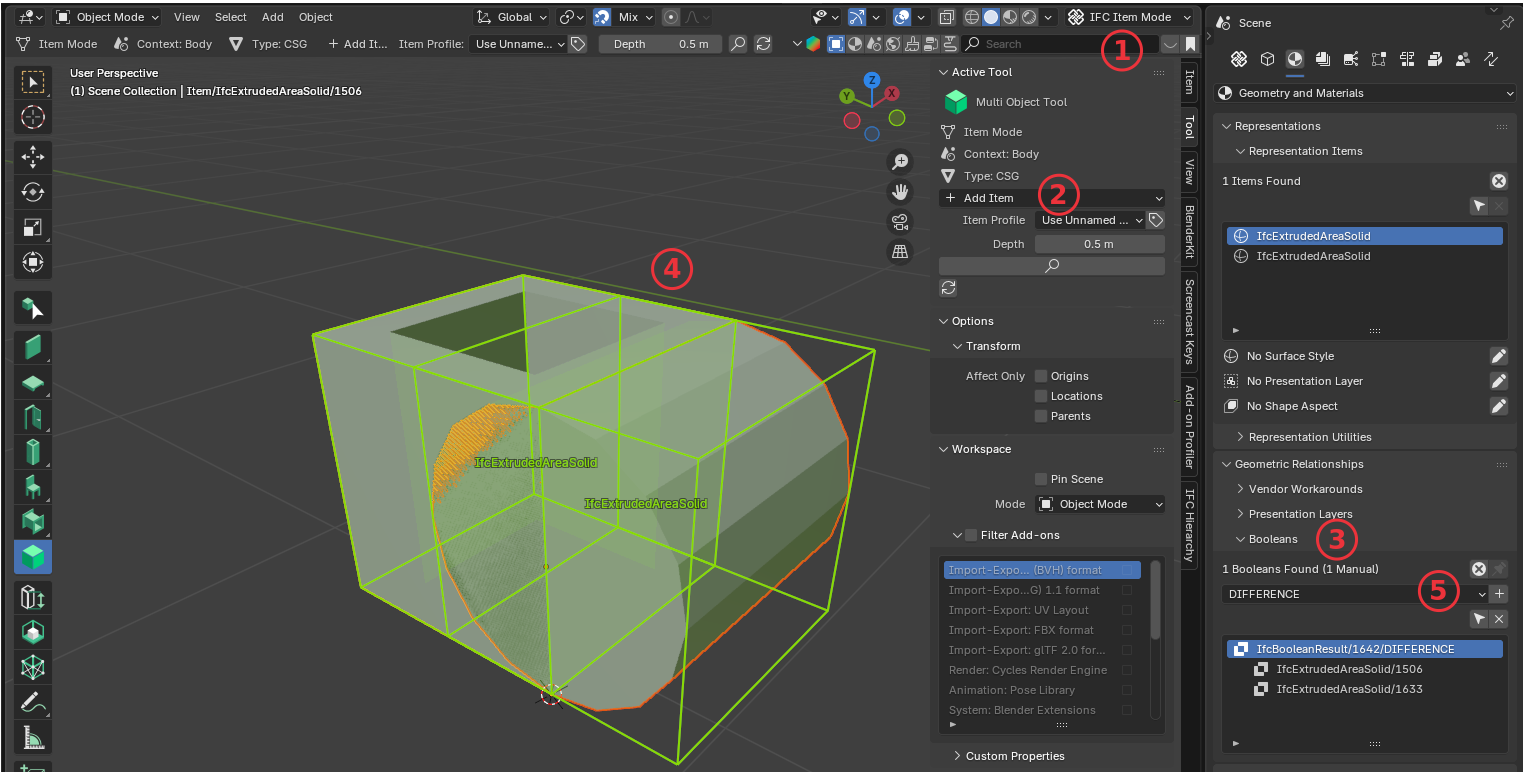
If you want to be a bit more complex, you can go into "Ifc Item Mode" (1) and in the toolbar you can "Add Item" (2). Once you have multiple items, select two items (4), go to the Boolean section (3), and add (5) a difference, intersection or union. Note you won't see the effect until you escape back to Ifc Object Mode.
The square object uses the first single profile with a hole method, and then the second method to cut out a horizontal cylinder section, giving:
None of this is specific to IfcSpaces, although in this case I did create them as IfcSpaces.
@Erfan_Hoss
out of curiosity, what are you trying to achieve? If you can give an example to understand your request better
thanks
@sjb007
Thank you for your response.
Yes, I want to create a duct inside the space.
I tried the method you mentioned, but when I create a Mesh Cube in Item Mode, it is not possible to change its dimensions to match the hole I want to create.
Please share a snapshot of it, thanks
@steverugi
I have an apartment space. I want to place a duct inside this space. In the end, I want to subtract the volume of this duct from the total volume of the space.
Therefore, it is necessary to have two spaces inside each other: one is the entire space, and the other is the duct space, which is inside the larger space and creates a hole in it to reduce its volume.
There are two spaces. one us a duct that is inside and second is the bigger space.Here is the snapshot
Looks like the first approach by @sjb007 is what you need, in case I can share a gif soon
Thank you so much
I would appreciate it if you could send the gif.
@Erfan_Hoss
see if it helps:
EDIT
forgot to mention that if you need an IfcSpace identifying the cavity of the shaft you can select its walls to get it, as shown in the video with the other walls
Yes, thank you.
However, this method becomes very time-consuming and difficult when the walls of the larger space have many breaks and are complex—especially if this operation needs to be repeated multiple times.
The method I explained in the video below is the same second approach that @sjb007 described.
If I proceed with this process, will it cause any issues or is it correct to do so?
@Erfan_Hoss
both methods are valid
method 1: create a space with the T-tool using surrounding walls and subtract the volume of another solid using boolean
method 2: create a space using an extruded area solid, use internal polygon to define the cavity
using boolean in method 1 allows editing of the subtracting solid
using method 2 is useful if you just need to cut out a passing through element from a simple extruded volume representing the original IfcSpace
it's up to your preference to decide which does the best job for you I guess, maybe more experienced modelers will step in soon
PS the sound of your video is too low I didn't fully grasp what you said, sorry
Your explanation was very helpful and it really helped me.
I'm very thankful to you