

[WIP] Proposal for Advanced Interactive 4D Planning Features in Bonsai BIM

Hello everyone,
For the past few months, I've been working on extending the 4D capabilities of Bonsai BIM. My goal is to move beyond static video rendering and create a more interactive "workbench" for real-time project planning and analysis.
I recently discussed this work with Dion Moult, and he encouraged me to share my progress here to get feedback from the community. The implementation is currently under review, and I'm eager to hear your thoughts on the approach and technical decisions.
The Problem I'm Addressing:
Traditional 4D videos are passive. They don't allow for on-the-fly analysis, filtering, or deep-diving into the schedule-model connection, which are critical for effective planning meetings. When someone asks "Can we see what happens if we delay this by two weeks?" the current workflow requires re-rendering, which kills decision-making momentum.
Implemented Solution (Proof of Concept):
I've developed a proof-of-concept with the following capabilities:
Core Interactive Features:
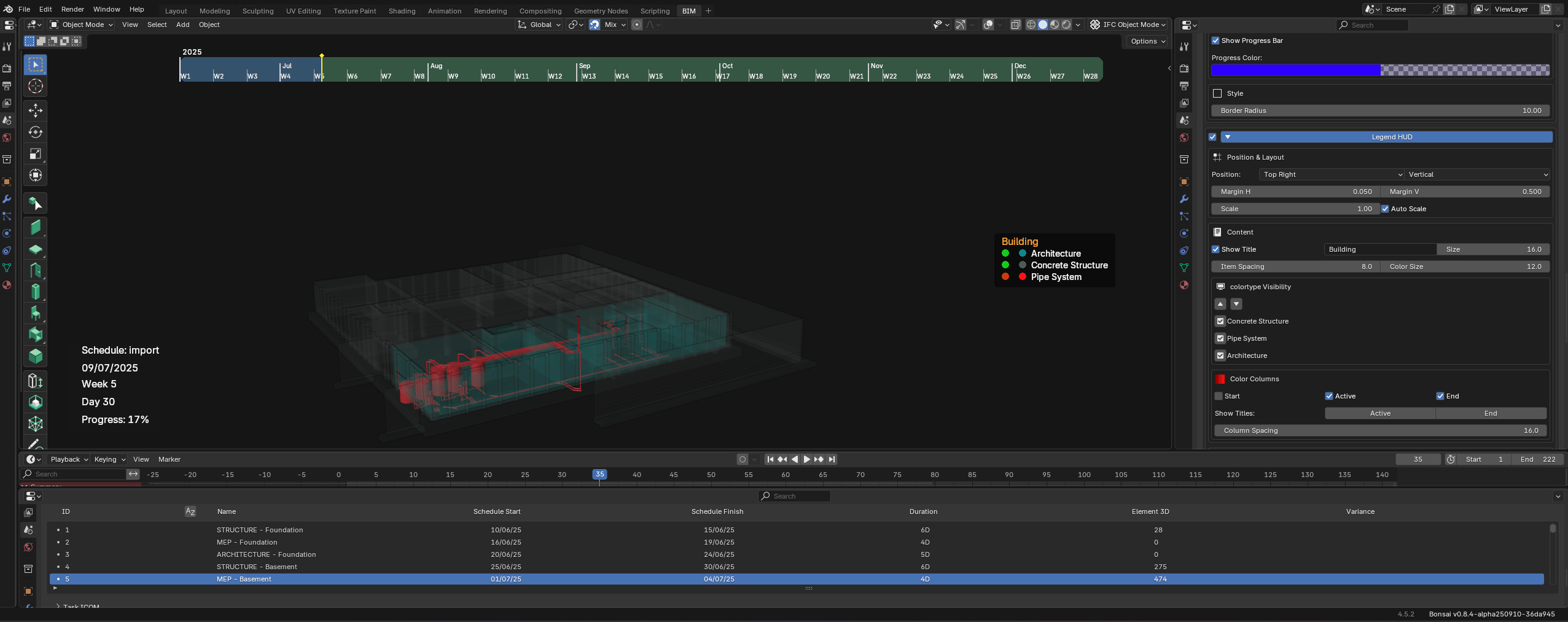
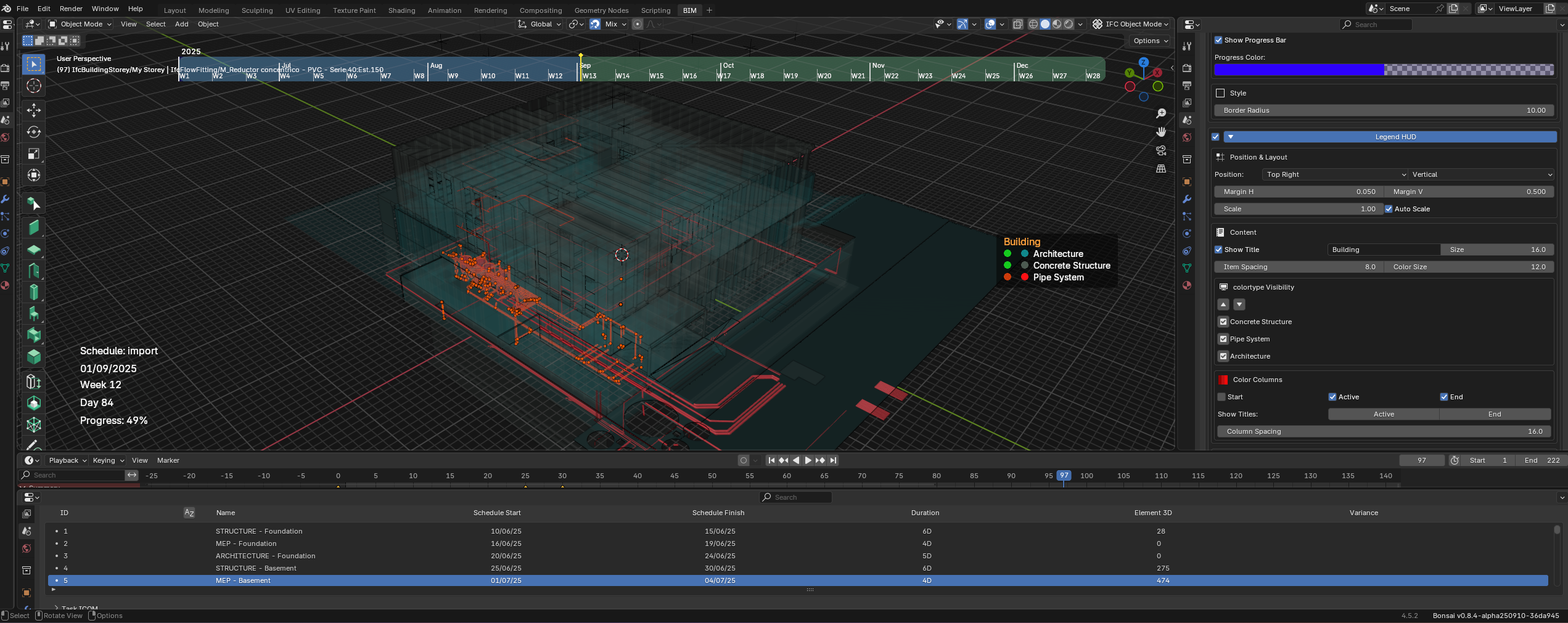
Real-time Timeline Scrubbing: Navigate instantly to any day or week without re-rendering (achieved through SequenceCache with NumPy vectorization)
Dynamic Filtering System: Isolate elements based on task properties (status, discipline, type) in real-time
Two-way Model-Schedule Bridge: Click an element in 3D → see its tasks in schedule, and vice-versa (using GlobalId lookups)
3D Task Integration:
Automatic 3D element selection on task click
"Element 3D" column showing element count per task
Reverse lookup: select element → find all related tasks
Filter tasks by element count
Bulk selection operators for multi-task workflows
Enhanced Gantt Visualization: Interactive web-based timeline
Advanced Features:
ColorType Management System: 13 predefined types (CONSTRUCTION, DEMOLITION, OPERATION, etc.) with unlimited custom groups and priority stack
Camera Orbit System: Automated circular camera paths for presentations
HUD Overlay System: Professional overlays (Legend, Text, Timeline) for documentation
Variance Tracking: Compare Planned vs Actual schedules
Snapshot System: Capture and restore static construction states
Copy 3D: Copy complete schedule configurations between IFC files (matches by task Identification, includes PredefinedType, ICOM assignments, and ColorType configurations)
Sync 3D: Bulk-assign elements to tasks via IFC property set values (e.g., 5000 elements in seconds by matching property values to task identifications)
Animation Baking: Export-ready keyframes for external rendering
Performance Improvements:
50-100x faster computation through NumPy vectorization
2x faster animations (20s vs 40s for 8000 objects)
Batch processing to prevent UI freezing
Optimized IFC element lookup caching
Video Demonstration:
I've created a short video showing these features in action from a user's perspective
Current Implementation Status:
The implementation is functional and has been tested with projects up to 8000 elements. The code is currently under review and not yet publicly available, but I'm happy to discuss the technical approach and architectural decisions.
What's Working:
✅ Core performance infrastructure (caching, vectorization, batch processing)
✅ All interactive features (scrubbing, filtering, two-way bridge)
✅ 3D Task system with automatic selection and element counting
✅ ColorType system with group management
✅ Camera, HUD, and snapshot systems
✅ Bulk assignment tools (Copy 3D, Sync 3D)
Seeking Community Feedback:
I'm particularly interested in feedback on these architectural decisions:
Performance & Scalability:
Current approach uses NumPy-based caching with pre-built lookup tables for instant IFC relationship access. What are realistic IFC size limits for this strategy?
Better approaches for handling 10,000+ element projects?
GlobalId lookup for the two-way bridge - is this efficient enough at scale, or should I explore alternatives?
The 3D Task element counting system processes all tasks recursively - any concerns with deep task hierarchies?
Data Architecture:
5. ColorType groups stored as JSON in scene properties - any concerns for version control or alternatives you'd suggest?
6. The caching strategy uses multiple layers (SequenceCache, IFCLookupOptimizer, AnimationPerformanceCache) - is this over-engineering or good separation of concerns?
7. Copy 3D matches tasks by Identification string - are there edge cases where this could fail?
Integration Considerations:
8. Which features would be most valuable for potential Bonsai integration?
9. Are there specific Bonsai coding conventions or architectural patterns I should align with?
UI/UX Trade-offs:
10. Timeline scrubbing: should it update continuously during drag or only on release? (performance vs. responsiveness)
11. Should filter states persist across Blender sessions?
12. 3D Task automatic selection: should it work with both outputs AND inputs, or just outputs?
Technical Approach Summary:
The system is built around several key components:
SequenceCache: NumPy-based pre-computation of all animation states
IFCLookupOptimizer: Pre-built lookup tables for instant IFC relationship access (task→products, products→tasks bidirectionally)
ColorType System: JSON-based configuration with priority resolution and group stacking
3D Task System: Real-time element counting with recursive task processing, automatic selection callbacks, and reverse lookup capabilities
Batch Processing: Using bpy.app.timers to avoid blocking UI
State Management: Comprehensive snapshot/restore system for UI state preservation across all operations
Next Steps:
The goal is to contribute valuable interactive planning capabilities to the open-source community.
Any feedback, suggestions, or concerns are extremely welcome. I'm particularly interested in hearing from anyone who's worked with large-scale 4D implementations or has insights on Blender performance optimization with massive IFC files.
Thank you for taking the time to review this!
Federico Eraso!








 and 14 others.
Comments
I'm not your target audience so I can't give you useful feedback on the features. As someone who just tried to watch the demo video I think I can give feedback there:
1. The music is unnecessary, and adds nothing.
2. Go slower and explain what is happening with a voice over. The video whizzed around so fast clicking and spinning like a maniac that I have no idea what you did, or why. It looks pretty, but bewildering. I watched a second time, and I still can't really follow. Either the video has been sped up, or you need less caffeine. :-)
sjb007, I´m new here, very thank you for you feedback
👍
Hi!
I appreciate the work that you've put into this project! My advices would be:
These two features are now merged upstream:
@sjb007 sa
same here
with the difference that I have planning background, making me somehow part of the target audience, but unfortunately demo and writeup didn't help me (got lost somewhere there)
hopefully a new demo/writeup will clarify that, thanks
I can help provide some context. @Federico_Eraso approached me showing some new features he had implemented related to the 4D module. He works as a BIM consultant around 4D modeling and these features are well established workflows present in other 4D tools (Navisworks, Synchro) that he is familiar with, but Bonsai does not have them. This will help bring Bonsai catch up towards feature parity with other tools.
English is not his first language, and he is also not a coder (AI helped). The current code is published here https://github.com/Svisuals/4D_Bonsai which exists as a series of files which need to be copy pasted / replace the current Bonsai code. Through screenshare, I've seen a demo of some of these features at a high level ... and this a huge amount of work accomplished! Due to the volume, I encouraged him to make a bullet list of the full featureset so that we can incrementally merge them. Due to limitations in English it may not be possible to get a comprehensive explanation of all the features, but there are some we can glean from the screenshots and video, such as viewport HUD timelines, instant feedback whilst scrolling timeline, variance date calculations, task based filtering (the 4D equivalent of our element filters), a bunch of new controls around colourschemes (important in visualisation), and so on.
Due to the volume of changes and nature of AI code, we'll be incrementally merging this project.
thanks @Moult for the useful info, much appreciated
for others, I searched the term 'HUD' so you don't have to do it :D
Thanks, @dionmoult for the great explanation of the development process. My goal was to create a functional proof-of-concept to test and validate the vision for these interactive features.
I'm thrilled that the core idea is solid enough to be taken seriously and implemented properly by the core development team. Looking forward to the community's feedback as this moves forward!
Dear @Federico_Eraso
Thanks in advance for your work
I'd greatly appreciate if, as your feature gets more and more implemented in Bonsai, a brief description of its use were to be shared, so to give you proper feedback.
Looking forward to it
Cheers
@Federico_Eraso
Incredible work so far! I’ve used synchro, Navisworks, and fuzor professionally before and would love if we can get Bonsai to be a serious competitor with them!
The timeline scrubber is awesome!
Personally I think the interface of blender really hinders a lot of the needed functionality. Synchro was a minimum two monitor program mandatory. Fuzor had a more minimal interface which is good for focusing on the visual aspect and just enough to tie tasks to objects.
One thing I’d love to see is a focus on the video editing aspect of 4d animations. Like text call-outs for specific work tasks tied to their start date. Also an overlay for active tasks during that period.
Unfortunately I work in US construction so a lot of the standards and formats used in bonsai aren’t useful for me.
I’d love to see a slowed down video with walk throughs of features and voice over
@Federico_Eraso
This looks really promising, and I would like to do more or less the same thing.
Please find the animated gif as an indication of the stretch I have with Navisworks.
I woul like to add granularity in the progress of a timeliner , e.g. running the appearance of elements on serial numbers included in the metadata, without specifically adressing them in the 4DSBS of the timeliner.
Besides this, I have an extensive report in Power BI , which breaksdown completely the information within a Gannt chart.
This allows to visualise the relations in relational diagrams, so you can easily iterate in planning files, or have an AI agent do so.
Please contact me, I am happy to share best practice, and get started with Blender.
Grazie Mille!
Willem
Hi @Willem_76,
Thank you for the positive feedback and for sharing the Navisworks workflow! That GIF is a great reference.
Regarding your point on granularity: I completely agree. Driving the appearance of elements based on metadata (like serial numbers) without cluttering the main timeline schedule is a powerful feature. Since my current implementation uses IFCLookupOptimizer to handle property sets efficiently, adding a logic to stagger the visibility based on a specific property value is definitely feasible and would be very fast with the vectorization approach I'm using.
Best regards, Federico
Hi @Federico_Eraso , I find the proposal really promising! I would replace Navisworks with a heartbeat with Bonsai to check construction sequencing (mostly for smaller-scale multi-residential project models authored in Archicad).
Is there an estimate on when these features will be available for testing?
Work has resumed on this - we had a meeting to review where we left off, pick a feature to merge (colour types and groups), and design a way to rebuild it.
Also for those wanting to try out the (unmerged) functionality, you can use the
4dbonsaibranch which contains all of the 4D Bonsai code. Some things may not work exactly (Blender's Python API has changed since this was first coded such as related to fcurves) but it's mostly there I think.You can also check out https://github.com/IfcOpenShell/IfcOpenShell/issues/7682 to see the progress in merging.
Really glad to see this has momentum. I've been hoping for this sort of functionality in Bonsai since I first started using it.
I know it gets a lot of rightful flack - but the Navisworks Timeliner is a really intuitive interface for creating 4d, in my opinion.
The one thing I really hope Bonsai will be able to do that Navis can't is attach a common animation to multiple tasks. So, for example, you can have your concrete pour "filling up" in the simulation. Synchro can do this, but for Navis, you have to generate a separate animation per object, which is impossible with large numbers of tasks/objects.
Yes, appareance profiles (this is already part of OPs original list: "ColorType Management System: 13 predefined types (CONSTRUCTION, DEMOLITION, OPERATION, etc.) with unlimited custom groups and priority stack") and growth simulation go hand in Synchro.
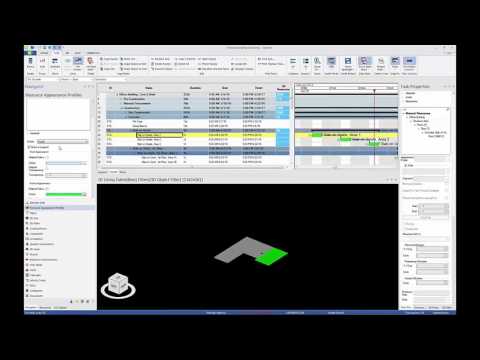

Appareance profiles define how elements look before-during-after each task, and growth simulation controls how elements appear.
https://bentleysystems.service-now.com/community?id=kb_article_view&sysparm_article=KB0017698
Other than what @CSN mentioned (concrete pour shows the element appearing bottom-top, we can have all kinds of directions (maybe controlled by a customizable vector in Bonsai?) for slabs that are cast in multiple steps, for columns, for soil (disappearing from the top as it is being filled back).
This is achieved with hacks in Navis (I hope there is a better way than this...):
https://forums.autodesk.com/t5/navisworks-forum/timeline-animation-how-do-i-show-items-growing-from-ground-up/td-p/7083788
Yes the foundation is very good but the main point would be to have some type of user integration like local web server when you can share task and user can report what element they installed this day so you can track planed and live what is happening, and this web app need to be synced with bonsai so 4d would have some meaningful impact as this is just proof of concept, just add web backend like https://ifctester.org/ and this would have value also maybe consider collaboration thru https://www.buildingsmart.org/standards/bsi-standards/bim-collaboration-format/
And then prepare bcf files for every user and then user send thru email bcf files and you import into bonsai and track