

"Simple" operator for "Getting element values" & "Formatting" from Selector syntax

This is an attempt to make easier for new users to master the use of the Selector syntax, namely to retrieve element values and formatting them, which are very useful in "Intelligent Tags".
See below:
Here the proposed PR: https://github.com/IfcOpenShell/IfcOpenShell/pull/7106
What do you think? This is how I have thought to "make it simple to use" but I do not know if there is a better approach. Your feedback is very welcome. I guess that this could eventually be useful also in other cases (CSV export, for example). And in general we should be thinking about a UI helper operator (or three) that addresses the three use cases of filtering, getting a value, and formatting that value.
Cheers!









Comments
As a followup this would be the suggestion for the filtering case. To add a magnifying glass that provides the list of possible values in the current file for the corresponding element in the search menu (in Grouping and Filtering -> Search or Collaboration -> Spreadsheet Import/Export).
For the case of globalD I have followed the same idea as in enum_property_search of providing next to the globalID the ifclass name and the ifcelement name so it is easy to find).
I am a little bit suspicious about the performance. It would be great to see how it behaves in real big projects.
PR: https://github.com/IfcOpenShell/IfcOpenShell/pull/7315
Cheers!
I wanted to make a feature request ... I love it
I have added a toggle so by default the search will only use the elements in the outliner and not the ifc file:
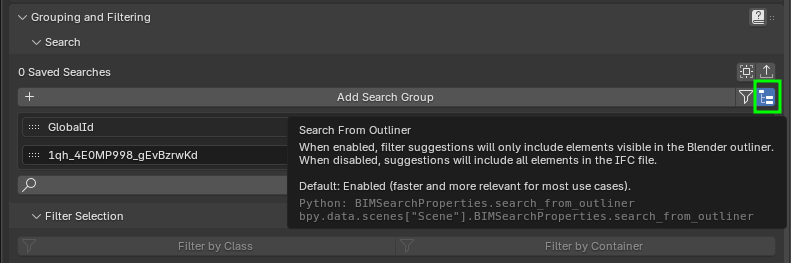
This improves the speed a lot.
Sincerely I do not know if looking to the ifc file contents to select elements that do not appear in the outliner is of any benefit. Is there any use case in which it could make sense? If not I guess I can simplify and remove the toggle and just search within the elements in the outliner?
Of course this is just to generate suggestions. The user can always edit whatever she/he likes.
Thanks!
The only thing I can think of is perhaps linked in ifc files? I've not used that, so it may be a non issue. Just a thought of the top of my head.
@falken10vdl this is awesome!
This is great!
An enhancement would be to add all the parent classes of any entities, ie. if there are IfcDoor entities, then also add all the parent classes to the search list: IfcBuildingElement, IfcElement, IfcProduct etc..
ifcpeek does this using something like this:
entity.is_a()model.schema.declaration_by_name()supertypeattribute@brunopostle Something like this for the case of facet "Parent"?
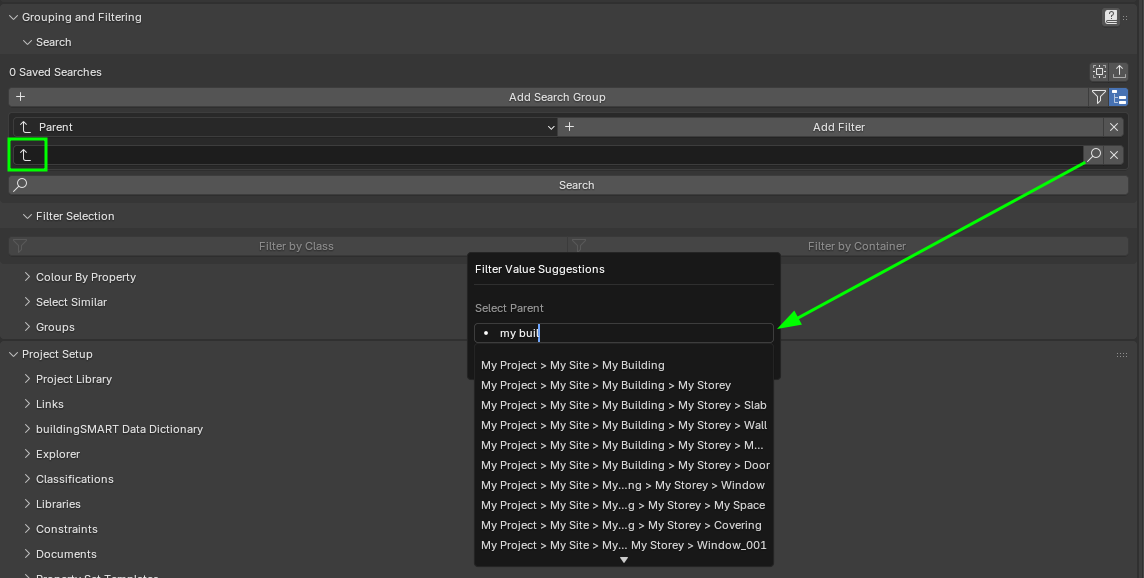
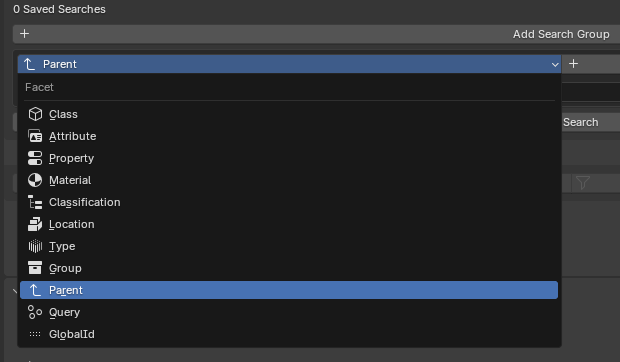
Or you think this should be added for all the other facets (except for Query where I am not adding any suggestion)?
Cheers!
I think a use case would be for MEP: ports and systems.
I like both options. Suggestion: add "systems" to the list of options.
Thank you for your great work!
@walpa Thanks for the feedback! Could you please share a sample ifc file with MEP so I can try to add these "systems" to the search options and test it?
Sorry I am not yet very familiar with MEP ;)
@falken10vdl I was thinking of the IFC class structure. Classes such as IfcDoor and IfcWall are both members of a 'super class' IfcBuildingElement. If you do a selector query for IfcBuildingElement you will match all the physical components of the building - even though there are no instances of IfcBuildingElement in the model.
@brunopostle , let us move to the https://community.osarch.org/discussion/3205/how-is-search-meant-to-work to address this.
See my comment there please.
I have revamped the whole UI for creating the intelligent TAG for the literals in the Text annotations doing it more Bonsai -ish :)
It is in the updated PR https://github.com/IfcOpenShell/IfcOpenShell/pull/7317
It is based on how the search filters work, as a number of rows (in this case concatenating values) which I believe it is easier to understand and more compact.
Cheers!
It's getting 'real' up in here.
Good grief, @falken10vdl ! Do you even sleep, bro?
@falken10vdl Example IFC file for testing. Sorry, the pipe fitting library is in my language, but I think it's followable. :)
@walpa
nice work! did you model them yourself?
EDIT
does anyone have a similar example with electrical system? thanks
EDIT 2
my best attempt: link
Yes, totally at BonsaiBim. Thank you.
@walpa Please take a look to this one:
I have added a systems icon, that allows you to select either a leaf or parent. If you select a parent, then it will fetch all the children below.
in both cases it resolves to a list of globalIds that then are queried as a selector syntax instance query.
The PR is in https://github.com/IfcOpenShell/IfcOpenShell/pull/7315
It is merged in the latest bonsaiPR addon if you want to try it out.
https://github.com/falken10vdl/bonsaiPR/releases/tag/v0.8.4-alpha251113
Let me know if that is what you were looking for or something else.
Cheers!
@falken10vdl Exactly! You're the best! Thank you.
PR https://github.com/IfcOpenShell/IfcOpenShell/pull/7505 is merged.
This is a fresh PR based on many others addressing different aspects of TEXT Annotations:
Cheers!