

ifc-blend sync & customer user UI revisited

Reading conversation Syncing Blend File and IFC File and trying to make user customizations on panels work for a given project (Simple customization of panel layout to clear/arrange space for different workflows) I have updated the PR 6638 doing the following in order to keep the "blender metadata" that it is useful to keep the panels layout for example.
- Create and operators to Save blend file without geometry in the same place as the ifc file but with suffix .metadata.blend.
- Create an operator to load Metadata+IFC. What it does is:
- Load the blend file -> panels are recreated no geometry
- Load the ifc file with flag should_start_fresh_session = False and props.has_blend_warning = False
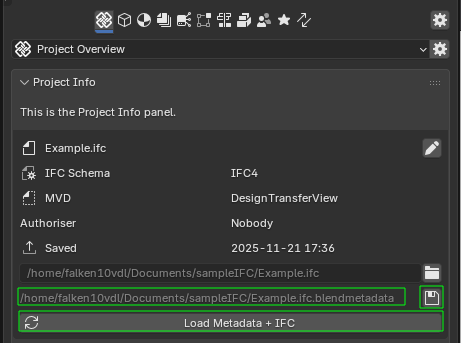
See it in action:
What do you think? Should not this be the default behavior (maybe even remove more than geometry)?
This way we would have layouts customized per project.
Cheers!





Comments
Does this mean .... only without the whole IFC Collection's geometry, which would be great,
or would that also concern possible Cameras, Lights, Entourage geometry, Materials (*) ..... which is what I would like to keep in sync with the IFC.
(*) I would basically like to link my IfcStyles material over-writings to the current Project Blend File, not an external Material Blend File. As such a Material Blend file may be used as a Material Template when I start a Project but then I may want do some project specific adaptions which I do not want for the Material template .... if that makes some sense ?
(But that's not a real issue)
Still a newbie and so far, if keeping Blend and Bonsai in sync is critical,
the only thing I could imagine to force "safe"syncing was to keep the Bonsai IFC file "Blender free" - create a Master Blend file for my Visualization Stuff - and reference/link a Blend File saved from the Bonsai BIM.
I not have any problem with a clear separation of Bonsai and Blender stuff in general.
Which would need constantly manual saving and updating the Bonsai's Blend Reference File. And I am not sure if e,g. Visibility states of the Bonsai Reference would be kept in my Viz Master Blend and such things .....
For now I have my "Project Template" - Panel Layouts, some template Cameras and Daylight System, Render and Viewport Settings, .... in my custom Startup.blend. By default this is where my Bonsai IFC "IFC imports" will come in and what it will look like.
But from there I would like to adapt and update my Blend Viz stuff and being able to save it. Or I may also get a newer IFC version from clients or update and work with the IFC file - and keep both together.
My Template should also contain some basic Materials to start from. At least once I am able to oversee and control Blender Materials, which I am still far away from (mainly Texture scales ...)
Finally these Materials in that "ifc file but with suffix .metadata.blend" file would be what I like to use to overwrite the IFC Material Styles with.
(best with relative paths if that helps finding files cross platform, Mac and also Windows or Linux....)
BTW,
I do not expect or demand something, just try to illustrate a workflow environment, which may be not related to the main target group but currently is quite a bit limited by Bonsai/Blender collaboration.
But I am really exiting about the idea of your customizable Bonsai Panels. These are still overwhelming for me. I am doing hard in Bonsai UI/Panels to find stuff or visually differentiate the separation between different data groups. Something I felt never been an issue before in plain Blender UI/UX. So far I have not looked closer at it but I think I miss some more brightness contrasts or bold naming in "separators".
(And of course there are these hidden things like clicking on plain text may offer a Selection or such things, like Apple hiding attachment controls in Mail until you hover a certain (empty) area with your cursor and it will finally pop up)
So thank you very much for your work !
@zoomer I also agree that it is a pitty to lose a lot of functionality that blender provides and it is lost because it is not an ifc topic. Moreover I guess that trying to mimic some already available blender behaviour within ifc (via custom psets, groups, docs referencing, etc. ) is maybe not ideal or not very natural.
If you agree maybe we can workout a PR following the rational above as an extra option in the addon settings and allow the user to decide...
Just my two cents ;)
Cheers!
I am aware of being a minority (ArchViz and even on Mac) :)
Blender for using mainly Bonsai and IFC is absolutely great and so impressing.
Currently I do not oversee if or where users doing sophisticated IFC stuff like extracting plans and BOMs, like many seem to do, will also need or profit from Bonsai+Blender sync ..... ?
Besides the current AEC/3D or world situation and trends to exponentially rising fees and subscription-only, there may be likely a potential of rising interest in Bonsai and Blender, which may also add more workflows that want also access Blender stuff.
that's a good idea.
@zoomer, I have updated this PR changing completely the internal structure so it is using blender properties which simplifies the handling of the session.
The metadata saved preserves the menus, lights, cameras.. only geometry is removed. I have also added as an extra option so one cna enable it or not.
Note that if you enable it when you save it will save the metadata blendfile and when loading it will try to load that same before importing the ifc.
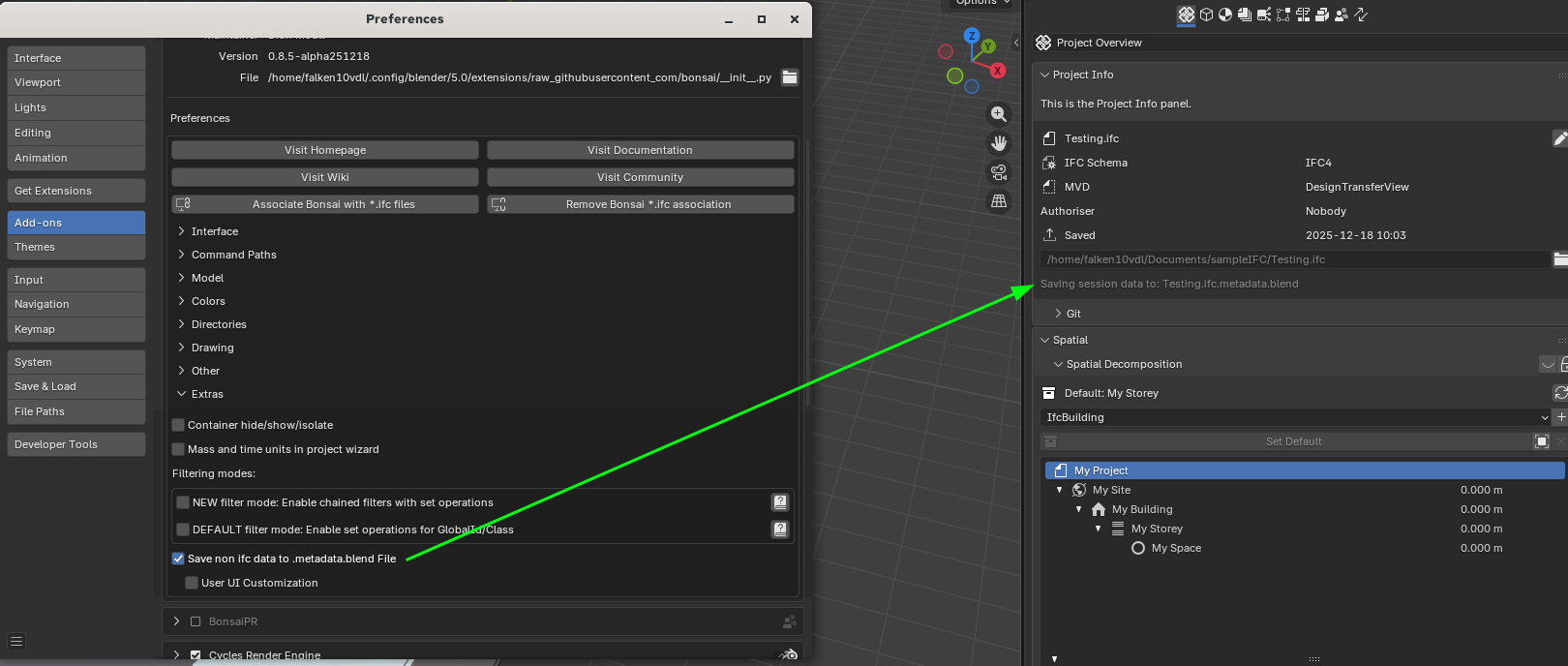
1. Enable the feature in the Extra panel of the addon settings
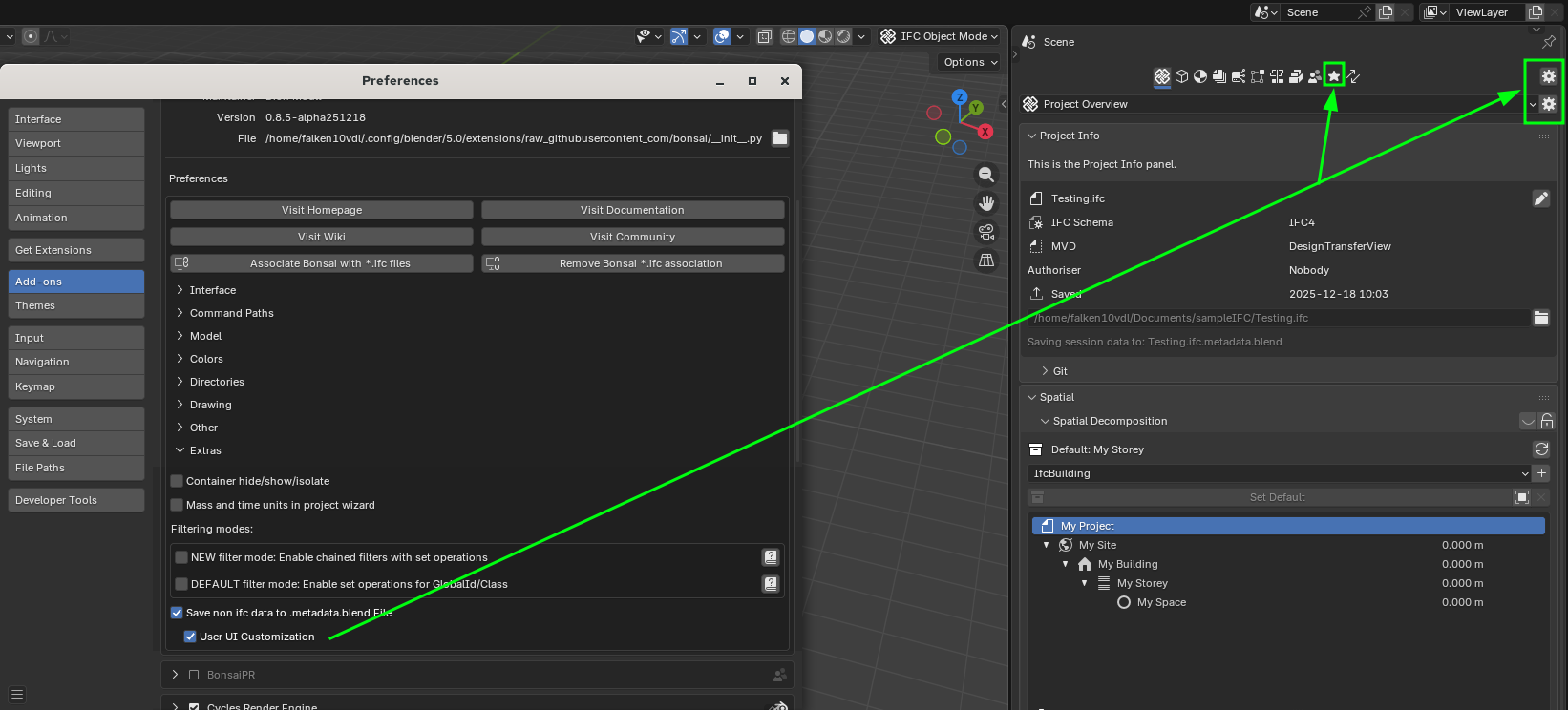
2. You can customize panels visbility, add them to special BOOKMARKS panel and move the position of the panels in the TAB
3. Saving (ctrl-s) will save both the ifc and the blend metadata file. Loading will attempt to first load (if it exists) the metadata file and then the ifc
Your feedback is very wellcome!
Cheers!
Now I am speechless .....
Thank you very much @falken10vdl !
An early Christmas Present :)
I have to play with these on weekend ....
If I am not wrong .... that also means, if I have an existing IFC in a Project Folder ....
Will all geometry be removed ?
I will test this ....
@zoomer If you want to give it a try, it is included in the latest bonsaiPR:
https://github.com/falken10vdl/bonsaiPR/releases/tag/v0.8.4-alpha251211
Cheers!
@zoomer. Yes all geometry, but now that you have shown a nice use case, maybe we should be removing from metadata.blend file all obects that are below ifcproject and keep the rest (even if they are geometry, as they are not ifc geometry).
Otjer possibility is adding a tickmark in the outliner that would allow us to selectively mark what items we want to keep in the .metadata.blend file and which ones not.
Please let me know what do you think makes more sense.
Cheers!
@zoomer
I have not tested but I think so. It will just load that as a blend file and then load ifc with the flag should_start_fresh_session=False
Cheers!
Is it also in the (standard) latest builds ?
I have updated and restarted Blender but I don't find it :)
This the version I have (0.8.5 !) but may be not the latest of todays .... :
It is OK also if it comes tomorrow ....
(I just hope it does not have to do with my custom Start.blend again ...)
@zoomer . Currently the PR is not merged in the main branch as it is still to be finalized.
You can however test it if you download the addon called bonsaipr from https://github.com/falken10vdl/bonsaiPR/releases/tag/v0.8.4-alpha251211
You download the zip file for your computer type and install it like any other blender addon. Please note that you have to disable bonsai in order to enable bonsaipr.
See https://community.osarch.org/discussion/comment/27392#Comment_27392 for the rationale behind this "bleeding edge".
I hope it makes sense.
Cheers!
Sorry. See coment below
@zoomer I think the use case you have brought is very interesting and can lead to a very powerful workflow ifc+non_ifc data.
I have done two changes in that regard:
I think this allows something like what you were describing above. See the example below where we add for example an archipack pro fence and a spot light.
you can try it in the new bonsaipr release :
https://github.com/falken10vdl/bonsaiPR/releases/tag/v0.8.4-alpha251212
Cheers!
Many thanks @falken10vdl
It is hard to keep up with your pace :)
I have BonsaiPR installed now.
I would not need Bonsai UI customizations saved for each project. I would generally hide some Bonsai features which I don't need so that Bonsai's UI gets easier to read. It wouldn't be a deal breaker either if UI customization has to be saved project specific in Meta.
OK, I see it get's difficult.
Bonsai saves IFC files and there is no sense to save any other than IFC stuff into an IFC. If I get that right, basically everything that is really Project related would fit right into an IFC file already. Part Presets, Asset Libraries, prepared Tables, BOM, Plan Setups, ..... could be already be saved or referenced from an IFC Template (?)
So where to save UI Customizations .... in Metafile ? in Blender Startup.blend ? in Bonsai AddOn Settings ? ....
Will there come more Bonsai things in the future to be saved beside a clean IFC file ? Will Bonsai at one point need its own file format, besides the IFC file ?
Usually my Apps had global App Settings + File Settings.
Blender has a ton of App Settings too, but decided to save many things in the Blend file. Both ways have their dis-/advantages. Lots of which I would see as a global App Setting (Like Snaps, UI, Panel visibilities, default render modes and all that). Hence my super loaded Startup.blend file. So maybe the (Meta) Blend is the proper place for saving "everything" non IFC.
I think that the workflow you have suggested mixing bonsai with other apps is very powerful.
I do not know ifc enough to know if an ifc file alone can hold all the info required to properly author and AEC project. Things like UI customization and parametric objects might not be "naturally" supported. There are ways to do that. Take a look to Standardizing BBIM property sets?
However I think that pragmatically we can benefit of a lot of functionality that it is available in blender and not yet available in bonsai. for that case I think that saving that part in the metadada.blend makes sense in order to have a better experience.
For example if you take the conversation about modeling a ramp (How can I model a ramp between walls with varying height in Blender / Bonsai? You can see that currently there is no native tool in bonsai to model it. You could use blender modifiers or some addons to have that done parametrically for example. Once you are happy, it is just quite simple to change the resulting mesh to a ramp IFC object and from then you have it in the "ifc" side instead of the "blender" side.
As Bonsai is getting more feature rich many things that are not saved in this metadata.blend will be moving to the ifc.
Cheers!
From my perspective so far the cleanest solution looks like a strict separation of Bonsai and Blender stuff inside Blender.
There is that special IFC Collection from Bonsai, it should contain only stuff that is saved in the IFC - Blender/User should be "locked out" for any Blender stuff. If you want to create something Blender for your BIM Model - do it outside of the IFC Collection. When you want to "import" it into IFC - apply an IFC tag and it does jump over into IFC. That Collection could look completely different than a usual Blender Collection, to visualize this.
On the other hand Bonsai should not harm any Blender only stuff outside of its territory.
If such a separation is manageable - there is no meaning in doing so - but Bonsai could work in a Blend File (?) and just also saving all IFC stuff in an IFC file. (Or even embed the IFC in Blend ?) When opening that Blend file with all Blender Content, Bonsai also loads the IFC and re-generates the IFC Collection content. If you save the Blend it will also save the IFC.
This is basically what you already did in PR v2 (?)
If I got that right Bonsai does already write some "Bonsai" data into the Blend file ?
(I think features like the "GitHub" option settings is something that possibly can or should not be saved inside the IFC)
So if it is possible to safely and officially keep Blend + IFC together and Bonsai can really make use of the Blend file for storing all things and features that do not fit into IFC, I think that could make Bonsai more flexible and future proof too.
Maybe it needs a new *.ifcblend or *bonsai file ending to this that this belongs to and also opens an IFC file - not just a regular Blend file.
Good to hear that enabling such a "Sync" can also help Bonsai in general, not just my rare workflow. More possibilities while keeping a pure IFC.
Also Blender things like Modifiers and Nodes used in Bonsai Tools to keep parametric ?
(Current end result generated and saved in IFC, while the tool's and modeling history kept and saved in Blender for further changes ?)
Hmmh, todays Blender 5.0.1 RC + PR here.
Loaded an IFC (2x3) here.
Did no changes but saved IFC to see how the Meta Blend looks ....
and got a Blender fail message (but no red Bonsai Warning) :
BTW
So if there is a "__temp_blendmetadata.blend" used .... does this also mean that a Template has to do some voodoo ...... so a self made Blend file with proper naming (as my idea a few posts above) - would never be recognized as a true Meta Blend ?
Another test with another IFC 4.0 also failed ....
@falken10vdl
In your last video, when you showed Bonsai AddOn extra Settings, you had not activated PRBonsai but a normal Bonsai !? (none of those new Settings in my todays Bonsai 0.85 in Blender 5.1, only in the PRBonsai on my 5.0.1)
Hi @zoomer the error seems to be that it is not possibe to write in the folder. Maybe writing permisions?
The _temp... Is a temporary file. I create a temp file and then remove in that one the ifproject structure and then rename it to .filename.ifc.metadata.blend.
Do you get this error in some paryciular case? It looks some permision issue in your directories
Yes the recording I was doing was using the developmwnt environment of the source code with this PR directly, that is why you were seeen bonsai and not bonsaipr.
However since I guess you do not have a dev environment in place, the easiest is to load the bonsaipr. Should not be any difference.
I feared that warning could mean something like this .... I can't exclude it
I mean I do have access rights on that shared drive on my previous M1 Mac Mini, otherwise I would not have been able to load and save these IFC's ....
Aaargh,
it feels like Apple broke the whole network stack since at least Tahoe. My current Apple network experience with my MBP is sub my 2005 Windows experience.
Thank you !
I will try locally again ......
I just tried with the bonsaiPR in linux and works properly. Here for example I added a kitchen form archipack pro :)
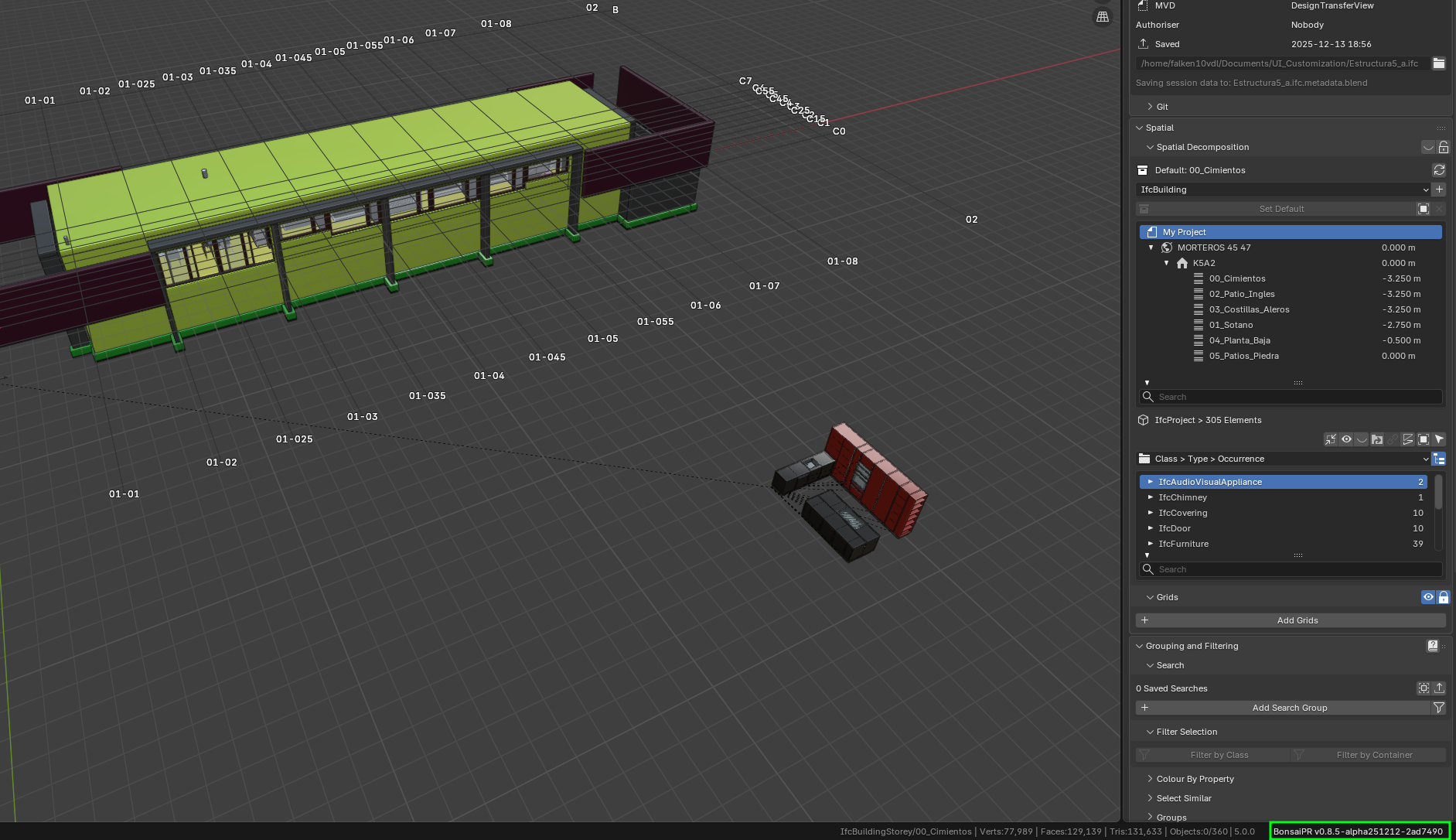
Cheers!
I have to get hold of a mac some time so I can test in that environment...
Oooops ...... same result from within my user folder .... same Warning but it will save the IFC nevertheless !?
Really ?
Not sure if App contents on Mac are always read only ? But usually I get a Window popping up asking me to allow that access for that App.
No way, Blender 5.0.1 now assigned full disk access, same message. I can't get it to save a Meta.
But is no problem, when for your BonsaiPR saves a Meta Blend, saving every thing Blender only, besides the IFC, that is exactly what I want and need.
I will try to reproduce it. Looks a macos issue. Is it working for the case of blender 5.0? You have given full write permisions to the blender.app, right?
I guess as a workaround, create thebmetadata.blend file yourself and then since it will read it I guess it will be granted write permisions... I think the os is not letting to create files.
Thanks!
Thanks !
Great, I saved the "FileName.ifc" and manually a blend file named "FileName.ifc.metadata.blend" (BTW, without any write issues !?) and when I reopened the IFC, all Blender stuff was still there as to expect.
And that also means that I could replace or add any other Blend File I want - and as long as it has the correct name - it will "sync" and work as a real Blender Meta file next to the IFC.
So that is exactly what I needed to be able to use Blender and Bonsai for Viz work.
Would be great if that PR gets an overall Osarch/Bonsai official OK and hopefully be used as a base for future features and Bonsai itself.
Meanwhile I updated to a later of your PR versions yesterday. (Was a 0.8.5)
So far I have PR on 5.0.1 only.
I tried everything about my network and access rights. It is true that I experienced a lot of network problems since I moved that external SSD drive from MPB to old Mac Mini to use as a file server ...... but I now got quite some overall improvements in accessing and reliability of the shared drive on my Mac Mini, which is great.
Time will tell if that attempt really solved all issues already.
I was not able to bring Bonsai to save a metatdata.blend when saving IFC Project though.
But I doubt that is really a classical write issue as .....
I think I can reliably work around by manually saving the metadata. As it looks like Bonsai can write/update a metadata here, once there already exists one.
(I remember some situations where Bonsai was notable to overwrite my own manually created metafile nevertheless - but I think it could be narrowed down to simple typos in file name ....)
@zoomer The PR is merged. It can be enabled at user discretion under Extras:
saving to .metadata.blend
Adding UI bookmarks and visibility toggles
Cheers!
Thank you very much, again !
I already wanted to ask here how that will work with these PRs. (Do all always get into Bonsai ?)
I once updated your PR version from v12 to v14 which worked ok, but with the Search PR v16 I had to realize that my metablend was gone :) So for now I went back to v14 and was a bit wondering how long a release would take or happen at all ....
So great to know it's already there and official.
And I can go with the auto update daily builds again :)
Yes, sometimes the same PR might not be possible to merge automatically due to conflict with others or changes in the base branch.
Cheers!
Thank you @falken10vdl. This feature really improves my workflow!
I tested it with a small ifc file (starting a demo project and adding an area light), and it worked. But, when I tested with my ifc file (18MB), it took a few minutes to save. It would be great if it is possible to speed it up.
I would like to provide my ifc file to reproduce it, but I cannot disclose... So instead, I confirmed that the issue can be reproduced with the following ifc file:
https://hub.openingdesign.com/OpeningDesign/Cool_Car_Guys/src/branch/main/Open/Models/Bonsai/OD_Cool_Car_Guys.ifc
My system environment is:
Steps to Reproduce