@yoayo Thanks for the feedback!
Yes the process to strip down the ifc information from the file is done in a python loop that probably is the bottle neck. Let me go over it to see what can be done.
Thanks!
@falken10vdl, I appreciate your work!
I am also the one who wants to integrate Bonsai BIM and ArchViz together. @zoomer is not the only one who wants to synch ifc and blender objects such as:
Area Lights (with ies files)
HDRI Sky
Cameras
Plants
Surrounding Buildings
If the saving time becomes faster, geometry nodes can be a real choice for a parametric tool for Bonsai BIM, perhaps?
@yoayo I have removed the loop and done the purging differently using more blender functions and non loop bonsai functions (only loop over IfcStyles to remove the corresponding blender materials to avoid duplication when they are generated by the ifc loading).
Please try it out and provide your feedback.
Cheers!
Hmmh, I also remember having had lags when saving IFC + metatdata.
Thought it was a network hiccup here.
EDIT :
Ah, ok, already solved :)
(But I think I will wait for the merge into daily builds .... I just cleaned up my Blenders Extensions yesterday. Hope @yoayo can confirm and that there is no further testing required)
@falken10vdl, @zoomer, I confirmed that the time dramatically improved! It is now about 10s +. I think it is tolerable. I am not sure if it's possible to make it faster than now, but it would attract more people if we make it happen.
Anyway, I will use this feature from now on. Thank you again @falken10vdl.
Thank you @falken10vdl, once again making a great contribution!
For me, this saving time is acceptable, I just wish there was some indication that it's happening, so the user doesn't get confused.
In the test I ran, an undesirable behavior appeared. Reopening the ifc file renamed the object. This only happened in the Blender outliner; it's working fine in the ifc file.
@yoayo said:
If the saving time becomes faster, geometry nodes can be a real choice for a parametric tool for Bonsai BIM, perhaps?n.
Thanks @walpa !
Could you share a sample file to get this fixed? @theoryshaw providednsome feedback yesterday that got fixed now in the latest release.
Let me also try to get the percentage complete. Currently the whole process is done in a subprocess. Maybe it makes more sense to do it in the foreground.
@falken10vdl, thank you very much for your contributions.
I'm testing ".metadata.blend" and I can't see the differences with the method ".blend file that's connected to .ifc file", except that with “.metadata.blend” data loading/saving is automatic.
With a “.blend file connected to .ifc file” we can also save PBR materials, lights, sky, non-IFC objects ..….
I'm sure I'm missing something.
Are there any other differences between the two methods?
Thanks !
With a “.blend file connected to .ifc file” we can also save PBR materials, lights, sky, non-IFC objects ..….
I would think this works. At least this is what I want to set up. Adding Materials to the Meta (with fake user) and finally reference the Materials of the Meta to IfcSurfaceStyles.
Indeed I have not tested this, as my Materials currently were assigned to Blender-only objects only.
with “.metadata.blend” data loading/saving is automatic.
This ..... and manually saving the Blend could have rests of IFC data, even if you delete the whole parent IFC Collection (?) Which maybe could cause problems when starting and loading the IFC in (?)
(I think otherwise we would not have to wait for the delete all IFC procedure lag when saving, if it could also work by just deleting the IFC Collection.
And, so far syncing was just not recommended. Now we have an idea how that could be (officially ?) possible by separating between IFC and Blend.
I remove materials that have the same name in IfcStyle in the metadata.blend file since they would be duplicated when loading the ifc. The other materials (not connected to the ifc) are saved in the metafata so you should be able to retrieve them.
Cheers!
I am not so happy with the (mandatory) naming of the Metadata Blend. Because of the multiple extra "points" and being so much longer :
LongFileName.ifc + LongFileName.ifc.metadata.blend
I would have naively expected something like
LongFileName.ifc + LongFileName.meta
(and set such file ending to "open allways with Blender) or even just
LongFileName.ifc + LongFileName.blend
For the Metadata, if I got that correct, there is no extra Bonsai Voodoo inside that Meta file, so just a plain Blend File (?)
At least I did not notice any problems when just adding "any" Blend File with proper Naming beside the IFC, so far. (Which I have to do anyway on Mac as it can't save the first initial Meta file)
The idea behind is to be able to add any kind of (IFC-free) Blender Project Template be set as the Meta file.
Sure. Let me add a fieldd in the settings so the user decides what suffix to add over the filename (.ifc.blend, .blend .meta.blend...). Regarding the need to create a file, have you tried in the latest bonsai (not bonsaiPR as now it is in the main branch)?
I am saving the temp file before creatying the meta in the same folder as the ifc folder.
Cheers!
@falken10vdl said:
I remove materials that have the same name in IfcStyle in the metadata.blend file since they would be duplicated when loading the ifc. The other materials (not connected to the ifc) are saved in the metafata so you should be able to retrieve them.
Cheers!
Ooops, that's very good to know, I would have done exactly that. I thought that IFC and Blend Data would be somehow separated (?)
I don't feel that comfortable to need to use and pre or suffixes.
Is it also a problem to have a MaterialSet AND a Surface Style using the same name "Concrete" ?
@falken10vdl said:
Sure. Let me add a fieldd in the settings so the user decides what suffix to add over the filename (.ifc.blend, .blend .meta.blend...).
Wow ! Great !
Thank you.
Regarding the need to create a file, have you tried in the latest bonsai (not bonsaiPR as now it is in the main branch)?
I am saving the temp file before creatying the meta in the same folder as the ifc folder.
Oooops ... that works like a charm !
Thanks again.
For me yes, but I am not sure.
it will be saved with the next standard "Save Project" anyway ... only for the rare case that you Save As an IFC under new Name .... and only do lots of Blender-only stuff for hours and then Blender+Bonsai unexpectedly crashes.
But if I get that correct, Blender makes even Backups of current "unsaved" Blend Files (?).
If that is generally good in terms of good software design or so .... yes (?)
So you mean on top of the addon switch add a property (tickmark) in the project overview for easy access on a per file fashion?
As running through learning and testing I ran in a few situations where I thought, ah, Status Bar tells me that "save Metadata" still works .... but this or that test file would not really have needed a Meta Blend ..... or like when using Bonsai just as my IFC Viewer but save just for testing something and such ....
I mean the Metadata companion to an IFC for a project really important for me. Just that it only makes sense when the Blend does contains some Blender data, otherwise it will just save the Startup.blend
So I think it would be cool.
But where in that Panel would it be adequate, does it fit on top, or somewhere at the bottom like Units ?
And should move all settings like file anding also move or better stay in the AddOn Settings ?
(Btw, it took me years to realize that some AddOns really have such AddOn Settings)
Or could Bonsai need a general Bonsai Settings Tab with rising features the future and are there already settings needed to be changed more often or project related ?
@zoomer "Save IFC Project As..." should behave taking in account the addon setting for "Save non ifc data to metadata blend File"
I have just created a PR to address the need for a switch to toggle metadata loading in a per file basis. I have used an IFCDocumentInformationElement to keep track of it:
If you enable "Save session data to:..." the IFCDocumentInformationElement is added to the IFC file. If you disable it it is removed.
When loading/saving the ifc it will check the main toggle in addon settings ("Save non ifc data to metadata blend File") and then if loading will temporarily load the ifc to see if it has the IFCDocInfo for metadada and if it does it will enable the "Save session data to:,,," while if saving it will create/remove the IFCDocInfo based on the toggle status.
@yoayo and @walpa I have been looking to the parametric possibilities using modifiers, Geometry Nodes, Svershock or IFCSvershock.
Since we have taken the approach to delete all blend elements below the IFCProject collection in the Outliner (Bonsai will recreate the IFCProject collection based on the IFC file) before saving the metadata blend file this means that any GN or modifier applied to those elements are lost and not reloaded in the metadata file.
One possibility to address parametric design already supported is using IFCSvershock. This will be saved to the IFC File and will be loaded independently of the blendmetadata file. This however forces to have installed svershock/IfcSvershock and use IFCSvershock only.
Another possibility would be to design using GN or modifiers (or Svershock) on "template" elements that will serve as generic parametric objects that can then be applied to "IFC elements or Ifc Types".
I have not reviewed in detail the possibilities offered by IFcSvershock but I believe that probably already it would be possible to create a base IFC file with IFC Svershock that could read properties from the IFC objects (like for example TAGS) and apply the geometry of the blend "templates" to those IFC tagged objects.
However I think that maybe that is a rather convoluted approach and maybe it is just simpler to define a syntax in TAGs for example that can be programmatically read and applied changes based on blend "template" objects.
The idea would be something like this for a simple example of a "GN to scale":
We add the IFC Tag GN:Scale=1.2,0.8,1.5 to the elements where we want to change the scale x=1.2, y=0.8, z=1.5
We define a blender "template" object with a GN Group called "Scale" that will use block to scale the object with the parameter required (in this case the scaling factors)
We define a bonsai operator ("Edit_With_GN") that will parse the IFC Tags looking for the GN syntax. If there is a match to the corresponding GN group then the GN modifier is applied to the IFC element.
This allows to modify the geometry of some IFC element. If the geomtry is changed in the GN, the correspodnign parameters in the TAG should then be updated
When the file is saved, the modifiers below the IFC elements are lost since IFC does not know about this and the blendmetadata also does not save anything below the IFCProject collection. However the modifiers below the blender "template" element will be preserved (They should be saved somewhere else under a GN collection for example). And if one wants to modify parametrically the IFC object, just by invoking the "Edit_With_GN" operator, the modifiers and parameters will be attached tot he IFC object for the user to interact with it.
@falken10vdl
while I am not too familiar with geometry nodes and similar sorcery in Blender I'd love to have parametric design like in FreeCAD, maybe with the support of a table with variables set in the geometry itself. So I'm all for any automation wizardry coming in the future.
At the same time I'm not too sure if this currently represents the highest priority in Bonsai. But I might be totally wrong of course.
Our beloved addon IMHO still lacks:
1. MEP system routing, advanced automated fittings, easier setting of flow and port attributes.
2. Basic user interface to draft IfcAlignment for future development in civil works
3. A more structured design output, atm is workable but requires some extra steps I personally don't find too difficult but end users might
4. An advanced UI for 4D/5D to complete the excellent work done so far by @SigmaDimensions (Yassine) and @Massimo (that I know of)
5. Structural design/analysis basic implementation, maybe there is? It's not a hot topic on our platform for some reason
6. Not to mention the 1k open issues our scarce resources (both human and financial) seemingly struggle to deal with
7. just to mention a few features that probably would deserve a bounty and could boost Bonsai to a much more widespread audience (aka potential donors and contributors)
Please don't see this as a complaint, just a note for me to better understand the current scenario/roadmap. I'm playing grandpa here ;)
I can only be grateful for your relentless work, it's nothing less than outstanding, that is why I address this to you directly.
Thanks
EDIT
reading it again I realise it's more an engineer's cahier de doléances than architect's :D


Comments
Cool.
:)
@yoayo Thanks for the feedback!
Yes the process to strip down the ifc information from the file is done in a python loop that probably is the bottle neck. Let me go over it to see what can be done.
Thanks!
@falken10vdl, I appreciate your work!
I am also the one who wants to integrate Bonsai BIM and ArchViz together. @zoomer is not the only one who wants to synch ifc and blender objects such as:
If the saving time becomes faster, geometry nodes can be a real choice for a parametric tool for Bonsai BIM, perhaps?
@yoayo I have removed the loop and done the purging differently using more blender functions and non loop bonsai functions (only loop over IfcStyles to remove the corresponding blender materials to avoid duplication when they are generated by the ifc loading).
Please try it out and provide your feedback.
Cheers!
Hmmh, I also remember having had lags when saving IFC + metatdata.
Thought it was a network hiccup here.
EDIT :
Ah, ok, already solved :)
(But I think I will wait for the merge into daily builds .... I just cleaned up my Blenders Extensions yesterday. Hope @yoayo can confirm and that there is no further testing required)
@falken10vdl, @zoomer, I confirmed that the time dramatically improved! It is now about 10s +. I think it is tolerable. I am not sure if it's possible to make it faster than now, but it would attract more people if we make it happen.
Anyway, I will use this feature from now on. Thank you again @falken10vdl.
Here are the time I got from my end:
Time Tested -- Case 01: ifc file from Open Design
File Size = 34.7MB
File Tested:
https://hub.openingdesign.com/OpeningDesign/Cool_Car_Guys/src/branch/main/Open/Models/Bonsai/OD_Cool_Car_Guys.ifc
Time Tested -- Case 02: ifc file from my own
File Size = 18.5MB
Thank you @falken10vdl, once again making a great contribution!
For me, this saving time is acceptable, I just wish there was some indication that it's happening, so the user doesn't get confused.
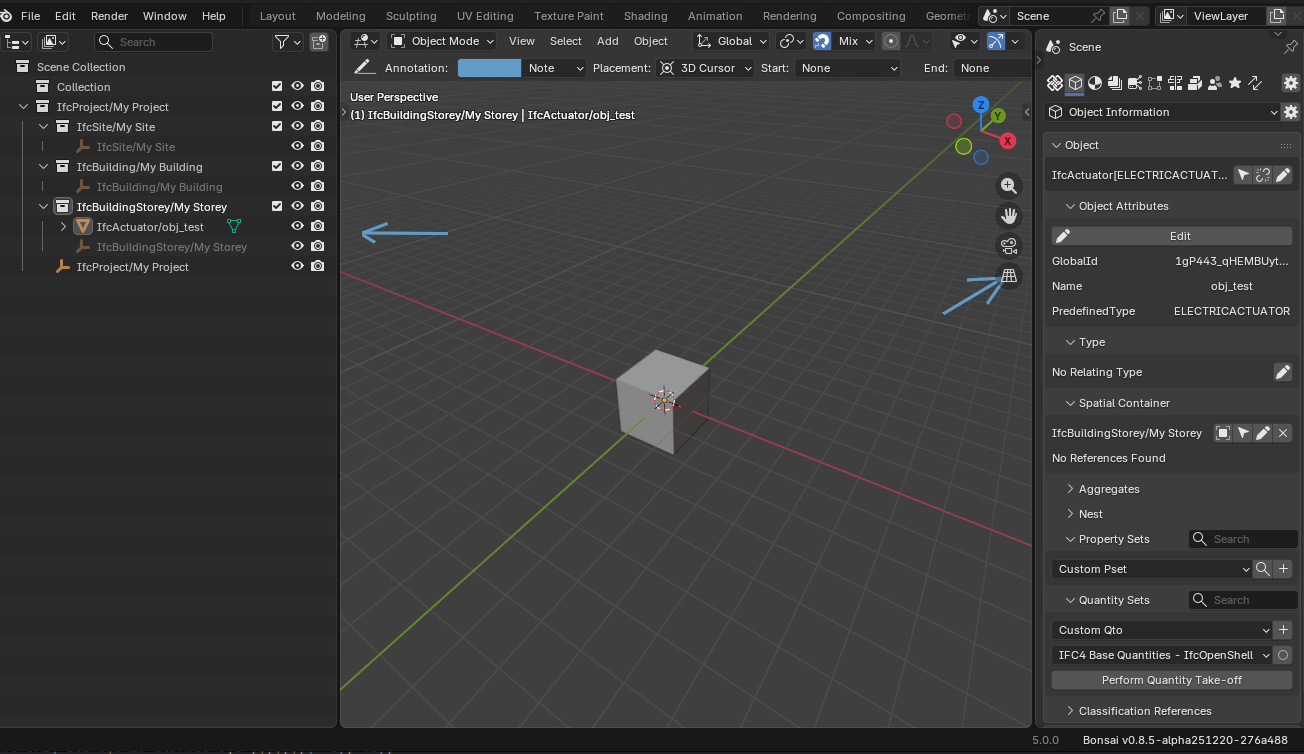
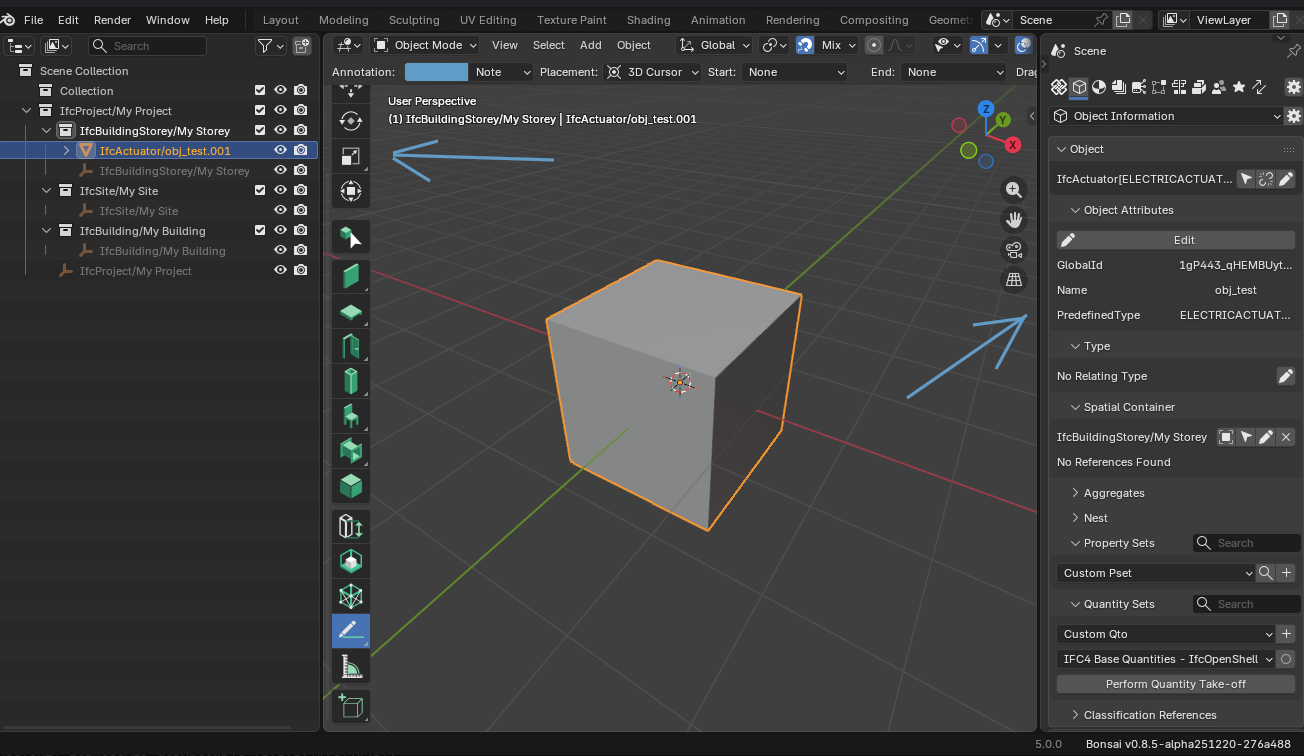
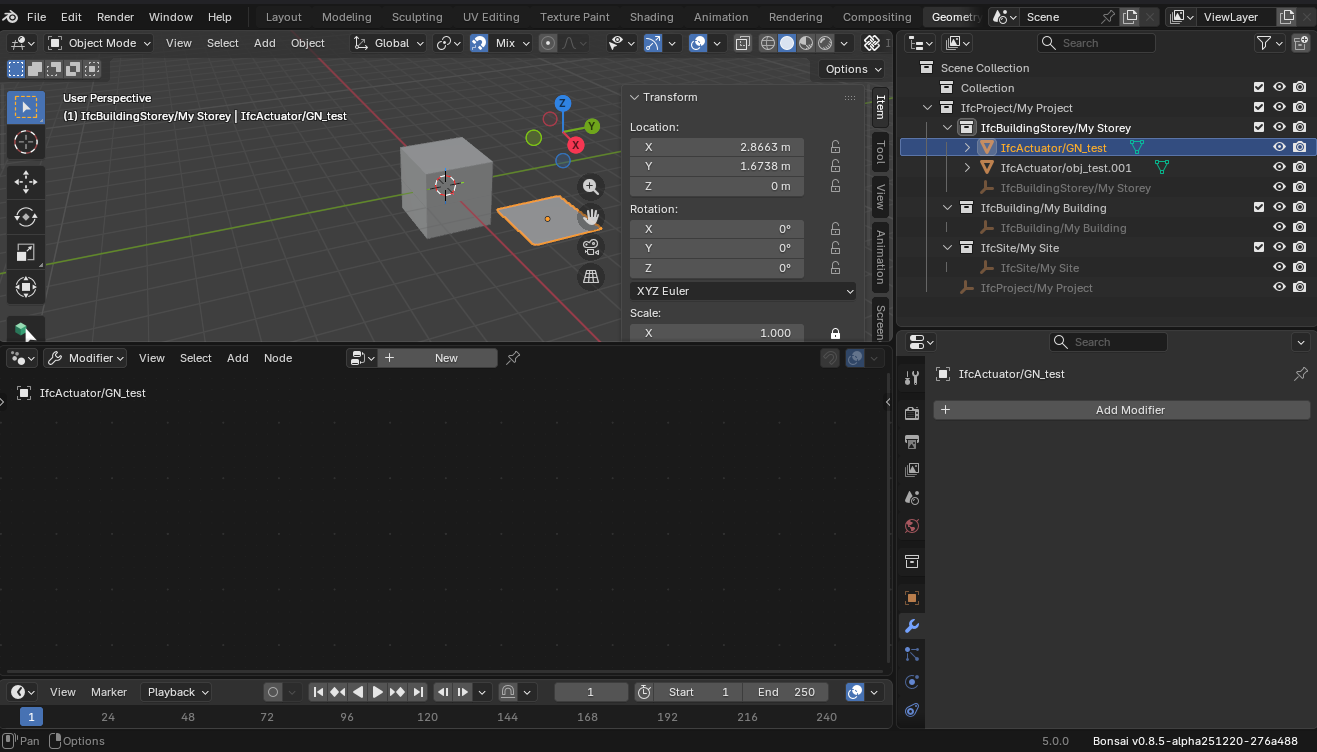
In the test I ran, an undesirable behavior appeared. Reopening the ifc file renamed the object. This only happened in the Blender outliner; it's working fine in the ifc file.
Not yet:
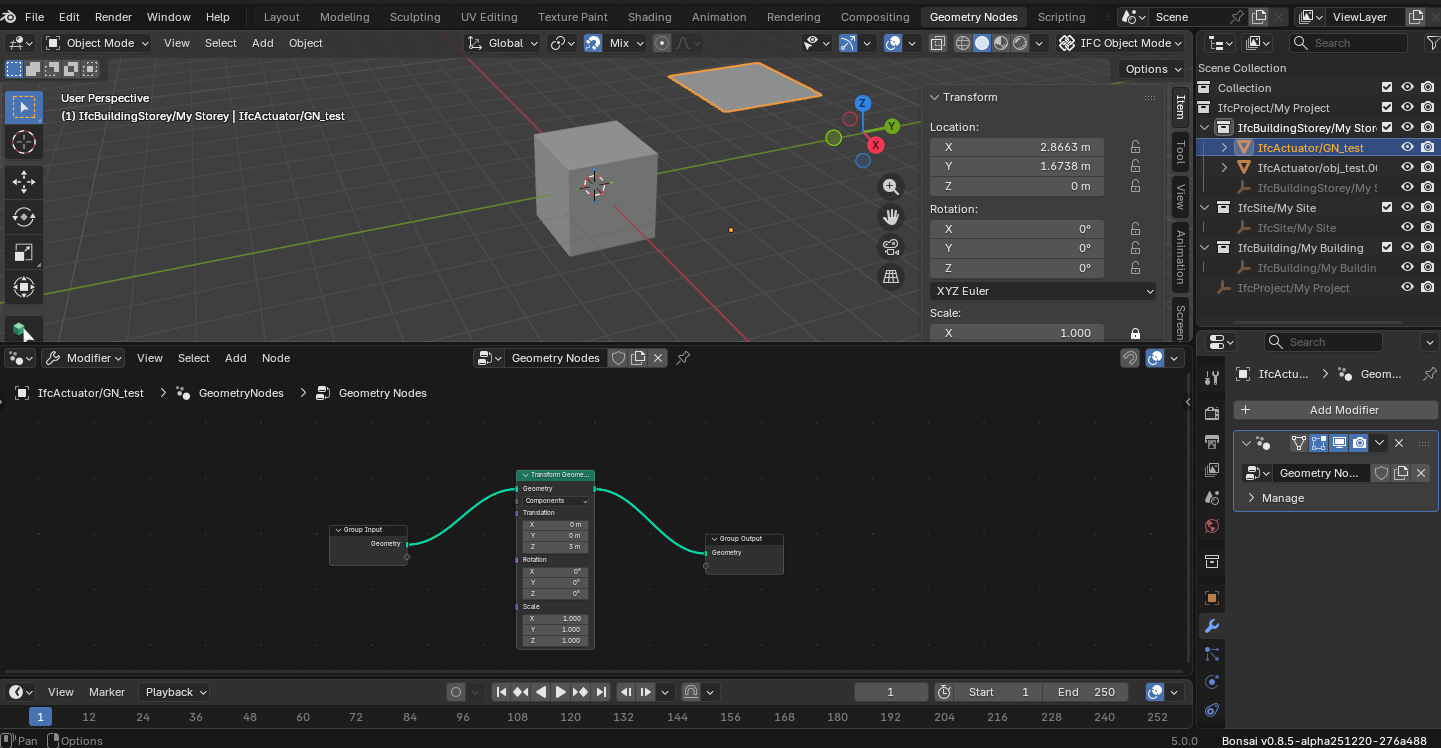
After reopening
Thanks @walpa !
Could you share a sample file to get this fixed?
@theoryshaw providednsome feedback yesterday that got fixed now in the latest release.
Let me also try to get the percentage complete. Currently the whole process is done in a subprocess. Maybe it makes more sense to do it in the foreground.
Here they are.
Blender 5.0
bonsai_py311-0.8.5-alpha251220-linux-x64
@falken10vdl, thank you very much for your contributions.
I'm testing ".metadata.blend" and I can't see the differences with the method ".blend file that's connected to .ifc file", except that with “.metadata.blend” data loading/saving is automatic.
With a “.blend file connected to .ifc file” we can also save PBR materials, lights, sky, non-IFC objects ..….
I'm sure I'm missing something.
Are there any other differences between the two methods?
Thanks !
I would think this works. At least this is what I want to set up. Adding Materials to the Meta (with fake user) and finally reference the Materials of the Meta to IfcSurfaceStyles.
Indeed I have not tested this, as my Materials currently were assigned to Blender-only objects only.
This ..... and manually saving the Blend could have rests of IFC data, even if you delete the whole parent IFC Collection (?) Which maybe could cause problems when starting and loading the IFC in (?)
(I think otherwise we would not have to wait for the delete all IFC procedure lag when saving, if it could also work by just deleting the IFC Collection.
And, so far syncing was just not recommended. Now we have an idea how that could be (officially ?) possible by separating between IFC and Blend.
I remove materials that have the same name in IfcStyle in the metadata.blend file since they would be duplicated when loading the ifc. The other materials (not connected to the ifc) are saved in the metafata so you should be able to retrieve them.
Cheers!
I am not so happy with the (mandatory) naming of the Metadata Blend. Because of the multiple extra "points" and being so much longer :
LongFileName.ifc + LongFileName.ifc.metadata.blend
I would have naively expected something like
LongFileName.ifc + LongFileName.meta
(and set such file ending to "open allways with Blender) or even just
LongFileName.ifc + LongFileName.blend
For the Metadata, if I got that correct, there is no extra Bonsai Voodoo inside that Meta file, so just a plain Blend File (?)
At least I did not notice any problems when just adding "any" Blend File with proper Naming beside the IFC, so far. (Which I have to do anyway on Mac as it can't save the first initial Meta file)
The idea behind is to be able to add any kind of (IFC-free) Blender Project Template be set as the Meta file.
Sure. Let me add a fieldd in the settings so the user decides what suffix to add over the filename (.ifc.blend, .blend .meta.blend...). Regarding the need to create a file, have you tried in the latest bonsai (not bonsaiPR as now it is in the main branch)?
I am saving the temp file before creatying the meta in the same folder as the ifc folder.
Cheers!
Ooops, that's very good to know, I would have done exactly that. I thought that IFC and Blend Data would be somehow separated (?)
I don't feel that comfortable to need to use and pre or suffixes.
Is it also a problem to have a MaterialSet AND a Surface Style using the same name "Concrete" ?
Wow ! Great !
Thank you.
Oooops ... that works like a charm !
Thanks again.
@zoomer PR Metadata-blend-file-suffix-configuration #7515 allows you to provide a custome suffix for the metadata blend file:

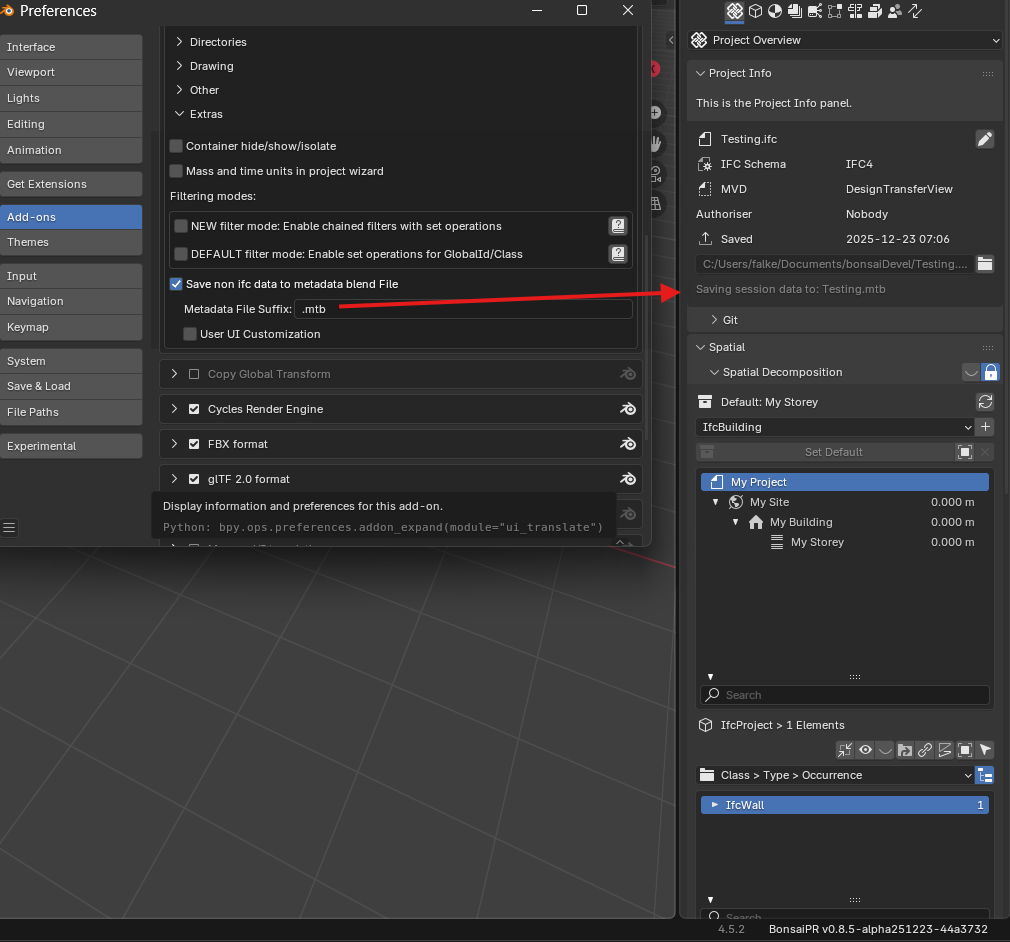
Just update to wahtever you like and hit "enter" and it should be taken in account. Ex:
You can test it in latest bonsaiPR https://github.com/falken10vdl/bonsaiPR/releases/tag/v0.8.4-alpha2512230735
Cheers!
This PR is now merged.
Thanks!
That was fast - I can see it :)
Thanks !
Not sure if that could be needed or useful in anyway but while playing, I noticed .....
I guess should be added to be consistent, right?
So you mean on top of the addon switch add a property (tickmark) in the project overview for easy access on a per file fashion?
Cheers!
For me yes, but I am not sure.
it will be saved with the next standard "Save Project" anyway ... only for the rare case that you Save As an IFC under new Name .... and only do lots of Blender-only stuff for hours and then Blender+Bonsai unexpectedly crashes.
But if I get that correct, Blender makes even Backups of current "unsaved" Blend Files (?).
If that is generally good in terms of good software design or so .... yes (?)
As running through learning and testing I ran in a few situations where I thought, ah, Status Bar tells me that "save Metadata" still works .... but this or that test file would not really have needed a Meta Blend ..... or like when using Bonsai just as my IFC Viewer but save just for testing something and such ....
I mean the Metadata companion to an IFC for a project really important for me. Just that it only makes sense when the Blend does contains some Blender data, otherwise it will just save the Startup.blend
So I think it would be cool.
But where in that Panel would it be adequate, does it fit on top, or somewhere at the bottom like Units ?
And should move all settings like file anding also move or better stay in the AddOn Settings ?
(Btw, it took me years to realize that some AddOns really have such AddOn Settings)
Or could Bonsai need a general Bonsai Settings Tab with rising features the future and are there already settings needed to be changed more often or project related ?
i've noticed the save takes a while too, even after https://github.com/IfcOpenShell/IfcOpenShell/commit/9a1b0ce44c36f49a55bd99e81cd18769aab9d695
Yes let me trace it to find out where is the bottleneck.
Thanks!
This Extra Tab in the preferences isn't windows only, right? I do not have this tab.
@Beyon it is in all platforms but in bonsai unstable installation:
https://docs.bonsaibim.org/guides/development/installation.html#unstable-installation
Cheers!
@falken10vdl
I see, thanks a lot :) Happy New Year!
@zoomer "Save IFC Project As..." should behave taking in account the addon setting for "Save non ifc data to metadata blend File"
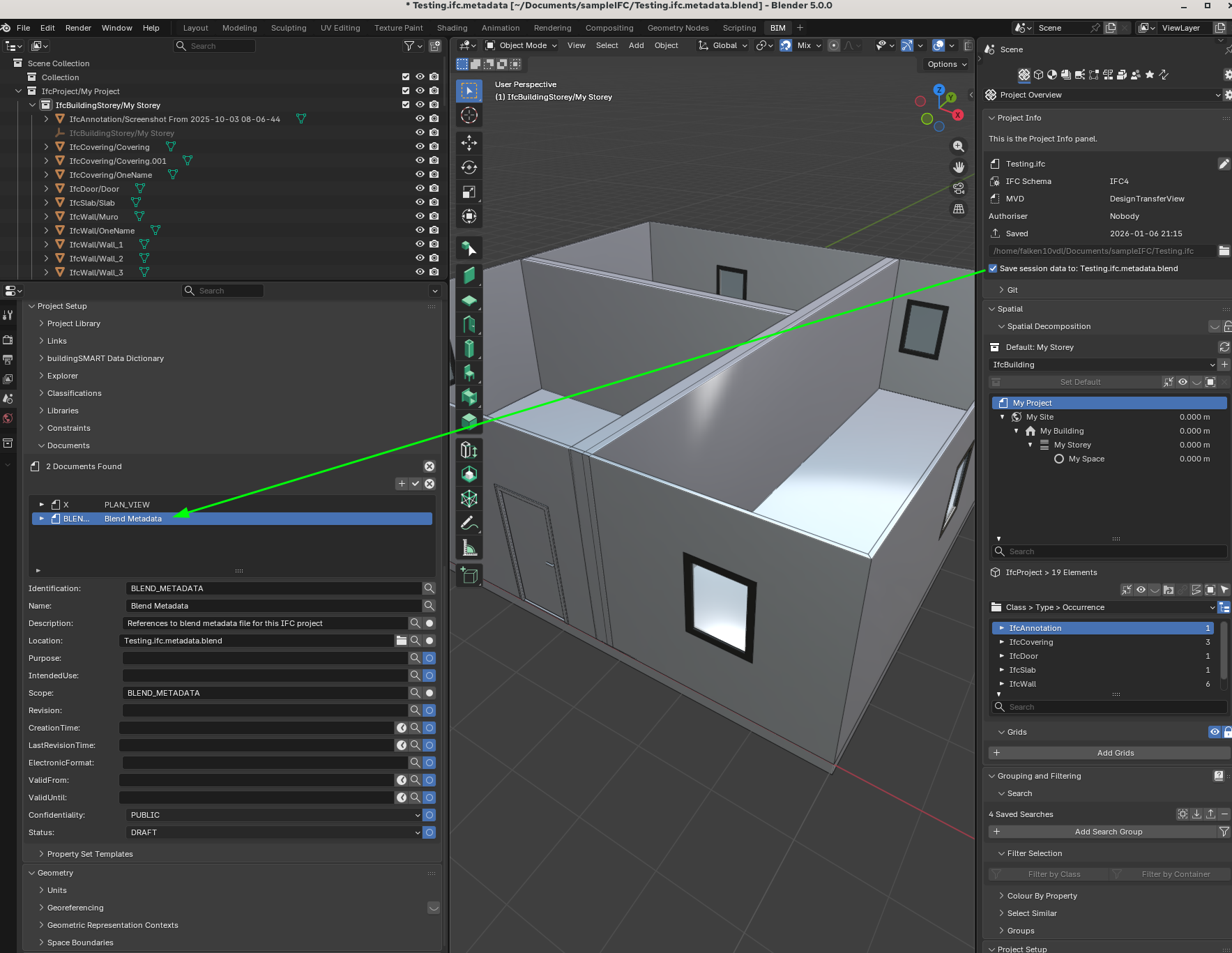
I have just created a PR to address the need for a switch to toggle metadata loading in a per file basis. I have used an IFCDocumentInformationElement to keep track of it:
If you enable "Save session data to:..." the IFCDocumentInformationElement is added to the IFC file. If you disable it it is removed.
When loading/saving the ifc it will check the main toggle in addon settings ("Save non ifc data to metadata blend File") and then if loading will temporarily load the ifc to see if it has the IFCDocInfo for metadada and if it does it will enable the "Save session data to:,,," while if saving it will create/remove the IFCDocInfo based on the toggle status.
Please take a look to PR https://github.com/IfcOpenShell/IfcOpenShell/pull/7536
Cheers!
@yoayo and @walpa I have been looking to the parametric possibilities using modifiers, Geometry Nodes, Svershock or IFCSvershock.
Since we have taken the approach to delete all blend elements below the IFCProject collection in the Outliner (Bonsai will recreate the IFCProject collection based on the IFC file) before saving the metadata blend file this means that any GN or modifier applied to those elements are lost and not reloaded in the metadata file.
One possibility to address parametric design already supported is using IFCSvershock. This will be saved to the IFC File and will be loaded independently of the blendmetadata file. This however forces to have installed svershock/IfcSvershock and use IFCSvershock only.
Another possibility would be to design using GN or modifiers (or Svershock) on "template" elements that will serve as generic parametric objects that can then be applied to "IFC elements or Ifc Types".
I have not reviewed in detail the possibilities offered by IFcSvershock but I believe that probably already it would be possible to create a base IFC file with IFC Svershock that could read properties from the IFC objects (like for example TAGS) and apply the geometry of the blend "templates" to those IFC tagged objects.
However I think that maybe that is a rather convoluted approach and maybe it is just simpler to define a syntax in TAGs for example that can be programmatically read and applied changes based on blend "template" objects.
The idea would be something like this for a simple example of a "GN to scale":
When the file is saved, the modifiers below the IFC elements are lost since IFC does not know about this and the blendmetadata also does not save anything below the IFCProject collection. However the modifiers below the blender "template" element will be preserved (They should be saved somewhere else under a GN collection for example). And if one wants to modify parametrically the IFC object, just by invoking the "Edit_With_GN" operator, the modifiers and parameters will be attached tot he IFC object for the user to interact with it.
Does it make sense?
@falken10vdl, Thank you for the suggestion!
While thinking this for a while, I thought it would be better to make a baby step for now.
That is:
1) Creat parametric geometries with GN
2) Save them as metadata of .blend
3) Covert those blender geometries to IFC elements or IFC types
Here is why I think the integration GN and IFC is pretty challenging at this moment.
@falken10vdl
while I am not too familiar with geometry nodes and similar sorcery in Blender I'd love to have parametric design like in FreeCAD, maybe with the support of a table with variables set in the geometry itself. So I'm all for any automation wizardry coming in the future.
At the same time I'm not too sure if this currently represents the highest priority in Bonsai. But I might be totally wrong of course.
Our beloved addon IMHO still lacks:
1. MEP system routing, advanced automated fittings, easier setting of flow and port attributes.
2. Basic user interface to draft IfcAlignment for future development in civil works
3. A more structured design output, atm is workable but requires some extra steps I personally don't find too difficult but end users might
4. An advanced UI for 4D/5D to complete the excellent work done so far by @SigmaDimensions (Yassine) and @Massimo (that I know of)
5. Structural design/analysis basic implementation, maybe there is? It's not a hot topic on our platform for some reason
6. Not to mention the 1k open issues our scarce resources (both human and financial) seemingly struggle to deal with
7. just to mention a few features that probably would deserve a bounty and could boost Bonsai to a much more widespread audience (aka potential donors and contributors)
Please don't see this as a complaint, just a note for me to better understand the current scenario/roadmap. I'm playing grandpa here ;)
I can only be grateful for your relentless work, it's nothing less than outstanding, that is why I address this to you directly.
Thanks
EDIT
reading it again I realise it's more an engineer's cahier de doléances than architect's :D