@walpa said: @falken10vdl
Tests:
1 - Linking 2 files (location disabled) in a main file:
After reopening the main file, only 1 file remained linked; the second one did not.
2 - Linking 1 file twice (1 location disabled and another automatic) in a main file:
I created a copy/move of the disabled file, and after reopening, both remain linked, and the change in the location of the disabled copy was saved.
3 - Linking 2 files (1 location disabled and another automatic) in a main file:
I made a copy/move of the disabled file, and after reopening the main file, both remain linked, but the geometry of the disabled copy disappeared, leaving only the empty ifcproject.
Thanks @walpa for the feedback!
I have updated the PR BonsaiPR v0.8.5-alpha260120-fd84431. Upon reloading the site file, you need to click "Load Links from Cache" or "Rebuild Links Cache":
@steverugi , can you take a look to the georeferencing bit? with mode AUTOMATIC or MANUAL should behave using georeferencing data as it was done previously. Please let me know if you see something not right.
I tested it with some dummy UTM30N georeferenced site and buildings and all seems to be working fine
thanks a lot for your incredible support
The reason for the 1km is not to do with Blender precision, it's to do with surveying precision where the combined scale factor may be assumed to be a constant (and therefore a helmert transformation used as a map conversion). More reading here. Blender precision can go up to 5km before 1mm values are affected.
I've recorded a video to help understanding false origin modes:
@falken10vdl said:
Now the Location in the 3dviewport is used as uuid (thanks @Moult !) this allows to have the same file located in multiple places but not twice in the same place
Just out of curiosity, does it also take rotation into consideration? Two instances of the same IFC could theoretically have the same placement point but different rotations and not overlap.
Excuse the crude mockup.
Not a deal breaker, but potential future improvement.
@falken10vdl
I tried linking 2 files with the same configuration (false origin mode or cursor position) and noticed that one of them is not saved.
Any change in the configuration allows all files to be saved.
@falken10vdl
I tried linking 2 files with the same configuration (false origin mode or cursor position) and noticed that one of them is not saved.
Any change in the configuration allows all files to be saved.
Can you record a small video, please?
I am not able to reproduce that issue. I have a site.ifc, bulding_a.ifc, building_b.ifc and I can link them both several times. See the cache files being created.
What it is not possible is to put exactly the same file twice in the same position (x,y,z, angle). Why would you like to have the same duplicated in the same place?
Cheers!
I might be missing something, but it doesn't seem to 'remember' to load the linked .ifc file.
It is working as it was. It will not load the links upon reload. You need to push the reload button as you do in the video. We can automatically do that. The only thing is that if there is no cache it will take some time to rebuild it.
I would assume that this move and save, would save it's location upon reopening.
That is working as it was :) I actually had the same question to @Moult in the PRs comments:
Before I had added a PSet in IfcProject that was tracking all these visual aspects. Maybe this can leverage the metadata.blend file?
This might not be possible, but wanted to ask again, is it possible for the drawing's exclude/include filters to apply to links?
In addition, would be nice to have an option where each ifc link had its own exclude/include filters that could override the main file's exclude/include filters.
@falken10vdl said: @theoryshaw I have updated the PR so it takes in account metadata info to place it correctly if is is changed from the initial position.
Intuitively this feels like it should be saved in the .ifc somehow.
To be a more agonostic approach, outside just bb.
@falken10vdl said:
What it is not possible is to put exactly the same file twice in the same position (x,y,z, angle). Why would you like to have the same duplicated in the same place?
No, it's happening with different files.
Saving with 3 linked files.
@falken10vdl said:
Before I had added a PSet in IfcProject that was tracking all these visual aspects. Maybe this can leverage the metadata.blend file?
Can it ?
(Visibilities, custom Positions, Info to linked Files, .... )
When Metadata Blend has all that info - but starts first - then loads the IFC.
@zoomer said:
Can it ?
(Visibilities, custom Positions, Info to linked Files, .... )
When Metadata Blend has all that info - but starts first - then loads the IFC.
Yes it does work with blend metadata file. Anyhow we must make it work with IfcocRef.
Cheers!
You are right. It was a bug. It is now fixed. should be available in the next bonsaiPR build for testing.
ping @theoryshaw as well. What naming convention should we be using for the collection name? Currently there is a limitation in the collection... it uses the filename without directory info... this means that two files named the same in different places of the filesystem linked into the same location will collide here:
/home/falken10vdl/file.ifc and /home/falken10vdl/otherplace/files.ifc are properly handled by the UI and the caches are in their directories but if we link them in the same position. ex DISABLED 3.0,2.0,5.0,45.0... the collectionname is the same for both: IfcProjectFile/file.ifc_DISABLED_3d0_2d0_5d0_45d0 which is not right... @Moult what makes semantically sense? initially we had uuid which did not have this problem but yes is meaningless in front of the end user.
If you have a site with a modular building that is repeated again and again through the site, the mathematically correct approach is:
1. Have a site.ifc with complete georeferencing data
2. Have a building.ifc with no georeferencing data, because it is truly modular and site-agnostic
3. Link building.ifc into site.ifc multiple times, each time using the MANUAL mode
If you follow these steps, the values to enter in the false origin+angle are a little bit complex.
I think that it is easier for the user to do teh following:
1. Set your 3dcursor in the site.ifc either snapping or providing the coordinates so you are happy where to put the new linked building.ifc
3. Then link in a NEW "Manual" mode using those x,y,z + the angle of the cursor to place building.ifc with respect to site.ifc
Currently if you use the "False Origin" + "Angle to Grid North" it is not obvious what to put there if what you know is the offset + angle of the building.ifc with respect to the site.ifc Do you agree @Moult ?
Thanks!
PS: The MANUAL mode I think is doing a translation of minus false origin and a rotation of angle to grid north. If you do the math and want to use MANUAL to enter values so you arrive to Px,Py,Pz and angle theta, you need to work your way backwards and that is not simple I think:
This might be planned already, but having a UI where you can use G and R and Shift+D to move/rotate/duplicate these links around the scene would be helpful while in 'design mode'--because things change a lot while designing.
@theoryshaw said:
This might be planned already, but having a UI where you can use G and R and Shift+D to move/rotate/duplicate these links around the scene would be helpful while in 'design mode'--because things change a lot while designing.
G and R you can already do if you enable metadata. Once it is clear where to store the information in IFC we will have it also without metadata.
Shift-D, since we are using the initial position as the basis for the cache filename, collection name and UI links naming maybe it is not so easy, but would this be acceptable?
EDIT... if we use STEPID for uuid, we should no have a problem to use shift-d to create a new link out of a given one
We should be copying the type of link from the source. That is fine for DISABLED and MANUAL as there is no info in the source IFC related to georeference. However if the source is AUTOMATIC, the only way to keep it automatic and positioned elsewhere is if we change accordingly the IfcMapConvertion. That would mean that we create another IFC file copying the original but changing the georeferencing data. I do not know if that is ideal as then you have two different files that you will need to keep in sync for the rest of things...
If we accept that this is mainly used in a workflow as @Moult suggested (site.ifc georeferenced and building.ifc not georeferenced) then we can copy the link for MANUAL and DISABLED and refuse to do it if it is AUTOMATIC (as the georeference data would not be right)
The way Bonsai generally resolves name clashes is to not rely on name, but instead a Blender prop on that object. Can the collection instance / empty have tool.Ifc.link() to the IfcDocumentReference STEP ID?
Totally agree that if the user wants "Put it here at my cursor" the math is troublesome since the coordinates are always the global coordinates at the origin. The solution you've come up with works great, but I think in the future a more discoverable UI can be made, both for opening and linking.
In the future, when linking a file, I'm thinking about redesigning the UI to let the user explicitly select "from" and "to". The from dropdown could select from "Local Coordinates", "CRS Coordinates", and then let you specify the numbers, then the to dropdown could select from "Local Coordinates", "CRS Coordinates", "Blender Coordinates" and then let you specify the numbers (and of course another field for rotation). Also instead of the three modes "AUTO", "MANUAL", "DISABLED", I think more explicit wording can also be used, e.g. "IFC Local XYZ to Blender XYZ"... but all this needs bit more mulling and I think is a separate topic to this PR. For now, let's just lock in functionality related to linking multiple of the same IFC, and storing its placement.
Can the collection instance / empty have tool.Ifc.link() to the IfcDocumentReference STEP ID?
That is a very elegant solution! It has the benefits of the uuid but it is an id relevant in the site.ifc file. Thanks!
We can have collection names and cache filenames to be of the type building1_#327 or building5_#824... And the UI with filename, stepid and location in 3dview
Now if the link is moved in the 3dview we can save the location in the UI & identification field of the doc reference and maybe add a warning in the UI if there exist georef data in the site.ifc and building.ifc and they do not match as they should.
Cheers!
I'm not entirely certain what should happen in terms of linking to IfcDocumentReference in the scenario where you are linking into a non-IFC Blender session. I'll leave that to you :) I haven't had a chance to actually test out the PR yet.
Uses STEPID of IfcDocumentReference as UUID to distinguish between linked project
Stores current location information in the identification field of the IfcDocumentReference
Only one cache file per filename. No change of origin compared to original IFC file. So location information not stored in cache
Collection empties store location+rotation
AUTOMATIC -> uses Georef data from both site.ifc and building.ifc to set the right position of building with respect to site
DISABLED -> uses 3D cursor to position building
MANUAL -> uses manula input with default values as needed to make building end up in the 3d cursor position/rotation (so efectively like DISABLED mode if you accept the values)
G,R,Shift-D work
No need to use metadata file to get proper positioning of buildings over site (all info in the site.ifc)
Metadata could be leveraged for visuals (store exac same look as it was left in previous session)
Still missing:
Generate a warning if the site.ifc is georefenced and one building.ifc georefenced is moved (as that would mean that the ifc data of both files are not congruent)
Address the usecase of linking buildings without a parent site.ifc (linking over empty blender)
Run all tests and maybe add one at least for DISABLED with arbitrary 3dcursor and MANUAL with default settings to arrive to the 3Dcursor as well
Thanks @falken10vdl!
I'm not seeing the spatial structure and elements of the linked files in the outliner.
Is this feature not yet available? What am I missing?


Comments
Thanks @walpa for the feedback!
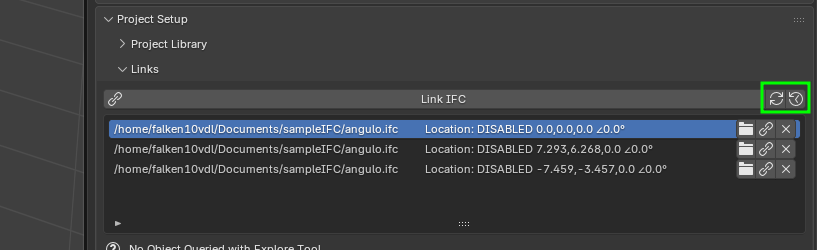
I have updated the PR BonsaiPR v0.8.5-alpha260120-fd84431. Upon reloading the site file, you need to click "Load Links from Cache" or "Rebuild Links Cache":
Here in action:
Cheers!
@falken10vdl
I tested it with some dummy UTM30N georeferenced site and buildings and all seems to be working fine
thanks a lot for your incredible support
The reason for the 1km is not to do with Blender precision, it's to do with surveying precision where the combined scale factor may be assumed to be a constant (and therefore a helmert transformation used as a map conversion). More reading here. Blender precision can go up to 5km before 1mm values are affected.
I've recorded a video to help understanding false origin modes:
https://cloud.thinkmoult.com/ifc-videos/false-origin-modes.mp4
Just out of curiosity, does it also take rotation into consideration? Two instances of the same IFC could theoretically have the same placement point but different rotations and not overlap.
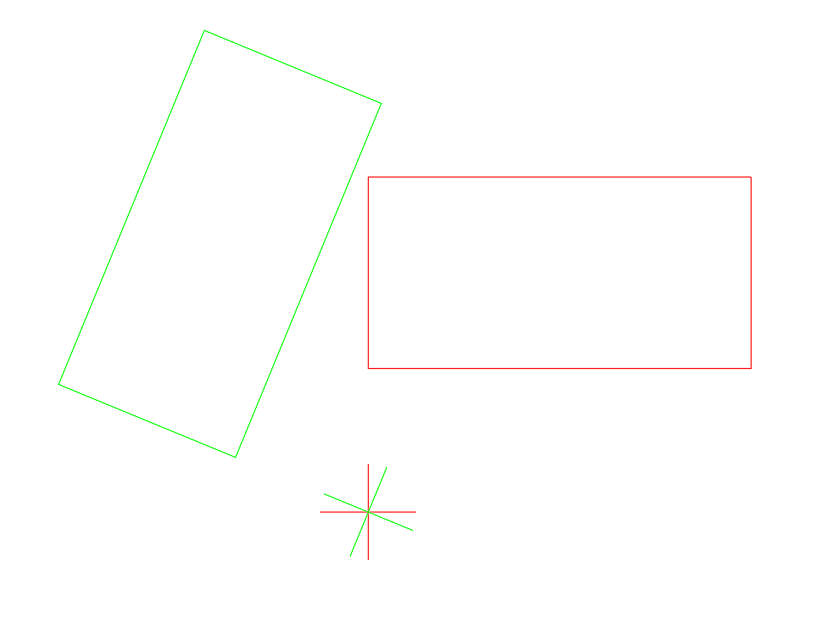
Excuse the crude mockup.
Not a deal breaker, but potential future improvement.
@falken10vdl
I tried linking 2 files with the same configuration (false origin mode or cursor position) and noticed that one of them is not saved.
Any change in the configuration allows all files to be saved.
@Moult
Really clear explanation! Thanks!
@duarteframos, Yes, it works.
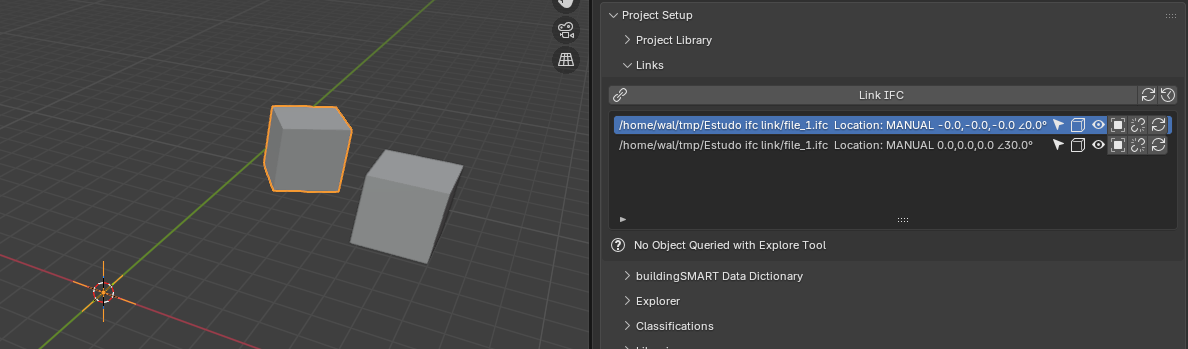
Can you record a small video, please?
I am not able to reproduce that issue. I have a site.ifc, bulding_a.ifc, building_b.ifc and I can link them both several times. See the cache files being created.
What it is not possible is to put exactly the same file twice in the same position (x,y,z, angle). Why would you like to have the same duplicated in the same place?
Cheers!
I might be missing something, but it doesn't seem to 'remember' to load the linked .ifc file.
...
I would assume that this move and save, would save it's location upon reopening.
Did I do it correctly?
...
Would it be possible to
Shift + Dthe link, and have it in the list of linked files?...
This might not be possible, but wanted to ask again, is it possible for the drawing's exclude/include filters to apply to links?
...
Perhaps we can use the following test files to share common tests.
https://hub.openingdesign.com/OSArch/Community_Troubleshooting/src/branch/main/7570_IFC link management with UUID support. Same file can be linked multiple times
Please let me know if you'd like to be added to https://hub.openingdesign.com/ to push any changes.
backstory: https://community.osarch.org/discussion/2627/osarchs-own-git-hosting-service
@theoryshaw
It is working as it was. It will not load the links upon reload. You need to push the reload button as you do in the video. We can automatically do that. The only thing is that if there is no cache it will take some time to rebuild it.
@theoryshaw
That is working as it was :) I actually had the same question to @Moult in the PRs comments:
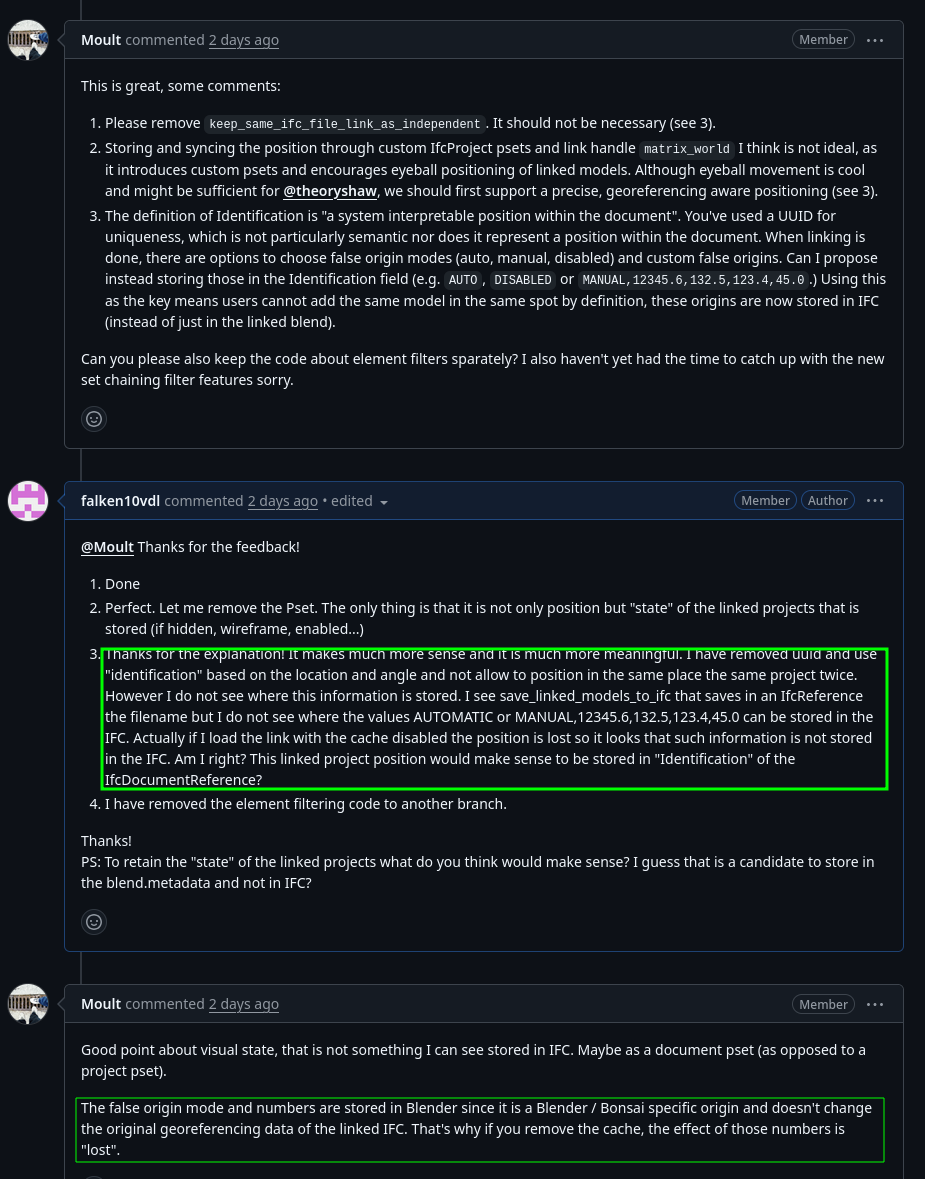
Before I had added a PSet in IfcProject that was tracking all these visual aspects. Maybe this can leverage the metadata.blend file?
@theoryshaw I have updated the PR so it takes in account metadata info to place it correctly if is is changed from the initial position.
Cheers!
In addition, would be nice to have an option where each ifc link had its own exclude/include filters that could override the main file's exclude/include filters.
Intuitively this feels like it should be saved in the .ifc somehow.
To be a more agonostic approach, outside just bb.
No, it's happening with different files.
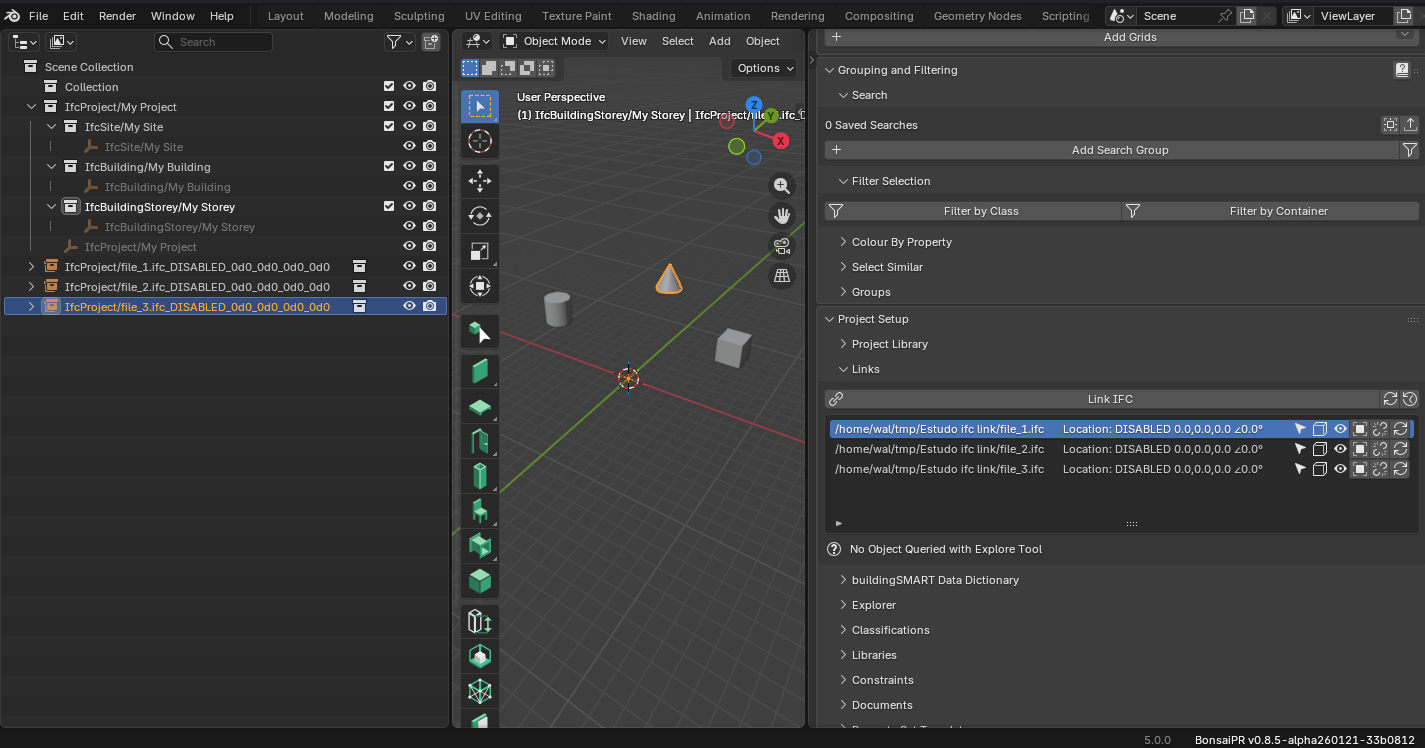
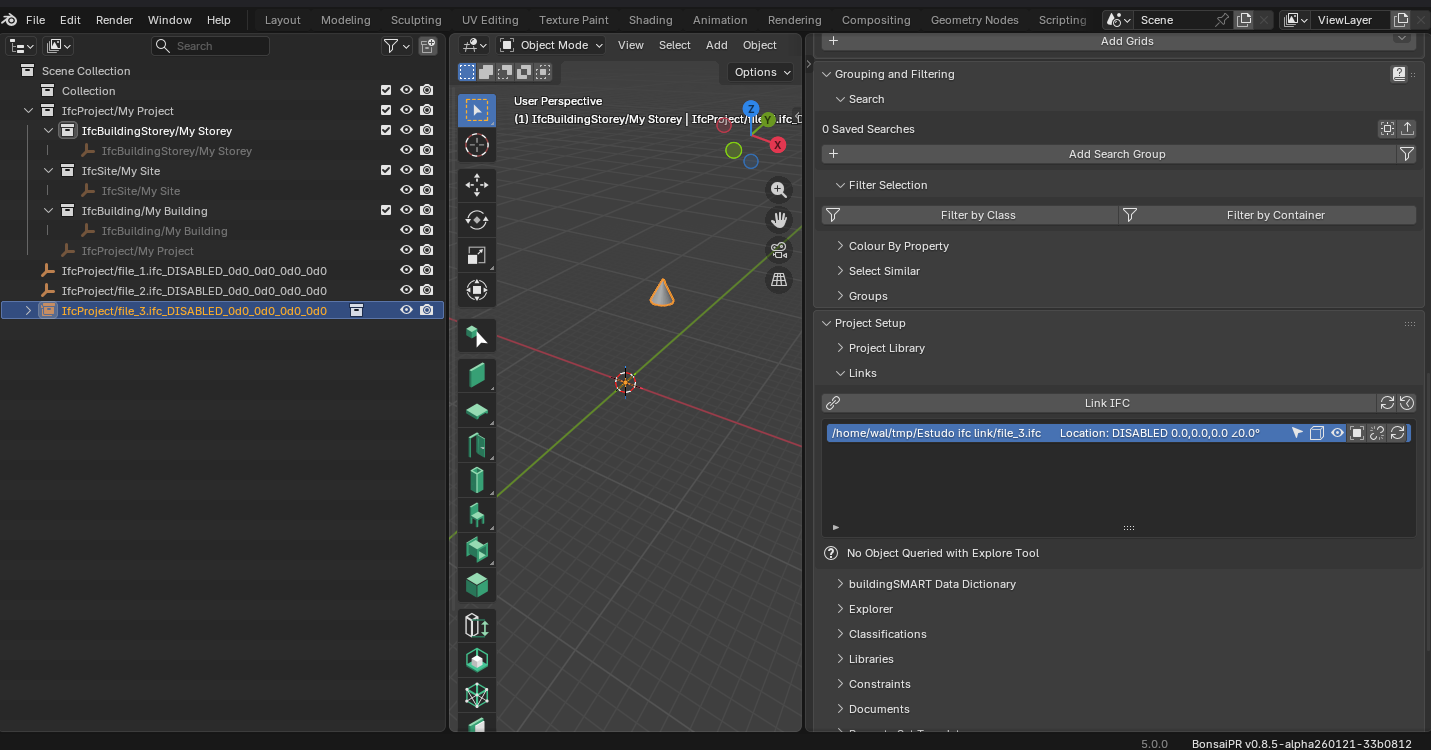
Saving with 3 linked files.
After reopening and reload links.
Can it ?
(Visibilities, custom Positions, Info to linked Files, .... )
When Metadata Blend has all that info - but starts first - then loads the IFC.
Yes it does work with blend metadata file. Anyhow we must make it work with IfcocRef.
Cheers!
You are right. It was a bug. It is now fixed. should be available in the next bonsaiPR build for testing.
ping @theoryshaw as well. What naming convention should we be using for the collection name? Currently there is a limitation in the collection... it uses the filename without directory info... this means that two files named the same in different places of the filesystem linked into the same location will collide here:
/home/falken10vdl/file.ifc and /home/falken10vdl/otherplace/files.ifc are properly handled by the UI and the caches are in their directories but if we link them in the same position. ex DISABLED 3.0,2.0,5.0,45.0... the collectionname is the same for both: IfcProjectFile/file.ifc_DISABLED_3d0_2d0_5d0_45d0 which is not right...
@Moult what makes semantically sense? initially we had uuid which did not have this problem but yes is meaningless in front of the end user.
What should we do?
Cheers!
@falken10vdl was the following abandoned on these later iterations?
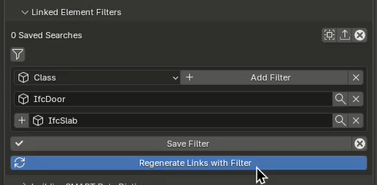
Couldn't find it.
Not sure. Don't know enough yet about the assumptions going in.
Yes, as per the the comments in IFC link management with UUID support. Same file can be linked multiple times #7570 It should be kept separately.
I have created another branch in falken10vdl/IfcOpenShell:element-filters-for-linked-projects but have not yet created any PR. Once the "multiple same file" strategy is agreed I will update it and create the PR.
I am playing a little bit with the workflow and for the one suggested by @Moult in this thread above I think that another MANUAL mode would make sense.
If you follow these steps, the values to enter in the false origin+angle are a little bit complex.
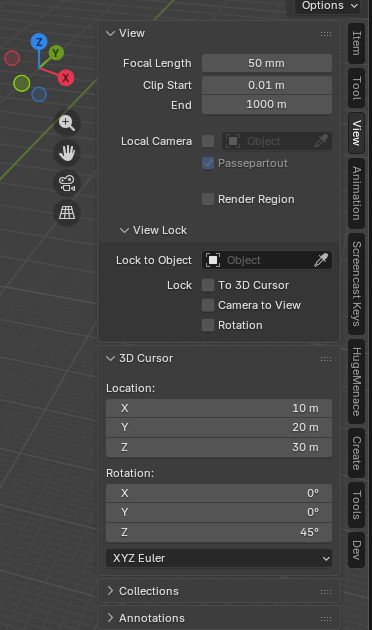
I think that it is easier for the user to do teh following:
1. Set your 3dcursor in the site.ifc either snapping or providing the coordinates so you are happy where to put the new linked building.ifc
3. Then link in a NEW "Manual" mode using those x,y,z + the angle of the cursor to place building.ifc with respect to site.ifc
Currently if you use the "False Origin" + "Angle to Grid North" it is not obvious what to put there if what you know is the offset + angle of the building.ifc with respect to the site.ifc Do you agree @Moult ?
Thanks!
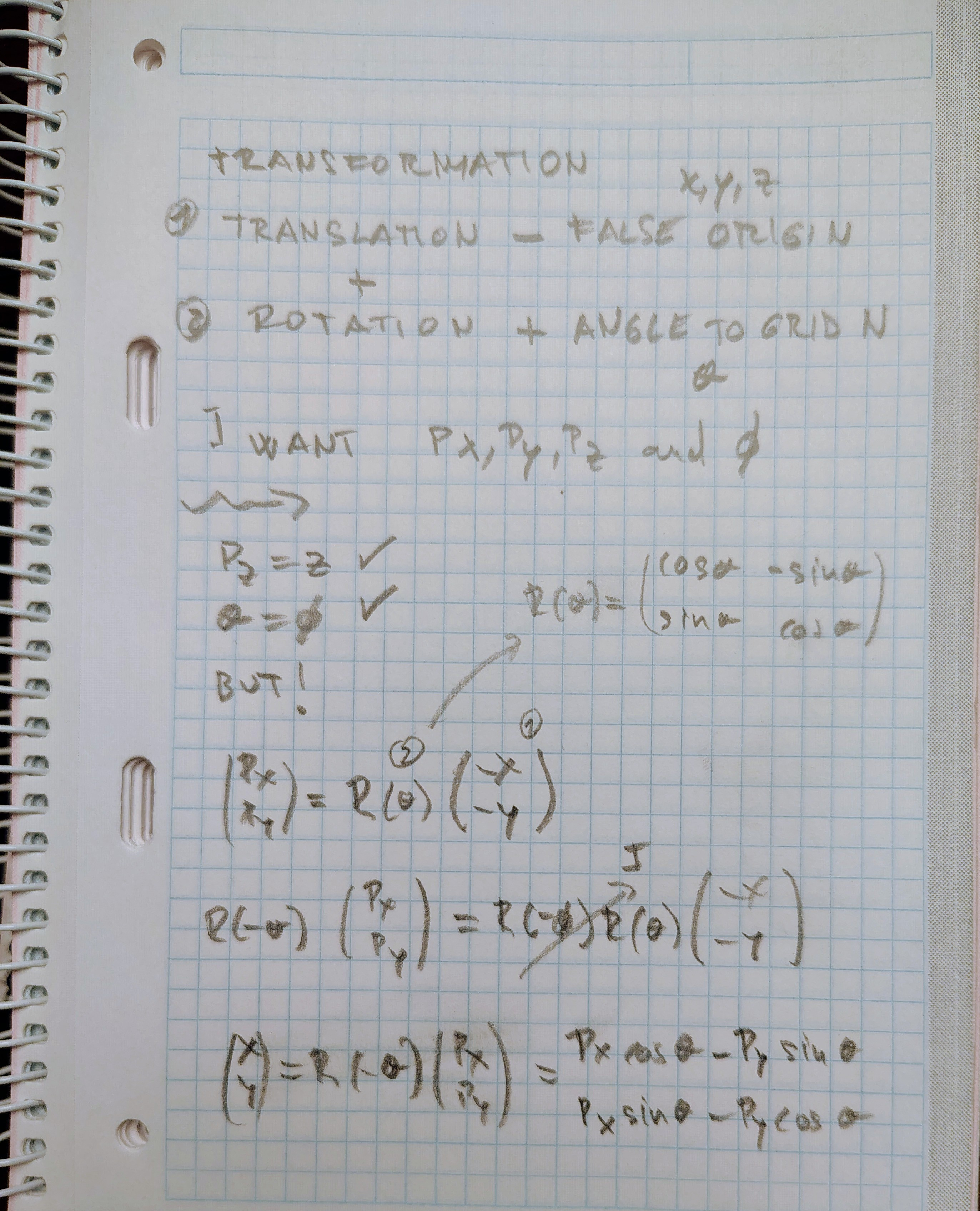
PS: The MANUAL mode I think is doing a translation of minus false origin and a rotation of angle to grid north. If you do the math and want to use MANUAL to enter values so you arrive to Px,Py,Pz and angle theta, you need to work your way backwards and that is not simple I think:
This might be planned already, but having a UI where you can use
GandRandShift+Dto move/rotate/duplicate these links around the scene would be helpful while in 'design mode'--because things change a lot while designing.PR updated so in manual mode it suggests the needed values to end up in the 3D cursor position and angle
Cheers!
G and R you can already do if you enable metadata. Once it is clear where to store the information in IFC we will have it also without metadata.
Shift-D, since we are using the initial position as the basis for the cache filename, collection name and UI links naming maybe it is not so easy, but would this be acceptable?
EDIT... if we use STEPID for uuid, we should no have a problem to use shift-d to create a new link out of a given one
We should be copying the type of link from the source. That is fine for DISABLED and MANUAL as there is no info in the source IFC related to georeference. However if the source is AUTOMATIC, the only way to keep it automatic and positioned elsewhere is if we change accordingly the IfcMapConvertion. That would mean that we create another IFC file copying the original but changing the georeferencing data. I do not know if that is ideal as then you have two different files that you will need to keep in sync for the rest of things...
If we accept that this is mainly used in a workflow as @Moult suggested (site.ifc georeferenced and building.ifc not georeferenced) then we can copy the link for MANUAL and DISABLED and refuse to do it if it is AUTOMATIC (as the georeference data would not be right)
Cheers!
The way Bonsai generally resolves name clashes is to not rely on name, but instead a Blender prop on that object. Can the collection instance / empty have tool.Ifc.link() to the IfcDocumentReference STEP ID?
Totally agree that if the user wants "Put it here at my cursor" the math is troublesome since the coordinates are always the global coordinates at the origin. The solution you've come up with works great, but I think in the future a more discoverable UI can be made, both for opening and linking.
In the future, when linking a file, I'm thinking about redesigning the UI to let the user explicitly select "from" and "to". The from dropdown could select from "Local Coordinates", "CRS Coordinates", and then let you specify the numbers, then the to dropdown could select from "Local Coordinates", "CRS Coordinates", "Blender Coordinates" and then let you specify the numbers (and of course another field for rotation). Also instead of the three modes "AUTO", "MANUAL", "DISABLED", I think more explicit wording can also be used, e.g. "IFC Local XYZ to Blender XYZ"... but all this needs bit more mulling and I think is a separate topic to this PR. For now, let's just lock in functionality related to linking multiple of the same IFC, and storing its placement.
That is a very elegant solution! It has the benefits of the uuid but it is an id relevant in the site.ifc file. Thanks!
We can have collection names and cache filenames to be of the type building1_#327 or building5_#824... And the UI with filename, stepid and location in 3dview
Now if the link is moved in the 3dview we can save the location in the UI & identification field of the doc reference and maybe add a warning in the UI if there exist georef data in the site.ifc and building.ifc and they do not match as they should.
Cheers!
I'm not entirely certain what should happen in terms of linking to IfcDocumentReference in the scenario where you are linking into a non-IFC Blender session. I'll leave that to you :) I haven't had a chance to actually test out the PR yet.
Here the first version of the agreed
PR:
Still missing:
See it in action:
Cheers!
Thanks @falken10vdl!
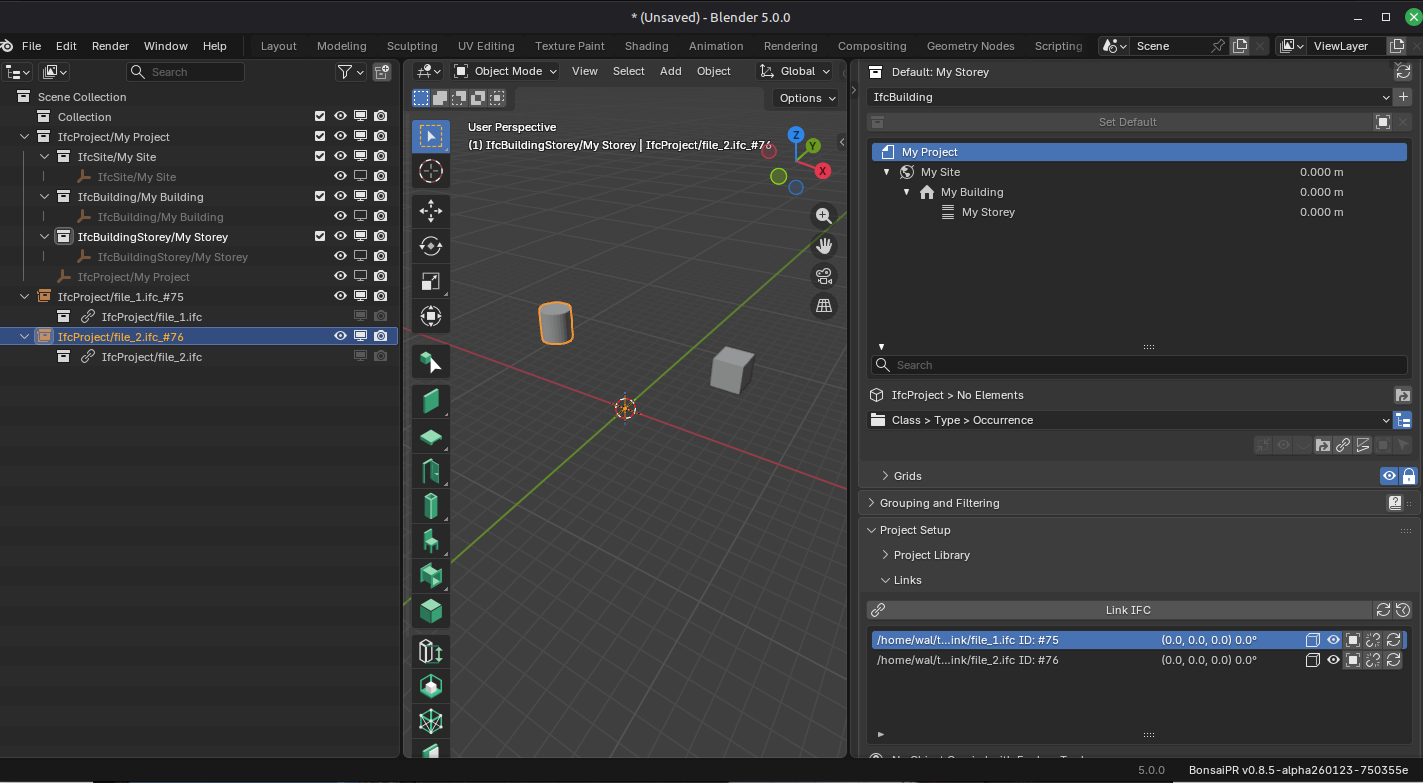
I'm not seeing the spatial structure and elements of the linked files in the outliner.
Is this feature not yet available? What am I missing?
Great contribution!
Would it be possible to apply external styles to the links?
Also possible to have the links load automatically when opening the .ifc file?