@theoryshaw said:
Great contribution!
Would it be possible to apply external styles to the links?
Added support to load external styles.
Since there are many combinations possible between the level of geo data in site.ifc and buildings.ifc. I have added the geo name and vertdatum in the link panel to know if the status of the site in terms of georefencing:
And then a number of icons to represent the different possibilities of the linked projects:
With no Geo data (white circle with X)
With incompatible geo data. That is. It has CRS.name and/or CRS.VertDatum but not the same as the ones of the site.ifc (red circle with X)
In this case, if you choose AUTOMATIC or DISABLED the effect is the same. You get it placed at the 3dCursor
With partial Geo data. That means CRS.Name is matched but not the CRS.VertDatum. In this case we can place it in X, Y, Angle but not Z (crossed world)
With full Geo data. We have a match for both CRS.Name and CRS.VertDatum. (world)
In this case AUTOMATIC will place them according to the geo data. And the placement will be right. However if you move them or create another instance in other place, we color the icons in red (alert) as the geo data in IFC does not match any longer the position here within the site.
Cheers!
@theoryshaw said:
Also possible to have the links load automatically when opening the .ifc file?
Maybe this should only happen if there are cache files? otherwise it will take quite some time maybe to regenerate caches?
Please give it a try by regenerating caches in real world scenaria so you find if it makes sense to open (and eventually generate) the links when opening the .ifc file.
Cheers!
@walpa said:
Thanks @falken10vdl!
I'm not seeing the spatial structure and elements of the linked files in the outliner.
Is this feature not yet available? What am I missing?
Yes I think it has never been there. There is currently the possibility to go to the explorer tool and if you right click on an element, it will tell you the ifc data for it. It is reading the sqlite cache. Probably it would be interesting to agree what needs to be stored in that sqlite database and then how do we interrogate it from the UI. @Moult What are your thoughts on this? What makes sense? IMHO I like always the idea of LoD & "Divide et impera" :) Otherwise you need immense resources while in reality our brain can just concentrate in one thing at a time... I would say that double clicking in a linked project should open a new full blown blender+bonsai session with that file. So one can change whatever one needs and then when closing this session, trigger the cache regeneration for that particular file and update the corresponding instances in the parent site.ifc (- cpu + memory)
Cheers!
This is a great indicator of georeferencing status. My thoughts on linked file structure is that linked files are first for reference only, built for performance and scalability of massive files (which I work with daily personally). Other options should be possible, but without sacrificing the massive file support.
What else do you think needs to be done before the PR is ready for final testing and review? We can always have more PRs for additional feature after this :)
@falken10vdl said:
I would say that double clicking in a linked project should open a new full blown blender+bonsai session with that file.
I think this sounds reasonable.
But it may be a problem on macOS. Usually you can't open another instance of an App.
Some Apps can open multiple Files inside an instance. Like Bricscad, Vectorworks, .... or even extract the extra files Viewports to another display. I would love if Blender could open multiple Files for drag and drop between both. Or like Modo that can show all open files at a time ....
I think there is an option/workaround. Unfortunately I lost the link to the tutorial, but I made an "App" by Apples Scripteditor that does open a second Blender instance, usually done by using Terminal. Should have been : do shell script "open -n /Applications/Blender.app"
What else do you think needs to be done before the PR is ready for final testing and review? We can always have more PRs for additional feature after this :)
Let me go over it and clean it and make sure all tests are passing.
@falken10vdl
Regarding the visualization of the hierarchical structure, I understand that this is not the focus of this PR; let's leave that for another discussion.
I was just curious to know how you managed to make the linked file objects visible in the Outliner in your January 22nd video.
What else do you think needs to be done before the PR is ready for final testing and review? We can always have more PRs for additional feature after this :)
@walpa said: @falken10vdl
Regarding the visualization of the hierarchical structure, I understand that this is not the focus of this PR; let's leave that for another discussion.
I was just curious to know how you managed to make the linked file objects visible in the Outliner in your January 22nd video.
You mean the IfcGroups (just create a group in you building.ifc and you will see it in the site.ifc when you link it)? Well that was the origin of this thread but I was new to the workflow of linking files and when I started to play with them to see what the issue here was I saw that linking several times the same file was not supported so the conversation then shifted in that direction since that is a base requirement to have.
As a side note I like myself better the idea of Levels of Detail since I find its a simpler approach. However from the examples that you, @theoryshaw , @zoomer have provided and the comments about project federation from @steverugi it is clearly a very nice functionality to have.
In general the worflow I use instead of linking files is that I use IfcDocuments which themselves are ifc project files to implement all this "several ifc files" setup. In fact it was to make things speedy even in low end computers. I am using this more for detailing info within a building than arranging several building within a site. For example at LOD200 or 300 I would model a slab with the regular Bonsai tool, however if it s for example at joist-vault slab, I would then create another ifc file for the arrays of joist and vaults. With documents you can assign the LOD300 ifc file to just the LOD200 slab and directly open it as another session. This way you always keep files small which makes blender/bonsai run faster and a corruption of one file has small implications.
However my workflow has some limitations in that if you want to change a component that has a major impact in the external envelope, for each level, you need to change a pair of files (the upper and the referenced one) while linking you just reload the cache to get a new freshview. That is why maybe adding "double click" functionality to the linked files is a good idea as well.
I now see clear benefits from the linking approach... to name a few which are not possible just with doc references: visial check of georeferencing, changes in the child model are reflected in the parent one (this one can be a game changer if you are doing some tens of houses of different models, etc.), etc.
@theoryshaw but mirroring is not something that ifc handles with a ",switch" right? I mean. when we link a file we cache its blend chunk representation and then position it with location and angle. The ifc is the same for all of them.
In the case of mirror we can mirror in blender the chunk but the linked IFC is not represented but that file (the mirror in ifc is another file). We could store the mirroeing data in the doc reference (another field?) and generate the right postions
cheers?
@theoryshaw said:
Yes, support for mirroring in IFC is sadly lacking. :)
Yes mirroring the 'blender chuck' seems like the lowest hanging fruit.
Wow, really lots of argumentations in the forum you have linked... IMHO we can have some mirroring info (axis, global or local... etc.) the same way we have location and angle saved in the document reference and we just perform the mirroring in the blender 3Dview but do not create an IFC representation of the mirrored project. Is that acceptable?
Cheers!
That's a really interesting chat. There are some clarifications I think:
Claude seems to alternately suggest an external manifest file and to have IFC as "the authoritative owner". To be clear, the latter is what is implemented.
Also to clarify, mirroring is now possible
The criticism about the reimplemented helmert transformation is about code I forgot to delete, all good now.
The SQL lazy load cache thing... this is definitely something I want to investigate, but probably not SQL. I was originally going to attempt HDF5 (there are some bugreports tracking this attempt), but now I need to also investigate RocksDB.
@Moult huge thanks for your help! I have learned a lot with this PR7607.
As per the comments in it about extra functionality, if you guys do not mind I will issue some PRs, one per feature to avoid having too many things at the same time ( I have tendency to do that because it allows me to create an automated bonsaiPR with as much functionality as possible but now I think it is just worse).
So next things to address:
handling SurfaceStyles: yes can implement outside this PR, I suspect there is a cleaner way to implement it than was previously proposed
importing IfcGroups as child collections: probably warrants broader discussion here, also best addressed as a separate PR
being able to immediately move a manual, or disabled link. (mirroring?) - I think basically addressed.
duplicating links: can implement, but not now. I had an attempt but quickly realised that the duplicate function has some more fundamental issues which need to be addressed first.
I would add double-click in a linked file opens that file, erases the cache and unlinks it. The idea is that if you want to change something in the original file you can just double click and it makes sense that you reload it then in the host file.
cool.
Another nice feature would be if a file could link upon itself.
For example if the file has a model of a house, and then you link that house back into the file. Could layout a subdivision of houses that way.
Change the house design in the file, save, refresh links, and all the houses on the site update--all in the same file.
@theoryshaw I guess that to be consistent It should be like drawing. However imho a chained set is really easy to understand... And you just need a single selector. You start with nothing, first line is to ADD, Next lines are chained one to the Next one and you can either add, substract or intersect... Just like venn set diagramas.
My 2 cents :)
yeah, i guess i don't have a preference, just that it should be consistent across the various UI locations.
...
Having said that however, i wasn't able to get the following drawing query to work as a single query in the linked UI. Perhaps I was missing something.
Include: group="1_The Kosh"
Exclude: IfcSlab, parent="Projecting Slabs Agg"
...
For now, to be consistent, i included 'exclude' as well to the linked UI. https://github.com/IfcOpenShell/IfcOpenShell/pull/8242/changes/8f9164bf7237cf71ed52dfba9ec403c018a70fd0


Comments
For what it's worth, I added external styles to the test files...
https://hub.openingdesign.com/OSArch/Community_Troubleshooting/commit/1a4fcc2acf2ee0468dd3fb6f65ba8995e04b4df4
Added support to load external styles.
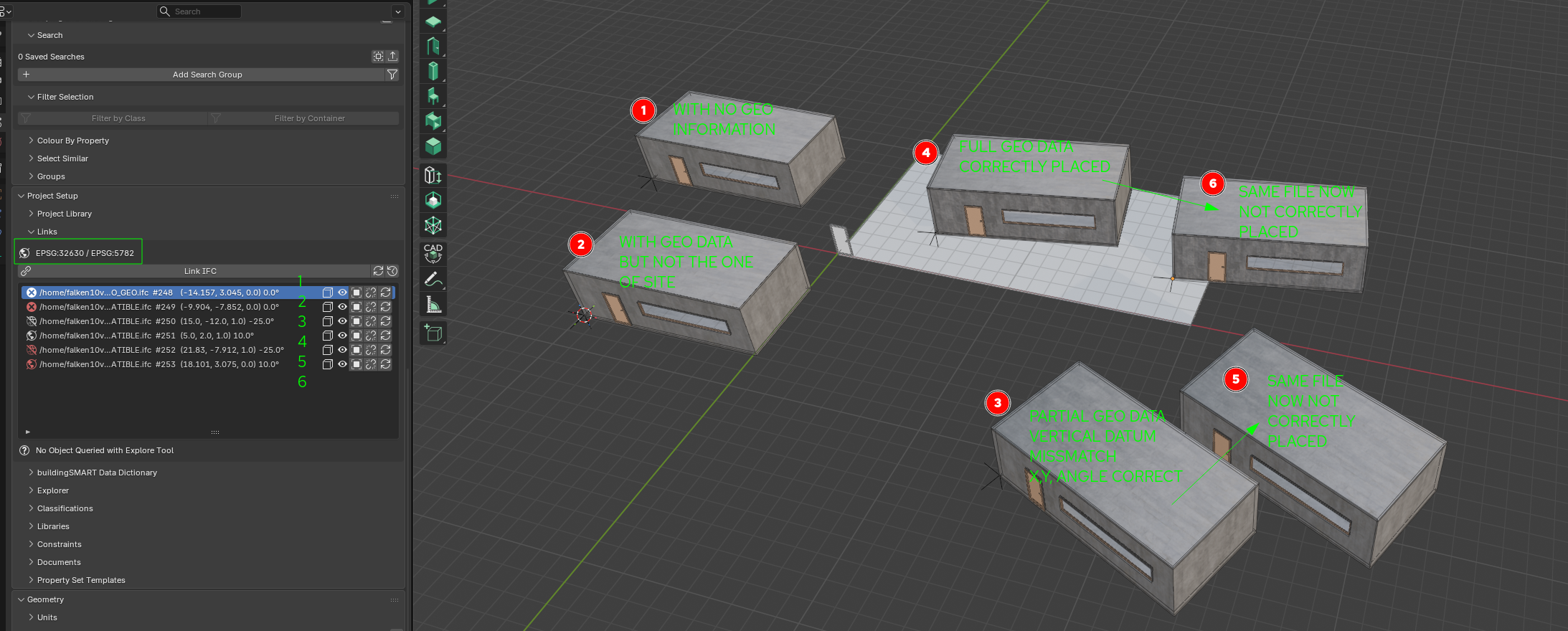
Since there are many combinations possible between the level of geo data in site.ifc and buildings.ifc. I have added the geo name and vertdatum in the link panel to know if the status of the site in terms of georefencing:
And then a number of icons to represent the different possibilities of the linked projects:
With incompatible geo data. That is. It has CRS.name and/or CRS.VertDatum but not the same as the ones of the site.ifc (red circle with X)
In this case, if you choose AUTOMATIC or DISABLED the effect is the same. You get it placed at the 3dCursor
With partial Geo data. That means CRS.Name is matched but not the CRS.VertDatum. In this case we can place it in X, Y, Angle but not Z (crossed world)
In this case AUTOMATIC will place them according to the geo data. And the placement will be right. However if you move them or create another instance in other place, we color the icons in red (alert) as the geo data in IFC does not match any longer the position here within the site.
Cheers!
Maybe this should only happen if there are cache files? otherwise it will take quite some time maybe to regenerate caches?
Please give it a try by regenerating caches in real world scenaria so you find if it makes sense to open (and eventually generate) the links when opening the .ifc file.
Cheers!
Yes I think it has never been there. There is currently the possibility to go to the explorer tool and if you right click on an element, it will tell you the ifc data for it. It is reading the sqlite cache. Probably it would be interesting to agree what needs to be stored in that sqlite database and then how do we interrogate it from the UI.
@Moult What are your thoughts on this? What makes sense? IMHO I like always the idea of LoD & "Divide et impera" :) Otherwise you need immense resources while in reality our brain can just concentrate in one thing at a time... I would say that double clicking in a linked project should open a new full blown blender+bonsai session with that file. So one can change whatever one needs and then when closing this session, trigger the cache regeneration for that particular file and update the corresponding instances in the parent site.ifc (- cpu + memory)
Cheers!
This is a great indicator of georeferencing status. My thoughts on linked file structure is that linked files are first for reference only, built for performance and scalability of massive files (which I work with daily personally). Other options should be possible, but without sacrificing the massive file support.
What else do you think needs to be done before the PR is ready for final testing and review? We can always have more PRs for additional feature after this :)
I think this sounds reasonable.
But it may be a problem on macOS. Usually you can't open another instance of an App.
Some Apps can open multiple Files inside an instance. Like Bricscad, Vectorworks, .... or even extract the extra files Viewports to another display. I would love if Blender could open multiple Files for drag and drop between both. Or like Modo that can show all open files at a time ....
I think there is an option/workaround. Unfortunately I lost the link to the tutorial, but I made an "App" by Apples Scripteditor that does open a second Blender instance, usually done by using Terminal. Should have been :
do shell script "open -n /Applications/Blender.app"Perhaps it's not implemented yet, but would assume it would remember the location of the links upon reopening...
Let me go over it and clean it and make sure all tests are passing.
@falken10vdl
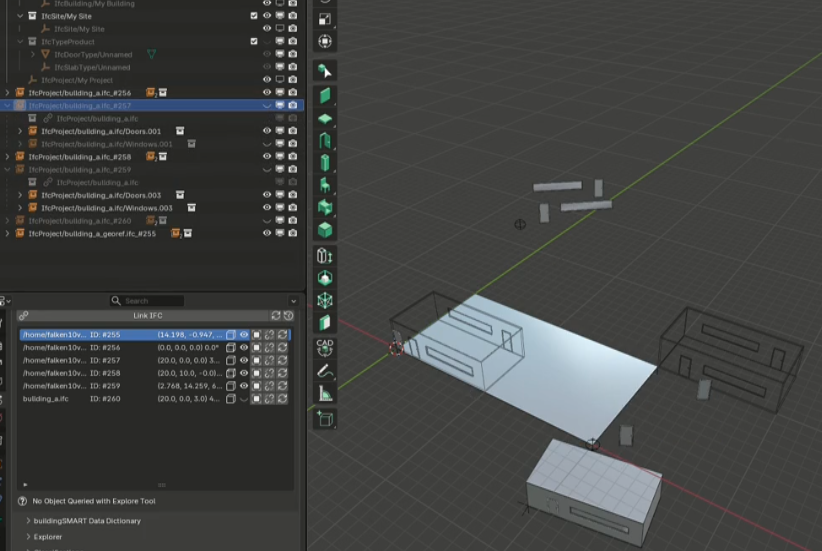
Regarding the visualization of the hierarchical structure, I understand that this is not the focus of this PR; let's leave that for another discussion.
I was just curious to know how you managed to make the linked file objects visible in the Outliner in your January 22nd video.
I tried several things but couldn't replicate it.
Thanks!
@Moult I have just created a PR with the main functionality for review.
https://github.com/IfcOpenShell/IfcOpenShell/pull/7607
Cheers!
You mean the IfcGroups (just create a group in you building.ifc and you will see it in the site.ifc when you link it)? Well that was the origin of this thread but I was new to the workflow of linking files and when I started to play with them to see what the issue here was I saw that linking several times the same file was not supported so the conversation then shifted in that direction since that is a base requirement to have.
As a side note I like myself better the idea of Levels of Detail since I find its a simpler approach. However from the examples that you, @theoryshaw , @zoomer have provided and the comments about project federation from @steverugi it is clearly a very nice functionality to have.
In general the worflow I use instead of linking files is that I use IfcDocuments which themselves are ifc project files to implement all this "several ifc files" setup. In fact it was to make things speedy even in low end computers. I am using this more for detailing info within a building than arranging several building within a site. For example at LOD200 or 300 I would model a slab with the regular Bonsai tool, however if it s for example at joist-vault slab, I would then create another ifc file for the arrays of joist and vaults. With documents you can assign the LOD300 ifc file to just the LOD200 slab and directly open it as another session. This way you always keep files small which makes blender/bonsai run faster and a corruption of one file has small implications.
However my workflow has some limitations in that if you want to change a component that has a major impact in the external envelope, for each level, you need to change a pair of files (the upper and the referenced one) while linking you just reload the cache to get a new freshview. That is why maybe adding "double click" functionality to the linked files is a good idea as well.
I now see clear benefits from the linking approach... to name a few which are not possible just with doc references: visial check of georeferencing, changes in the child model are reflected in the parent one (this one can be a game changer if you are doing some tens of houses of different models, etc.), etc.
Cheers!
Thanks @falken10vdl for threading the needle! Not easy--community makes it easier.
@falken10vdl , would it be possible to support mirroring of these links as well?
Would help with laying out a site, for example, with one housing type that can be mirrored...
Similar to the 8 minute mark of the following tutorial video...
https://www.dropbox.com/scl/fi/ro9err44e8vhvw4sjdczd/129000_20250529_1627-Laying-out-the-site-with-housing-types.mp4?rlkey=8hj7cv1yaey5ojf4de2k9q438&dl=0
@theoryshaw but mirroring is not something that ifc handles with a ",switch" right? I mean. when we link a file we cache its blend chunk representation and then position it with location and angle. The ifc is the same for all of them.
In the case of mirror we can mirror in blender the chunk but the linked IFC is not represented but that file (the mirror in ifc is another file). We could store the mirroeing data in the doc reference (another field?) and generate the right postions
cheers?
Yes, support for mirroring in IFC is sadly lacking. :)
Yes mirroring the 'blender chuck' seems like the lowest hanging fruit.
Wow, really lots of argumentations in the forum you have linked... IMHO we can have some mirroring info (axis, global or local... etc.) the same way we have location and angle saved in the document reference and we just perform the mirroring in the blender 3Dview but do not create an IFC representation of the mirrored project. Is that acceptable?
Cheers!
Yes for sure!
Yes, creating a mirrored IFC representation would be pretty involved task i would think.
A good chat (it seems) about the architecture around the associated PR's (#7570, #7607)
https://claude.ai/share/4b07e03c-aef0-44c1-8d29-a076c0fc4c86
That's a really interesting chat. There are some clarifications I think:
@Moult huge thanks for your help! I have learned a lot with this PR7607.
As per the comments in it about extra functionality, if you guys do not mind I will issue some PRs, one per feature to avoid having too many things at the same time ( I have tendency to do that because it allows me to create an automated bonsaiPR with as much functionality as possible but now I think it is just worse).
So next things to address:
I would add double-click in a linked file opens that file, erases the cache and unlinks it. The idea is that if you want to change something in the original file you can just double click and it makes sense that you reload it then in the host file.
Cheers!
Hi @falken10vdl, I added some new linking functionality, if curious, and would like to review. :)
https://github.com/IfcOpenShell/IfcOpenShell/pull/8242
Hi @theoryshaw this is a great addition! Yes I am very interested to understand how it is implementes.
Thanks!
cool.
Another nice feature would be if a file could link upon itself.
For example if the file has a model of a house, and then you link that house back into the file. Could layout a subdivision of houses that way.
Change the house design in the file, save, refresh links, and all the houses on the site update--all in the same file.
@falken10vdl
For the filter, for links, what's your thoughts of using both 'exclude' and 'include' like with drawings?
@theoryshaw I guess that to be consistent It should be like drawing. However imho a chained set is really easy to understand... And you just need a single selector. You start with nothing, first line is to ADD, Next lines are chained one to the Next one and you can either add, substract or intersect... Just like venn set diagramas.
My 2 cents :)
yeah, i guess i don't have a preference, just that it should be consistent across the various UI locations.
...
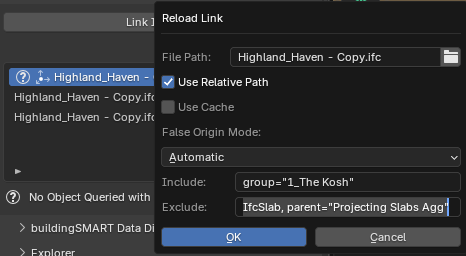
Having said that however, i wasn't able to get the following drawing query to work as a single query in the linked UI. Perhaps I was missing something.
Include:
group="1_The Kosh"Exclude:
IfcSlab, parent="Projecting Slabs Agg"...
For now, to be consistent, i included 'exclude' as well to the linked UI.
https://github.com/IfcOpenShell/IfcOpenShell/pull/8242/changes/8f9164bf7237cf71ed52dfba9ec403c018a70fd0