

Dasu - layout & print web app

Hi, I have been working on a web app for laying out and printing drawings, actually my new mate Claude and I have been working on it :)
The problem I had was putting together drawing sheets on my secured locked-down work computer, I was using PowerPoint, there were some limitations! so, I pasted a mockup of what I thought the UI could look like into Claude last weekend and got obsessed. See the link for a proof-of-concept https://github.com/4nigel/dasu
I see an opportunity for this to integrate with Bonsai, as mentioned in the road map file.
It's my first attempt at a web app and first use of Github so please excuse any noobism










Comments
posting my
promoteicon was not enough :)Guys please check what @Nigel is sharing here, it's awesome!
Devs, kindly consider it to handle our web layout editor, we can bridge the current gap we have when Bonsai goes into SVG via Inkscape or similar for its output.
Pretty please?
Thanks
Very interesting stuff!
I see a lot of value also for modifying hatches and lines without the need to modify the css by hand
Awesome!
Here's your first pull request. :)
https://github.com/4nigel/dasu/pull/1
prepare for the onslaught. ;)
WTH !
Looks so cool.
And even seems to work in Safari ....
something worth considering perhaps...
https://claude.ai/share/99cd29e7-7863-4348-adf7-65429952bc1f
Here's another one :)
https://github.com/4nigel/dasu/pull/2
This project will be interesting to see where it goes.
It will be interesting to see where the 'architecture' of this project will go--especially if only novice programmers, such as myself, are the only ones contributing. It'll be a fun to see it play out.
Although I do hope more experienced coders provide their insight... but i know that bandwidth is tiny nowadays with the onslaught of vibers out there.
I started by doing a mock-up of what I thought the interface should look like, pasted that into Claude told it what I wanted to be able to do and why, along with some rules like FOSS including any dependencies as well as doing everything the 'typical way' and avoiding going down rabbit holes. I was really surprised at the first iteration that came back, many buttons were clickable, some even did basic stuff like grids and paper size. If Ryan calls himself a novice, then I am definitely a noob but like any design work the better the brief (knowing what you want, why you want it and what you can afford), the better the outcome.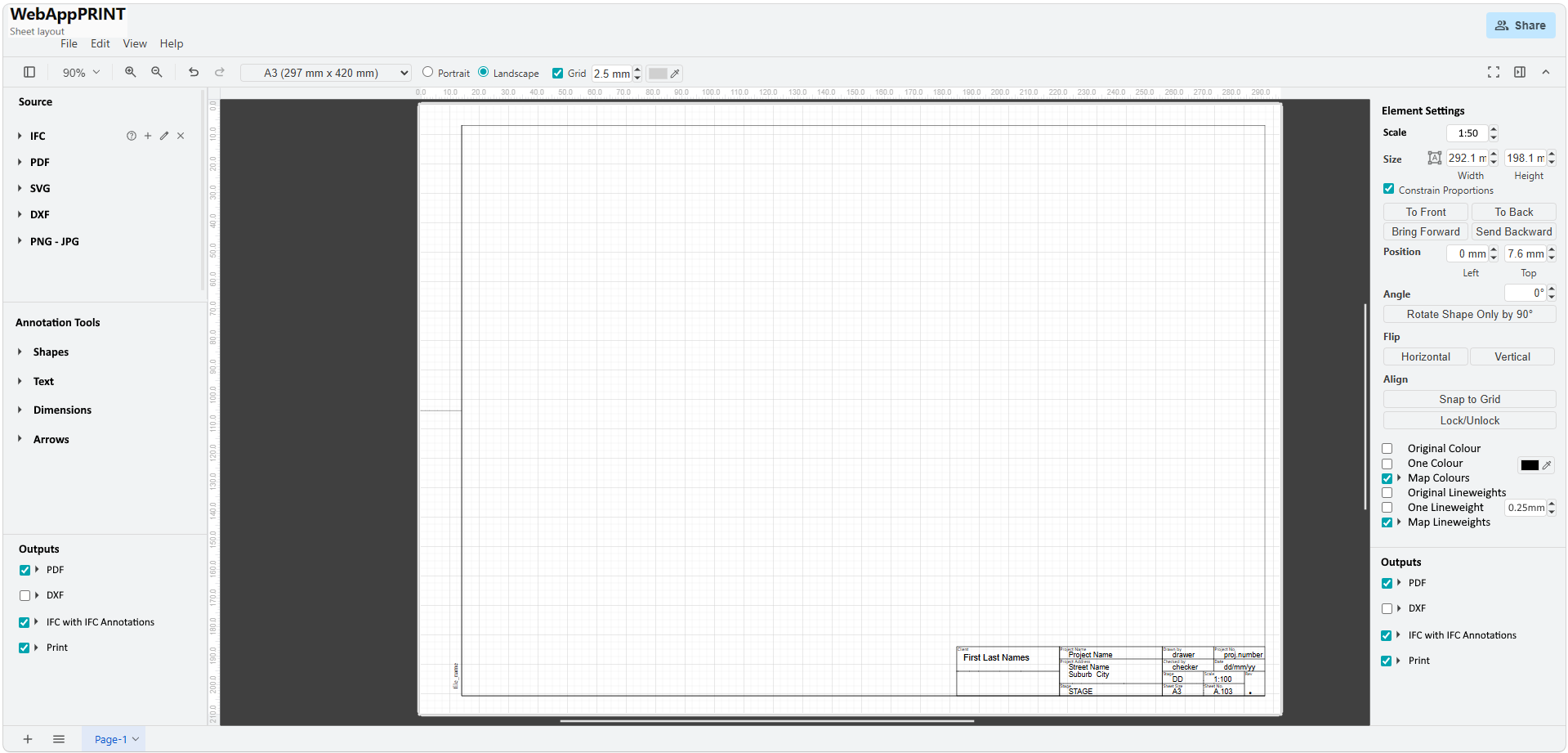
The following AI-assisted proposal explores aligning with how Bonsai structures its assets. It also explores replacing the
.bprintformat with a distributed set of files that would be easier to version track with Git — with the aim, basically, of making the workflow as distributed-friendly as possible.Thoughts?
Proposal Here
# Proposal: A Shared Open Project Format for Bonsai and Dasu
Background
Dasu is a browser-based drawing sheet layout tool. It lets you compose drawings from Bonsai BIM, DXF, PDF, SVG, and raster images into print-ready sheets — entirely in the browser, with no install or subscription required. It includes a local bridge server that receives live SVG pushes from Blender/Bonsai as you work.
Bonsai (formerly BlenderBIM) is the Blender-based open-source BIM authoring tool built on IfcOpenShell. Among its many capabilities, it manages drawing sets: it generates SVG drawings from camera views, assembles them into sheet layouts, and stores all of this in the IFC file and on disk.
At present, these two tools work alongside each other but maintain separate, incompatible project structures. This proposal describes a path toward a shared open format that would let both tools — and future tools — read and write the same project folder without conflict.
The Problem
Dasu's current format
Dasu currently saves everything into a single
.bprintfile: a JSON blob containing Fabric.js canvas state for all sheets, embedded or referenced assets, app preferences, and project metadata. This works for single-user workflows but has real limitations:.bprintfile.Bonsai's existing structure
Bonsai already writes a well-considered folder structure:
The IFC file itself is the manifest: sheets are
IfcDocumentInformationentities, drawings areIfcAnnotationentities, and relationships between them are stored asIfcDocumentReferenceentries. This is already an open, standardised structure.The question is: can Dasu join this structure rather than sit alongside it?
The Proposal
We propose that Dasu adopt Bonsai's existing folder and file conventions as its primary project format. Instead of a single
.bprintfile, a Dasu project is a folder on disk — the same folder as the Bonsai project.Folder structure (no changes to Bonsai's conventions)
The only new directories are
images/and.dasu/. Everything else already exists.The layout SVG as the shared working file
Bonsai's layout SVGs already use a clean, structured format with
data-typeattributes:Dasu would read and write this format directly. When Dasu places a drawing on a sheet, it writes a
<g data-type="drawing">group. When Bonsai reads the layout, it sees the same group. Both tools edit the same file without conflict, because each tool owns its own content type.Content that has no IFC equivalent (user-placed annotations, DXF imports, raster images, non-Bonsai SVGs) would be written into a
<g data-type="dasu-overlay">group that Bonsai ignores gracefully.The IFC file as manifest
Dasu would read sheet and drawing metadata directly from the IFC, rather than maintaining its own copy:
IfcDocumentInformation(Scope=SHEET)IfcAnnotation(ObjectType=DRAWING) +EPset_DrawingIfcDocumentReferencerelationshipsBBIM_Documentationproperty set onIfcProjectThis means when a Bonsai user renames a sheet or updates a revision, Dasu sees it immediately on next open — no sync required.
EPset_Drawing — what Dasu would read
Each drawing carries a property set that describes not just its scale and projection, but also the paths to all the assets used to render it. Dasu would read all of these:
Scale"100")HumanScale"1:100")TargetViewPLAN_VIEW,SECTION_VIEW, etc.)HasLineworkHasAnnotationHasUnderlayInclude/ExcludeGlobalReferencingStylesheet.cssfile indrawings/assets/Markersdrawings/assets/Symbolsdrawings/assets/Patternsdrawings/assets/ShadingStylesdrawings/assets/CurrentShadingStyleShadingStylesis currently appliedMetadataThe asset paths (
Stylesheet,Markers,Symbols,Patterns,ShadingStyles) all resolve relative to the IFC file location, and the files themselves live indrawings/assets/. This is important for Dasu: rather than maintaining its own parallel style system, it can read and honour the styles Bonsai has already defined. Dasu-specific overrides (per-IFC-class colour, lineweight, visibility) would layer on top of these base styles and be stored in.dasu/canvas.json— only the delta, not a full replacement.The
.dasu/canvas.jsonsidecarA small sidecar file stores only what cannot live in either the IFC or the layout SVG: Fabric.js-specific state that Dasu needs to reconstruct the canvas but that has no standard representation elsewhere.
Sheet names, paper sizes, positions, scales — all absent here because they live in the IFC or the layout SVG. The sidecar is genuinely thin.
Sheets are a build artefact
The
sheets/directory is the compiled output ofSheetBuilder.build(). Neither Dasu nor the user edits it directly. It is produced fromlayouts/on demand — either by Bonsai's "Build Sheet" operator, or triggered by Dasu via the bridge server. This meanssheets/can go in.gitignore, the same way compiled build output does in software projects.Why this is better for collaboration
Git-friendly by design
Each concern diffs independently. Changing a dimension annotation on one sheet touches only that sheet's layout SVG. Adding a drawing to another sheet touches only that sheet's file, plus
model.ifcfor the relationship. No single blob accumulates all changes.Binary files (
images/*.png, PDFs) are isolated in their own directory, making.gitattributesrules for Git LFS straightforward:Decentralised workflow
Because the format is a plain folder of standard files, teams can:
No proprietary lock-in
The format is: IFC (ISO 16739), SVG (W3C), JSON (ECMA-404), and a folder. Any tool that can read these can participate. The
.dasu/canvas.jsonsidecar uses no proprietary encoding — it is plain JSON that any developer can parse.What would need to change
In Dasu
cmdOpen/cmdSave(single-file) withcmdOpenFolder/cmdSaveFolder(directory-based).bprintwindow.showDirectoryPicker()in Chrome/Edge; fall back to the bridge server for Firefox and for Blender-integrated workflows.bprintformat entirely — no migration path, clean breakIn Bonsai
Potentially nothing, or very little. Bonsai already owns
layouts/,drawings/,sheets/, andmodel.ifc. The proposal asks Dasu to conform to Bonsai's conventions, not the other way around.One possible addition: a small extension to the layout SVG schema to formally define
data-type="dasu-overlay"as a recognised but tool-agnostic content group, so future tools know to preserve it rather than strip it. This could be a one-line addition to Bonsai's SVG schema documentation.Open questions for the community
Layout SVG as shared working file — Is it appropriate for Dasu to write directly to the layout SVG, or should Bonsai remain the sole writer of that file? An alternative is for Dasu to maintain its own sidecar layout alongside Bonsai's, with a merge step.
IFC read in the browser — Reading
model.ifcfrom a browser requires an IfcOpenShell WASM build or delegating to the bridge. The bridge is the pragmatic path for now. Is there appetite in the community for a lightweight browser-side IFC reader focused on document/sheet metadata only?data-type="dasu-overlay"formalisation — Should this be a documented extension to the Bonsai layout SVG schema? Or should Dasu-placed non-IFC content live entirely in a separate sidecar SVG per sheet?Titleblock templating — Bonsai uses Mustache-style templating in titleblock SVGs (
{{Scale}},{{Name}}, etc.). Dasu currently generates title blocks programmatically. Should Dasu adopt the same template format so both tools use the same titleblock files?The bridge server's role — In this architecture, the bridge becomes the primary I/O layer (file read/write, IFC parsing, sheet building). Is this the right direction, or should the browser do more directly via the File System Access API?
.dasu/in version control — Should.dasu/canvas.jsonbe committed (so collaborators share canvas layout state) or gitignored (so it's local to each user, like an IDE's.vscode/folder)? The answer probably depends on workflow.Summary
.bprint(single JSON blob).bprint.bprintfilegit archiveThis is not a proposal to build something new. It is a proposal for Dasu to stop maintaining a parallel structure and instead join the one Bonsai has already built — using open standards that any future tool can participate in.
Feedback and questions welcome.
Dasu is free and open-source. Source: github.com/openingdesign/dasu
@theoryshaw the proposal was a lot of reading for me, I had to get my AI to help me 😉
this is a really cool idea, and I have two other ideas to add to it, see my svg that I made in Dasu with a Claude diagram
@Nigel Cool. Can you have AI print out a proposal writeup similar to the one I posted above. Will help me understand a little more.
Hi @theoryshaw the attached doc sums it up well. You will see I had a thought about Dasu outputting Ifc 2D documentation
@Nigel nice, i think we're getting somewhere!
I've modified the proposal to incorporate your additional development 'paths', and refined a few other ideas, and added a few more ideas, as well
This is fun. :)
Proposal Here
Proposal: A Shared Open Project Format for Bonsai and Dasu
The following AI-assisted proposal explores aligning with how Bonsai structures its assets. A parallel path alongside the
.bprintformat that explores a distributed set of files that would be easier to version track with Git — with the aim, basically, of making the workflow as distributed-friendly as possible.A response from community member Nigel has been incorporated below, which refines the proposal considerably — in particular introducing a three-pathway framework that preserves
.bprintfor standalone use cases rather than retiring it outright.Background
Dasu is a browser-based drawing sheet layout tool. It lets you compose drawings from Bonsai BIM, DXF, PDF, SVG, and raster images into print-ready sheets — entirely in the browser, with no install or subscription required. It includes a local bridge server that receives live SVG pushes from Blender/Bonsai as you work.
Bonsai (formerly BlenderBIM) is the Blender-based open-source BIM authoring tool built on IfcOpenShell. Among its many capabilities, it manages drawing sets: it generates SVG drawings from camera views, assembles them into sheet layouts, and stores all of this in the IFC file and on disk.
At present, these two tools work alongside each other but maintain separate, incompatible project structures. This proposal describes a path toward a shared open format that would let both tools — and future tools — read and write the same project folder without conflict.
The Problem
Dasu's current format
Dasu currently saves everything into a single
.bprintfile: a JSON blob containing Fabric.js canvas state for all sheets, embedded or referenced assets, app preferences, and project metadata. This works for single-user workflows but has real limitations:.bprintfile.Bonsai's existing structure
Bonsai already writes a well-considered folder structure:
The IFC file itself is the manifest: sheets are
IfcDocumentInformationentities, drawings areIfcAnnotationentities, and relationships between them are stored asIfcDocumentReferenceentries. This is already an open, standardised structure.The question is: can Dasu join this structure rather than sit alongside it?
Design Strategy: Adopt Conventions, Not Assumptions
The guiding principle for this proposal — especially in these early stages — is to adopt Bonsai's conventions as fully as possible, and diverge only when real-world friction makes it necessary.
Bonsai has already solved hard problems through years of actual use: token naming, file structure, IFC entity relationships, asset path conventions, status vocabulary. Adopting these wholesale means Dasu inherits those design decisions without having to justify them from scratch. It also gives Dasu an immediate, credible value proposition for the OSArch community: it works natively with Bonsai projects from day one.
There is also a practical argument against premature abstraction. It is not possible to design a good platform-agnostic standard in the abstract. The right time to generalise is when there is real friction — a second tool that does things differently and needs to interoperate. Building toward an imagined standard before that point usually produces the wrong abstraction.
The important distinction is between conventions and assumptions:
The three-pathway framework enforces this boundary. For example:
{{Name}}and{{Identification}}are Dasu's token names across all paths — but in Path 1 they are populated from Dasu's own sheet metadata, not from an IFC file. The vocabulary is shared; the data source is path-dependent. That is the right level of coupling.Where divergence will eventually be needed — the likely candidates are things Bonsai doesn't need to handle because it lives inside Blender: multi-source sheet composition (DXF, PDF, and rasters alongside IFC drawings), browser-native UX patterns, the crop/viewport concept, and non-IFC projects. These are the areas where Dasu will eventually need its own conventions. By the time those needs arise, there will be real-world experience to design from rather than speculation.
The Three-Pathway Framework
Rather than a single mandatory format, the proposal recognises three distinct usage contexts. The folder-based format is the right long-term direction — but it is not the only format, and
.bprintis not retired..bprintformat, any machine.bprintoutputShared infrastructure across all three paths:
- SmartText tokens — PascalCase, Bonsai-compatible
-
dasu-overlaySVG group — Dasu namespace, Bonsai ignores gracefully- Sidecar concept —
.bprintis a fat sidecar;.dasu/is a thin sidecar- PDF / SVG / Print output
Note on
.bprint: Path 1 users — including users on locked-down government machines wherewindow.showDirectoryPicker()requires explicit IT permissions — depend on the zero-dependency.bprintworkflow..bprintis a permanent first-class format for Paths 1 and 3, not a stepping stone to be retired. Both formats coexist permanently.The Proposal (Path 2: Bonsai-integrated)
We propose that Dasu adopt Bonsai's existing folder and file conventions as its Path 2 project format. A Path 2 project is a folder on disk — the same folder as the Bonsai project.
Folder structure (no changes to Bonsai's conventions)
The only new directories are
images/and.dasu/. Everything else already exists.The layout SVG as the shared working file
Bonsai's layout SVGs already use a clean, structured format with
data-typeattributes. The key principle is that each tool owns clearly named groups and never writes into the other tool's groups:Ownership rules:
data-type="titleblock"data-type="drawing"data-type="dasu-overlay"x/yinto Bonsai-owned groups. Position overrides go into.dasu/canvas.jsononlydasu-overlayis a formally documented, reserved group name — Bonsai preserves it, Inkscape passes it through, other tools ignore it gracefullyContent that has no IFC equivalent (user-placed annotations, DXF imports, raster images, non-Bonsai SVGs) lives in the
dasu-overlaygroup and is invisible to Bonsai.The IFC file as manifest
Dasu would read sheet and drawing metadata directly from the IFC, rather than maintaining its own copy:
IfcDocumentInformation(Scope=SHEET)IfcAnnotation(ObjectType=DRAWING) +EPset_DrawingIfcDocumentReferencerelationshipsBBIM_Documentationproperty set onIfcProjectThis means when a Bonsai user renames a sheet or updates a revision, Dasu sees it immediately on next open — no sync required.
Conflict resolution by path:
EPset_Drawing — what Dasu would read
Each drawing carries a property set that describes not just its scale and projection, but also the paths to all the assets used to render it. Dasu would read all of these:
Scale"100")HumanScale"1:100")TargetViewPLAN_VIEW,SECTION_VIEW, etc.)HasLineworkHasAnnotationHasUnderlayInclude/ExcludeGlobalReferencingStylesheet.cssfile indrawings/assets/Markersdrawings/assets/Symbolsdrawings/assets/Patternsdrawings/assets/ShadingStylesdrawings/assets/CurrentShadingStyleShadingStylesis currently appliedMetadataThe asset paths all resolve relative to the IFC file location, and the files themselves live in
drawings/assets/. Dasu-specific overrides (per-IFC-class colour, lineweight, visibility) layer on top of these base styles and are stored in.dasu/canvas.json— only the delta, not a full replacement.The
.dasu/canvas.jsonsidecarA small sidecar file stores only what cannot live in either the IFC or the layout SVG. The discipline is keeping it thin: if something can live in the IFC or the layout SVG, it must not also live in the sidecar.
What lives where:
IfcAnnotation.GlobalId_blankMeta(Path 1) — not in sidecarSheet names, paper sizes, positions, scales — all absent here because they live in the IFC or the layout SVG. Note the key change for Path 2: Fabric object IDs are replaced by
IfcAnnotation.GlobalIdas the per-drawing key, which is stable across sessions.Should
.dasu/canvas.jsonbe committed to git? Yes, by default. It contains layout decisions that affect what everyone sees on the sheet — it is not the same as.vscode/which is truly personal. Teams can choose to gitignore it if they prefer local-only canvas state.Sheets are a build artefact
The
sheets/directory is the compiled output ofSheetBuilder.build(). Neither Dasu nor the user edits it directly. It is produced fromlayouts/on demand — either by Bonsai's "Build Sheet" operator, or triggered by Dasu via the bridge server.sheets/should go in.gitignore, the same way compiled build output does in software projects.Why this is better for collaboration
Git-friendly by design
Each concern diffs independently. Changing a dimension annotation on one sheet touches only that sheet's layout SVG. Adding a drawing to another sheet touches only that sheet's file, plus
model.ifcfor the relationship. No single blob accumulates all changes.Binary files are isolated in their own directories, making
.gitattributesrules for Git LFS straightforward:Note:
model.ifcshould also go to Git LFS for larger projects — IFC files commonly reach 50–200 MB.Decentralised workflow
Because the format is a plain folder of standard files, teams can:
No proprietary lock-in
The format is: IFC (ISO 16739), SVG (W3C), JSON (ECMA-404), and a folder. Any tool that can read these can participate. The
.dasu/canvas.jsonsidecar uses no proprietary encoding — it is plain JSON that any developer can parse.What would need to change
What already exists (in Bonsai / IfcOpenShell)
The following are not Dasu work items — they already exist in Bonsai. Dasu's job is to consume them, not rebuild them:
{{Token}}fieldslayouts/titleblocks/in the Bonsai projectIfcDocumentInformation)model.ifcEPset_Drawing)model.ifcStylesheet,Markers,Symbols,Patterns)drawings/assets/data-typegroups)layouts/*.svgIn Dasu — what needs to be built
The honest sequencing, with no items marked done prematurely:
IfcDocumentInformation+EPset_Drawingfrommodel.ifcvia bridge — prerequisite for almost everything else in Path 2cmdOpenFoldercmdOpen— opens a Bonsai project folder via bridge orshowDirectoryPicker().dasu/sidecar writeIfcAnnotation.GlobalIdrather than Fabric object IDslayouts/*.svgto reconstruct sheet canvas from Bonsai-placed drawingsdasu-overlaywrite<g data-type="dasu-overlay">group in layout SVG.bprintmigration tool.bprintfiles to folder format via bridgeshowDirectoryPicker()model.ifcvia bridgeToken mapping — Dasu → Bonsai
Bonsai builds its token data directly from IFC attribute names via
get_info(). Sheet fields are prefixed withSheet. The full replacement:{{sheet.name}}{{SheetName}}IfcDocumentInformation.Name{{sheet.id}}{{SheetIdentification}}IfcDocumentInformation.Identification{{description}}{{SheetDescription}}IfcDocumentInformation.Description{{revision}}{{SheetRevision}}IfcDocumentInformation.Revision{{sheet.status}}{{SheetStatus}}IfcDocumentInformation.Status{{issue.date}}{{SheetLastRevisionTime}}IfcDocumentInformation.LastRevisionTime{{purpose}}{{SheetPurpose}}IfcDocumentInformation.Purpose{{sheet.scale}}{{Scale}}EPset_Drawing.HumanScale(computed){{drawn.by}}{{DrawnBy}}{{checked.by}}{{CheckedBy}}{{discipline}}{{Discipline}}{{project.name}}{{ProjectName}}IfcProject.NameorIfcSite.Name{{project.address}}{{ProjectAddress}}IfcSiteaddress (no direct IFC attribute){{date}}{{Date}}{{year}}{{Year}}Tokens with no IFC equivalent (
DrawnBy,CheckedBy,Discipline,ProjectAddress) would be sourced from a custom property set or from Dasu's own sheet metadata — to be confirmed with the Bonsai team.Further alignments with Bonsai conventions
Beyond token names, this proposal adopts several other Bonsai conventions outright:
Sheet status values — Bonsai stores status in
EPset_Status.Statusas a free-text field onIfcDocumentInformation. There is no fixed Bonsai enum. Dasu proposes adopting the following common construction industry values (aligned with IFC convention and industry practice) and storing them in the same pset:DRAFTFOR REVIEWFOR APPROVALFOR CONSTRUCTIONFOR INFORMATIONAS-BUILTSUPERSEDEDView title template — Dasu will adopt Bonsai's
view-title.svgdirectly fromlayouts/assets/rather than generating its own. The template uses three tokens:{{Identification}},{{Name}},{{Scale}}. No Dasu-specific tokens are added to the view title.Paper size from titleblock SVG — Bonsai does not store paper size as a separate IFC property. Sheet dimensions are inferred from the titleblock SVG's
widthandheightattributes. Dasu will do the same — paper size is a property of the titleblock file, not of the sheet record.Target view vocabulary — Dasu will use Bonsai's
EPset_Drawing.TargetViewvalues verbatim for labelling and filtering drawings:PLAN_VIEWSECTION_VIEWELEVATION_VIEWREFLECTED_PLAN_VIEWMODEL_VIEWTitleblock token set — Bonsai's titleblock templates (A1, A2, A3) use
{{Name}},{{Identification}}, and{{Revision}}as their core tokens, rendered via pystache fromIfcDocumentInformation.get_info(). Dasu will render these templates using the same data source and the same token names.In Bonsai
Potentially nothing, or very little. Bonsai already owns
layouts/,drawings/,sheets/, andmodel.ifc. The proposal asks Dasu to conform to Bonsai's conventions, not the other way around.One possible addition worth raising with the Bonsai team: formally document
data-type="dasu-overlay"as a reserved-but-ignored group name in the layout SVG schema, so future tools know to preserve it rather than strip it. One line in Bonsai's documentation would suffice.Open questions for the community
data-type="dasu-overlay"formalisation — This proposal assumesdasu-overlaywill be formally documented as a reserved, tool-agnostic group name in the Bonsai layout SVG schema. Is the Bonsai team agreeable to this? A one-line addition to the schema documentation would be sufficient.Status values — Since
EPset_Status.Statusis free-text in IFC, there is no canonical list to adopt. The values proposed above reflect common industry practice — are they the right set? Are there values missing or that should be renamed?IFC read in the browser — Reading
model.ifcfrom a browser requires an IfcOpenShell WASM build or delegating to the bridge. The bridge is the pragmatic path for now. Is there appetite in the community for a lightweight browser-side IFC reader focused on document/sheet metadata only?The bridge server's role — In Path 2, the bridge becomes the primary I/O layer (file read/write, IFC parsing, sheet building). Is this the right direction, or should the browser do more directly via the File System Access API for users who have it available?
Path 3 — clarification needed, assumed later phase — Nigel's response refers to Path 3 as "MoneyBIM IFC import", but this term doesn't correspond to any known tool or product we could identify. Our best reading is that it describes a workflow where a user imports an IFC file to extract drawing/sheet metadata without needing a full Bonsai/Blender setup — using IFC as a read-only data source to populate a
.bprintproject. Parsing IFC independently of the bridge would require either an IfcOpenShell WASM build or a lightweight IFC reader, which is a meaningful technical dependency. Our assumption is that this is a later phase of implementation, tackled after Path 1 and Path 2 are solid. If the community sees it differently — or if it is simpler to implement than we think — please correct us.Summary
.bprint(single JSON blob).bprintoutput.bprintfilegit archive.bprintfileThis is not a proposal to build something new. It is a proposal for Dasu to grow a second, Bonsai-native mode — built entirely from standards that already exist — while keeping the standalone
.bprintworkflow intact for users who need it.Feedback and questions welcome.
Dasu is free and open-source. Source: github.com/openingdesign/dasu
it sure is fun, it's now lunchtime in NZ so I'll read your update :)
Noob question: when I update dasu.html in my own GitHub repo do I need to do a pull request? I worried I may have over-written your recent update
No, you can push directly.
If you push, and if your change conflicts with something that is already on github, it will let you know there's a conflict, and then you have to resolve before pushing.
As a general rule, before i 'push', i like to make sure I 'pull' down all the recent changes.
And also, if i plan on making a changes, i pull down before i start making changes.
You'll get used to it. :)
In general don't worry about overwriting something. That's what Git's great for--keeping the history of changes, and being able to revert if need be.
I make a PR with this proposal doc:
https://github.com/4nigel/dasu/pull/3
Using git will better help us 'diff' it now, as it evolves.
@theoryshaw MoneyBIM is my name for all the proprietary BIM apps ;)
ha... gotcha. Thanks, google was not helping. :)