

Open CAD Studio (with native DWG/DXF support)

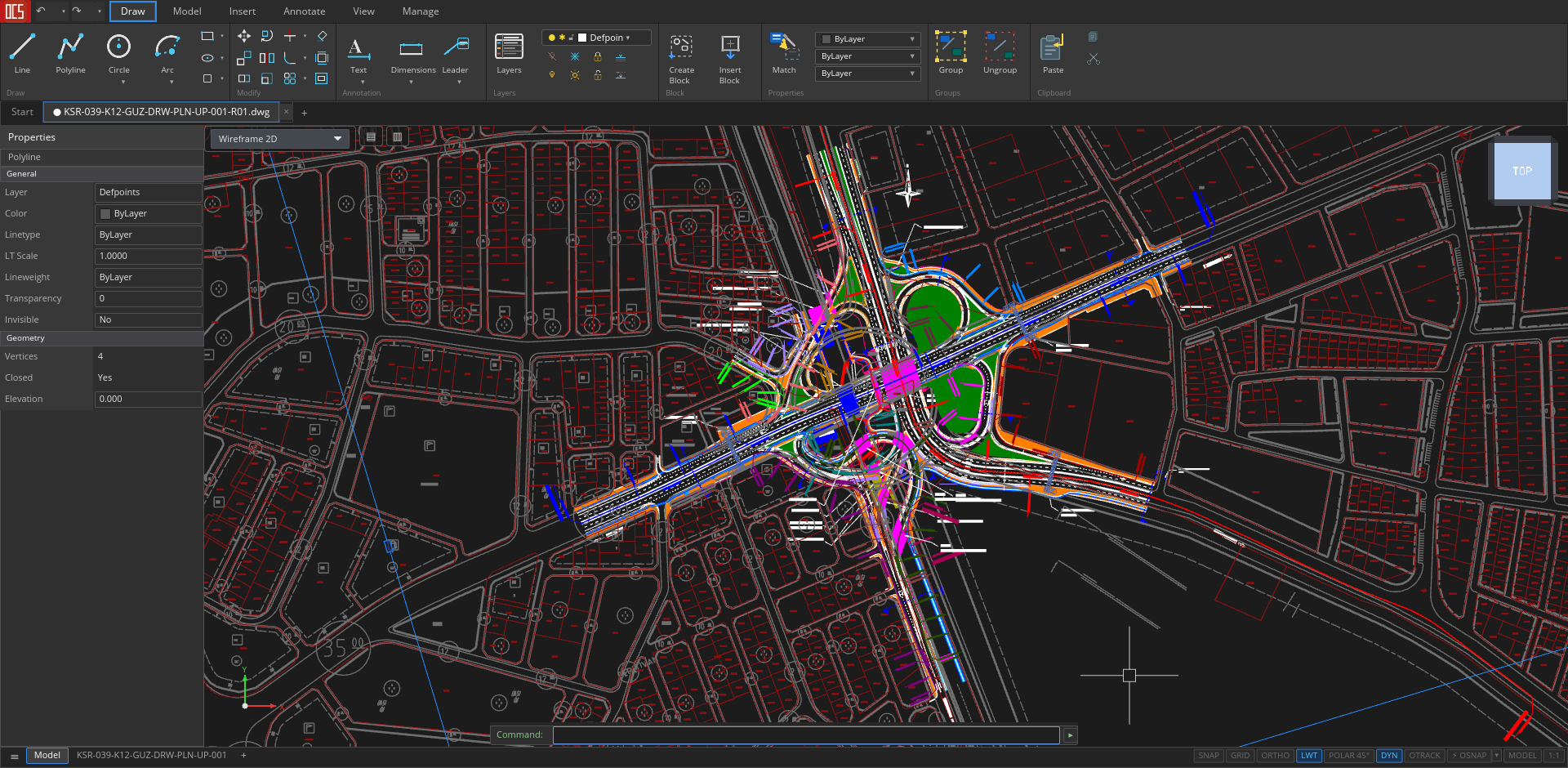
Open CAD Studio: a modern, Open Source 2D + 3D CAD application that reads and writes DWG and DXF natively built in Rust, with GPU-accelerated rendering.
Starts < 1 second. Size 30 MB
No license. No converters. No workarounds. Just open, draw, save.
What's in it:
➡️ Full 2D drafting — LINE, PLINE, CIRCLE, ARC, ELLIPSE, SPLINE, HATCH, OFFSET, TRIM, EXTEND, FILLET, MIRROR, ARRAY, ROTATE, SCALE, EXPLODE… the entire AutoCAD-style command set
➡️ Native DWG & DXF (R13–R2018) read/write — the de-facto industry-standard format, without third-party library licenses
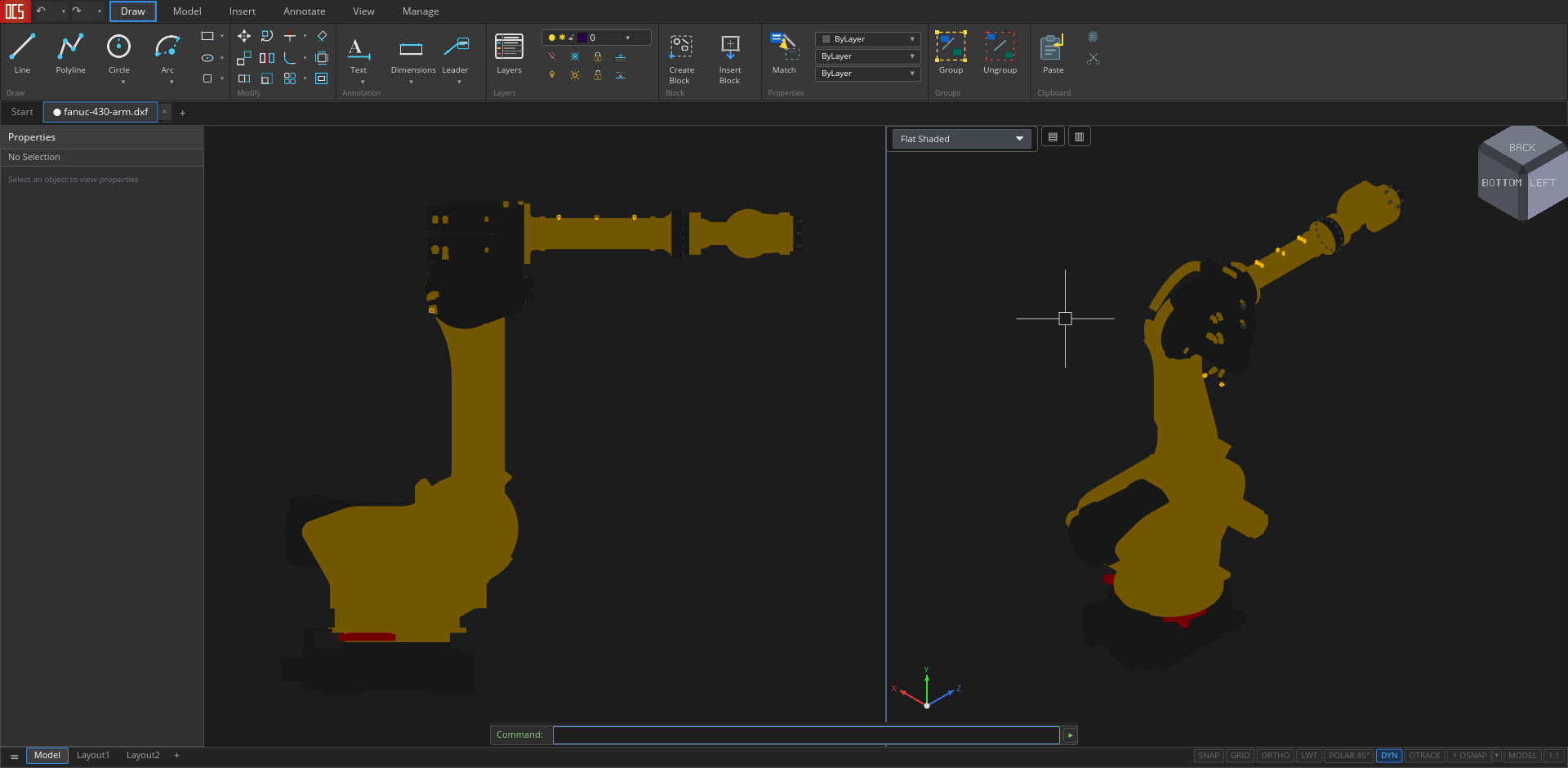
➡️ 3D modelling with ACIS solids tessellation — BOX, SPHERE, CYLINDER, EXTRUDE, REVOLVE, LOFT, SWEEP, ARRAY3D — and 3DSOLID/REGION/BODY entities from DWG render correctly
➡️ Paper space + layouts — multi-tab model space, viewport projection with inline MSPACE overlay, VPORTS presets, plot styles (CTB/STB), PRINT directly to system printer
➡️ Full dimensioning — linear, aligned, angular, radial, diameter, ordinate + DIMSTYLE with everything (DIMASZ, DIMSCALE, DIMEXO, DIMEXE…)
MLEADER, MTEXT, tables, GD&T tolerances, MLINE — with dedicated style managers
➡️ STL, STEP AP203, OBJ import/export, PDF plot, WBLOCK, XREF — everything you need to fit into an existing CAD chain
GPU-accelerated via wgpu — scales smoothly to large models with many solids
➡️ Under the hood: Rust for memory safety and performance, iced for the UI, wgpu for the GPU rendering. Cross-platform: Windows, macOS, Linux. GPL-3.0 license.
➡️ Product page: https://www.open-aec.com/open-cad-studio/
➡️ Repo: https://github.com/HakanSeven12/OpenCADStudio
➡️ Releases: https://github.com/HakanSeven12/OpenCADStudio/releases









 and 5 others.
Comments
Unfortunately it crashes while starting on Mac.
(See here : https://github.com/HakanSeven12/OpenCADStudio/issues/53 )
Will try again to install on Linux (ElementaryOS) these days ....
Im using Linux(Pop OS) and there is testers on windows side. But I dont have any Mac tester. So if you want to help I can try to fix issues for Mac.
I can try.
(I am just a software end user)
First can you create a seperate issue for the crush? So we can track the progress on that.
Done.
Can you test 0.4.8?
This is really, really awesome! I guess this is the question everybody is wondering ...
How is DWG support handled? An internal library? Any thoughts on other initiatives like LibreDWG?
Thanks! That's definitely the long-term vision, although we're not there yet. Regarding DWG support, Open CAD Studio is currently built on top of Acadrust, which itself builds upon AcadSharp. I'm building on existing open-source foundations and contributing improvements where I encounter missing functionality or compatibility gaps.
In practice, OCS development and Acadrust development often go hand in hand. When I need features, bug fixes, or support for additional DWG entities that aren't yet available, I try to contribute those improvements upstream rather than maintaining a completely separate implementation.
Compared to QCAD and LibreCAD, my focus is slightly different. Those projects are mature and have historically been centered around DXF workflows, where OCS aims to provide a modern CAD experience with DWG interoperability as a first-class concern. The dream is reaching a point where users can work with DWG files confidently without needing AutoCAD installed at all.
Interesting. I've never understood why would anyone want to use dwg instead of dxf - I've worked with AutoCAD extensively in multiple architecture offices and never found any functionality apart from blocks and xrefs useful.
Anyway, I have quickly tested open cad studio and I am quite impressed. It supports xrefs (which I dearly miss in qcad and librecad) looks really nice, fast, compact (everything autocad isn't since like fifteen years ago) and feels really familiar to an autocad user.
I really hope your group doesn't disappear as fast as it appeared and wish you all the best.
Thank you 🙂
The challenge is that DWG remains the industry standard. Even when a workflow could technically use DXF, DWG is often what people exchange every day.
To be honest, the original reason I started this project was much simpler: I just wanted a way to open DWG files on Linux. Over time, I kept adding features that I personally missed, and it evolved from a DWG viewer into a more complete CAD application.
At the moment, I'm still driven mostly by curiosity and the challenge itself. As long as donations cover the AI costs involved in development, I'll keep working on it and pushing it forward.
^^ This. Absolutely this. It's very sad, but true.
Another thing to take into account is file size, DXF is ASCII (which is good cause it's easily-ish reverse engineered and parseable), but DWG takes somewhere between 2 - 10 times less space on disk, it depends on the type of geometry but it is quite drastic on big files.
Hi, @HakanSeven12
any alternative to Patreon if someone would like to donate to your project?
thanks
I don't intend to keep using dxf, but I have a git repo consisting of about 100MB of Autocad dxf files with about 150 commits, and the repo is 25MB - this was unexpectedly a very efficient thing to do
Hi 🙂 Only patreon works in Turkey. Other options are not supported in my country. I searched for alternatives for several times but couldn't find any.
I know, but in my experience the bloat in dwg (unnecessary 3D, OLE objects etc.) leads to much bigger dwg than dxf anyway, because people just carelessly copy paste everything from file to file.
Sure, but one can say the same thing about pretty much all 3D file formats. It is possible to make DWG files very space-efficient if you use the right tools (xref, hatches, MESH, and nested blocks I guess). It suffers the same fate as IFC I think, it's mainly used as an interoperability file format and not a native drawing format so every vendor does their own thing when exporting or importing and you lose all the benefits along the way. Cheers
Hi everyone. OCS has a web version now!
OCS Web try it in the browser: https://hakanseven12.github.io/OpenCADStudio/
@HakanSeven12 It may be a font issue. I'm seeing little boxes like when the system can't find the right glyph. I'm running on Linux, so the font may not be available. Ideally the font used should be delivered with the page if that is in fact the issue.
You are right. That's a known issue. In desktop app it fallbacks to system font. But in web version there is no fallback.
Hi @HakanSeven12 thanks again for your super tool, much appreciated
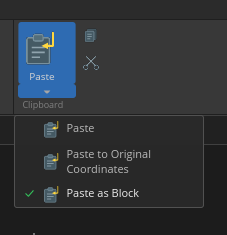
will copy-paste between different drawings be implemented, maybe with same coordinates?
cheers
Hi. You can copy paste but as I remember it wont transfer layer of object. So its not fully implemented. Also don't have paste to origin feature too. Can you open an issue on github? Because I just keep forgetting it
yes copy/paste works but sometimes you need to pass objects from one drawing to another, and the option is not available at the moment
done!
PS I can't figure out how to save files created in Autocad or QCAD, once edited in OCS I can't open them up with other apps (even Autodesk TrueView fails, and OCS too) cheers
Can you send me your autocad and ocs files? You can create a new issue for that too. Also is that problem appears only after a copy paste operation?
This problem is solved and will be available in next release
New copy paste options are added. Also the other bugs must be fixed now and will be available in next release. Let me know if they're still exist
I added a plugin system that allows anyone to develop their own extensions and share them through the OCS Plugin Manager. I also added an automation API, enabling external applications and scripts to interact with and control OCS.
Example Plugin: https://github.com/HakanSeven12/opencad-example-plugin
Automation: https://github.com/HakanSeven12/OpenCADStudio/tree/main/docs/automation
@HakanSeven12 said:
it works! thank you so much
Snapping now works as expected aswell, Nearest no longer supersedes all other reference points. Also the icon for portable Windows .exe is a welcome addition.
On behalf of a lot of people who depend on .dwg, a deep thanks for working on this.
You're welcome 🙂