

How to eliminate these ugly lines in elevation projection.

OK, so I'm not sure if this is the better forum when seeking help understanding, or the discussions feature in Github.
So I've got my model set up. I'm using Status tags on the walls and windows. I'm happy with how the plans look (existing, demolition and proposed.) I'm using @theoryshaw assets for the moment, though I tweaked it slightly so the demo plan is using a different css file. This is so the demo tagged items render blue in the existing plan. Here is an example of a window that will be filled. I've created a "plug" of wall material tagged New.

The issue comes when getting elevations:
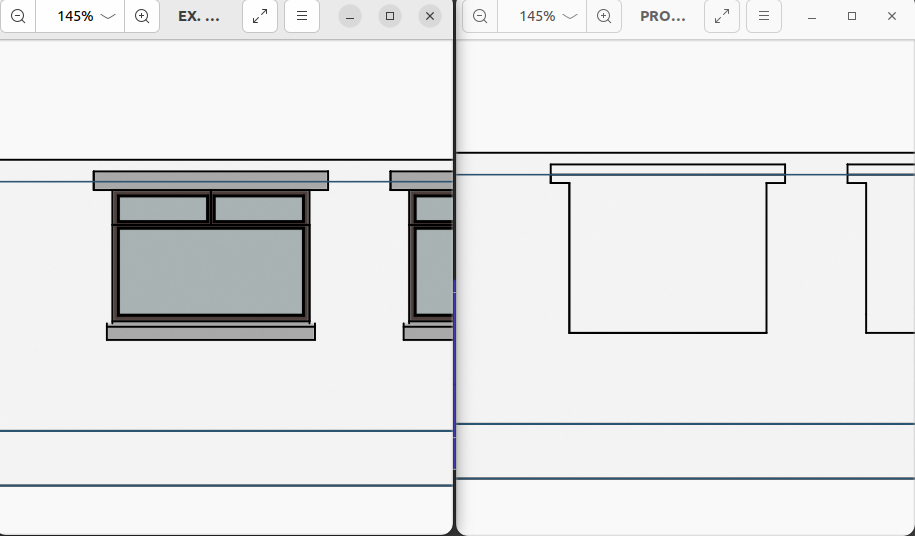
The existing elevation is good obviously, but the proposed one has this ugly outline.
If I've understood all this correctly, JoinCriteria only works in cut mode. This is based on my understanding that cut mode is where the camera plane intersects geometry, and projection mode is where geometry is in front of the camera plane. So I think I've run into a limitation of Bonsai's drawings. Or am I doing something bad with the way I've constructed my model? (Not an architect, so maybe I'm doing something a real architect wouldn't do.)
The only way I could see to avoid the ugly outlines is to create entirely separate walls, and then either somehow abuse the status tags, or use custom EPset's and filter on those. Or there is some other way I don't know about to control/fix this?
Comments
very cool.
funny thing, we 'just' came up with hack for this.
I don't have time now to write it out, but here's our conversation. You might be able to piece together what we did.
https://matrix.to/#/!SBFOmwCPtPqLmvzaJB:matrix.org/$SRZzJXiTV1vWE6_Ip47BKLfSkAz3p0WyWjwyqzPYBWo?via=matrix.org
Do you know? I'm tracking your repo and I even saw that "hidden line" commit. Totally misunderstood what the phrase meant. I thought you were trying to get lines hidden by geometry to appear in a drawing, like a dashed line or something.
So from some quick piecing together... I add the custom pset template to my two wall components, set the HiddenLineHack value to true, and the css rule takes care of not drawing the lines. I will go play.
Never mind the deep end, this feels a bit more like jumping in to the Mariana Trench. I know I said it in my self-intro message, but the way you make this stuff available for everyone to learn from is seriously amazing.
Thanks... wouldn't make it fun otherwise. :)
OK, so it's sort of working. Unfortunately it also kills some of the outline of the main wall. I can see in your chat that where you are using it in a kitchen section this doesn't really matter, as it is bounded on all four sides anyway.
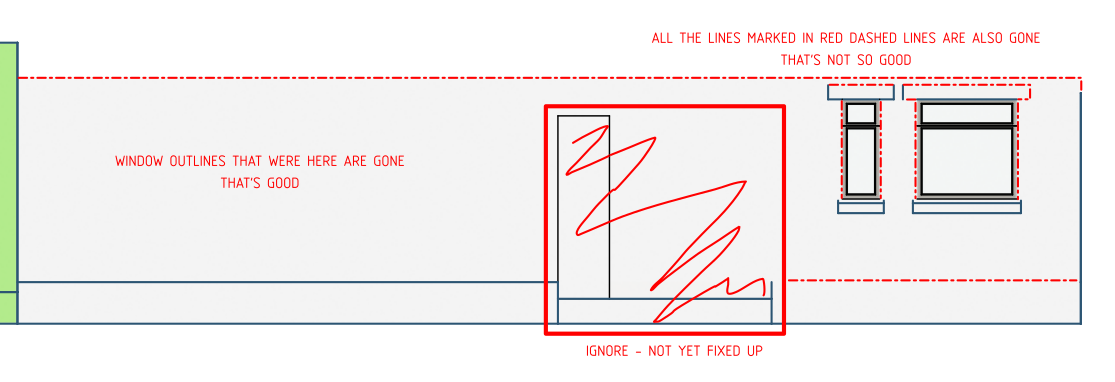
For now I think I'll just have to leave the hack on the filler blocks, but not set it for the main wall. Then when I want the final presentation copy, just manually delete those lines that come about from the void in the main wall in Inkscape.
FYI the line you have checked in to gitea didn't work. I had to change:
.ODGeneric-HiddenLineHackTrue.projection {display: none;}to
.ODGenericHiddenLineHack-True.projection {display: none;}For anyone else's information (FAEI?) you also have to add:
OD_Generic.Hidden_Line_Hackto the cameras Metadata field, as well as using the OD assets and psets available from the OD gitea.
Nice!
Yeah, there are definitely drawbacks to this approach.
...
Maybe protrude your headers slightly.
...
Maybe have your window void slightly larger than the window frame, that way the frame line reads.
Would think 'joining' these line's is in the roadmap, if you want to
+1it:https://github.com/IfcOpenShell/IfcOpenShell/issues/3742
btw, this is the Mariana Trench. ;)
https://github.com/IfcOpenShell/IfcOpenShell/discussions/5587
I can't decide if it feels more like someone summoning the devil, or more like my university modules involving differentiation and integration. Scary stuff either way!
Took a stab with AI:
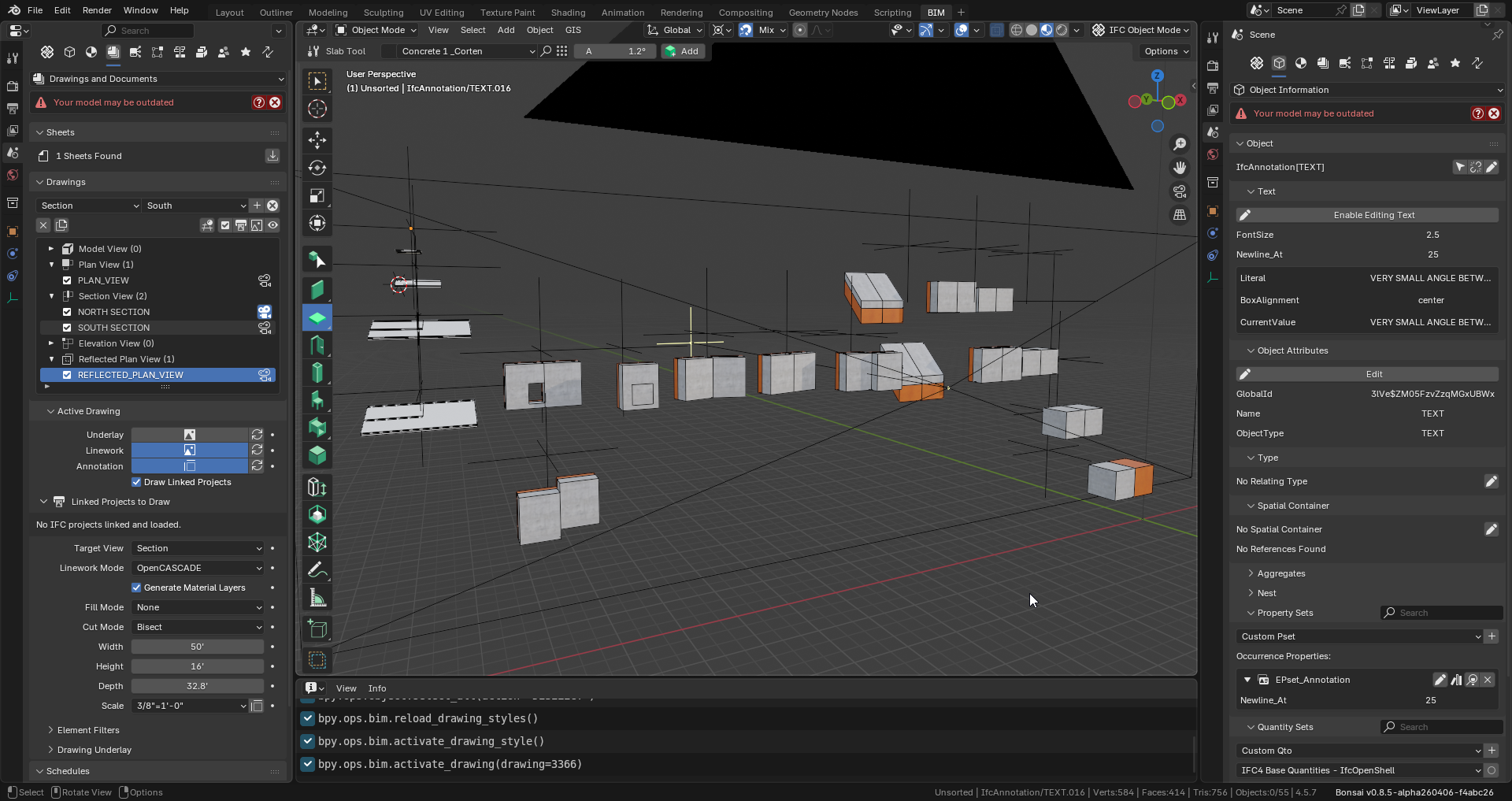
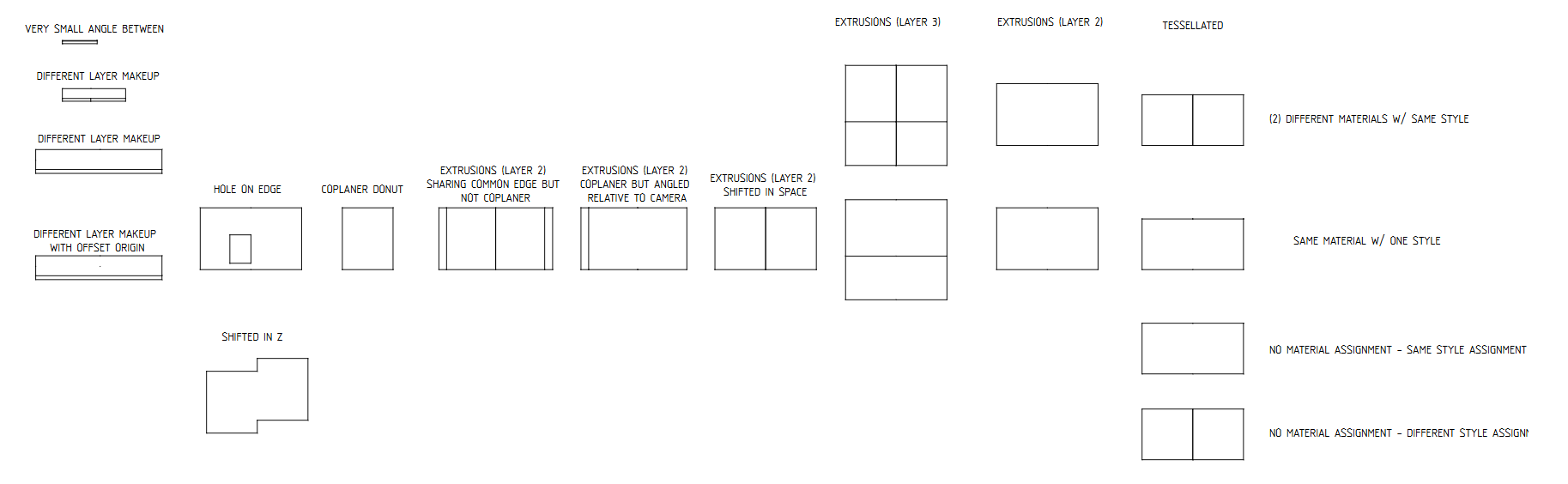
https://github.com/IfcOpenShell/IfcOpenShell/pull/7908
If you want to play around with it install the BleedingEdge BonsaiPR build:
https://docs-unstable.bonsaibim.org/guides/development/installation.html#bonsaipr-bleeding-edge-installation
That looks amazing... but... ;-) Should there be a line where the material changes as part of a MaterialLayerSet? i.e. the "EXTRUSIONS (LAYER 3)" examples would have 4 horizontal lines, not 3? Same with the layer 2 examples that are angled to the camera - there's a missing line where the material changes. Of course perhaps this is a deliberate choice. Just asking.
Yeah, i'm thinking that dealing with 'material layers' is a whole another high level exercise....could be wrong.
Just wanted to get this foundation down first, and test it for awhile.. before moving on to layers.
Just spitballing...
Thinking about https://github.com/IfcOpenShell/IfcOpenShell/issues/3668
Would it make sense to make the dot tolerance value (as seen in this commit https://github.com/IfcOpenShell/IfcOpenShell/commit/32c2ec3966aaf1d3256c4416eaf46173b02390c9 ) an angle settable by the user rather than a fixed value? I'm wondering if this would allow busy meshes (spheres, pipes, other curved objects) to be tuned down.
Just FYI, that's the coplanar tolerance between to (2) adjacent surfaces on (2) different objects, not the tolerance between (2) adjacent surfaces on (1) object.
Regardless, yes exposing that parameter to a preference, would probably be a good idea.
Yeah, I just ran a couple of tests playing with the value, and realised I'd misunderstood something. 🤔 Was puzzled, so thanks for clarifying. Now I'm realising that this is probably not at all applicable to #3668.
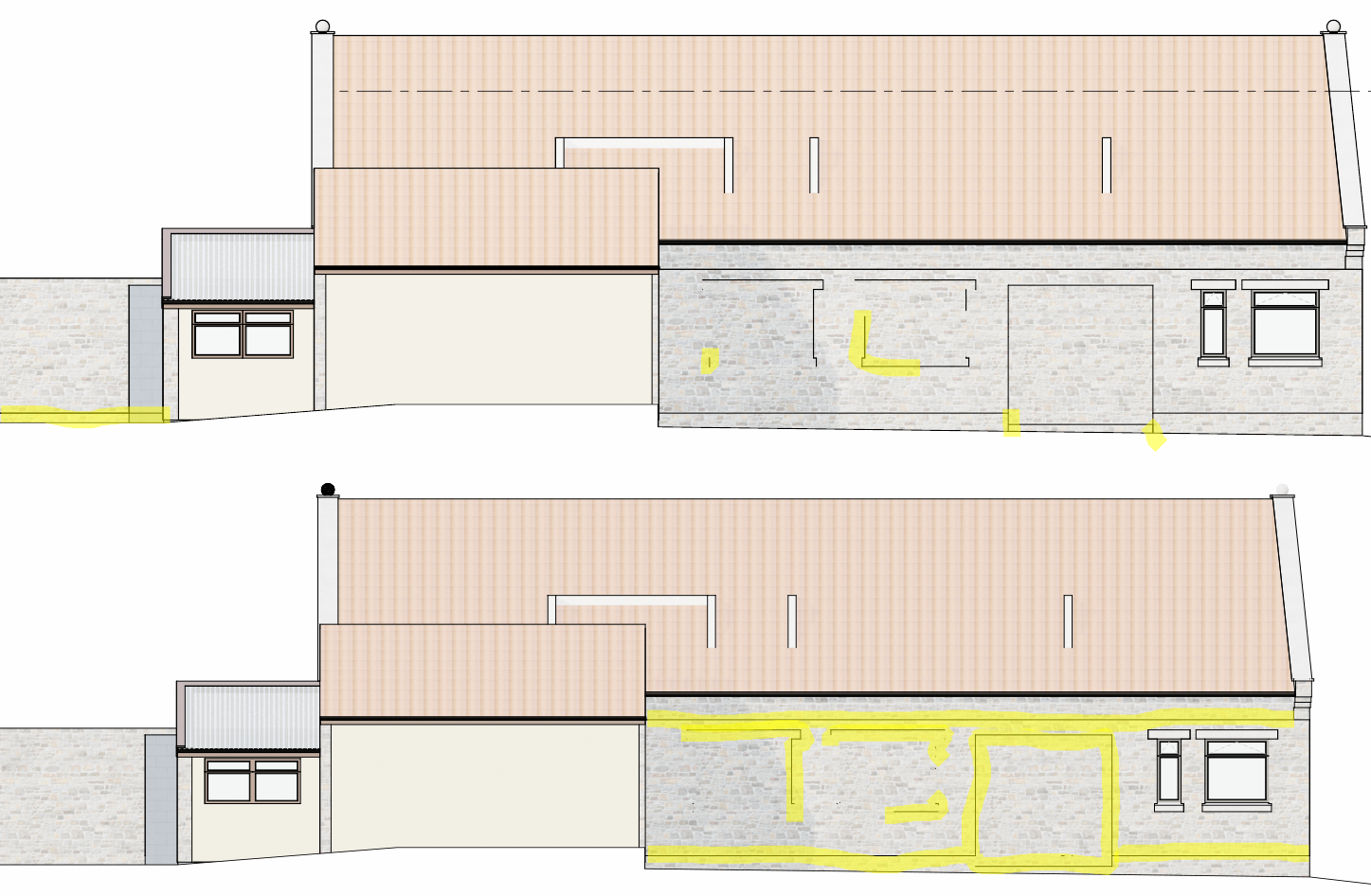
I'll download your test file and give it a whirl. I can tell you now though that I'm getting inconsistent results on my main file. I'm using NEW "wall plugs" (like your donut test) to fill voids in EXISTING walls and the results are not great. On the top image I've highlighted the lines that were successfully removed. On the bottom image I've highlighted those that were not removed (ignore the spheres on the roof they aren't part of this test):
Now I've run your demo file, and I get some differences to you posted image:
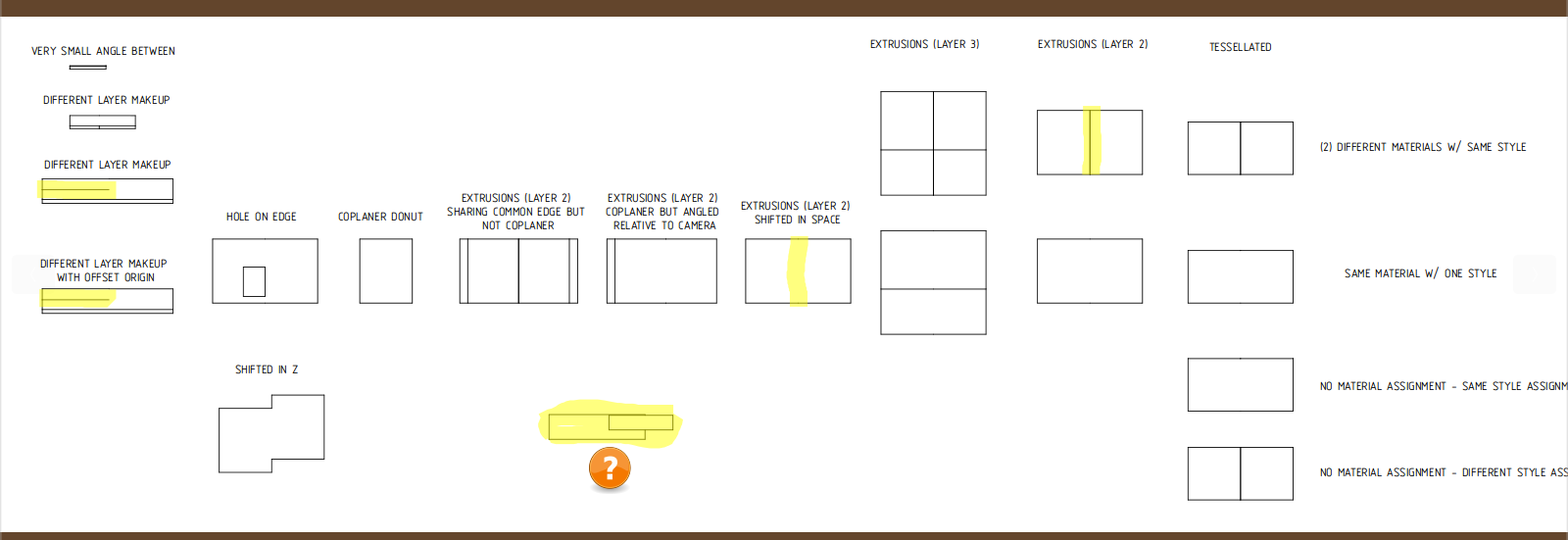
No idea where the bit marked with a ? came from. That's just weird!
Not sure if you want issues here, or posting to github.
Thanks so much for testing!
Would it be possible to share your .ifc house file on the github pr? I'd like to test on my side.
...
that was a quick test that was failing once. I just didn't label it yet.
...
I 'just' updated the PR a couple hours ago, please share any other tests, with
coplanar join.ifcthat don't work on your side going forward.As my file is my personal house, and has information that points to my physical location and other PII it is not something I'd publish for all to see.
I'm open to zipping it up and giving you a private google drive link to download the project files as they stand. (Just don't judge me harshly, as I'm not a pro and it is (still!) not complete.)
My test was with the very latest [upd] bonsaiPR release (2604072104).
Yep, that works.
No judgement here. ;)
Check your private inbox message here on OSArch. You should see the link.
@sjb007 I tried and tried, but AI could not help me come to a solution for your wall. I added it to the testing doc, and also provided an 'architectural doc' to help other AI agents get up to speed, if you or anyone else wants to try and tackle:
https://github.com/IfcOpenShell/IfcOpenShell/pull/7908#issuecomment-4232350302
Trust me to be awkward! ;-)
I did wonder if I was trying to be too clever with my complicated cut-outs and equally complicated, voided plugs. It might be easier to create larger, more regular cutouts, and create a DESTROY and NEW plug with just a single somewhat complex void.
However, That doesn't explain to me why something simple like the lines between the three levels of walls (footing, ground and first) are not eliminated. I would have thought those lines to be somewhat simple. Anyhoo. I'll play around with it when I find time.
@sjb007 Na, that's some good testing content! :)
Let me know if want to add/modify the testing files(s)... will give you permissions to the OSArch org on https://hub.openingdesign.com/OSArch/Community_Troubleshooting
Would love to start showing how our community could use their own Git hosting service--would provide more justification for this proposal--that is, migrating the instance to the OSArch banner---especially when combined with continuous integration, as discussed here.