

Video tutorial series for Blender + Bonsai

With a happy heart, I'm excited to launch a video tutorial series for...
Blender + Bonsai
more info: https://hub.openingdesign.com/OpeningDesign/Bonsai_Tutorials#readme
...
These video tutorials are designed to help beginners learn both Blender and Bonsai, starting from the basics--all the way to more advanced uses. It's geared toward AEC professionals.
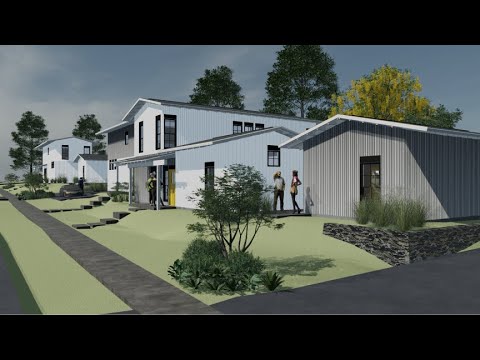
With over (122) videos and counting, each averaging around 4.5 minutes, you’ll go from creating a simple cube in Blender all the way through assembling a basic construction drawing set in Bonsai--a pocket neighborhood in Wisconsin.
The videos are tightly edited to avoid repetition and filler. You won’t be watching us model the same thing over and over—just the essential steps, clearly explained.
The tutorials series also covers integrating, an always evolving, open source set of libraries and templates for materials, entourage, drawing standards and modeling--so you don't have to reinvent the wheel. I already went through the pain. :)
Best of all: We will contribute 20% of all revenue to the Bonsai / IfcOpenShell development fund, to support ongoing growth of the platform.
About the Creator(s)
- Ryan Schultz is the founder of OpeningDesign, a radically transparent, open source architecture studio. He’s been practicing architecture for nearly 30 years, is a long-time contributor to the OSArch community, and has been actively using Bonsai for over 3 years.
Want to Contribute?
If you're interested in contributing your own tutorials (e.g. 4D, MEP, clash detection, prefab workflows) or helping shape a fair revenue-sharing model, join the conversation here: https://community.osarch.org/discussion/3032/blender-bonsai-tutorial-series-launched-looking-for-contributors
The attached video shows the evolution of the model throughout the tutorial series, as well as the final drawings.









 and 17 others.
Comments
Thanks a lot...from a Bonsai/Python newbie🙏
A rarity these days, it takes a lot of time and effort. Thanks for that, much appreciated
Open Collective is totally new to me.
I do not find any information about possible paying methods (e.g. PayPal, ....) ?
No worries!
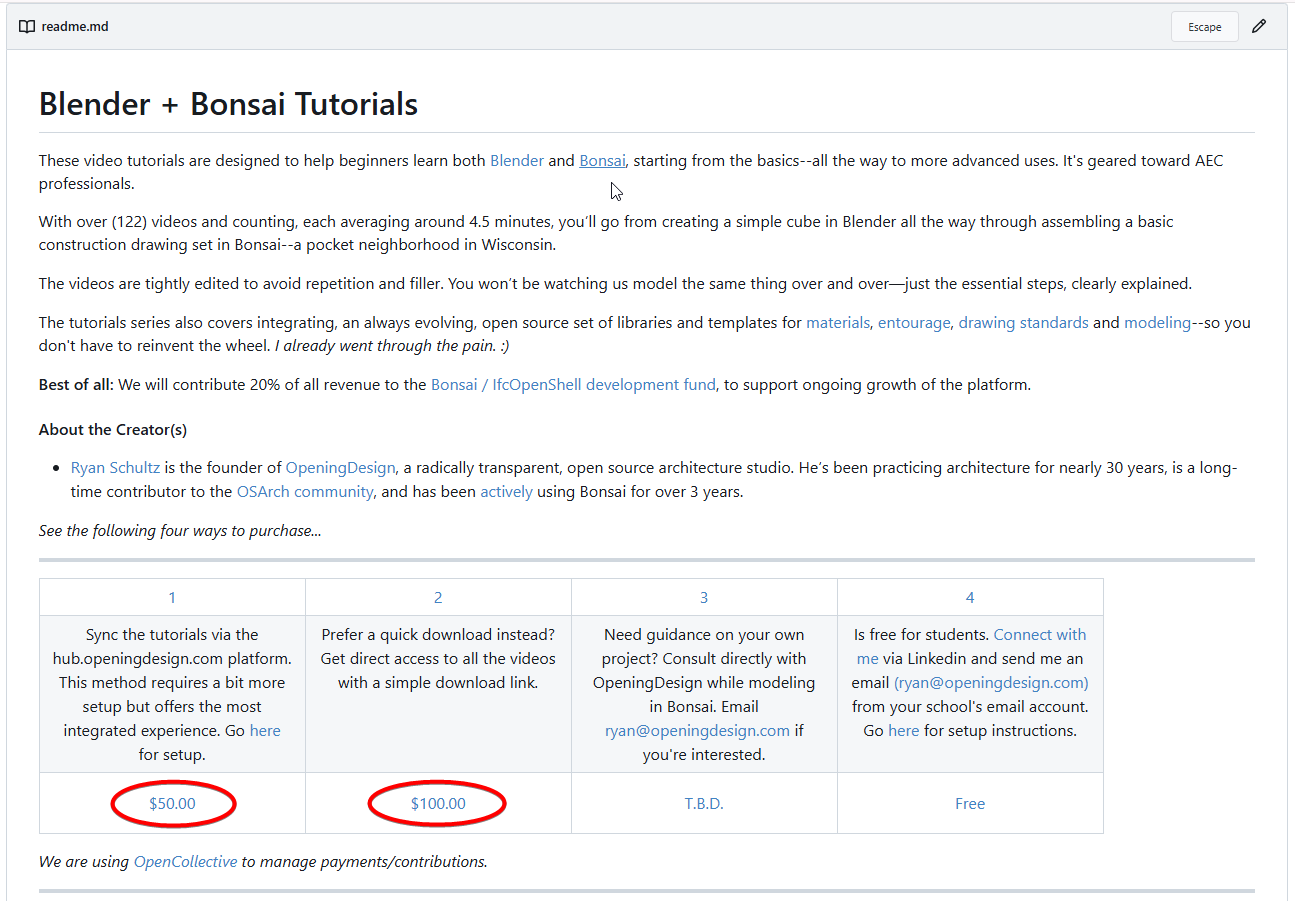
If you go to this link, https://hub.openingdesign.com/OpeningDesign/Bonsai_Tutorials#readme, can you click on one of the two links and does it take you to a payment page?
Or you can go here, https://opencollective.com/openingdesign/projects/blender_bonsai_tutorials_od, and click on one of the two links....

I was even a step further already, but before I enter data I wanted to know if there is any payment method I use.
I sometimes buy tutorials from a guy who seems to change stores like other people their hair cuts, same for different AddOn stores, each uses other methods, some that I avoid, did not have or want to use. And Open collective doesn't even mention payment methods on their site - or I did not find it.
@zoomer https://documentation.opencollective.com/giving-to-collectives/payment-methods
Thank you ver much, that helps !
Yes, now I see there are some supported methods.
Afterwards I tried to find the link myself and it took quite some time :)
I didn't expect the side bar links on the left side extending that much.
I just searched:
"open collective" payment methodsIt was the first link in the results.
Unfortunately when buying there were only 2 of those mentioned methods offered. Manual transaction and credit card
Payment instructions did not contain useful information that I would need for an international transaction, ok, I went by the second option.
I loaded one of the MP4s,
~~Can't open it on Mac (Quick Time Player)
Installed VLC Player, but still can't open that MP4.
EDIT :
Elmedia Player won't show these Mp4s either (?)~~
Actually your MP4s works fine,
I can even play them in Apple's SPACEBAR Preview.
It sounds as though you still need to unlock the encrypted videos, per step 5...
https://hub.openingdesign.com/OpeningDesign/Bonsai_Tutorials/src/branch/main/_Setup#readme
Please send me your GPG key, so i can add it to the repo.
I will also send you a Dropbox link (as this is the Tier you just purchased) for an easy download, without messing with Git, and unlocking.
Thank you for the purchase!
Cheers, Ryan
Makes sense, I also wondered why I can access the Videos so fast before I get my official download link.
I prefer your Dropbox Link.
I just shot IfcOpenShell/Bonsai's open collective, $237.46 USD (20% of $1,187.29 USD -- the revenue from contributors, to date)
Thanks for those that contributed thus far!
This community has so much mana, I am grateful to be pulled along in the slipstream
Thanks, is there an order of tutorials? For example where to start?
I am following them in ascendent cardinal order. They make sense in that order I think.
You can see the content in index.html or the list of videos in List of Videos.csv in the root directory:
https://hub.openingdesign.com/OpeningDesign/Bonsai_Tutorials#readme
Cheers!
historic moment, thanks a lot Ryan
Yes, as @falken10vdl suggested this is the order: https://hub.openingdesign.com/OpeningDesign/Bonsai_Tutorials/src/branch/main/List of Videos.csv
He kindly just pushed that index.html file to make it a little easier to view the videos...
After download, I completed the missing folders according to the numbering and naming, so I have them sorted nicely in Finder.
Great Videos.
As promised without any redundancy - so I often rewind or look them twice :))
And they really contain all Blender beginner "you-just-have-to-know"s (from an AEC/CAD/BIM view), which took me weeks or months to get answered on Blender Artists forum, when I started with Blender seriously.
Perfect to dig them out later again, in case you forgot something or search for help with a special problem.
While continuing the Videos, there raised some questions.
When I watched the 2 Stair videos (079000_20250304_1357 - Creating risers ...) I noted that you @theoryshaw created new a IfcMaterial for nearly each Component. So you are basically not creating BIM Materials but more like "Part Materials", where more than one of these Materials may be the same physical material and share the same IfcStyle/render material.
(At least it looks like Stair's treads and risers may use the same kind of wood here ?)
Since we got BIM Materials in my other Apps, I tried to create strictly physical Materials only. Usually BIM Materials have also IfcStyles/render materials applied, so are parent to Styles assignment. Even then, e.g. when a slightly different render texture or orientation is needed, I try to keep a single BIM material and maybe overwrite the texture externally instead.
Is this just a personal preference, matter of taste - or is there a reason behind that I don't see, like for BOM, calculations, .... ?
Second,
at the beginning of the Bonsai part, you mentioned that in Blenders Outliner, Bonsai switched back to a "flat hierarchy". Which makes it hard to use (like endless scrolling or tedious visibility switching). If we would adapt that, it would be reverted by the next session anyway. I would really prefer having e.g. a deeper hierarchy like My Story : Columns/Slabs/Walls
In pure Blender, when I imported my BIM Geometry by FBX, I was happy when I got my deep BIM structure and hierarchy in into Blender. And even for larger files, I did not notice any problems with my deep hierarchies.
Are deep Collection Hierarchies really such a problem in Blender in general, or more something from a Bonsai perspective when collaborating with Blender ?
And BTW,
I really like your creative (mis-)use of Tools - here copying the Wood Type Stair, switching to Concrete Type - to create a Stringer for the wood stair :)
If i understood your question correctly, my logic behind creating materials, is relatively tied to how i'm going to annotate the object. That is, i use a text leader with the a literal like
{{material.item.Material.Name.0}}or{{material.Name}}that pulls out the material's name into the text annotation.As i understand it, yes a deep hierarchy in blender, bogs things down. I think that's why @Moult flattened things. I could be wrong, but I remember reading that somewhere.
I wish i could take credit, but that was @bruno_perdigao's idea originally. Love it.
For those curious, here's the video for
079000_20250304_1357 - Creating risers by converting parametric stair to dumb geometryAnd .IFC file here: https://hub.openingdesign.com/OpeningDesign/Bonsai_Tutorials/src/commit/84994a3de8e8e01ab6c8f271300f8db565307802/079000_20250304_1357 - Creating risers by converting parametric stair to dumb geometry
Thanks @theoryshaw,
Thought it is something like this. (So far I never needed to do much 2D plans or annotations)
EDIT :
As showed in Bonsai Tutorial Video : "Intelligent Tags"
Now it makes more sense to me.
Strange, I do not find any hints on Blender having problems with deep hierarchies.
To test myself I dug out the ugly largest project I ever worked on. And had to realize, my Blender Test files did never had any hierarchy, all flat. Is quite fast in 3D view though.
I'll try to export it with a usable hierarchy if possible.
I don't think it is anything to do with Blender and deep hierarchies. I think it was more the overhead (both performance and additional coding) of mapping the spatial decomposition (site, buildings, stories, spaces, aggregates, etc) between Bonsai and Blender, and keeping them aligned. Especially when users would drag things between blender containers and then Bonsai having to detect and handle that, while keeping everything coherent.
For more explanation go here: https://community.osarch.org/discussion/26/bonsai-new-release/p13
And search for: "Flexible collections and new spatial manager"
Thanks Steve!
@zoomer
honest question out of curiosity, is there anything in the current interface that you cannot (or find difficult to) handle with spatial containers, assembly, or group arrangement?
I only use the outliner when I need to have all types in one place, if it were a separate panel I'd see its presence on the left hand side of the opening window just a nuisance, a new feature maybe? ;)
thanks
Great, that is exactly what I was hoping for - for pure Blender things.
Thanks for that link, it helped to better understand the hierarchy thing in Bonsai.
I know your question wasn't aimed at me, but subsequent changes added a frustration to my work flow, detailed here: https://github.com/IfcOpenShell/IfcOpenShell/issues/6664
The spatial and elements panels do not work together with the status filter. I got so frustrated I "forward ported" the old icons and function to show/hide/isolate the containers in the spatial panel.
Honestly ...... it is just a misunderstanding or staying in old habits.
I was very happy when Blender BIM brought the BIM Workspace for Blender. With Outliner left + Properties right it looked familiar like in Bricscad with respective Structure Tree left and Properties right. So for me that Outliner was always just the BIM Structure Tree or Spatial Manager where I control my visibilities and hierarchies.
I did not really notice or seriously follow much the later development inside the Bonsai Properties. I tested mostly export/import between Bonsai and my other Apps and was more focus on lossless geometry exchange than any specific IFC things so far. I only used Bonsai Tabs and Spatial Manager for rare specific IFC/BIM only tasks, like adding Stories or special element hiding like IfcGrids and IfcSpaces.
Recently I also noticed that Blender's Outliner was not optimal for IFC. And I saw on your screenshots that no one uses the original BIM Workspace. You had more than one Bonsai Tab Windows open at a time and more IFC only stuff than 3D View window. But I thought, maybe IFC/Data nerds ;)
But thanks to @sjb007's Link I got it now and will rethink my Bonsai understanding and usage
And now I think the current BIM Workspace is a bit deprecated.
I think it would need mainly the Spatial Manager Tab (or a tuned/modified version of it) on the left an a minimized Outliner on the bottom, which you temporarily expand - for Blender only things like controlling, Cameras, Lights, Entourage, ....
And a bit problematic are Bonsai's Object and Material Tabs. E.g. things like Editing Parametric's does not belong into a Material Tab. Fits better into the Objects Tab, or if to crowded, adding extra Tabs.
Hmmh, I think I can not select by IfcSpaces - as I can do with other Ifc Classes.
So as Spaces can appear as 3D Geometry, which I want to switch off, I have to search them in Outliner anyway.
Not really, I will still most times need the Outliner for most of my kind of BIM tasks. And then I miss that there are no Ifc "Class" Containers - or any possible Filter/Search Order as I can apply in BC's Structure Tree ....
Switch to the Spatial tool and use the "Toggle Hide Spaces" Button in the toolbar. The issue is that again, this is not properly sticky when using the spatial decomposition's elements panel. Use Alt-Click on the element panel's Show icon, and despite IfcSpaces
a) not being in the element panel (2/3 of the element modes at least), and
b) not actually being a sub-class of IfcElement (it is of sibling type IfcSpatialElement),
the spaces will reappear.
So you have to use the Outliner and hide the collection if you don't want to be continuously turning them off again.